Setting the current visual style in AutoCAD using .NET

A quick one to end the week, as I really need to start packing for AU. 🙂

Thanks to Augusto Gonçalves, from DevTech Americas, for pointing out this DevNote on the ADN site in a recent email to an ADN member.

The below code shows the steps to set the current visual style to "realistic" in AutoCAD. As with many AutoCAD features, you can also set the current visual style by sending commands to the command-line, but then why do something in 3 lines of code when you can do it in 40? 😉 Seriously, there are some advantages to this approach – such as not polluting the command history, for instance – but that's really a decision for individual developers to make.

Here's the C# code defining the SVS command:

using Autodesk.AutoCAD.ApplicationServices;

using Autodesk.AutoCAD.DatabaseServices;

using Autodesk.AutoCAD.EditorInput;

using Autodesk.AutoCAD.Runtime;


namespace VisualStyles

{

  public class Commands

  {

    [CommandMethod("SVS")]

    static public void SetRealisticVisualStyle()

    {

      Document doc =

        Application.DocumentManager.MdiActiveDocument;

      Editor ed = doc.Editor;

      Database db = doc.Database;


      Transaction tr =

        db.TransactionManager.StartTransaction();

      using (tr)

      {

        ViewportTable vt =

          (ViewportTable)tr.GetObject(

            db.ViewportTableId, OpenMode.ForRead

          );

        ViewportTableRecord vtr =

          (ViewportTableRecord)tr.GetObject(

            vt["*Active"], OpenMode.ForWrite

          );

        DBDictionary dict =

          (DBDictionary)tr.GetObject(

            db.VisualStyleDictionaryId, OpenMode.ForRead

          );

        vtr.VisualStyleId = dict.GetAt("Realistic");


        tr.Commit();

      }

      ed.UpdateTiledViewportsFromDatabase();

    }

  }

}

Here's a simple indication of the SVS command working. The Visual Styles ribbon panel before…
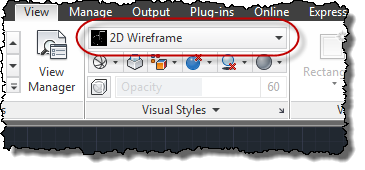
Default visual style setting

… and after execution of the SVS command:
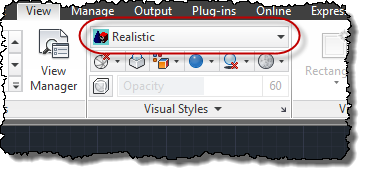
The updated visual style setting

That's it, for now: I'll hopefully post a few updates next week from AU 2011.

2 responses to “Setting the current visual style in AutoCAD using .NET”

  1. Hi Kean,

    This is Jaime here, great job with your blog, and for the reply on my email good to know that the name was enough, Quick question about the SVS example, I've been trying to use this by calling the function on a separate action, meaning that this function becomes part of the process of all my actions that take place when i call my app. The problem is that I'm getting a crash when it reaches the line :

    ViewportTableRecord vtr =

    (ViewportTableRecord)tr.GetObject(

    vt["*Active"], OpenMode.ForWrite

    );

    And i think the reason could be because, I'm clicking an Icon which could set the viewport to something different than "*Active".

    Any Idea on this ? thank you so much for your help take care and hope to see you again soon.

    Best,
    Jaime

  2. Hi Jaime,

    🙂

    Try checking whether vt contains "*Active" before the GetObject() call: if it doesn't there may be some other way to get the viewport you want (perhaps via the CVPORT variable? This is just off the top of my head, mind).

    Cheers,

    Kean

  3. The Autodesk.AutoCAD.Internal.Utils class contains some very handy static methods for manipulating visual styles, including:

    - GetCurrentViewportVisualStyleId
    - GetVisualStyles
    - Is3dVisualStyle
    - SetCurrentViewportVisualStyle
    - visualStyleId
    - visualStyleName

    Art

  4. Kean Walmsley Avatar

    Thanks, Art!

    Anyone using these just needs to be aware that they're not part of the officially supported API, of course.

    Kean

  5. Would it be possible to make text objects printable in paper space viewports having the "Conceptual" visual style? To print text in such viewports we need to overlap two viewports one with the 2D visual style and the other with the Conceptual style, wich is rather tedious...

  6. Kean Walmsley Avatar

    Hi Patrick,

    This sounds like a product issue (one that's not really in my area of expertise). I suggest posting it either via ADN or the appropriate online discussion forum.

    Regards,

    Kean

  7. Thank you for this blog very appreciated it for good to know.

  8. How to fetch visual style of current document using c#?

    1. Sorry for the delayed reply: please post your support questions to the AutoCAD .NET forum.

      Thank you,

      Kean

Leave a Reply to Jaime Rosales Cancel reply

Your email address will not be published. Required fields are marked *