Creating a custom PaletteSet class exposing a close event inside AutoCAD using .NET

In the last post, we saw some code that provided a relatively crude mechanism for finding out when a particular custom palette set gets closed by the user.

In this post, we encapsulate this technique in a new class – which I've called PaletteSet2, for the want of a better name – that can be used to apply it to a number of custom palette sets at once.

Here's the C# code for the new PaletteSet2 implementation:

using Autodesk.AutoCAD.ApplicationServices;

using Autodesk.AutoCAD.Runtime;

using Autodesk.AutoCAD.Windows;

using System;


[assembly: CommandClass(typeof(PaletteSet2))]


namespace Autodesk.AutoCAD.Windows

{

  public class PaletteSet2 : PaletteSet

  {

    // Hold a static pointer to the palette set being closed


    public static PaletteSet2 Current = null;


    // Our static event to be fired on close


    public static event EventHandler PaletteSetClosed;


    // In the constructor we add an event handler to check

    // for changes of state (show/hide)


    public PaletteSet2(string name) : base(name)

    {

      this.StateChanged +=

        (s, e) =>

        {

          // On hide we fire a command to check the state properly


          if (e.NewState == StateEventIndex.Hide)

          {

            // Set the static property to point to our palette


            PaletteSet2.Current = this;


            // Launch the command quietly


            Application.DocumentManager.MdiActiveDocument.

              SendStringToExecute(

                "CHECKPALETTESETCLOSE ", true, true, false

              );

          }

        };

    }


    // For some reason we need a default constructor with 0 args


    public PaletteSet2()

      : base("")

    {

    }


    // Our command implementation


    [CommandMethod("CHECKPALETTESETCLOSE", CommandFlags.NoHistory)]

    public static void CheckPaletteSetState()

    {

      // Get the static instance set


      PaletteSet2 ps = Current;


      // If it's invisible, it has been closed


      if (ps != null && !ps.Visible)

      {

        // Set the static instance to null and fire the

        // subscribed event


        Current = null;

        if (PaletteSetClosed != null)

        {

          PaletteSetClosed(ps, new EventArgs());

        }

      }

    }

  }

}

Here's some code that can be used to test it, creating two distinct palette sets that will have their close event monitored.

using Autodesk.AutoCAD.ApplicationServices;

using Autodesk.AutoCAD.Runtime;

using Autodesk.AutoCAD.Windows;


[assembly: CommandClass(typeof(Test.Commands))]


namespace Test

{

  public class Commands

  {

    private static PaletteSet2 _ps1 = null, _ps2 = null;


    [CommandMethod("PSTEST")]

    public static void CreatePaletteSet()

    {

      bool attachEvent = false;


      if (_ps1 == null)

      {

        _ps1 = new PaletteSet2("First PaletteSet to Close");

        _ps1.Style =

          PaletteSetStyles.NameEditable |

          PaletteSetStyles.ShowPropertiesMenu |

          PaletteSetStyles.ShowAutoHideButton |

          PaletteSetStyles.ShowCloseButton;


        _ps1.MinimumSize = new System.Drawing.Size(300, 300);


        attachEvent = true;

      }

      if (_ps2 == null)

      {

        _ps2 = new PaletteSet2("Second PaletteSet to Close");

        _ps2.Style =

          PaletteSetStyles.NameEditable |

          PaletteSetStyles.ShowPropertiesMenu |

          PaletteSetStyles.ShowAutoHideButton |

          PaletteSetStyles.ShowCloseButton;


        _ps2.MinimumSize = new System.Drawing.Size(300, 300);


        attachEvent = true;

      }


      // Only attach the static event if we just created

      // a palette set


      if (attachEvent)

      {

        // We subscribe to a static event, which is a bit

        // anomalous (but hey)


        PaletteSet2.PaletteSetClosed +=

          (s, e) =>

          {

            PaletteSet2 ps = s as PaletteSet2;

            if (ps != null)

            {

              Application.DocumentManager.MdiActiveDocument.

                Editor.WriteMessage(

                  "\n\"{0}\" closed!", ps.Name

                );

            }

          };

      }

      _ps1.Visible = true;

      _ps2.Visible = true;

    }

  }

}

This version of the PSTEST creates two palette sets, which are initially docked. Something I should have mentioned about the reason for implementing a command, in the first place: the standard StateChanged event gets fired twice when undocking a palette set – once to hide it and once to display it again. This means we can't assume a hide notification means the palette set is being closed – we really need to wait until the dust has settled before checking the state of the palette set in order to proclaim our verdict. Which is why we're sending a command to be executed (and in fact may send it a few times – as we could well be receiving multiple hide notifications if undocking the palette set – which is just fine, as it's only the first command invocation that does anything interesting).

Here are those palette sets undocked:
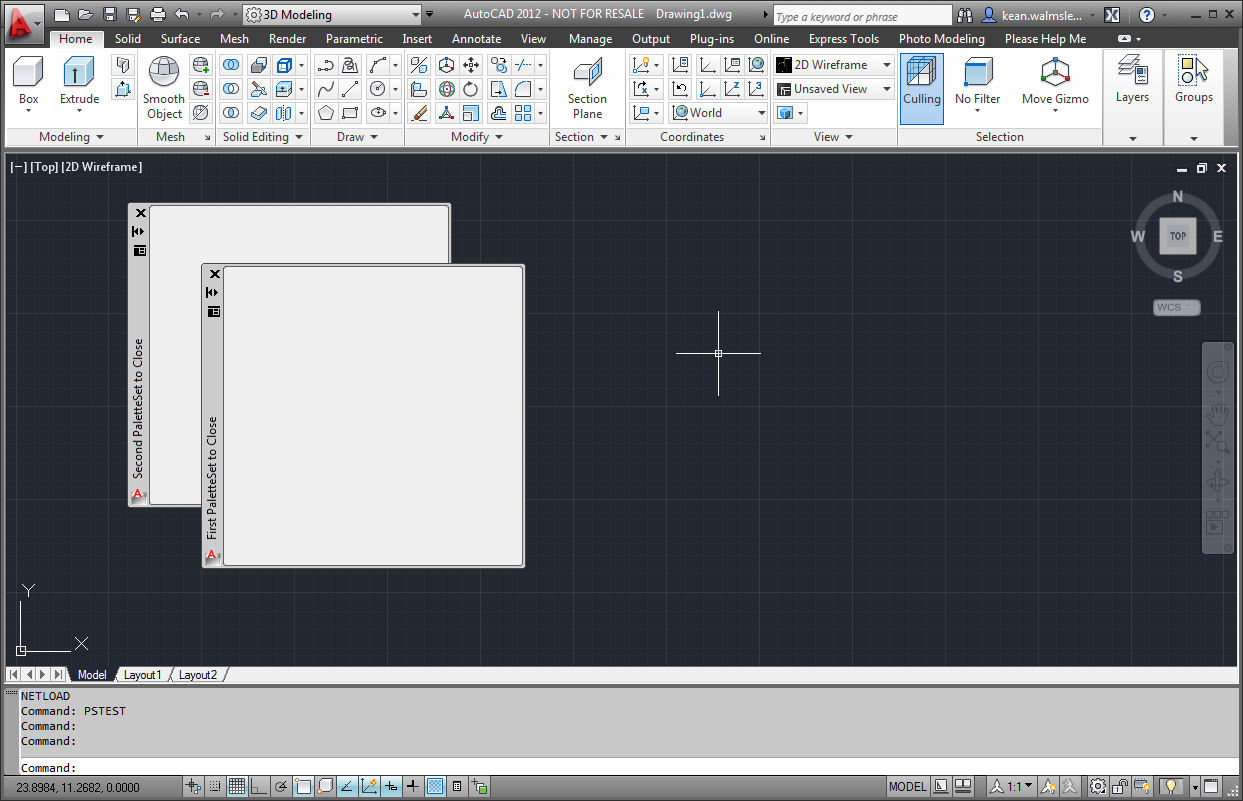
Our palette sets to be closed

When we close these palette sets, we see at the command-line that each has been correctly identified in our event handler:

Command:

"First PaletteSet to Close" closed!

Command:

"Second PaletteSet to Close" closed!

There is one thing, in particular, that I find less than ideal about this implementation: we're implementing/firing a static event from the PaletteSet2 class, which means we only set the handler once for the class, but it also means we don't get custom close behaviour for each palette set. We could check the name of the palette set when closing to implement custom behaviour, should we so desire, but it's not quite as simple as having a custom event defined for each instance.

If anyone can find a way to implement this approach using a non-static event – or has some other improvement to suggest regarding the above technique – please do post a comment.

That's it for now, in this last post before Christmas (and probably of 2011, although I may yet queue something up for next week, if I have the time). May all the readers of this blog have a wonderful festive season – I'll be back with more posts in 2012. A Merry Christmas and a Happy New Year, to those of you who celebrate them! πŸ™‚

16 responses to “Creating a custom PaletteSet class exposing a close event inside AutoCAD using .NET”

  1. Hi Kean,

    Since your CheckPaletteSetState command method is defined inside the PaletteSet2 class, you’re allowed to access non-static events on any PaletteSet2 instance within the scope of that method. Just make your event non-static, and then change the code that fires the event to:

    if (ps.PaletteSetClosed != null)
    ps.PaletteSetClosed(ps, new EventArgs());

    Merry Christmas!

    - Scott

  2. Hi Scott,

    Merry Christmas to you, too! πŸ™‚

    If memory serves me correctly, there was some kind of runtime issue that stopped me getting it working (something I should have more accurately documented in the blog post, thinking about it).

    Did you happen to get it working on your end, by any chance? I'll try again in January, if not.

    Cheers,

    Kean

  3. Works like a charm for me. That was really the only change to your code that I made, but I'll email you my code just in case.

  4. Perfect - thanks Scott.

    Must have done something dumb (time to take a break ;-).

    Kean

  5. Hi

    Interesting 'workaround'

    I was just wondering what happens if a palleteset is closed while a command is in progress (if it's docked it will cancel out the command, but if it's floating the command should continue to remain in progress, that is until the SendStringToExecute 'hack' is processed.

  6. It's pretty simple to get the behaviour you want, either way... I can see some people might want the active command cancelled (in which case prefix the command string sent to the command-line with a couple of escape characters) while others might want the behaviour you've described (where you can register the CHECKPALETTESETCLOSE command as CommandFlags.Transparent and prefix the command string with an apostrophe).

    I gave it a quick test and it seemed to work well.

    Kean

  7. Thanks.

    I was also wondering about how the Action Recorder reacts to this sort of workaround.

  8. I admit that's not something I've tested, but I wouldn't expect there to be a problem.

    If you do give it a try, please let me know! πŸ™‚

    Kean

  9. Actually there's a much more reliable way to solve this problem, that doesn't sending command input (which I've always regarded as a gruesome kludge - and some have noted that when implementing your solution AutoCAD crashes, but I can't verify that).

    http://www.theswamp.org/index.php?topic=42179.msg476706#msg476706

  10. Thanks, Tony.

    I hadn't seen any crash reports, myself, but it's good to know you've found a way to avoid them, should I now hear of any.

    Kean

  11. Hi Kean,

    The above code is good but even if the event is fired always,the code inside it is not executed always. I am clearing my selection set on palette close but it is not cleared always.Can you suggest some solution.

  12. Hi Dev,

    If you can tell me when the code isn't executed (i.e. under which circumstances) then perhaps I can suggest a solution.

    Regards,

    Kean

  13. Alexander (Sasha) Frumkin Avatar
    Alexander (Sasha) Frumkin

    Kean,

    Thank you for writing this blog - there is tons of good information here. I am a huge fan.

    As far as I remember, a custom palette information is supposed to get saved to FixedProfile.aws file using the GUID so a custom PaletteSet object has to be initialized only when application runs for the first time on a particular machine. It does not work for me in 2013. Do you have any hints on how I can enforce saving custom PaletteSet data to FixedProfile.aws file?

    Thank you
    =Sasha

  14. Sasha,

    Sorry for the delay - this comment got flagged as spam - no idea why. πŸ™

    Off the top of my head I don't, I'm afraid. Have you tried checking in with ADN or the discussion groups (I assume you must have - this comment is now 3 weeks old)?

    Regards,

    Kean

  15. Hi Kean,

    on your code in creating paletteset, i am trying to call a wcf i created in c# to iterate result and create palettes, but i am getting an endpoint missing, on a normal windows app. it is working, but i do the process on your code its an error.. any ideas on this?

    Steps:
    1. Add Service Reference to the WCF
    2. Code: using AutoLibrary.DLService;
    3. ServiceLibraryClient library = new ServiceLibraryClient();

    when the code step hits step 3, error occurs.

    any help and tips will be greatly appreciated πŸ™‚

    thanks

  16. Hi Mark,

    Sorry - no ideas from my side. I haven't done all that much with WCF, admittedly.

    Best regards,

    Kean

Leave a Reply to Kean Walmsley Cancel reply

Your email address will not be published. Required fields are marked *