So starts the next leg of my journey to become platform agnostic. After using a Mac as my primary system for the last year or so (albeit only doing a modest amount of Mac-specific coding, for now, and almost always having a Windows session alive inside Parallels Desktop), I now have my first Linux system, in the form of an incredibly cool Raspberry Pi device.
This is nearly the first time I've touched command-shell Unix since graduating from University – I've opened a Terminal window a few times to do something trivial on OS X – but I'm happy to note I've managed to remember a fair bit (although I doubt I'll ever re-learn the vi shortcuts I used to know :-S).
It actually feels really good to be working so close to the metal again – I've missed the feeling of connecting with the OS and hardware at such a low level. I'm really having so much fun with this technology. 🙂
And it was really very easy to get the device up and running, at least initially: I plugged in a keyboard via USB, a screen via HDMI and an RJ45 LAN cable, and then inserted an SD card containing the OS. To turn it on I simply plugged in a micro-USB phone charger for power, and it booted up right away.
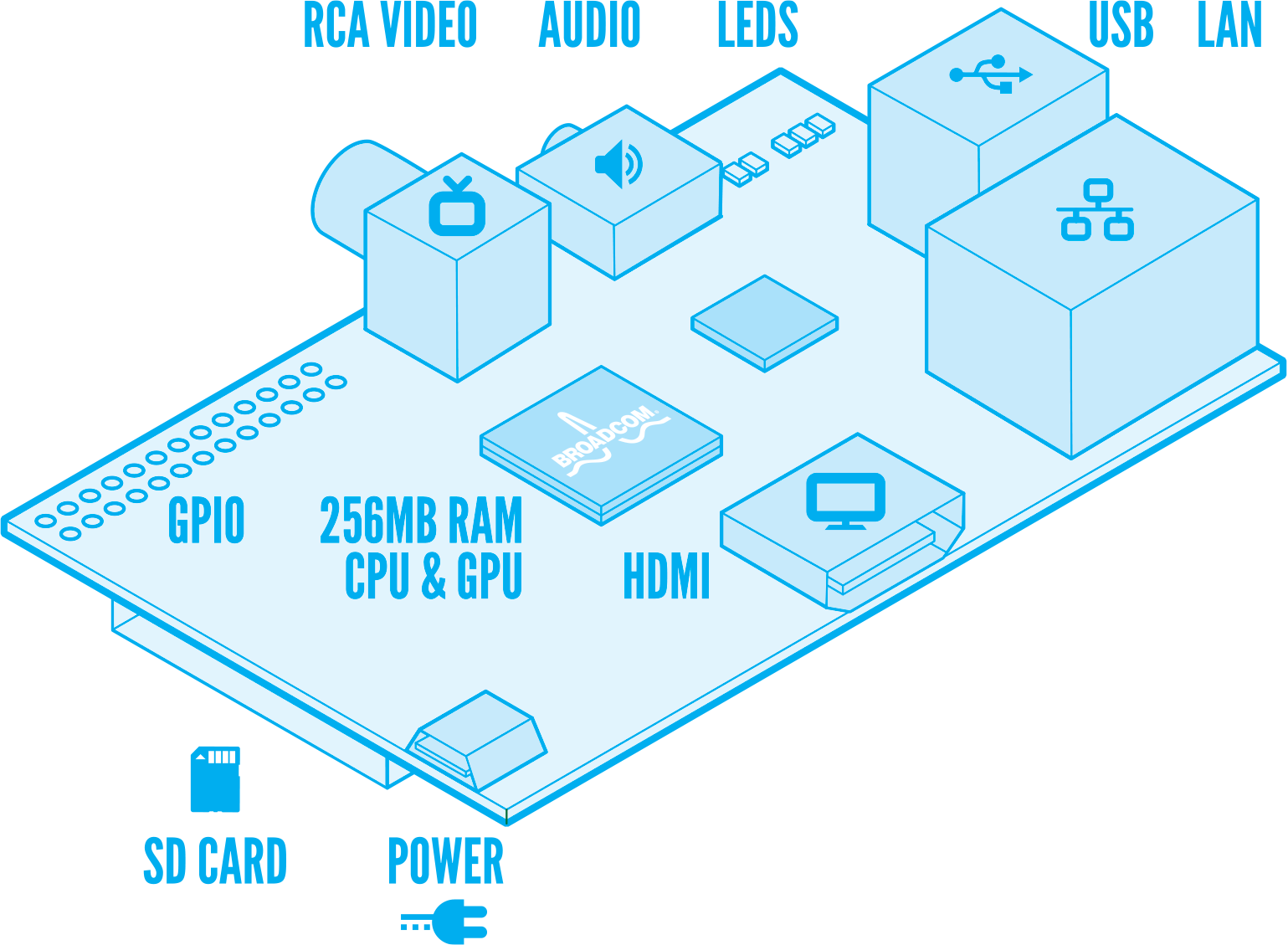
[Diagram by Paul Beech]
Over the last day or so, I have:
- Burned a build of Raspbian "wheezy" (a Debian variant) onto a 2GB SD card using Win32DiskImager
- Booted the Raspberry Pi from it – which, as noted above, worked perfectly first time
- Installed various secondary components using the excellent apt-get (Debian's equivalent of NuGet, which was almost certainly influenced by it)
- Discovered I needed more space when downloading OpenCV
- Saved my 2GB OS installation back to my PC – again using Win32DiskImager – and used it to write the enhanced OS image to a 4GB SD card
- Expanded the OS partition to fill the 4GB SD card
- Downloaded, extracted, built and installed OpenCV (by far the most time-consuming part)
- Ran various OpenCV samples, to see them in action on the Pi
I'm having some trouble building/running an OpenCV face detection implementation, but I suspect that's just through my ignorance.
To help with accessing and managing the device, I also performed some additional tasks:
- Set up remote access via SSH and PuTTY
- Installed a basic PHP web server (which I subsequently disabled – the main point was to get PHP installed and running)
- Installed RaspControl (thanks for the tip, Alex!)
While waiting for help getting face detection via OpenCV working, I decided to "simply" attempt to get motion detection working, instead.
- Installed Motion
- Updated the Raspberry Pi firmware (as I was struggling to get my webcam detected)
- Installed uvccapture to be able to grab stills from the webcam
So far I've managed to get a few stills out of the webcam, with differing lighting conditions:


Now I want to get Motion working properly and then connect it with this Google Drive uploader/emailer script. Eventually I'll manage to get OpenCV to process some frames and detect faces, but probably not today. 🙂


Leave a Reply to AlexFielder Cancel reply