This series of posts builds upon the mini-series on building a motion-detecting security cam based around the Raspberry Pi. Once you have your motion detecting security cam up and running, you should be able to move on to the next stage: enabling that system to recognize faces that it has been trained against.
My specific project (which I'm calling the Facecam, although I haven't applied for a trademark 😉 pulls data down from Facebook and uses that to train the face recognition system, but that's far from being a requirement: it's also very possible to train the database in other ways.
We'll go into detail on the various parts over the coming weeks (probably once a week, as I want to continue blogging about other topics, too), but let's start by introducing the project and the system architecture.
Here's the elevator pitch: Facecam is a security camera that recognises a resident's Facebook friends when they come to their front door and allows for tailored communication both to the resident and the visitor.
This would basically mean that instead of the resident receiving a notification email saying "You have a visitor" (as in the case of the motion-detection system we saw previously), the email would read "John Smith visited you". And John could potentially receive a customized "we're out" message while standing at the door and even a post on his Facebook wall thanking him for the visit.
A lot of this is clearly contingent on the accuracy of the facial recognition system – something we'll look at much more closely later on. In case the accuracy isn't adequate, it would be nice at least to provide some feedback to the visitor, saying "Welcome, John!" (even if it's actually Megan at the door ;-).
Right, now let's dive into the system architecture. Here's a quick diagram of the Facecam system:
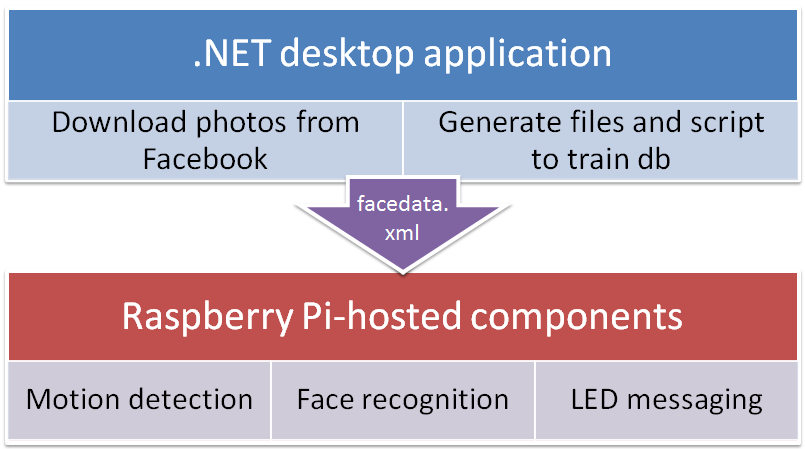
Here's a look at the new components (in addition to the "Motion detection" box we saw previously):
1. A component to download information on the resident's Facebook friends (.NET desktop application)
This component will build a "friend" database (stored in a file named facedata.xml) to be used at runtime by the security cam. The database will be trained with the friends' photos as downloaded from Facebook. So the component will need to access – for each friend – both their names and the photos in which they have been tagged (as well as the tag information, of course).
Using the tag information, the component will use OpenCV to attempt to extract the friend's face (by checking the list of detected faces against the tag location, to get the closest match), and – if it finds it – it will resize, crop and equalize the greyscale intensity of the image before saving it to disk for later use in the database training process.
This is ultimately an offline, CPU-intensive operation – we will simply need the database transferred across to the Raspberry Pi from time to time – so the approach we'll take is to create a .NET desktop application that performs this task on a higher-powered device.
2. A component to analyse frames saved by the motion-detection system, checking for friends (face recognition)
This is the guts of the system: the runtime component that will again use OpenCV to process images captured from the webcam, detect faces and then check the results against the facial recognition database on the Raspberry Pi. This needs to be pretty efficient – as the feedback should be in close to real-time – which may be a challenge: given the relatively low power of the Raspberry Pi CPU, we'll have to jump through some interesting hoops to get this working well enough.
3. A component to provide feedback to the visitor (LED messaging)
If we're going to tell the visitor that they have been recognised (or in some way warn unwanted visitors that their photo has been sent to the property's residents), then we're going to need some kind of screen. The Raspberry Pi has both HDMI and component video outputs, but I've decided to go the way of a USB-powered LED message-board. More on this in due course.
Right, that's it for this introductory post. We'll look in more detail at each of these components over the coming weeks, starting with the .NET desktop application to download friend information.


Leave a Reply to Jeremy Tammik Cancel reply