This was a fun question that came in from James Meading. I genuinely didn't think I'd manage to look into it before the break, but it tweaked my interest during my trip back from the UK:
I thought this might be a topic you would be interested in. I do not use ctrl-v for pasting entities, only text to command line.
I already tried removing the keyboard shortcuts to ctrl-v via the cui, and that just makes ctrl-v not do anything when command line does not have focus.
So I think I need to write a transparent function, make a command in the CUI that runs the function, and assign ctrl-v to it. Its the transparent part I have never done.
I would want the "enhanced paste" routine to be able to run inside any other command gracefully. Maybe this is just running a little function that runs before paste.
This really sounded like an interesting little problem but also a very useful bit of functionality: basically you could have AutoCAD change its "paste" behaviour based on the type of data in the clipboard. For instance, if the clipboard contains drawing data, let the PASTECLIP command have at it. If it contains text, send it to the command-line.
I decided to generalise the request (and ultimately the solution) to encompass copy operations, too. At a basic level, we can just hook into Ctrl-C and then look at the selection set chosen by the user: in our case we're just going to write a message to the command-line mentioning the number of objects selected, but we might choose only to call COPYCLIP under certain circumstances. We might also use this opportunity to add certain objects into the operation (although there are other ways this might be achieved inside AutoCAD).
Here's the C# code:
using Autodesk.AutoCAD.ApplicationServices;
using Autodesk.AutoCAD.EditorInput;
using Autodesk.AutoCAD.Runtime;
namespace InterceptCopyPaste
{
public class Commands
{
// For our command to intercept PASTECLIP, we don't care
// about the pickfirst set: it just needs to be transparent
[CommandMethod("PCINT", CommandFlags.Transparent)]
static public void PasteClipIntercept()
{
var doc =
Application.DocumentManager.MdiActiveDocument;
var ed = doc.Editor;
// Get the contents of the clipboard
var obj =
(System.Windows.Forms.DataObject)
System.Windows.Forms.Clipboard.GetDataObject();
if (obj != null)
{
// Find out whether the clipboard contains AutoCAD data
var formats = obj.GetFormats();
bool foundDwg = false;
foreach (var name in formats)
{
if (name.Contains("AutoCAD.r"))
{
foundDwg = true;
break;
}
}
if (foundDwg)
{
// If so, start the PASTECIP command, cancelling any
// active commands (we may have been called transparently)
doc.SendStringToExecute(
"\x1B\x1B_.PASTECLIP ", true, false, true
);
}
else
{
// If not, try to get text data from the clipboard
var text = (string)obj.GetData("Text");
if (!string.IsNullOrEmpty(text))
{
// If there is some, send it to the command-line
doc.SendStringToExecute(text, true, false, true);
}
}
}
}
// For the command that intercepts COPYCLIP, we need not only
// a transparent command, but one with pickfirst support
[CommandMethod(
"CCINT",
CommandFlags.Transparent |
CommandFlags.Redraw |
CommandFlags.UsePickSet
)]
static public void CopyClipIntercept()
{
var doc =
Application.DocumentManager.MdiActiveDocument;
var ed = doc.Editor;
// Start by getting the pickfirst set or object selection
var psr = ed.GetSelection();
if (psr.Status == PromptStatus.OK && psr.Value != null)
{
// In case the selection is not from the pickfirst set,
// we need to set it from the selection for COPYCLIP
// to pick up
ed.SetImpliedSelection(psr.Value.GetObjectIds());
// Report how many objects have been selected
ed.WriteMessage(
"\n{0} entities selected.\n", psr.Value.Count
);
// Pass the control on to COPYCLIP
doc.SendStringToExecute("_.COPYCLIP ", true, false, true);
}
}
}
}
To really make this work properly from Ctrl-C and -V, we need to use the CUI command to reassign the macro for Copy and Paste to "^C^C_ccint" and "'_pcint", respectively:
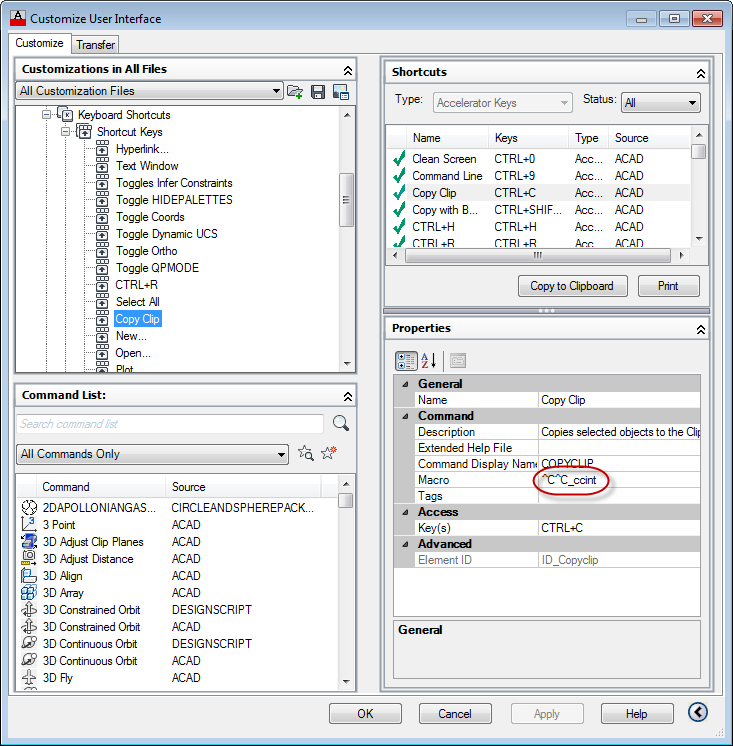
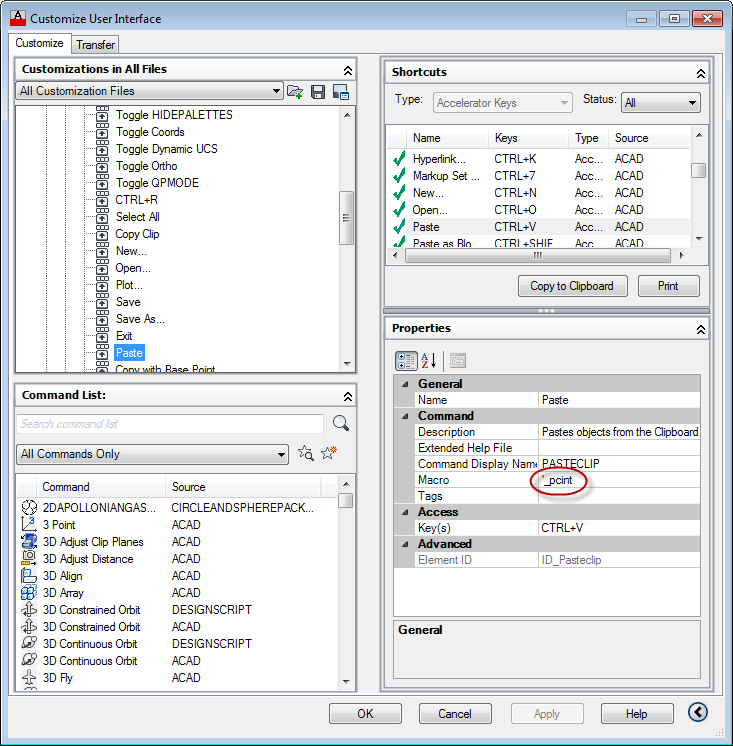
We've removed the ""^C^C" prefix from the Ctrl-V call – replacing it with an apostrophe – because we want our new command to be transparently callable, something that is really only useful if we're sending text data from the clipboard to the command-line. If the normal PASTECLIP command is to be called, we anyway prefix the command-string with escape characters to cancel any active commands.
Now when we use Ctrl-C and -V to copy or paste in AutoCAD, we have our custom behaviour kick in. You may find these commands more verbose on the command-line, as we're selecting once before passing through to COPYCLIP, for instance, but we could streamline then somewhat to not echo the command-strings, at least. That's really left as an exercise for the reader, depending on the specific needs.
Right then... that's me nearly done for the year. In the next few days I'll be heading up to the mountains for Autodesk's annual "week of rest" closure, but I'll almost certainly have the odd tidbit to share while I'm there.
In the meantime, I wish you all the very best for this festive season, whether you celebrate Christmas and the New Year or not.


Leave a Reply to Kean Walmsley Cancel reply