
AutoCAD 2014 for developers

AutoCAD 2014 logoToday is the official launch of 2014 family of products. AutoCAD 2014 will be available in the coming days to customers around the world. You'll no doubt find lots of information on the interwebs regarding the product's features, so I'm going to focus specifically on the opportunities – and requirements – the new release presents to developers.

Firstly, ADN members should refer to the (as ever) thorough information produced by the DevTech team and posted under the "Events" section of the ADN website. I expect the AutoCAD DevBlog will be making much of this available to a broader audience over the coming days/weeks. Be sure to check there often.
AutoCAD 2014 splash screenIn today's post we'll take a high-level look at AutoCAD 2014 for developers, and then drill into a couple of the specific areas over the coming days/weeks.

Binary compatible release

The first thing to mention is that this release is binary application compatible with AutoCAD 2013. (If you're not sure what this means, this ancient – at least from this blog's perspective – post should help.) Applications built for AutoCAD 2013 should just work with AutoCAD 2014. It's also worth noting that we're still targeting .NET Framework 4.0 with this release.

Reading between the lines, you should realise that we're still building AutoCAD 2014 with the C++ compiler provided in Visual Studio 2010, for now (although we're using the VS 2012 IDE with the 2010 platform toolset, in case that's of interest to people).

Aside from application compatibility, this is also a DWG compatible release: we're not changing the DWG file format in AutoCAD 2014.

Security features

While it's true that existing AutoCAD 2013 applications "should just work" with AutoCAD 2014, there's an important caveat. Building on concepts originally introduced in AutoCAD 2013 SP 1.1, AutoCAD 2014 has a much more stringent security model in place for applications. This has been introduced to combat the rise of AutoCAD-targeting malware (see my recent AUv class for some background).

We'll go into this in more detail in a near-future post, but for now you're likely to see this dialog when AutoCAD attempts to load a DLL from a location it doesn't explicitly trust:
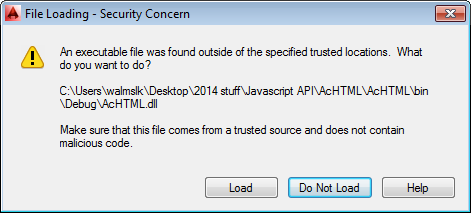
Security dialog in AutoCAD 2014

There are a number of ways to resolve this (i.e. to stop the dialog from being displayed each time AutoCAD tries to load a module from an untrusted location):

  • Use the Autoloader to load the module
    • The Autoloader folders are trusted automatically
  • Make sure the module has been digitally signed
    • Authenticode-signed executables are trusted automatically
      • This is not the same as "signing the assembly" in Visual Studio, which refers to the act of assigning a strong name to a .NET assembly
  • Add the module's folder to the TRUSTEDPATHS (or TRUSTEDDOMAINS – see below) system variable
  • Set SECURELOAD to 0
    • Please do not do this: it really does defeat the object and leaves your system open to malware attack

JavaScript API

This, for me, is the "big ticket" item for this year's release (from a developer perspective, of course). With it being the "lingua franca" of the web (including the mobile web and increasingly the world of cross-platform development), JavaScript is the latest programming language to be enabled to work with AutoCAD. I, for one, welcome our new web-centric overlords!

Just as with the introduction of AutoCAD's .NET API, back in AutoCAD 2005, we weren't "done" in just one release. The first release of the JavaScript API has been implemented with very focused goals, to allow you to:

  • Drive "in canvas" user interface activities, such as querying for user input and displaying transient graphics
  • Manipulate the current view: zoom, pan, switch Visual Style, etc.
  • Implement "out of canvas" user interface dialogs via HTML5 that connect back to AutoCAD via JavaScript

The Design Feed feature inside AutoCAD makes use of this new capability, so we're "drinking our own champagne" (apparently another – more polite, vegetarian compatible? – way of saying "eating your own dog food") with this API from day one.

So how do these goals translate to exposure of individual parts of AutoCAD's core object model? Here are the pieces targeted in the V1 release:

  • Prompts
  • Transient graphics and input
  • Dragger (e.g. Jigs)
  • View manipulation
  • Commands
  • Windows
  • Drawing object operations and events
  • Bindable Object Layer (BOL)
  • Application object (miscellaneous properties)

You'll be able to use these capabilities inside a JavaScript file or HTML page and load it inside AutoCAD using the new WEBLOAD command, Application.LoadJSScript() from .NET or acjsLoadJSScript() from ObjectARX.

That said, the way you're most likely to implement JavaScript functionality in this release of AutoCAD is to implement an HTML5 palette that can be loaded into AutoCAD via a new overload of the PaletteSet.Add() method (one which now takes a URI parameter). You'll need a local module (.NET or ObjectARX) to load the palette by calling this API method, but the UI itself can be hosted elsewhere and therefore be updated more easily.

If dealing with standard modal/modeless windows, you'll use a different protocol:

  • In .NET: new overloads for the Application class methods, ShowModalWindow() and ShowModelessWindow()
  • In ObjectARX: acedShowHTMLModalWindow(), acedShowHTMLModelessWindow() and acedAddHTMLPalette()
  • In LISP: (showHTMLModalWindow) [as it only deals with modal UI]

Now as a V1 implementation, there are certainly holes in the API coverage. If you want to fill these, as a stop-gap, you can implement additional capabilities in .NET (using the JavaScriptCallback attribute to mark a method accordingly) or ObjectARX (using acjsDefun()) and then call them from JavaScript. The functions get called with a JSON fragment containing any arguments being passed. We'll look at this mechanism in more detail in a future post.

Because it's now possible to host such program content on the web – and not in a local folder – we've added the TRUSTEDDOMAINS sysvar (which is analogous to TRUSTEDPATHS for the local system) to enable specific internet domains to be marked as trusted. This URL list is not accessible via the OPTIONS dialog, but you can append to it easily via LISP [e.g. (setvar "TRUSTEDDOMAINS" (strcat (getvar "TRUSTEDDOMAINS") ";through-the-interface.typepad.com")) ] or via the Registry.

While the JavaScript API allows us to provide a more convenient protocol for certain operations – such as Acad.Editor.CurrentViewport.zoomWindow(pt1, pt2, true) to perform a Zoom Window with an animated view transition – even in addition to the ability to host content centrally it's not enough to justify the development and introduction of a new API. The plan is to take this API technology beyond the desktop, at some point in the future. Exciting times!

GeoLocation API

The AutoCAD Map 3D team has implemented a key feature in AutoCAD 2014, allowing drawings to be geo-referenced. ObjectARX and .NET APIs (via the AcDbGeoData and GeoLocationData classes, respectively) have been provided that allow you to add geo-location information into an AutoCAD drawing.

Various properties exist that allow you to define the mapping between drawing coordinates and the real-world. Again, we'll take a closer look at this capability in a future post.

VBA 7.1

In AutoCAD 2014 we've upgraded the core VBA version from 6.3 to 7.1. VBA is still being provided as a separate download, but this version now provides native support for 64-bit Windows.

We've been telling developers for some time to move from VBA to .NET, mainly as Microsoft's investment in VBA was far from
clear (and the performance that was possible when using VBA 6.3 on a 64-bit OS was poor).

New life has now been breathed into the technology, which is good news, although – based on the information that was available at the time – many people have invested significant effort into porting away from it. We still see .NET as a better platform for professional, Windows-centric development, so I hope people don't consider this effort to have been wasted.

Summary

That's it for this quick introduction to the developer-centric capabilities in AutoCAD 2014. In the coming posts we'll dig into the JavaScript API, defining a simple command using JavaScript before creating a simple HTML5 dialog that we'll load into an AutoCAD palette.

82 responses to “AutoCAD 2014 for developers”

  1. So the VBA is here to stay. What's Microsoft position now as for Office products?

  2. It's probably a bit early to say "it's here to stay", although I agree that having a 64-bit capable version does give the technology a brighter future than it had.

    I don't know how VBA has been integrated into Office in recent years, I admit, but I have to assume it's there.

    Kean

  3. Any updates to Lisp and/or VLISP IDE?

  4. I don't know of any changes to the VL IDE (and haven't noticed any).

    At least one new LISP function (I know of(showHTMLModalWindow), mentioned above) has been added, and there may well be others.

    Kean

  5. Hi Kean,
    Will there be a corresponding ObjectARX 2014 SDK release soon or can we use the 2013 SDK (I imagine not)?

  6. Hi Craig,

    There will indeed be a corresponding ObjectARX SDK. As it's a binary application compatible release you can use the 2013 SDK, but you clearly won't get the new bells & whistles from the 2014 version.

    Cheers,

    Kean

  7. Zafer BAŞPINAR Avatar
    Zafer BAŞPINAR

    Thank you for your information

  8. Kean, is it possible to add a path to TRUSTEDDOMAINS (or TRUSTED PATHS) via code on C++ Object Arx? Or even, add it to any register entry on my plugin installer?

    Thank you

  9. [Repeating from another comment.]

    Lucas,

    You can use acedSetVar() from ObjectARX to do this, or you might write to the keys in "HKEY_CURRENT_USER\Software\Autodesk\AutoCAD\R19.1\ACAD-D001:409\Profiles\<<unnamed profile="">>\Variables", if you really needed to.

    For the domains, you might want to pick up the default value from here, to make sure you don't break anything by removing existing domains from the list: "HKEY_LOCAL_MACHINE\SOFTWARE\Autodesk\AutoCAD\R19.1\ACAD-D001\Variables\TRUSTEDDOMAINS".

    The best, of course, is to use Autoloader to avoid all of this.

    Kean

    1. mohankumar peruru Avatar
      mohankumar peruru

      Hi Kean,
      I need to write to trustedpaths variable while installing my autoloader dll. So i have only option of setting registry entry.
      In the registry path "HKEY_CURRENT_USER\Software\Autodesk\AutoCAD\R19.1\ACAD-D001:409\Profiles\<<unnamed profile="">>\Variables", the profile name "<<unnamed profile="">>" is always same? if not how to get this name can you please elaborate?

      1. Kean Walmsley Avatar

        Hi mohankumar,

        Please post your support questions to the AutoCAD .NET forum - someone there will be able to help:

        forums.autodesk.com/

        Regards,

        Kean

  10. Kean, I really like the new ObjectARX 2014 self-extracting installers for SDK, and Documentation (why is it separate?), so for that I thank you (ADN).

    Now that those are available, are there any plans to offer an AutoCAD 2014 .NET Wizard (if at all, due to binary compatibility, etc.) for Visual Studio 2010/2012?

    Cheers

  11. Thanks - I hadn't realised the SDK and docs had been posted to ADN yet, so I'm happy to see them there.

    I assume they're posted separately as the SDK without docs is 13.6MB and the docs are a whopping 106MB. This way people who just want the headers and libs can get them quickly. I'm pretty sure it's been this way on autodesk.com/objectarx for some time, now.

    I'll pass on your request for an updated Wizard (which may well generate a response that none is needed, as you've suggested).

    Regards,

    Kean

  12. It turns out the updated .NET Wizard should be posted in the next day or two.

    Kean

  13. And the reason the ObjectARX docs are so big is that they include a Visual Studio integration (which I've been using for some time now and find *extremely* handy - check it out!).

    Kean

  14. Understood, and thanks for the update.

  15. Unfortunately, the MSI still requires elevated permission(s) to install, which I do not have on my work computer.

    I'll see if I can convince IT to allow the install, but they aren't exactly fans of my having Visual Studio Express to begin with... I have little choice though, as we work with and I customize Civil 3D... Autodesk seemingly does not promote / support / care for the continued development of Visual LISP, or it's IDE these days (forgive the pun).

    *Throws penny in wishing well*

    In any event, many thanks for the work you do, your time, and consideration.

    Cheers

  16. please, all those that are going to use TRUSTEDPATHS, remember to NOT remove OTHERS paths; just ADD your path to the system variable using ;

    Sub AgregarTrustedPath()
    On Error Resume Next
    Dim varData As Variant
    varData = ThisDrawing.GetVariable("TRUSTEDPATHS")
    If LenB(varData) = 0 Then
    ThisDrawing.SetVariable "TRUSTEDPATHS", "C:\InnerSoft\2014"
    Else
    Dim intPosition As Integer
    intPosition = InStr(1, varData, "C:\InnerSoft\2014")
    If intPosition = 0 Then
    ThisDrawing.SetVariable "TRUSTEDPATHS", varData & "C:\InnerSoft\2014"
    End If
    End If
    End Sub

    thanks

  17. Good point. I would have hoped it was obvious, but then I should have spelled it out, anyway.

    The same is absolutely true of TRUSTEDDOMAINS, which already contains data AutoCAD needs to function.

    Thanks,

    Kean

  18. Hi Kean,
    I have my project developed with ObjectARX 2013. Now today I updated my application on objectARX 2014. But problem is, as soon I "Clean solution" on VS 2010 for objectarx 14, it removes .arx and all supportive files (.ilk, .bsc, .pdb etc) generated through objectarx 2013.
    It treats 2013 arx as previous build of 2014 arx

    What could be the problem ?

    Actually I need both .arx files developed with ObjectARX 2013 and 2014.

    Thanks in advance.

  19. Kean Walmsley Avatar

    Hi Sandeep,

    Sounds as though you need to set up separate project configurations for each of the two outputs.

    Regards,

    Kean

  20. Thanks for the reply Kean, here both of these projects have their own .vcxproj and .sln files (with different names and settings), and their names too are different. We have all types of ObjectARX projects right from AutoCAD 2000 to 2013. This problem has been encountered for 2014 only.

    Thanks

  21. Kean Walmsley Avatar

    Please submit your question to the ObjectARX Discussion Group or to the ADN team.

    Kean

  22. william shakespeare Avatar
    william shakespeare

    hello KEAN WALMSLEY,
    I want to ask a question, can you tell me how to realise calculate the area of an arbitrary closed curve, I suggest AutoCAD using the formula as below, ain't that true?
    1

  23. Hi Kean,

    as You said "(although we’re using the VS 2012 IDE with the 2010 platform toolset, in case that’s of interest to people)" how can You multitarget in VS 2012 for C++ ObjectARX? Until VS 2010 You could use Daffodil Multitargeting. How to do it with VS2012?

    Thanks!

  24. Kean Walmsley Avatar

    Hi,

    This should be of help:

    msdn.microsoft.com/en-us/library/vstudio/ff770576.aspx

    Regards,

    Kean

  25. Kean,

    Is there any variable that turns off/on the feature of AutoLoad folders in %appdate% %programfiles% %programdata% folders.
    I have a PackageContents.xml to load dll that no matter what I do it does not load plugin.
    Thanks

  26. Andre,

    Not that I'm aware of. I suggest contacting ADN, whether directly or via the AutoCAD .NET Discussion Group.

    Regards,

    Kean

  27. what is the picture on splash screen for autocad 2014

  28. Kean Walmsley Avatar

    Sorry - I don't know. It's certainly nice though.

    Kean

  29. Sorry for the delayed response - this was flagged as spam. As we've interacted by email since I assume this is now closed. The issue rather than the curve. 😉

    Kean

  30. I have to develop a web application to do grahpics and raws for Autocad since on a C# Project. I never do that, I dowloaded the .NET api, it´s neccesary install a Autocad versión in order to develop applications to autocad since Visual Studio 2012 or only the api is neccesary?.

    Thank´s.

  31. This post - even if it's a bit old - should be a good place for you to start.

    Kean

  32. Thomas Ludewig Avatar

    This makes my day !

    So FINALLY they realized that they have a need for a simple robust scripting language.

    VBA will be dead if Microsoft wants to teach millions of normal users to learn some language from scratch without the help of any makro recorder (in some of daily used applications like excel/word etc) without tons of documents which show how to use things and are willing to blow a full professional developer environment on the screen just to change a entity color.
    (And are willing as well to learn it)

    From that point of view i am usually happy if i can teach some friends to uses dynamic macros. and 3% maybee shows a bit interest on VBA. Sorry to say it clearly: for most users "THAT'S it!"

    For ACAD2015 i would love to see a nice VBA compiler so that i can test my code in the interpreter and then just burst it on the compiler - native for sure 😉

  33. Hi Kean,

    We have created sample plugin project using template in VS2010 c# for AutoCAD Plant3D.
    It generates two classes

    class MyPlugin : IExtensionApplication - // This class is instantiated by AutoCAD once and kept alive for the
    // duration of the session. If you don't do any one time initialization
    // then you should remove this class.
    class MyCommands - // This class is instantiated by AutoCAD for each document when
    // a command is called by the user the first time in the context
    // of a given document. In other words, non static data in this class
    // is implicitly per-document!

    Currently object of MyPlugin class is created by AutoCAD on Netload.
    Object of MyCommands class is created by AutoCAD internally when a command is called by the user the first time
    But we want to create object of MyCommands class in MyPlugin class when respective document is activated.

    Is there any way to do the same ?
    Or can we obtain reference of MyCommands class from AutoCAD ?
    Or can we create object of MyCommands class in Myplugin and then register it in AutoCAD for respective document ?
    Or is there any way to communicate in between these two objects?

    Thanks in advance

  34. FYI, the first 64-bit version of VBA was version 7.0 shipped with Office 2010, they just didn't license it to third parties until recently.

  35. Kean Walmsley Avatar

    Hi Rohit,

    This isn't a support forum, and this question doesn't relate to this post.

    Please send it to the ADN team, if you're a member, or otherwise post it to the AutoCAD .NET Discussion Group.

    Regards,

    Kean

  36. Hi Kean

    When i want load my lisp function(user defined) automatically when autocad 2014 started(like autocad 2012)
    but i couldn't do this.Here to do this i am using appload command but i don't want to do this. Any help from your side.
    Thanks in advance.

  37. Hi Ashis,

    This is not a forum for support, and your question doesn't relate to this post.

    If you don't want to use APPLOAD's StartUp Suite you may want to look at modifying acad.lsp. Beyond that you should contact ADN or ask your question on the AutoCAD LISP Customization forum.

    Regards,

    Kean

  38. Hi Kean,

    Autocad 2014 user. because it does not seem to have painted objects ObjestARX talking about failure. How can I solve this problem .. ObjestARX do not look at the options section.
    Thanks in advance.

  39. Hi there,

    I'm afraid I don't understand the question. I don't think it's really related to code I've posted here, so please do ask it on the ObjectARX Discussion Group.

    Thanks & regards,

    Kean

  40. pls help me
    how to remove supertools plugin from autocad 2014?

  41. I don't even know what that is. Please post your request to the relevant online discussion group.

    Kean

  42. Hi Kean,

    May I ask where have CloseAndSave method in document object gone?

    How can I close a drawing through code?

    Thanks

  43. Hi, i am new to lisp programming, can you help me out where to start with.... i have using autocad from 5 years or so...

  44. I suggest getting started with the resources list on the AutoCAD Developer Center.

    Kean

  45. Hi Yaqi,

    It's now in an extension method. You should be able to call it as normal on a document, though, providing you have the assembly reference and usual namespace "using" statement.

    BTW - please address such questions to the AutoCAD .NET Discussion Group. This blog isn't a support forum.

    Regards,

    Kean

  46. Hi, how and where can I download autocad objectarx sdk 2014?
    thx

  47. Excuse for my english

    but in the page that you show me
    i can't find the link

    in the past there was a page where i filled in the necessary fields and i download the objectarx sdk 2013
    but for sdk 2014 i can't find a similar page
    help me please

  48. There should be a "License & Download" link there, somewhere.

    Kean

    1. Hi kean.
      what load javascript code to AutoCAD of Folder Local?
      Because Not Load of URL http://localhost/...

      1. localhost will work if you have a web-server set up on your system. Otherwise just point to the filename - I use this approach all the time.

        Kean

        1. thank you kean
          yes web-server set up my system
          But not work.
          example: URL http://localhost/File/ZoomEntity.js
          physical addres = C:\inetpub\wwwroot\File\ZoomEntity.js

          1. Sorry - the same scenario works for me. Try checking the server logs and posting more info to the discussion groups.

            Kean

        2. من هر چقدر سعی می کنم اتوکد فایل اسکریپت من را اجرا نمی کند.
          و آدرس URL من را قبول نمی کند.
          من میدانم که IIS درست نصب شده است.

        3. No matter how I try I can not run AutoCAD script file.
          I do not accept the URL.
          I know that IIS is installed correctly.

  49. Didn't you find the "License & Download" link I mentioned on objectarx.com (which goes here)?

    Kean

  50. Hello Kean

    Thanks for the in depth information. I was triggered by the Design Feed feature you mentioned. In my situation TRUSTEDPATHS caused some challenges.

    An out of the box bare AutoCAD install is manipulated with a /b switch in the short cut of acad.exe. This .scr-script contains some LISP and sets TRUSTEDPATHS, then chain loads menu's, settings, changing SFSP, etcetera, all with LISP, ending in a standardized AutoCAD environment. This worked fine, even in AutoCAD 2014. Working with profiles is not an option, the systems are reset every day to out of the box state. There is a caveat, the /b switch calls code that sets TRUSTEDPATHS and that should be impossible but it works. That is... it works when the script is on a local drive. Unfortunately it should be run from a network location and that offers the dialogue box with the warning about running code outside the trusted zone.

    This is a show stopper and I decided to put everything in a .bundle under %appdata%. Works like a charm except for one thing: after acaddoc.lsp is loaded some additional commands are issued: RIBBON, COMMANDLINE and DESIGNFEED. Without using the Autoloader these commands are not issued.

    Can you tell me where these commands are defined? Or maybe to get a solution, how can RIBBONCLOSE, DESIGNFEEDCLOSE be issued from the described chain loading process after acaddoc.lsp has run? Off the record, since 360 is not installed the Design Feed pane gives an ugly error "net:ERR_NAME_NOT_RESOLVED".

    Wiebe

  51. Hi Wiebe,

    In general I ask people to post their questions - especially complex ones, such as this - to ADN or the appropriate online discussion group.

    Just a quick comment, though: it's more likely that the /b switch is topping the RIBBON, COMMANDLINE and DESIGNFEED commands from being called (rather than the Autoloader adding them). They are standard commands that are typically called on AutoCAD startup assuming that these UI elements are visible (not sure about DESIGNFEED - sounds as though you don't use that).

    Anyway, this issue probably needs assistance from someone in Support, so please do ask ADN or the forums.

    Regards,

    Kean

  52. Thanks Kean

    Posted it here: forums.autodesk.com/t5/Visual-LISP-AutoLISP-and-General/Autoloader-how-to-stop-executing-RIBBON-COMMANDLINE-and/td-p/4789507

    In the mean time I'll try to play a bit with the /b switch to create a work around.

  53. Dear Kean, We have a .net application where we have referenced
    AutoCAD 2012 Type Library and
    Autodesk.AutoCAD.Interop.Common(18) (Both COM type objects)

    Now we are expected to migrate to Autocad 2014
    We have changed the reference to
    AutoCAD 2014 Type Library and
    Autodesk.AutoCAD.Interop.Common (19) (Both .net type objects)

    We do not get any Build error but when execute the application we get the error Error loading type library/DLL. (Exception from HRESULT: 0x80029C4A (TYPE_E_CANTLOADLIBRARY)). Are any additional measures needed for a migration from AutoDesk 2012 to 2014

  54. Dear Shen,

    There are no additional measures that spring to mind (and I haven't seen this error, myself).

    I suggest posting to the AutoCAD .NET Discussion Group - I'm sure someone there will have some advice.

    Regards,

    Kean

  55. I have a problem with autocad 2014 .net. I had an aplication that worked well in 2012, but now on 2014, it get an error that says: the code in this project must be updated for use on 64 bit systems. Please review and update Declare statements and then mark them with the PtrSafe attribute.
    }Can you please give me an example of how to update this.

    Thanks.

  56. Is there an AutoCAD .NET Wizards for AutoCAD 2014 for Visual Studio 2010 ?

  57. The AutoCAD .NET Wizard for AutoCAD 2013 - which works with VS 2010 - will also create projects that are compatible with AutoCAD 2014.

    Kean

  58. After some testing I have a work around. Findings are published as an answer to the link above.

  59. Unfortunately not - I haven't had to do that (presumably in VB.NET).

    Please post your question to the AutoCAD .NET Discussion Group - I'm sure someone there will have done this.

    Kean

  60. Hi Kean,
    I have to set TRUSTEDPATHS variable in registry for my plgun installer,can I not set it in "HKEY_LOCAL_MACHINE\SOFTWARE\Autodesk\AutoCAD\R19.1\ACAD-D001\Variables\"?

    Thanks,
    Vinod Mahalle

  61. Hi Vinod,

    Yes, you can. Or at least you should be able to, given adequate privileges.

    Regards,

    Kean

  62. Hi Kean,

    Common Dialoge in VBA 7.1 for AutoCAD in Windows 7-64 bit is making Error "No Such Interface Supported"

    do you have solution in old XP it was fixed in registery:
    HKEY_LOCAL_MACHINE\Software\Microsoft\Internet Explorer\ActiveX
    Compatibility\{3B7C8860-D78F-101B-B9B5-04021C009402} DWORD value to
    0

  63. Hi Hani,

    Sorry - I don't know anything about this issue.

    Please post your question to the ADN team or the relevant discussion forum.

    Regards,

    Kean

  64. Hi Kean,

    I'm french, so I'm not so good in English.

    I'm using Autocad 2014 on 7 64x.
    I have installed :
    - VS 2012 express
    - ObjectARXWizards 2014
    - AutoCADNetWizards 2014

    I have the possibility to make a new project in VB or in VC#, but how can I make a new project in VC++ for making
    arx files, instead of dll files with VB or VC# ?

    Thank's.

    Seb.

  65. Hi Seb,

    The ObjectARX Wizard should be able to help you create a C++ project. I don't know whether the ObjectARX Wizard (which is a real plugin to VS rather than a project template) can work in VS Express, though: otherwise you may need to start from an ObjectARX sample, instead.

    Regards,

    Kean

    1. Hi kean.
      what load javascript code to AutoCAD of Folder Local?
      Because Not Load of URL http://localhost/...

  66. Hi Kean,

    I spend time on install an removing 🙁
    because of conflicts with .NET, SDK, ...

    I have create a new ObjectARX project in VSC++ Express 2010 and import it on VS Express 2012
    But it doesn't work.

    I'm creating a new PC for starting without all programm already installed instead of my current PC.

    Thank's,

    Seb

  67. Hi Kean, I'm trying to migrate an application from AutoCAD 2010 to AutoCAD 2014, concerning menu and toolbars of the CUI where I can find references to iterate between the various MENUGROUPS?

    Below is a piece of code for autoCAD 2010, which works fine:

    Const cuiname As String = "MYCUI"
    Dim mgroup As AcadMenuGroup
    Dim cuifile As String = "C:\CUI\\MYCUI.cuix"

    Try
    mgroup = Application.MenuGroups.Item(cuiname)
    Catch ex As System.Exception
    Dim mgroups As AcadMenuGroups = Application.MenuGroups
    mgroups.Load(cuifile)
    mgroup = Application.MenuGroups.Item(cuiname)
    End Try

    Thankyou

    Luigi

    1. Hi Luigi,

      Please post this to the AutoCAD .NET discussion group: I really don't have time to provide support.

      Thanks for understanding,

      Kean

      1. Yes Kean, already done, thank you

        Luigi

  68. I have a AutoCAD plugins written in C++ using Visual studio 2008 32 bit and its is using 32 bit ObjectARX 2012. Now i am trying to migrate the same plug in to 64 bit using Visual Studio 2014 (64bit) which shoudld be using 64 ObjectARX 2014.
    I am getting 300 plus Linker errors ..Some are repeated..Could any one please advise me on how to resolve these errors..
    I have given few errors for your reference:
    1.mismatch detected for '_MSC_VER': value '1600' doesn't match value '1700' in test.obj
    2.unresolved external symbol "__declspec(dllimport) public: bool __cdecl AcRxClass::isDerivedFrom(class AcRxClass const *)const " (__imp_?isDerivedFrom@AcRxClass@@QEBA_NPEBV1@@Z)
    3.error LNK2001: unresolved external symbol acedEntSel
    I went thorogh all the existing posts, unfortunately i did not get relevant answer for the issue i am facing.

Leave a Reply to Ashis Meher Cancel reply

Your email address will not be published. Required fields are marked *