As a follow-on from the last post, in today's we're going to look at a crude approach for collecting execution information about functions of your choosing from a .NET app inside AutoCAD. We're going to extend the implementation shown last time to record the time taken for the various "instrumented" commands to execute and make it easy to copy and paste this "performance" data into a tool such as Excel. We could also dump out a file directly that can be imported into Excel, but this way is simpler and only slightly more manual.
It's important to note the quotes in the above paragraph: measuring elapsed time in this way is indeed very crude – it's only a little bit better than measuring manually with a physical stop-watch (albeit much better than trying to use one of those Casio digital watches from back in the 80s with metal buttons that were so hard to press that they left imprints in your fingertips 😉 – as it's not at all granular in the data it collects.
Aside from the fact that a modern, multi-tasking OS has a lot of stuff going on that makes elapsed execution time inconsistent, both the OS and the .NET framework understandably do things to make code execute more quickly over time. Which is also a reason we're implementing a simple way to collect data across multiple runs, as that makes it easier to discard data from early runs that you might want to consider as a warm-up lap for your app.
If you're really interested in measuring performance, you really ought to invest (whether that means money or time) in using a profiler. Visual Studio 2012 has profiling tools built-in from the Professional version upwards, while with Visual Studio 2010 you apparently need at least the Premium version.
In a future post, it'd be good to take a more in-depth look at profiling AutoCAD apps, but for now we'll stick with this basic approach. If anyone out there has experience with profiling tools they'd like to share, please do so via a comment. Some tools are no doubt better than others, and it would be good to hear from people on this topic.
With that lengthy preamble out of the way, let's get onto the code. Here's an updated version of the C# code shown last time, with some additional work going on in the MeasureTime() method.
using Autodesk.AutoCAD.ApplicationServices;
using Autodesk.AutoCAD.DatabaseServices;
using Autodesk.AutoCAD.EditorInput;
using Autodesk.AutoCAD.Runtime;
using System.Collections.Generic;
using System.Diagnostics;
using System.Linq;
using System;
namespace ObjectEnumeration
{
public class Commands
{
// An execution "database" mapping between command-name and
// the list of timings for the various runs
private Dictionary<string, List<TimeSpan>> _execData =
new Dictionary<string, List<TimeSpan>>();
private void AddExecInfo(string cmd, TimeSpan elapsed)
{
// Add the execution info to the existing list for a command
// or create a new one if none exists
if (_execData.ContainsKey(cmd))
{
_execData[cmd].Add(elapsed);
}
else
{
_execData.Add(cmd, new List<TimeSpan>() { elapsed });
}
}
public void MeasureTime(Document doc, Func<int> func)
{
// Get the name of the running command(s)
// (might also have queried the CommandMethod attribute
// via reflection, but that would be a lot more work)
var cmd = (string)Application.GetSystemVariable("CMDNAMES");
// Start a Stopwatch to time the execution
var sw = new Stopwatch();
sw.Start();
// Run the function, getting back the count of the results
var cnt = func();
// Stop the Stopwatch and print the results to the command-line
sw.Stop();
doc.Editor.WriteMessage(
"\n{0}: found {1} lines in {2}.", cmd, cnt, sw.Elapsed
);
// Store the execution information for later use
AddExecInfo(cmd, sw.Elapsed);
}
[CommandMethod("DD")]
public void DumpExecutions()
{
// Loop through the execution database, dumping the results
// to the command-line
var ed =
Application.DocumentManager.MdiActiveDocument.Editor;
foreach (var kv in _execData)
{
ed.WriteMessage("\n{0}", kv.Key);
foreach (var ts in kv.Value)
{
ed.WriteMessage(
}
}
}
[CommandMethod("LL1")]
public void ListLines1()
{
var doc = Application.DocumentManager.MdiActiveDocument;
MeasureTime(
doc,
() =>
{
var ids = GetAllLines(doc.Database);
return ids.Count<Line>();
}
);
}
[CommandMethod("LL2")]
public void ListLines2()
{
var doc = Application.DocumentManager.MdiActiveDocument;
MeasureTime(
doc,
() =>
{
var ids =
ObjectsOfType1(
doc.Database, RXObject.GetClass(typeof(Line))
);
return ids.Count<ObjectId>();
}
);
}
[CommandMethod("LL3")]
public void ListLines3()
{
var doc = Application.DocumentManager.MdiActiveDocument;
MeasureTime(
doc,
() =>
{
var ids =
ObjectsOfType2(
doc.Database, RXObject.GetClass(typeof(Line))
);
return ids.Count<ObjectId>();
}
);
}
public static IEnumerable<Line> GetAllLines(Database db)
{
using (
var docLock =
Application.DocumentManager.MdiActiveDocument.LockDocument()
)
{
using (var tr = db.TransactionManager.StartTransaction())
{
var bt =
tr.GetObject(db.BlockTableId, OpenMode.ForRead)
as BlockTable;
var btr =
tr.GetObject(
bt[BlockTableRecord.ModelSpace],
OpenMode.ForRead
) as BlockTableRecord;
foreach (var obj in btr)
{
var line =
tr.GetObject(obj, OpenMode.ForRead) as Line;
if (line != null)
{
yield return line;
}
}
}
}
}
public static IEnumerable<ObjectId> ObjectsOfType1(
Database db, RXClass cls
)
{
var tr = db.TransactionManager.StartOpenCloseTransaction();
using (tr)
{
var btr =
(BlockTableRecord)tr.GetObject(
SymbolUtilityServices.GetBlockModelSpaceId(db),
OpenMode.ForRead
);
foreach (ObjectId id in btr)
{
if (id.ObjectClass.IsDerivedFrom(cls))
{
yield return id;
}
}
tr.Commit();
}
}
public static IEnumerable<ObjectId> ObjectsOfType2(
Database db, RXClass cls
)
{
var tr = db.TransactionManager.StartOpenCloseTransaction();
using (tr)
{
var btr =
(BlockTableRecord)tr.GetObject(
SymbolUtilityServices.GetBlockModelSpaceId(db),
OpenMode.ForRead
);
var lineIds =
from ObjectId id in btr
where id.ObjectClass.IsDerivedFrom(cls)
select id;
tr.Commit();
return lineIds;
}
}
}
}
We've simply added a dictionary that maps between command-names and a list of TimeSpan objects (one for each execution of that command, stored chronologically). After executing LL1, LL2 and LL3 multiple times – perhaps even using a script to do so – you can then call DD to dump the results to the command-line:
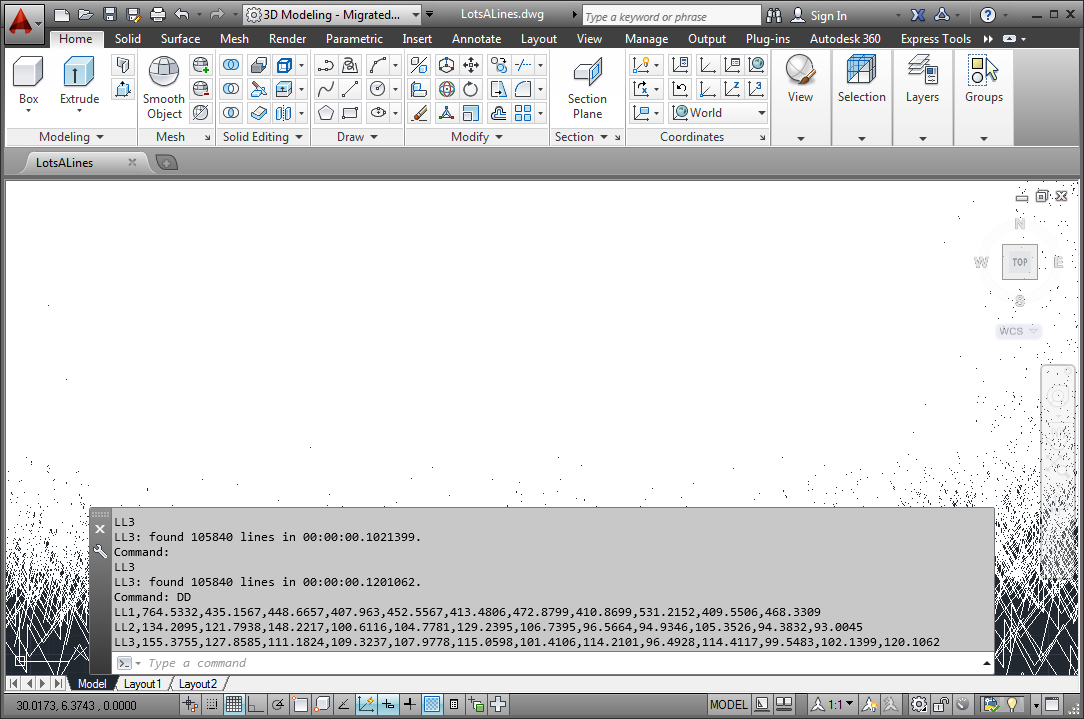
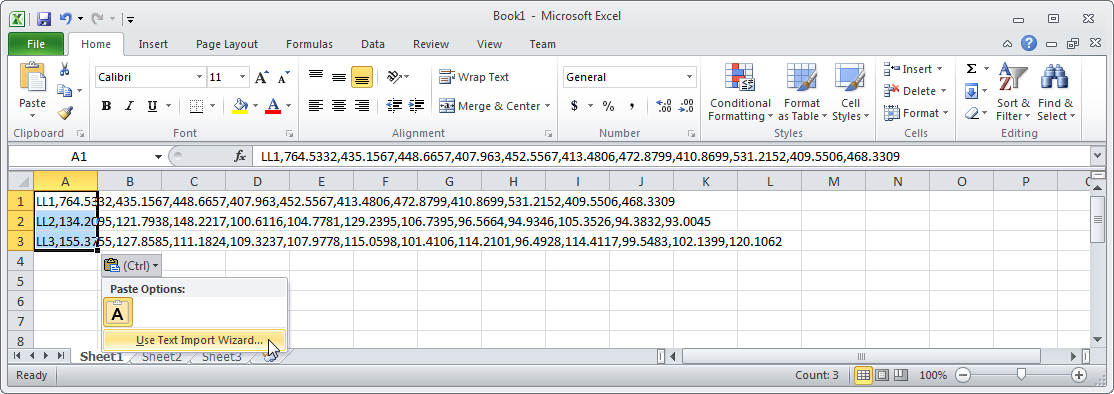
As the data dumped to the command-line is comma-delimited, it's easy to copy & paste this into Excel and then use its Text Import Wizard to more effectively populate your performance spreadsheet.
Then, of course, the AutoSum –> Average function makes it easy to average out a subset of the runs (in order to exclude early ones, should you wish to do so).
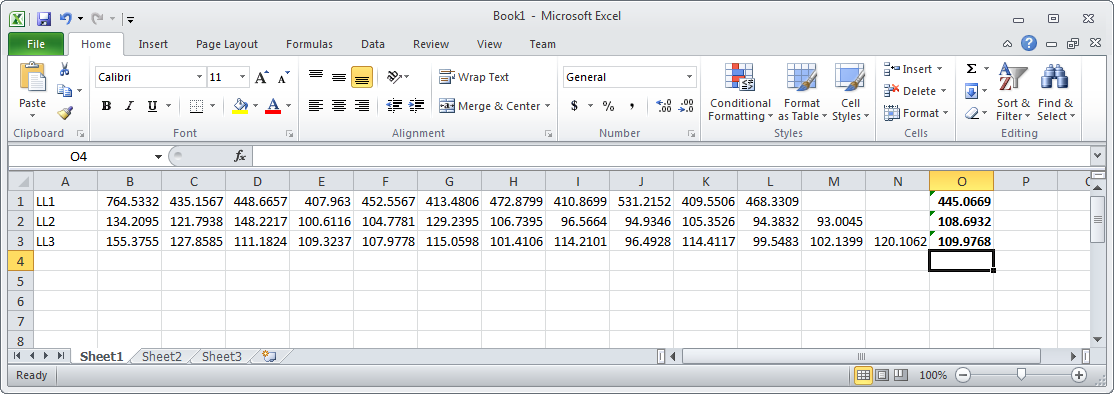
All very basic, yes, but it can help give you a rough idea of relative performance of different command implementations (and sometimes that's enough).
Just to finish up the story we started last time, the major problem Bruno ended up finding in his code was that it was relying on exceptions to determine when certain error conditions were in place (related to the existence of XData in his drawing). Once he modified the code to check for these conditions explicitly – rather than relying on catching exceptions – it ran within his performance parameters (in his own words, it's now "lightning fast!").


Leave a Reply to Tony Tanzillo Cancel reply