I was writing up a rather lengthy post following on from Monday's when I realised I needed some diagrams. And then I realised they were going to be complicated enough to need AutoCAD to create them. And then I realised I needed to write some code to generate some of the graphics, as they were too complicated to draw by hand. 🙂
 Which is what this post has ended up being about: it seemed quicker and easier to write this topic up than it was to finish the other one, which I'll hopefully publish tomorrow, if i can find the time.
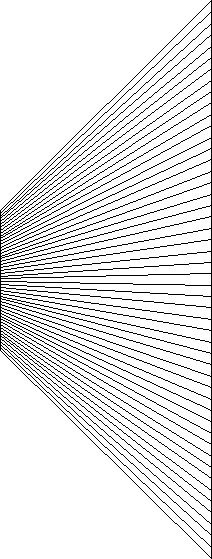
What's so complex? Well, in order to describe graphically the process that MapReduce uses to split off tasks (more on this tomorrow), I wanted to draw a number of lines going between two vertical lines – one being shorter that the other – such as the ones shown here.
The command's implementation turned out to be interesting for a few reasons, and actually pretty cool in terms of the results it creates.
On the implementation side, I chose to use nested transactions: the outer one collects information about – basically parameterizing – the two curves (we're generalising the code beyond lines as it doesn't cost anything to write it this way). The inner transaction is in a loop (so it's actually a sequence of nested transactions) and creates the geometry we want to show to the user.
The thing about AutoCAD curves is that they have an order – the start point and the end point may not come in the order you expect. So the code creates the lines one way and then asks whether to continue with those results – if "yes" then the transaction gets committed and the geometry remains in the drawing.
If the user chooses to reverse the order – by entering "no" – then we abort the transaction, and loop once again but reversing the order in which we get the second curve's points (i.e. the various new lines' end points). I could have added the option to reverse the order of the first curve's points, as while it' doesn't make any difference for my specific use-case of vertical lines, with different curve types and positions it could make a difference. But then my use-case didn't require it, so I kept things simple.
The simplest way to implement this, also to reverse the first curve's points – which is being left as an exercise for the engaged reader or for me to cover in a future post, depending – is to change our Boolean to a 3-state variable (e.g. an enumeration) and then progress this on each pass through the loop (rather than simple inverting the Boolean, which is the case currently). We'd then check this when deciding which points to use to define the various lines. But yes, more complexity than is needed for today.
Here's the C# code implementing the LBC command:
using System.Diagnostics;
using Autodesk.AutoCAD.ApplicationServices;
using Autodesk.AutoCAD.DatabaseServices;
using Autodesk.AutoCAD.EditorInput;
using Autodesk.AutoCAD.Geometry;
using Autodesk.AutoCAD.Runtime;
namespace GeometryCreation
{
public class Commands
{
[CommandMethod("LBC")]
public static void LinesBetweenCurves()
{
var doc = Application.DocumentManager.MdiActiveDocument;
var db = doc.Database;
var ed = doc.Editor;
// Ask the user to select a couple of curves
var peo = new PromptEntityOptions("\nSelect first curve");
peo.SetRejectMessage("\nMust be a curve.");
peo.AddAllowedClass(typeof(Curve), false);
var per = ed.GetEntity(peo);
if (per.Status != PromptStatus.OK)
return;
var firstId = per.ObjectId;
peo.Message = "\nSelect second curve";
per = ed.GetEntity(peo);
if (per.Status != PromptStatus.OK)
return;
var secondId = per.ObjectId;
// We need to know how many lines to draw between the two
var pio = new PromptIntegerOptions("\nNumber of lines");
pio.AllowNegative = false;
pio.AllowZero = false;
var pir = ed.GetInteger(pio);
if (pir.Status != PromptStatus.OK)
return;
int num = pir.Value;
var pko =
new PromptKeywordOptions(
"\nReady to continue? (if not, lines will be " +
"re-created in opposite direction along one curve)" +
" [Yes/No]",
"Yes No"
);
pko.Keywords.Default = "Yes";
// We have an outer transaction where we access some data
// about the curves - we're not writing, so will commit()
// at the end even if the user cancels
using (var tr = doc.TransactionManager.StartTransaction())
{
var firstCur =
tr.GetObject(firstId, OpenMode.ForRead) as Curve;< /p>
var secondCur =
tr.GetObject(secondId, OpenMode.ForRead) as Curve;
if (firstCur == null || secondCur == null)
return; // Shouldn't happen, we asked the user for Curves
// We'll be adding the new lines to the current space
var btr =
(BlockTableRecord)tr.GetObject(
db.CurrentSpaceId, OpenMode.ForWrite
);
// Parameterize the two curves once
// (we'll loop through the second backwards in
// case we reverse the order)
var pc1 = ParameterizeCurve(firstCur, num);
var pc2 = ParameterizeCurve(secondCur, num);
// Let's throw in an assert to make sure the collections
// have the same size (will create an obscure message,
// which is why I don't usually do this)
Debug.Assert(pc1.Count == pc2.Count);
// Here we're going to loop, allowing the user to flip
// backwards and forwards between a mode where we
// parameterize the second curve in reverse
bool reverseOne = false;
while (true)
{
// Our inner transaction, which will keep track of our
// new lines for us
using (var tr2 = doc.TransactionManager.StartTransaction())
{
// Loop across the size of the collection(s), creating
// lines between the points in each
for (int i = 0; i < num; i++)
{
var start = pc1[i];
var end = reverseOne ? pc2[num - (i + 1)] : pc2[i];
var ln = new Line(start, end);
btr.AppendEntity(ln);
tr2.AddNewlyCreatedDBObject(ln, true);
}
// We want the graphics updated before the transaction
// terminates, as we want the user to make an informed
// decision
tr2.TransactionManager.QueueForGraphicsFlush();
// Prompt whether we shoudl continue or loop
var pr = ed.GetKeywords(pko);
if (pr.Status != PromptStatus.OK)
break; // This will abort the inner transaction
// If "No" we'll loop after flipping the "reverse"
// boolean
if (pr.StringResult == "No")
{
reverseOne = !reverseOne;
}
else
{
// Only commit the inner transaction when we had a
// "yes, let's continue" response
tr2.Commit();
break;
}
}
}
// Always commit the outer (read-only) transaction as it's
// less expensive that aborting
tr.Commit();
}
}
// Helper function to gather a certain number of points along
// a Curve
private static Point3dCollection ParameterizeCurve(
Curve c, int count
)
{
var pc = new Point3dCollection();
// Our increment should be based on the fact we'll include
// points at both StartParam and EndParam (hence "count - 1")
var pinc = (c.EndParam - c.StartParam) / (count - 1);
// Loop along the parameter space
for (double p = c.StartParam; p < c.EndParam; p += pinc)
{
pc.Add(c.GetPointAtParameter(p));
}
// This approach may include a point at EndParam (or within
// tolerance) so we only add EndParam explicitly if we are
// one point short of what was requested
if (pc.Count < count)
{
pc.Add(c.GetPointAtParameter(c.EndParam));
}
return pc;
}
}
}
Just to see if it worked, I used the LBC command to write my name with lines between a few different curves (in this case some simple lines and arcs).

It reminds me of that art-form where you create shapes by tying string around nails. Which it turns out is called string art (thank you, Google & Wikipedia!).
You can also use the command with more complex splines and polylines, allowing you to make patterns that look almost 3D:

Right then, I'd better get on with that MapReduce post, to see if I can get it finished up before the end of the week.


Leave a Reply to Morten Cancel reply