A big thanks to Parrish Husband for both suggesting this topic and providing the majority of the code in this post. Parrish had been attempting to extend the technique shown in this aging post to include an icon with the content menu item.
At least one person had done this before, according to the blog comments, but had found – just as Parrish did – that the added icon didn't line up with the others in the menu. In fact it completely messed up the alignment of all the other icons in the menu: less than ideal behaviour.
So Parrish looked into an approach that made use of CUI for this. The below approach is mostly Parrish's code: I did add some logic to allow the code to be called repeatedly (as you might from start-up) without the menu being added multiple times or the performance penalty of reloading menus when unnecessary. I also chose to place my menu option at a specific option – before the "Add Selected" item – just to show how that can be done.
using Autodesk.AutoCAD.ApplicationServices;
using Autodesk.AutoCAD.Customization;
using Autodesk.AutoCAD.Runtime;
namespace ContextMenuWithIcon
{
public class Commands
{
const string cuiSectionName = "TTIF_Menus";
[CommandMethod("MIC")]
public static void MenuWithIcon()
{
var acadCui =
new CustomizationSection(
Application.GetSystemVariable("MENUNAME") + ".cuix"
);
var acMenuGroup = acadCui.MenuGroup;
// Check if the macro group exists
var grp = default(MacroGroup);
if (acMenuGroup.MacroGroups.Contains(cuiSectionName))
grp = acMenuGroup.FindMacroGroup(cuiSectionName);
else
grp = new MacroGroup(cuiSectionName, acMenuGroup);
var mac =
grp.CreateMenuMacro(
"Table Export 2",
"_.TABLEEXPORT2",
"",
"Exports a table to a Unicode-compatible CSV",
MacroType.Edit,
"tableexp.bmp",
"tableexp.bmp",
""
);
// If the macros in the group, remove it
// (otherwise we need to get it from the group for it
// not to be added back in as duplicate when we
// use it later... or so it seems)
if (grp.MenuMacros.Contains(mac))
grp.MenuMacros.Remove(mac);
grp.AddMacro(mac);
// Cycle through the PopMenus
foreach (PopMenu menu in acadCui.MenuGroup.PopMenus)
{
// Ignore all except the "Edit" context menu
if (!menu.Aliases.Contains("CMEDIT"))
continue;
// Default position is the last in the list
var pos = menu.PopMenuItems.Count;
for (int i=0; i < menu.PopMenuItems.Count; i++)
{
// If we find the "Add Selected" item, then
// we'll insert our menu in front of that
var item = menu.PopMenuItems[i] as PopMenuItem;
if (item != null && item.MacroID == "ID_AddSelected")
{
pos = i - 1;
break;
}
}
// Add a separator and then the new menu item, but
// only if it isn't already where we expect it to be
var testPos =
pos < menu.PopMenuItems.Count ?
pos - 1 :
menu.PopMenuItems.Count - 1;
&
#160; var test = menu.PopMenuItems[testPos] as PopMenuItem;
if (
test == null ||
(test != null && test.Name != "Unicode Export...")
)
{
var sep = new PopMenuItem(menu, pos);
var newItem =
new PopMenuItem(mac, "Unicode Export...", menu, pos + 1);
menu.PopMenuItems.Add(sep);
menu.PopMenuItems.Add(newItem);
// Only save and reload the CUI if we added our menu
// (the reload is particularly expensive)
acadCui.Save(true);
Application.ReloadAllMenus();
}
break;
}
}
}
}
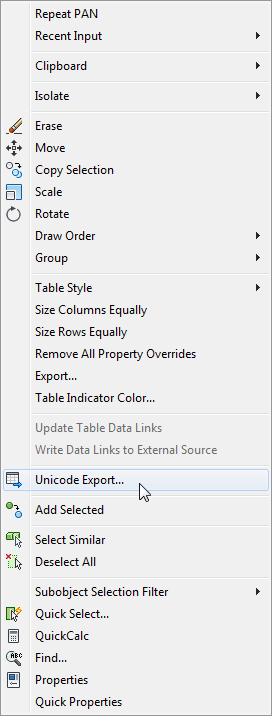 I adjusted Parrish's code to add a right-click menu item to call the command we saw in the last post. I designed a custom icon – which you can get here and place in the same folder as your compiled DLL – but you might also change the "tableexp.bmp" references in the code to "RCDATA_16_TABLE" (which will cause the TABLE command's icon to be used).
Our TABLEEXPORT2 command only works on Table objects, but I haven't yet found a simple way in CUI to restrict the existence of menu items to a specific object type. The main CUI file contains a number of "per-object type" menu sections, but there isn't one for Tables. Hopefully it's as simple as adding a "Shortcut menu" with the OBJECT_TABLE alias, rather than our current approach of adding the item to the "Edit Menu" which applies to all objects.
As you can see for the per-Table menu items that do get displayed in the context menu, it's quite likely that these were added via the non-CUI mechanism (i.e. using the ContextMenuExtension class or its ObjectARX equivalent). The primary clue being the lack of icons in that section of the menu (aha!).
I would like to have the menu item only be displayed for Table objects – if I find a way to do so via CUI, I'll post again showing how to do that. (Please post a comment if you've already worked this out for your application and are prepared to share. 🙂
The code makes changes to the main CUI file (acad.cuix). I'd also like to see whether a partial CUI might also be used for this – I haven't take the time to do so, as yet – but the current approach certainly works. Modifying acad.cuix (or any loaded CUI file) of course makes the menu item persist across sessions, which is great: we only incur the penalty of adding the item, saving it back and reloading menus when we first add the menu item (our code checks for the existence of the menu item on subsequent runs and terminates quite quickly if it's there, as mentioned earlier).


Leave a Reply to Kean Walmsley Cancel reply