I had an interesting email last week from Josh Mathews:
I'm having some trouble figuring out how to fix this problem I have and I'm not sure what the best way is to attack it. I have a large set of drawings that have these random strings of underscores strewn throughout the drawing (which look like random lines scattered all around when the drawing is printed – and make it confusing to look at), and so I'm trying to write a function that will iterate through the drawing and find all the text strings that contain ONLY underscores and then erase those text strings.
The problem is that some of the text strings are regular text entities and some are block attributes. So – the text entities I would like to erase, and the block attributes I would like to delete from the block.
The first thing that occurred to me when I read Josh's email was that it would be easy to throw together a quick overrule based on this previous post where we identified text and dimensions. From there we could look at a couple of ways to erase the problematic entities themselves, whether based on user selection (and nested selection, for the block attributes) or by cranking through the various block definitions (including the modelspace, of course).
The second thing that occurred to me was "how did the drawings get to be in this state?" Josh explained that the text was edited out and, for one reason or another, replaced with underscore characters. He wasn't sure of the drawings' origins. I wondered whether the text was redacted by a secretive 3-letter government agency, but I've decided not to ask too many questions. 😉
For the deletion approach, I ended up choosing the latter route where we scan and modify the various block definitions, making sure that along with the DBText and MText objects, we check the BlockReferences' AttributeReferences, as well. Identifying problematic text is actually done by the overrule's IsApplicable() method (more on this later), which uses a regular expression to check the string contents, a technique we saw most recently in this post. We're looking for strings that only contain spaces and underscores, but this technique could very easily be adapted to look for other kinds of string, too, of course.
All this led to the following C# implementation:
using Autodesk.AutoCAD.ApplicationServices;
using Autodesk.AutoCAD.DatabaseServices;
using Autodesk.AutoCAD.EditorInput;
using Autodesk.AutoCAD.Geometry;
using Autodesk.AutoCAD.GraphicsInterface;
using Autodesk.AutoCAD.Runtime;
using System;
using System.Text.RegularExpressions;
namespace DashedTextFinder
{
public class Commands
{
// Stores our global overrule instance
private static TextHighlightOverrule _tho = null;
[CommandMethod("EDT")]
public static void EraseDashedText()
{
var doc = Application.DocumentManager.MdiActiveDocument;
var ed = doc.Editor;
var db = doc.Database;
var count = 0;
// In case the SDT command hasn't been run, we need to create
// our custom overrule object
if (_tho == null)
_tho = new TextHighlightOverrule();
using (var tr = doc.TransactionManager.StartTransaction())
{
// Let's iterate through the BlockTable, erasing the
// relevant entities from the various BlockTableRecords
var bt =
(BlockTable)tr.GetObject(
db.BlockTableId, OpenMode.ForRead
);
foreach (var btrId in bt)
{
var btr =
(BlockTableRecord)tr.GetObject(
btrId, OpenMode.ForRead
);
foreach (var entId in btr)
{
// Also open erased objects, although we won't process
// them, of course
var ent =
(Entity)tr.GetObject(entId, OpenMode.ForRead, true);
if (!ent.IsErased)
{
// If the entity is a BlockReference, check its
// AttributeReferences, otherwise just check the
// entity itself using our overrule object
if (ent is BlockReference)
{
var br = (BlockReference)ent;
foreach (var aId in br.AttributeCollection)
{
var ar =
(AttributeReference)tr.GetObject(
(ObjectId)aId, OpenMode.ForRead, true
);
if (!ar.IsErased && _tho.IsApplicable(ar))
{
ar.UpgradeOpen();
ar.Erase();
count++;
}
}
}
else if (_tho.IsApplicable(ent))
{
ent.UpgradeOpen();
ent.Erase();
count++;
}
}
}
}
tr.Commit();
}
// As we've erased all "problematic" entities, we might also
// remove the overrule...
//_tho.Remove();
//_tho.Dispose();
//_tho = null;
ed.WriteMessage(
"\nErased {0} blank or dashed text entit{1}.",
count, count == 1 ? "y" : "ies"
);
}
// Highlights the dashed text objects in the drawing
[CommandMethod("HDT")]
public static void HighlightDashedText()
{
var doc = Application.Do
cumentManager.MdiActiveDocument;
if (_tho == null)
_tho = new TextHighlightOverrule();
short newCol = UpdateHighlightOverrule(doc, _tho);
if (newCol < 0)
{
_tho.Dispose();
_tho = null;
}
else
_tho.HighlightColor = newCol;
}
// A helper function which applies our highlight overrule
// to different types, adjusting the color index used
private static short UpdateHighlightOverrule(
Document doc, HighlightOverrule ho
)
{
// Ask the user for the new color index to use
var opts =
new PromptIntegerOptions("\nEnter highlight color index: ");
opts.LowerLimit = 0;
opts.UpperLimit = 127;
opts.Keywords.Add("Clear");
opts.DefaultValue = ho.HighlightColor;
var res = doc.Editor.GetInteger(opts);
if (res.Status == PromptStatus.Keyword)
{
// If the Clear keyword was entered, let's remove the
// overrule
if (res.StringResult == "Clear")
{
ho.Remove();
doc.Editor.Regen();
return -1;
}
}
else if (res.Status == PromptStatus.OK)
{
// Otherwise we attach the overrule for each type
ho.Add();
// If requested highlight color is a new color, then we
// want to change it
if (ho.HighlightColor != res.Value)
ho.HighlightColor = (short)res.Value;
doc.Editor.Regen();
}
return (short)res.Value;
}
}
// Custom base class with a highlight text property
public class HighlightOverrule : DrawableOverrule
{
private Type[] _types;
public HighlightOverrule(short col = 1, Type[] entTypes = null)
{
_types = entTypes;
_color = col;
}
// Color index used to highlight
private short _color;
// The color we highlight blocks with
public short HighlightColor
{
get { return _
color; }
set
{
if ((value >= 0) && (value <= 127))
{
_color = value;
}
}
}
public void Add()
{
// Call Overrule.Remove for each of the passed-in types
foreach (Type t in _types)
{
// Use try-catch, as Overrule.HasOverrule() needs an
// instance of an AutoCAD object, and we just have the
// type
try
{
Overrule.AddOverrule(RXObject.GetClass(t), this, false);
}
catch
{ }
}
}
public void Remove()
{
// Call Overrule.Remove for each of the passed-in types
foreach (Type t in _types)
{
// Use try-catch, as Overrule.HasOverrule() needs an
// instance of an AutoCAD object, and we just have the
// type
try
{
Overrule.RemoveOverrule(RXObject.GetClass(t), this);
}
catch
{ }
}
}
}
// Overrule to highlight text (MText and DBText) objects
public class TextHighlightOverrule : HighlightOverrule
{
public TextHighlightOverrule(short col = 1, Type[] types = null)
: base(
col,
types == null ?
new Type[] { typeof(DBText), typeof(MText) } : types
)
{
SetCustomFilter();
}
public override bool WorldDraw(Drawable drawable, WorldDraw wd)
{
// Registered for MText and DBText, so proceed cautiously
var ent = drawable as Entity;
if (ent != null)
{
var mt = ent as MText;
var dt = ent as DBText;
if (mt != null || dt != null)
{
&#
160; var norm = (mt == null ? dt.Normal : mt.Normal);
// Now we want to draw a box around the extents
var ext = ent.Bounds;
if (ext.HasValue)
{
var maxPt = ext.Value.MaxPoint;
var minPt = ext.Value.MinPoint;
// These are the vertices of the highlight box
// (it also contains a cross, for fun)
var pts =
new Point3dCollection(
new Point3d[]
{
new Point3d(minPt.X, minPt.Y, minPt.Z),
new Point3d(maxPt.X, maxPt.Y, maxPt.Z)
}
);
// Store old graphics color and lineweight
short oldColor = wd.SubEntityTraits.Color;
wd.SubEntityTraits.Color = this.HighlightColor;
var oldLineweight = wd.SubEntityTraits.LineWeight;
wd.SubEntityTraits.LineWeight = LineWeight.LineWeight070;
// Draw the polyline
wd.Geometry.Polyline(pts, norm, IntPtr.Zero);
// Restore old settings
wd.SubEntityTraits.LineWeight = oldLineweight;
wd.SubEntityTraits.Color = oldColor;
}
}
}
// Let the overruled Drawable draw itself
return base.WorldDraw(drawable, wd);
}
public override bool IsApplicable(RXObject overruledSubject)
{
// Extract the string we need to check from the types
// of entity this overrule works on (DBText & MText)
var stringToCheck = "";
var dt = overruledSubject as DBText;
if (dt != null)
{
stringToCheck = dt.TextString;
}
var mt = overruledSubject as MText;
if (mt != null)
{
stringToCheck = mt.Text;
}
return IsDashedOrWhitespace(stringToCheck);
}
private static bool IsDashedOrWhitespace(string text)
{
if (String.IsNullOrEmpty(text))
return false;
// Use a simple Regular Expression to check whether
// the string passed in consists only of spaces and/or
// underlines
return
Regex.Match(
text, "^[ _]+$", RegexOptions.IgnoreCase
).Success;
}
}
}
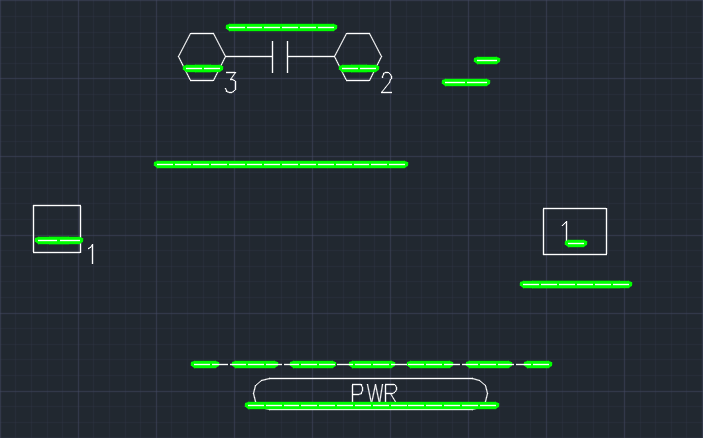
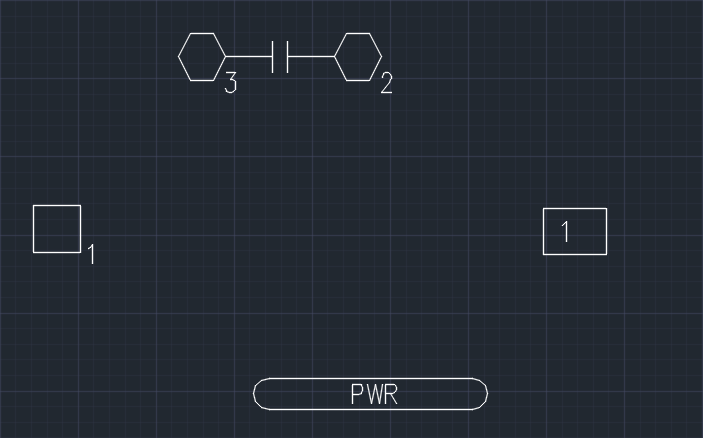
The HDT command shows dashed text using an overrule based primarily on the one we saw previously, while the EDT command goes through and erases the same entities.
They actually function independently, even if I've chosen to use TextHighlightOverrule.IsApplicable() from the EDT command as the "single source of truth" on whether the object we're iterating over deserves deletion. This function also works to identify AttributeReferences within a BlockReference as the AttributeReference class is derived from DBText.
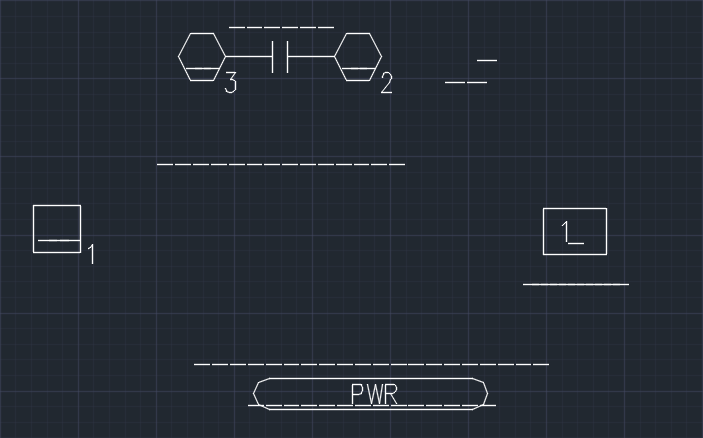
Here's a sample drawing with a number of dashed text objects:
Here's what happens when we run the HDT command selecting 3 as the highlight colour to display the dashed text objects in green:
And when we run EDT, we see the objects all get erased properly:
Thanks for the interesting question, Josh!


Leave a Reply to Chris Fugitt Cancel reply