After seeing some code to create basic jigsaws in AutoCAD – and then a quick look at fabricating them using a laser cutter – in today's post we're adding a "wiggle" factor, making the shape of the tabs more unique than in the prior version of the application.
This has been integrated into the existing JIG and JIGL commands, but we've also added a new command called WIGL, which applies a wiggle to the tabs of existing jigsaws (it basically checks the selection for splines with 6 fit points and runs our algorithm against those).
The amount of wiggle is calculated randomly for each tab but can also be influenced by a wiggle factor: this is hardcoded to 0.8 for the JIG and JIGL creation commands but can be specified by the user during the WIGL command.
Here's a before and after look at the results of running WIGL against our previous puzzle:
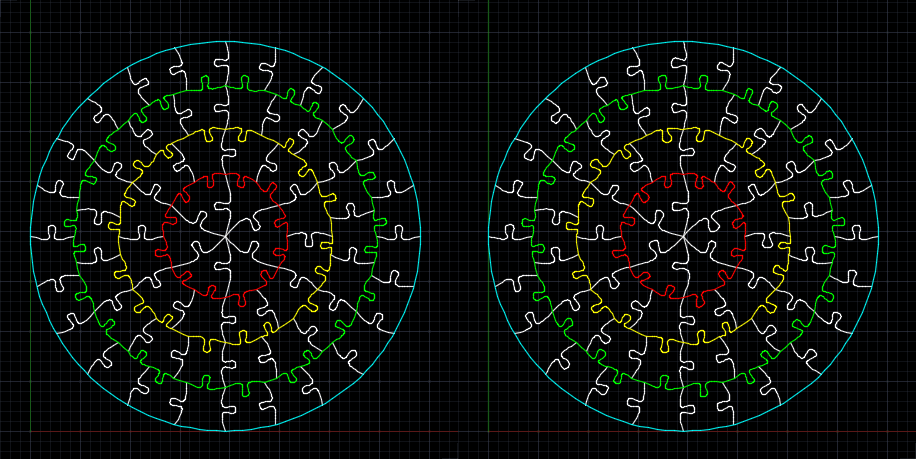
Here's the C# code implementing this version of the application:
using Autodesk.AutoCAD.ApplicationServices;
using Autodesk.AutoCAD.DatabaseServices;
using Autodesk.AutoCAD.EditorInput;
using Autodesk.AutoCAD.Geometry;
using Autodesk.AutoCAD.Runtime;
using System;
namespace JigsawGenerator
{
public class Commands
{
// The WIGL command asks the user to enter this value (which
// influences the extent of the "wiggle"). For the JIG
// and JIGL commands we just use this hardcoded value.
// We could certainly ask the user to enter it or get it
// from a system variable, of course
const double wigFac = 0.8;
// We'll store a central random number generator,
// which means we'll get more random results
private Random _rnd = null;
// Constructor
public Commands()
{
_rnd = new Random();
}
[CommandMethod("JIG")]
public void JigEntity()
{
var doc = Application.DocumentManager.MdiActiveDocument;
if (null == doc)
return;
var db = doc.Database;
var ed = doc.Editor;
// Select our entity to create a tab for
var peo = new PromptEntityOptions("\nSelect entity to jig");
peo.SetRejectMessage("\nEntity must be a curve.");
peo.AddAllowedClass(typeof(Curve), false);
var per = ed.GetEntity(peo);
if (per.Status != PromptStatus.OK)
return;
// We'll ask the user to select intersecting/delimiting
// entities: if they choose none we use the whole length
ed.WriteMessage(
"\nSelect intersecting entities. " +
"Hit enter to use whole entity."
);
var pso = new PromptSelectionOptions();
var psr = ed.GetSelection();
if (
psr.Status != PromptStatus.OK &&
psr.Status != PromptStatus.Error // No selection
)
return;
using (var tr = doc.TransactionManager.StartTransaction())
{
// Open our main curve
var cur =
tr.GetObject(per.ObjectId, OpenMode.ForRead) as Curve;
double start = 0, end = 0;
bool bounded = false;
if (cur != null)
{
// We'll collect the intersections, if we have
// delimiting entities selected
var pts = new Point3dCollection();
if (psr.Value != null)
{
// Loop through and collect the intersections
foreach (var id in psr.Value.GetObjectIds())
{
var ent = (Entity)tr.GetObject(id, OpenMode.ForRead);
cur.IntersectWith(
ent,
Intersect.OnBothOperands,
pts,
IntPtr.Zero,
IntPtr.Zero
);
}
}
ed.WriteMessage(
"\nFound {0} intersection points.", pts.Count
);
// If we have no intersections, use the start and end
// points
if (pts.Count == 0)
{
start = cur.StartParam;
end = cur.EndParam;
pts.Add(cur.StartPoint);
pts.Add(cur.EndPoint);
bounded = true;
}
else if (pts.Count == 2)
{
start = cur.GetParameterAtPoint(pts[0]);
end = cur.GetParameterAtPoint(pts[1]);
bounded = true;
}
// If we have a bounded length, create our tab in a random
// direction
if (bounded)
{
var left = _rnd.NextDouble() >= 0.5;
CreateTab(db, tr, cur, start, end, pts, left);
}
}
tr.Commit();
}
}
[CommandMethod("JIGL")]
public void JigLines()
{
var doc = Application.DocumentManager.MdiActiveDocument;
if (null == doc)
return;
var db = doc.Database;
var ed = doc.Editor;
// Here we're going to get a selection set, but only care
// about lines
var pso = new PromptSelectionOptions();
var psr = ed.GetSelection();
if (psr.Status != PromptStatus.OK)
return;
using (var tr = doc.TransactionManager.StartTransaction())
{
// We'll be generating random numbers to decide direction
// for each tab
foreach (var id in psr.Value.GetObjectIds())
{
// We only care about lines
var ln = tr.GetObject(id, OpenMode.ForRead) as Line;
if (ln != null)
{
// Get the start and end points in a collection
var pts =
new Point3dCollection(
new Point3d[] {
ln.StartPoint,
ln.EndPoint
}
);
// Decide the direction (randomly) then create the tab
var left = _rnd.NextDouble() >= 0.5;
CreateTab(
db, tr, ln, ln.StartParam, ln.EndParam, pts, left
);
}
}
tr.Commit();
}
}
[CommandMethod("WIGL")]
public void AdjustTabs()
{
var doc = Application.DocumentManager.MdiActiveDocument;
if (null == doc)
return;
var db = doc.Database;
var ed = doc.Editor;
// Here we're going to get a selection set, but only care
// about splines
var pso = new PromptSelectionOptions();
var psr = ed.GetSelection();
if (psr.Status != PromptStatus.OK)
return;
var pdo = new PromptDoubleOptions("\nEnter wiggle factor");
pdo.DefaultValue = 0.8;
pdo.UseDefaultValue = true;
pdo.AllowNegative = false;
pdo.AllowZero = false;
var pdr = ed.GetDouble(pdo);
if (pdr.Status != PromptStatus.OK)
return;
using (var tr = doc.TransactionManager.StartTransaction())
{
foreach (var id in psr.Value.GetObjectIds())
{
// We only care about splines
var sp = tr.GetObject(id, OpenMode.ForRead) as Spline;
if (sp != null && sp.NumFitPoints == 6)
{
// Collect the fit points
var pts = sp.FitData.GetFitPoints();
// Adjust them
AddWiggle(pts, pdr.Value);
// Set back the top points to the spline
// (we know these are the ones that have changed)
sp.UpgradeOpen();
sp.SetFitPointAt(2, pts[2]);
sp.SetFitPointAt(3, pts[3]);
}
}
tr.Commit();
}
}
private void CreateTab(
Database db, Transaction tr,
Curve cur, double start, double end, Point3dCollection pts,
bool left = true
)
{
// We're calculating a random delta to adjust the location
// of the tab along the length
double delta = 0.1 * (_rnd.NextDouble() - 0.5);
// Calculate the length of this curve (or section)
var len =
Math.Abs(
cur.GetDistanceAtParameter(end) -
cur.GetDistanceAtParameter(start)
);
// We're going to offset to the side of the core curve for
// the tab points. This is currently a fixed tab size
// (could also make this proportional to the curve)
double off = 0.5;
double fac = 0.5 * (len - 0.5 * off) / len;
if (left) off = -off;
// Get the next parameter along the length of the curve
// and add the point associated with it into our fit points
var nxtParam = start + (end - start) * (fac + delta);
&
#160; var nxt = cur.GetPointAtParameter(nxtParam);
pts.Insert(1, nxt);
// Get the direction vector of the curve
var vec = pts[1] - pts[0];
// Rotate it by 90 degrees in the direction we chose,
// then normalise it and use it to calculate the location
// of the next point
vec = vec.RotateBy(Math.PI * 0.5, Vector3d.ZAxis);
vec = off * vec / vec.Length;
pts.Insert(2, nxt + vec);
// Now we calculate the mirror points to complete the
// splines definition
nxtParam = end - (end - start) * (fac - delta);
nxt = cur.GetPointAtParameter(nxtParam);
pts.Insert(3, nxt + vec);
pts.Insert(4, nxt);
AddWiggle(pts, wigFac);
// Finally we create our spline and add it to the modelspace
var sp = new Spline(pts, 1, 0);
var btr =
(BlockTableRecord)tr.GetObject(
SymbolUtilityServices.GetBlockModelSpaceId(db),
OpenMode.ForWrite
);
btr.AppendEntity(sp);
tr.AddNewlyCreatedDBObject(sp, true);
}
private void AddWiggle(Point3dCollection pts, double fac)
{
const double rebase = 0.3;
// Works on sets of six points only
//
// 2--------3
// | |
// | |
// 0-----------1 4-----------5
if (pts.Count != 6)
return;
// Our spline's direction, tab width and perpendicular vector
var dir = pts[5] - pts[0];
dir = dir / dir.Length;
var tab = (pts[4] - pts[1]).Length;
var cross = dir.RotateBy(Math.PI * 0.5, Vector3d.ZAxis);
cross = cross / cross.Length;
// Adjust the "top left" and "top right" points outwards,
// multiplying by fac1 and the random factor (0-1) brought
// back towards -0.5 to 0.5 by fac2
pts[2] =
pts[2]
- (dir * tab * fac * (_rnd.NextDouble() - rebase))
+ (cross * tab * fac * (_rnd.NextDouble() - rebase));
pts[3] =
pts[3]
+ (dir * tab * fac * (_rnd.NextDouble() - rebase))
+ (cross * tab * fac * (_rnd.NextDouble() - rebase));
}
}
}
Right now the code isn't considering issues such as edges colliding as wiggle gets applied or the fragility of individual pieces. But it's certainly possible to adjust individual splines manually after running the command, of course.


Leave a Reply to David Ng Cancel reply