
This series of posts is one I've been meaning to write since AutoCAD 2016 started shipping. Thankfully a number of other people have filled the void, in the meantime, so I've created an appendix of related posts that you can find at the bottom of each post in this series.
The series is about how we're working to improve security inside AutoCAD, and what this means for application developers. Dieter's posts on Lynn's blog help explain some of the background to this work, much as I've posted here in the past, too.
Perhaps the biggest security change in AutoCAD 2016 is around the increased emphasis on program modules being digitally signed. Signing has really become "best practice" for software being deployed to customers, and we're really encouraging AutoCAD developers to go along this path. Signing tells customers that modules have been created by a trusted source and haven't been tampered since the moment they were signed.
So how do you sign your program modules? The first step is to get hold of a digital certificate, whether by making one (for testing) or buying one from a reliable vendor such as Symantec (VeriSign), DigiCert, GoDaddy, Thawte or GlobalSign. Make sure you get a code signing certificate that supports Microsoft Authenticode. You should expect to pay around $200-$500 per year for such a certificate, depending on where you get it from. This may seem expensive, but signing is becoming increasingly important to companies and it's a cost you can amortise across your various applications and customers.
Once you have a certificate, you'll need to create a PFX file for it: this will make it a lot easier to sign standard OS modules such as .NET DLLs, ARXs, CRXs, DBXs and EXEs. To perform this type of signing you use SignTool.exe, which can be run from a standard command prompt or from a Visual Studio post-build event.
You'll also want to import the certificate into the Windows certificate store: this will allow you to use it to sign AutoLISP files and also to verify the signature of signed modules on your system. (Strictly speaking it shouldn't be required to import the certificate to sign LISP files: at some point we're planning to enable the signing tool to work directly from the PFX file and other places, much as SignTool.exe does.)
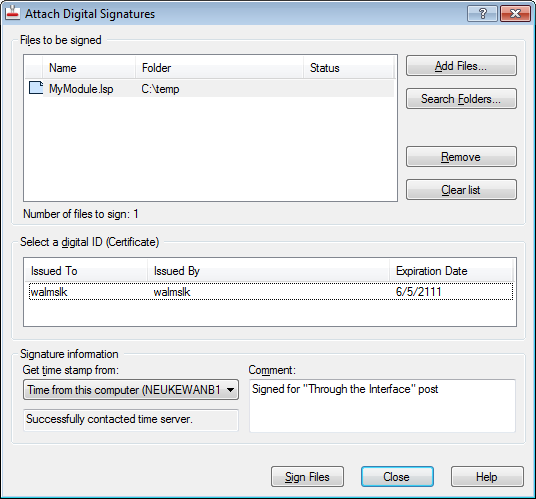
Signing AutoLISP is perhaps even easier than .DLLs, as the app that does it provides a GUI: AcSignApply.exe is found in AutoCAD's Program Files folder and can be used to sign .LSP (and .FAS, .VLX & .MNL) as well as drawing files and eTransmit archives.
Here's the UI for this tool:
There are some "executable" file types that currently can't be signed, such as .CUI, CUIx, .DVB, .JS, .PGP and .SCR. It's recommended that these files be placed in read-only locations, as these could otherwise become attack vectors for malicious applications.
In tomorrow's post we'll take a look at how AutoCAD behaves when loading signed/unsigned modules, as well as what a signed .LSP looks like.
Appendix
- Product documentation
- About Digitally Signing Custom Program Files
- About Digital Signatures for Executable Files
- About Loading A Digitally Signed Custom Program File
- To Make a Digital Certificate
- To Create A Personal Information Exchange (PFX) File
- To Import a Digital Certificate
- To Digitally Sign an AutoLISP File
- To Digitally Sign a Binary (ObjectARX or Managed .NET) File
- To Digitally Sign a Binary (ObjectARX or Managed .NET) File with a Pos
t-Build Event in Microsoft Visual Studio
- ADN DevBlog
- Dieter Schlaepfer's posts on Lynn Allen's blog


Leave a Reply to CADbloke Cancel reply