I mentioned in a recent post about some code I put together to replace a drawing's internal block structure with external references. The code determines the blocks used in the modelspace and then works through, saving each to a file via the wblock mechanism and then attaching them back in as Xrefs.
The code was surprisingly easy to put together. It's a bit on the destructive side – it rips out blocks and creates equivalent drawings in the temp folder – so I do suggest running this on a copy of your drawings. But as part of a process exporting content for viewing via the Autodesk View & Data API, for instance – after which you then throw away the modified drawings – I consider it to be quite a handy technique.
Here's the C# code:
using Autodesk.AutoCAD.ApplicationServices;
using Autodesk.AutoCAD.DatabaseServices;
using Autodesk.AutoCAD.Runtime;
using System.Collections.Generic;
namespace Block2Xref
{
public class Commands
{
// We'll map our former local block definitions to their Xref replacements
Dictionary<ObjectId, ObjectId> _map = new Dictionary<ObjectId, ObjectId>();
[CommandMethod("B2X")]
public void ConvertBlocksToXrefs()
{
var doc = Application.DocumentManager.MdiActiveDocument;
var db = doc.Database;
// Clear the map
_map.Clear();
using (var tr = db.TransactionManager.StartTransaction())
{
var bt =
(BlockTable)tr.GetObject(
db.BlockTableId, OpenMode.ForRead
);
var ms =
(BlockTableRecord)tr.GetObject(
SymbolUtilityServices.GetBlockModelSpaceId(db), OpenMode.ForRead
);
GenerateXrefForBlock(tr, null, ms);
tr.Commit();
}
}
// A recursive function to work through and replace blocks with Xrefs
private void GenerateXrefForBlock(
Transaction tr, BlockReference br, BlockTableRecord btr
)
{
var db = btr.Database;
// Iterate the block table record, looking for blocks, then recurse
foreach (var id in btr)
{
var br2 = tr.GetObject(id, OpenMode.ForRead) as BlockReference;
if (br2 != null)
{
// If we've found a BlockReference, check whether we've seen it
if (_map.ContainsKey(br2.BlockTableRecord))
{
// If we already have a replacement Xref, use that
br2.UpgradeOpen();
br2.BlockTableRecord = _map[br2.BlockTableRecord];
}
else
{
&#
160; // If not, we need to process the block by recursing
var btr2 =
(BlockTableRecord)tr.GetObject(
br2.BlockTableRecord, OpenMode.ForRead
);
GenerateXrefForBlock(tr, br2, btr2);
}
}
}
// After we've done our depth-first replacement of our block contents,
// wblock ourselves out and reattach as an Xref
// Only do this for nested calls (this won't happen for the initial
// run on the modelspace block)
if (!btr.IsLayout && br != null)
{
// Use the block name as the filename, and the name of our Xref
var blkName = btr.Name;
var outName = "c:\\temp\\" + blkName + ".dwg";
// Wblock out the block
var destDb = db.Wblock(btr.ObjectId);
destDb.SaveAs(outName, DwgVersion.Current);
// Erase the original block definition
btr.UpgradeOpen();
btr.Erase();
// Reattach the Xref
var xid = db.AttachXref(outName, blkName);
// Point the BlockReference to the newly created Xref
br.UpgradeOpen();
br.BlockTableRecord = xid;
// Add the entry to our map
_map.Add(btr.ObjectId, xid);
}
}
}
}
Here's the B2X command in action:
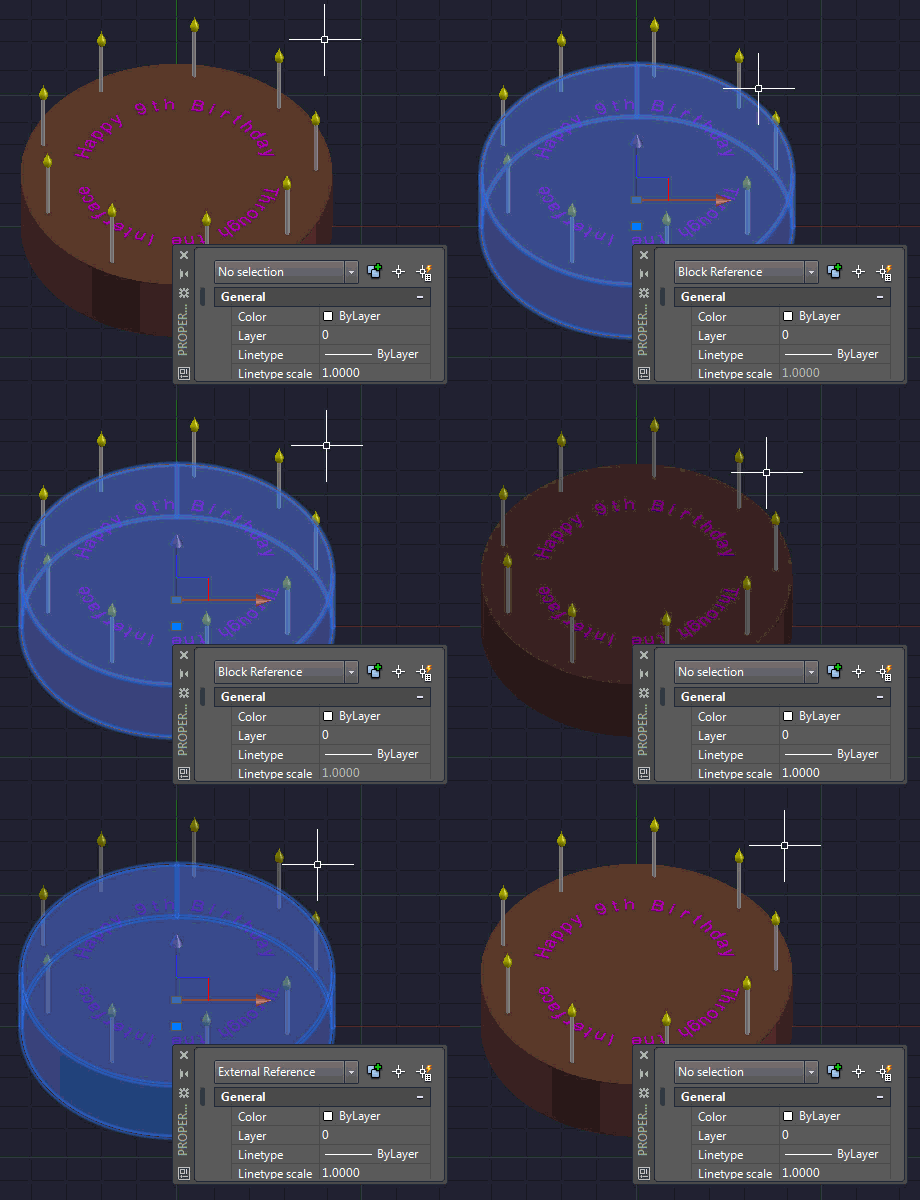
The main function is called recursively on blocks found in the current drawing's modelspace. It builds a dictionary that maps the ObjectIds of the former block definitions to their Xrefed replacements. It does this in a depth-first manner: it goes through the various leaves of the bock structure – although it uses the map to make sure it doesn't export the same block twice – before it finally gets around to wblocking and re-attaching the top level node.
Something to note: we're using Database.AttachXref() to perform the various attachments. This method calls through to acdbXrefAttach(), which uses standard Xref resolution rules and also fires off notifications to interested client applications. We could also choose to P/Invoke acedXrefAttach() directly, as this is a cleaner operation, as far as it goes, but it didn't seem to be worth the added complexity for this particular use-case. Do bear in mind that this might be worth doing for your own application, though, especially if your app is intended to co-exist with apps that keep an eye on Xref-related operations.
Thanks to Joel Petersen for providing his insight regarding Xref resolution & notification (I shared the above code yesterday in an internal discussion on this topic). That's twice in two posts – you're on a roll, Joel (groan).


Leave a Reply to Kean Walmsley Cancel reply