Checking for built-in AutoCAD objects using .NET

This interesting question came in by email from Igor, over the weekend:

Let say I want to delete a layer by it's name. I can get ObjectId or LayerTabelRecord  from the name, like

LayerTable tLayers = (LayerTable)

Transaction.GetObject(Database.LayerTableId,OpenMode.ForRead,false)

LayerTableRecord ltRecord = (LayerTableRecord)

Transaction.GetObject(tLayers.Item[Name],OpenMode.ForWrite,false);

Now having LayerTableRecord how can I found out that this DBObject is not the built-in one? Like names '0' or 'DEFPOINTS'.

Same goes for TextStyle (STANDARD) or layout (MODEL)….?

I can't found any property regarding this, like IsBuiltIn. The IsPersistent property is no help.
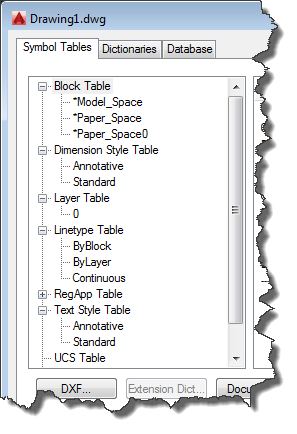
Built-in AutoCAD objects in ArxDbgIt's true that there isn't an IsBuiltIn property on AutoCAD objects… for block definitions you can check IsLayout, although that doesn't tell you whether the modelspace or a deletable paperspace, mind.

The first suggestion would be to use the very-handy SymbolUtilityServices namespace. I usually use this to check the validity of a symbol name, or to get the ObjectId of a built-in BlockTableRecord – such as modelspace – from a specified Database, but it can also be used to check whether symbols are "built-in".

Here are the methods you can use – each takes a string – to see whether you have the name of a built-in object:

SymbolUtilityServices.IsBlockLayoutName()

SymbolUtilityServices.IsBlockModelSpaceName()

SymbolUtilityServices.IsBlockPaperSpaceName()

SymbolUtilityServices.IsLayerDefpointsName()

SymbolUtilityServices.IsLayerZeroName()

SymbolUtilityServices.IsLinetypeByBlockName()

SymbolUtilityServices.IsLinetypeContinuousName()

SymbolUtilityServices.IsRegAppAcadName()

SymbolUtilityServices.IsTextStyleStandardName()

SymbolUtilityServices.IsViewportActiveName()


So it's not quite a simple as checking a property, but you can, at least, validate whether a name is "built-in" before you choose to do something destructive with the associated object.

One other thought occurred to me: if you wanted to do this more dynamically – i.e. protect a set of objects beyond those baked into the SymbolUtilityServices API – then you could drive it from the standard drawing template (e.g. acad.dwt). You would have some kind of "database" (which could simple be a JSON file) that is created by code that traverses the drawing structure in the file. It might also be hand-crafted, but the effort to automate it should be modest, and it would allow the file to be recreated when additional "standard" objects get added.

This "database" would then be read into memory and used at runtime to validate whether the user (or the application) should be allowed to modify or erase certain objects. It could be done at the name- or the ObjectId-level: we could create a simple list of "protected" ObjectIds the first time we need to check an modify operation on a particular drawing.

It strikes me that this must be a fairly common issue. Has anyone else address this in their application, in some (other) way?

6 responses to “Checking for built-in AutoCAD objects using .NET”

  1. Parrish Husband Avatar
    Parrish Husband

    This looks like a good candidate for extension methods. One example:

    public static bool IsSystemLayer(LayerTableRecord this)
    {
    return SymbolUtilityServices.IsLayerDefpointsName(this.Name) ||
    SymbolUtilityServices.IsLayerZeroName(this.Name);
    }

    Typing this out freehand so no compilation guarantees, but you get the idea.

    This could even be extended more generally on ObjectId with something like IsSystemObject, where the specific checks for block, layer, linetype, etc. would be done according to the type:

    public static bool IsSystemObject(ObjectId this)
    {
    // Layers, Blocks, Linetypes, TextStyle, Vport checks...
    }

    This second example may have some niche uses. If you're deleting objects, this would be a nice verification before pulling the trigger. Although the type checking would likely need to be optimized as much as possible if this is something that might end up in a tight loop on many entities.

    1. Yes! It'd be fun to flesh out an IsSystemObject/IsBuiltIn property for each class... although it may need to be an Extension Method with zero arguments until Extension Properties are part of C# (in C# 7, perhaps?).

      I may well look at this for Wednesday...

      Kean

      1. Parrish Husband Avatar
        Parrish Husband

        Kean,

        Yeah, extension properties would be amazing! Something I've wanted since I found out about extension methods. So in the above example under current C# constraints, calling this would still require the parenthesis:

        if (!layer.IsSystemLayer())
        // do something

    2. I use yours first suggestion so I pass the Name to a method that uses SymbolUtilityServices to find out predefined names

      The second suggestion IsSystemObject(ObjectId this) would involved type checking over several TableRecord types which is not very efficient regarding performance.

      But finding out that some objectId's name is not a bultin/system name still doesn't quarantine that such object will be deleted with no exception raised. For the layer named 'TEST' the method IsSystemLayer will return false, but erasing It will failed if it is an active layer, or its name is used in xData/xRecord.

      So mine question breaks down to two parts:

      1. finding out if object has a predefined symbol name

      2. bullet proof delete (erase) of any objectId

      All this can be done with a simple try/catch block. But I'm really not prone to raise the exceptions in host app if I can avoid it. Maybe I'm very wrong with this.

      So my idea is to use a skeleton like this:

      if IsSystemObject(Name)=false

      {
      if sometable.Has(Name)= true
      {
      id = sometable.Item[Name]

      if IsEraseable(Id)= true then id.Erase

      }

      }

      If this would be a function it could returns Int32/Enum indicating the outcome, like 0=Ok, -1=SystemObject, -2=UnEraseableObject....

      This way I would get an info why erase failed, Try/catch approach would not tell me this.

      To find out if any ObjectId is eraseable, I came up with this today: (warning: pascal code...:))

      method IsEraseable(db: Database; Id: ObjectId): System.Boolean;
      var Ids: ObjectIdCollection:= new ObjectIdCollection();
      begin
      Ids.Add(Id);
      db.Purge(Ids);
      result:= Ids.Count>0;
      end;

      The Purge method will filter out ids that can not be deleted. So if the collection is empty, the Id can not be deleted.

      This can be done as an extension on ObjectId (since it has database property) class like

      ObjectId.IsEraseable: Bool which would look very nit.

      extension method ObjectId.IsEraseable: System.Boolean;
      var Ids: ObjectIdCollection:= new ObjectIdCollection();
      begin
      Ids.Add(self);
      Database.Purge(Ids);
      result:= Ids.Count>0;
      end;

      Any thoughts?

      1. I've also been thinking about using Database.Purge() as a unified - and very simply - mechanism for checking whether objects can be erased. All you need is a single object that stores a number of hard pointer references to all the system objects, and then have (as you have suggested, Igor) an extension method that uses Purge() to check whether the object is eraseable.

        By the way, you don't need to open an object to check its type: you can use ObjectId.ObjectClass for that.

        Kean

        1. Thank you Kean and Parrish for your help.

          Btw,I'm not a programmer, I'm a civil engineer using my own .NET apps in autocad for speeding up my work. I get 3rd party dwgs with 100+ of layers, 200+ blocks, xy linetypes, textstyles,....so they are unmanageable for further work. I have to clean them by reducing layers to <5, txtstyles <2,....not to mention the blocks and colors not being set by layer.

          This can't be done manually for the dwg of size 50 Mb.

          The ACAD .NET is great. I was a Delphi guy for a decade, but I switched to the Oxygene for this reason some 1.5 years ago. So as I see it now I'm on the right path with the erase approach.

          Thanks again.

          Igor

Leave a Reply to Parrish Husband Cancel reply

Your email address will not be published. Required fields are marked *