Passing AutoCAD objects to commands called via .NET

This question came in as a blog comment on this previous post:

Is possible to use Revision Cloud in this situation? Example: Creating a polyline/circle/ellipse then make it a revision cloud.

It seemed to make sense to broaden the topic for the purposes of this blog post: how to pass an entity or entities to an AutoCAD command called via Editor.Command() or CommandAsync().

Since Editor.Command() was implemented in AutoCAD 2015, I've been a fan of the calling commands in AutoCAD application code. But I haven't actually covered the approach needed to send object information to commands via this function. Yes, you can always use the "_LAST" keyword during entity selection, but how else can it be done?

Here's some C# code that shows how to use the SelectionSet object to send one or more entities to a command:

using Autodesk.AutoCAD.ApplicationServices;

using Autodesk.AutoCAD.DatabaseServices;

using Autodesk.AutoCAD.EditorInput;

using Autodesk.AutoCAD.Geometry;

using Autodesk.AutoCAD.Runtime;


namespace CallingCommands

{

  public class Commands

  {

    [CommandMethod("CB")]

    public void CreateBlock()

    {

      var doc = Application.DocumentManager.MdiActiveDocument;

      if (doc == null)

        return;


      var db = doc.Database;

      var ed = doc.Editor;


      var ids = new ObjectIdCollection();


      // Create the geometry for our block using the AutoCAD .NET API


      using (var tr = db.TransactionManager.StartTransaction())

      {

        var ms =

          tr.GetObject(

            SymbolUtilityServices.GetBlockModelSpaceId(db),

            OpenMode.ForWrite

          ) as BlockTableRecord;


        if (ms != null)

        {

          // We'll have two diagonal lines with a circle


          var ln1 = new Line(new Point3d(0, 0, 0), new Point3d(10, 10, 0));

          var ln2 = new Line(new Point3d(0, 10, 0), new Point3d(10, 0, 0));

          var c = new Circle(new Point3d(5, 5, 0), Vector3d.ZAxis, 5);


          ids.Add(ms.AppendEntity(ln1));

          ids.Add(ms.AppendEntity(ln2));

          ids.Add(ms.AppendEntity(c));


          tr.AddNewlyCreatedDBObject(ln1, true);

          tr.AddNewlyCreatedDBObject(ln2, true);

          tr.AddNewlyCreatedDBObject(c, true);

        }


        tr.Commit();


        // Add the ObjectIds of our geometry to a SelectionSet


        var ida = new ObjectId[ids.Count];

        ids.CopyTo(ida, 0);

        var ss = SelectionSet.FromObjectIds(ida);


        // Create the block and insert it using sta
ndard commands


        ed.Command("_.-BLOCK", "TEST", "0,0", ss, "");

        ed.Command("_.-INSERT", "TEST", "0,0", 1, 1, 0);

      }

    }


    [CommandMethod("RC")]

    public void RevCloud()

    {

      var doc = Application.DocumentManager.MdiActiveDocument;

      if (doc == null)

        return;


      var db = doc.Database;

      var ed = doc.Editor;


      using (var tr = db.TransactionManager.StartTransaction())

      {

        var ms =

          tr.GetObject(

            SymbolUtilityServices.GetBlockModelSpaceId(db),

            OpenMode.ForWrite

          ) as BlockTableRecord;


        if (ms != null)

        {

          // Create our polyline boundary


          var pl = new Polyline();

          pl.AddVertexAt(0, new Point2d(0, 0), 0, 0, 0);

          pl.AddVertexAt(1, new Point2d(10, 0), 0, 0, 0);

          pl.AddVertexAt(2, new Point2d(10, 10), 0, 0, 0);

          pl.AddVertexAt(3, new Point2d(0, 10), 0, 0, 0);

          pl.Closed = true;


          // Add it to the drawing


          var id = ms.AppendEntity(pl);

          tr.AddNewlyCreatedDBObject(pl, true);


          // Create a SelectionSet and use it to call the REVCLOUD command


          var ss = SelectionSet.FromObjectIds(new ObjectId[] { id });

          ed.Command("_.REVCLOUD", "", ss, "");

        }


        tr.Commit();

      }

    }

  }

}


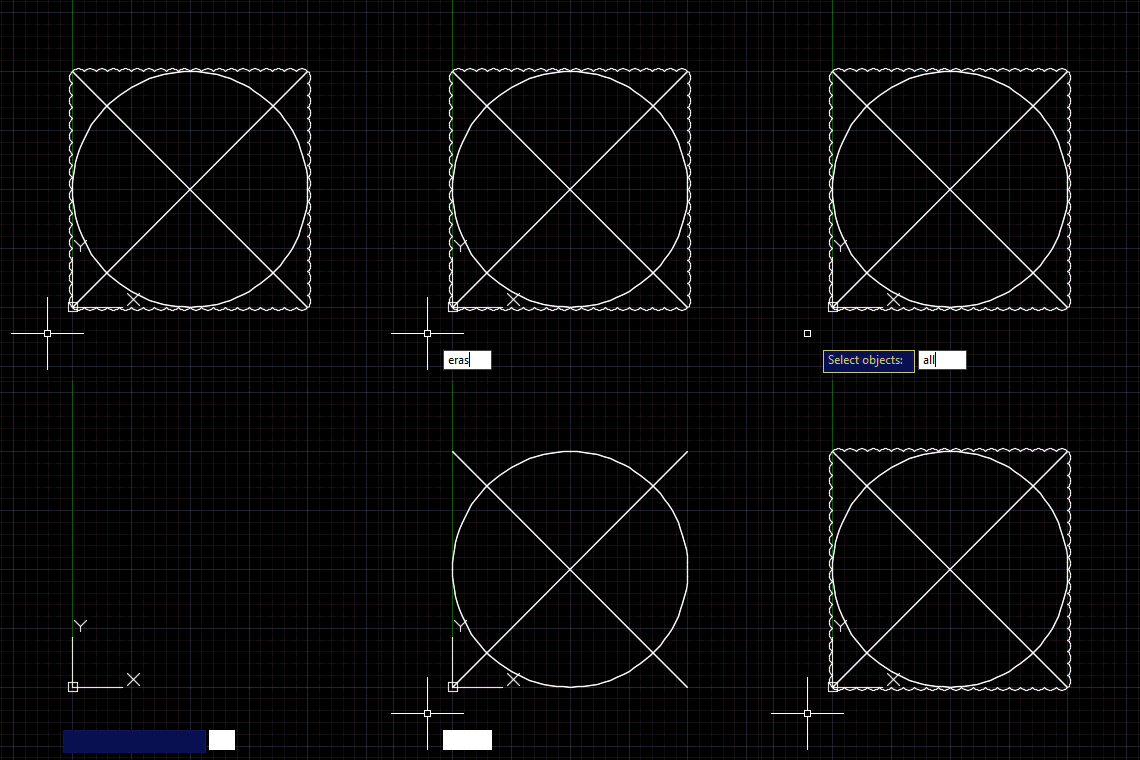
The first command, CB, creates a block of three pieces of geometry and then inserts it in the drawing. The geometry is created using .NET and the block is created and inserted using the BLOCK and INSERT commands. We could, of course, use the .NET API to define and insert the block, too: the point is that you can use a SelectionSet object to pass sets of objects – irrespective of how they have been created – to standard commands, as needed.

The second command, RC, creates a revision cloud from a polyline. This shows using a SelectionSet of a single object to respond to an Editor.GetEntity() or (entsel) prompt (i.e. one that asks for one entity rather than a set of multiple entities). In this case we're calling the REVCLOUD command right there inside the transaction, basically to show that it doesn't really matter where we call the command as long as the passed entities are already database-resident. Which they must be to have an ObjectId, of course.

Here are the two commands in action:
Calling commands

Finally, here's a quick shout out to one of our Expert Elites, Gilles Chanteau, for all his help on both the Autodesk forums and The Swamp. I'm always very impressed by the quality of answers Gilles provides to people, and posts such as this one will no doubt have been a great help to people already searching for this information. Ke
ep it up, Gilles!

10 responses to “Passing AutoCAD objects to commands called via .NET”

  1. Gabriel Potestades Avatar
    Gabriel Potestades

    Hi again Kean!

    It's working! Thank you for the immediate response. The command I was looking for was converting the entity to a selection set:

    var id = ms.AppendEntity(pl);
    tr.AddNewlyCreatedDBObject(pl, true);
    var ss = SelectionSet.FromObjectIds(new ObjectId[] { id });

    I didn't know that you still needed to create a var when appending an entity to the block table record to call it in the selection set.

    Thanks again!

    Regards.

  2. Hey, .net is finally able to do what Lisp can! Kidding, but its funny to see how important a command line is to a program, and languages that interact with it. Of all the differences between acad and microstation, the handling of the command line might just be why acad is more widely used. The ease of scripting and making macros with lisp was and is easier for the average person to deal with than other api's. I still see lisp being used by most cad managers to control the acad startup. Good to see the .net api getting in on the action, as it will help people port things over, though hopefully they transition to making items the .net way if possible.

  3. Hi kean ! Thank you for you valuable post . It is very useful to who leaning start autocad. I know one related topic Draw point, Revision cloud, Spline give me suggestion any another site is sweet able.

    1. Hi Akter,

      Sorry, I don't quite understand. Are you looking for suggestions of other sites/posts related to these three topics?

      Kean

  4. Kean,

    I've been hitting the 128 selection set limit in managed code, and the above example can be easily modified to show the error.

    By changing the above code to run inside a loop 130 times, it fails after 128 cycles:

    if (ms != null)
    {
    for (int i = 0; i < 130; i++)
    {
    // Create our polyline boundary

    var pl = new Polyline();
    pl.AddVertexAt(0, new Point2d(0, 0), 0, 0, 0);
    pl.AddVertexAt(1, new Point2d(10, 0), 0, 0, 0);
    pl.AddVertexAt(2, new Point2d(10, 10), 0, 0, 0);
    pl.AddVertexAt(3, new Point2d(0, 10), 0, 0, 0);
    pl.Closed = true;

    // Add it to the drawing

    var id = ms.AppendEntity(pl);
    tr.AddNewlyCreatedDBObject(pl, true);

    // Create a SelectionSet and use it to call the REVCLOUD command

    using (var ss = SelectionSet.FromObjectIds(new ObjectId[] { id }))
    {
    ed.Command("_.REVCLOUD", "", ss, "");
    }
    }
    }
    The behavior is the same as when I add a SelectionSet to a ResultBuffer and pass that into the acedInvoke() function. Whatever the managed SelectionSet is doing to create ADS_Names, it doesn't appear to be freeing it.
    Do you have any insight?
    Thank you,
    Jeff

    1. Hi Jeff,

      Interesting - I wonder at which point disposed SelectionSets are freed... maybe at the command boundary.

      Anyway - while somewhat related to the post I'm going to have to ask you to contact ADN or post to the discussion group: I'm heading off on vacation tomorrow for a week, and won't have time to investigate.

      Regards,

      Kean

  5. Gameti Charles Avatar
    Gameti Charles

    Hi Kean!
    This works very well.
    I want a way to do "Adersheet" similar to this approach.

    Such that, I can parse the selectionSet, source and target point3dCollection usind the ed.Commad()

    1. Kean Walmsley Avatar

      Please submit your support questions to the AutoCAD .NET forum.

      Thanks!

      Kean

  6. How to send command by selection filter
    Example send command extrim

    1. Please submit your support questions to the AutoCAD .NET forum.

      Thanks!

      Kean

Leave a Reply to Gameti Charles Cancel reply

Your email address will not be published. Required fields are marked *