Intersecting AutoCAD curves with a plane using .NET

This question came in via a comment, last week:

Is it possible to get the point of intersection between a spline/3dpolyline and a plane surface?

It turned out to be quite an interesting problem to solve. I started with brute force methods for the various curve types…

For Polylines I checked linear segments against the plane (this is an intersection we can test), and for arc segments I broke these into linear segments and checked those, too. It all worked well with a high enough "resolution" for arc segments.

Polyline3ds only have linear segments, so I could safely use the line-plane intersection approach for these, too.

Splines were more tricky. I started by converting them to Polylines with lots of linear (no arc) segments, before processing them as Polylines. This worked well enough, but was *really* slow to get accurate results. So I went back to the drawing board… I realised that if I projected the Spline onto the plane of interest, I could then check the new, projected curve against the original: the intersection points between the two curves should be the intersections between the Spline and the plane.

This worked perfectly! And it turns out that I could do this on all curves – not just Splines – so I ended up ripping out pretty much all the code I'd written up to that point. Coding is a process, after all, and the code we're left with is nice and clean: no need for any curve faceting, etc.

Here's the code in action on a set of curves intersecting a planar surface. The top curve is a Polyline, the next a Spline, the third a Polyline3d and – for good measure – the last is a Polyline2d.
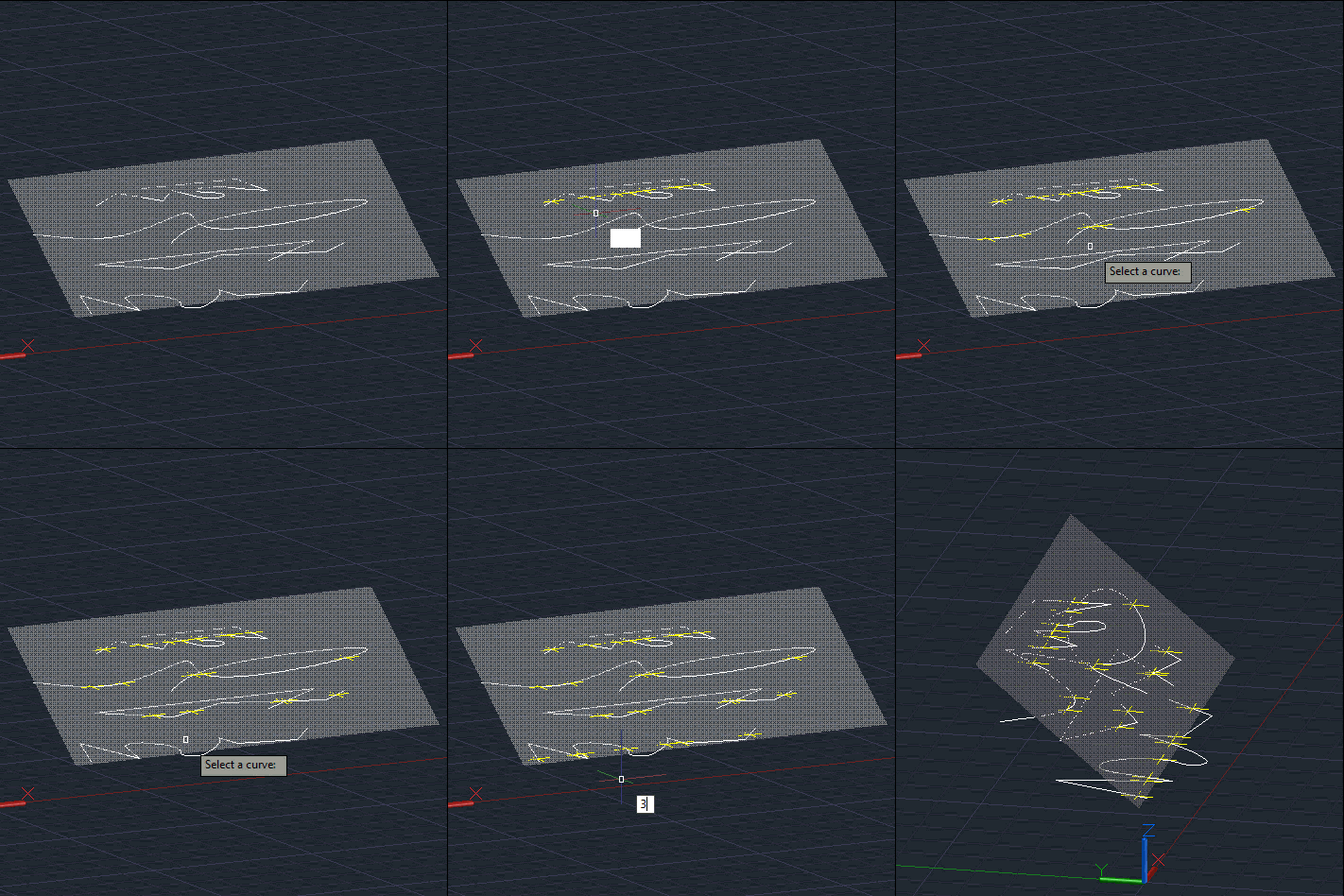
Intersecting curves and a plane

Here's the C# code defining our CPI (for CurvePlaneIntersections) command and the various extension methods upon which it relies:

using Autodesk.AutoCAD.ApplicationServices;

using Autodesk.AutoCAD.DatabaseServices;

using Autodesk.AutoCAD.EditorInput;

using Autodesk.AutoCAD.Geometry;

using Autodesk.AutoCAD.Runtime;

using System;


namespace EntityIntersections

{

  public static class Extensions

  {

    ///<summary>

    /// Returns an array of Point3d objects from a Point3dCollection.

    ///</summary>

    ///<returns>An array of Point3d objects.</returns>


    public static Point3d[] ToArray(this Point3dCollection pts)

    {

      var res = new Point3d[pts.Count];

      pts.CopyTo(res, 0);

      return res;

    }


    ///<summary>

    /// Get the intersection points between this planar entity and a curve.

    ///</summary>

    ///<param name="cur">The curve to check intersections against.</param>

    ///<returns>An array of Point3d intersections.</returns>


    public static Point3d[] IntersectWith(this Plane p, Curve cur)

    {

      var pts = new Point3dCollection();


      // Get the underlying GeLib curve


      var gcur = cur.GetGeCurve();


      // Project this curve onto our plane


      var proj = gcur.GetProjectedEntity(p, p.Normal) as Curve3d;

      if (proj != null)

      {

        // Create a DB curve from the projected Ge curve


        using (var gcur2 = Curve.CreateFromGeCurve(proj))

        {

          // Check where it intersects with the original curve:

          // these should be our intersection points on the plane


          cur.IntersectWith(

            gcur2, Intersect.OnBothOperands, pts, IntPtr.Zero, IntPtr.Zero

          );

        }

      }

      return pts.ToArray();

    }


    ///<summary>

    /// Test whether a point is on this curve.

    ///</summary>

    ///<param name="pt">The point to check against this curve.</param>

    ///<returns>Boolean indicating whether the point is on the curve.</returns>


    public static bool IsOn(this Curve cv, Point3d pt)

    {

      try

      {

        // Return true if operation succeeds


        var p = cv.GetClosestPointTo(pt, false);

        return (p - pt).Length <= Tolerance.Global.EqualPoint;

      }

      catch { }


      // Otherwise we return false


      return false;

    }

  }


  public class Commands

  {

    [CommandMethod("CPI")]

    public void CurvePlaneIntersection()

    {

      var doc = Application.DocumentManager.MdiActiveDocument;

      if (null == doc)

        return;

      var db = doc.Database;

      var ed = doc.Editor;


      // Ask the user to select a curve


      var peo = new PromptEntityOptions("\nSelect a curve");

      peo.SetRejectMessage("Must be a curve.");

      peo.AddAllowedClass(typeof(Curve), false);


      var per = ed.GetEntity(peo);

      if (per.Status != PromptStatus.OK)

        return;


      var curId = per.ObjectId;


      // And a PlaneSurface to check intersections against


      var peo2 = new PromptEntityOptions("\nSelect plane surface");

      peo.SetRejectMessage("Must be a planar surface.");

      peo.AddAllowedClass(typeof(PlaneSurface), false);


      var per2 = ed.GetEntity(peo2);

      if (per2.Status != PromptStatus.OK)

        return;


      var planeId = per2.ObjectId;


      using (var tr = doc.TransactionManager.StartTransaction())

      {

        // Start by opening the plane


        var plane = tr.GetObject(planeId, OpenMode.ForRead) as PlaneSurface;

        if (plane != null)

        {

          // Get the PlaneSurface's defining GeLib plane


          var p = plane.GetPlane();


          // Open our curve...


          var cur = tr.GetObject(curId, OpenMode.ForRead) as Curve;

          if (cur != null) // Should never fail

          {

            var pts = p.IntersectWith(cur);


            // If we have results we'll place them in modelspace


            var ms =

              (BlockTableRecord)tr.GetObject(

                SymbolUtilityServices.GetBlockModelSpaceId(db),

                OpenMode.ForWrite

              );


            foreach (Point3d pt in pts)

            {

              // Create a point in the drawing for each intersection


              var dbp = new DBPoint(pt);

              dbp.ColorIndex = 2; // Make them yellow

              ms.AppendEntity(dbp);

              tr.AddNewlyCreatedDBObject(dbp, true);


              // Quick test to make sure each point lies on our source curve


              ed.WriteMessage(

                "\nPoint is {0} curve.", cur.IsOn(pt) ? "on" : "off"

              );

            }

          }

        }

        tr.Commit();

      }

    }

  }

}

One response to “Intersecting AutoCAD curves with a plane using .NET”

  1. I wrote short lisp version posted here :
    theswamp.org/ind...
    (you have to have swamp membership to access)

    BTW. I read somewhere (from Sean Tessier I think) that command IMPRINT can do this accurately, you'll just have to explode surface, 3dsolid afterwards...

    1. Thanks, Marko: this seems to relate to the more general case of intersecting curves with solids (surfaces, too?), which is a bit beyond this simple scenario. Although if it's possible to project curves onto a surface then the approach in this post should work for that, too (something I mean to check).

      Kean

  2. Gabriel Potestades Avatar
    Gabriel Potestades

    Hi Kean,

    I tried the code in C# and VB.NET but it catches an error in
    cur.IntersectWith(gcur2, Intersect.OnBothOperands, pts, IntPtr.Zero, IntPtr.Zero);

    saying eInvalidInput.

    Thanks!

  3. Gabriel Potestades Avatar
    Gabriel Potestades

    It's working! Thank you so much!

    1. Great! Was the exception you hit something I need to adjust the code to check for? I should probably add some kind of exception handling.

      Kean

      1. Gabriel Potestades Avatar
        Gabriel Potestades

        I think It doesn't plot the point if the curve is straight in shape, so an error occurs. I revised your code that selects a single curve and multiple planes. It's working! Thanks again!

        1. hi Gabriel,
          would you mind to share your revised code?
          Thanks

      2. hi Kean,

        Do you have revised code ?
        Thanks

        1. I do not - I suggest posting to the AutoCAD .NET forum, to see whether anyone there can help.

          Kean

  4. writing essay service Avatar
    writing essay service

    I once decided to learn that technique but due to some shortage of time I could not get that knowledge but I think that every student must know that how to drive Auto cad program to be at ease in future.

  5. writing essay service Avatar
    writing essay service

    ok

  6. Hello Kean
    I like your post and comments.
    In this moment I´m doing some applications for AutoCAD 2016 .
    I have concluded that the intersectionWith objects functions is a very difficult question to understand .
    In my case I need to cut plane whith a polyline3d .
    As I have tried all possibilities without success.

    My plane is create with point3d and Vector Normal

    Dim plane As Plane = New Plane(PointInPolyline, derV3d)

    After trying to do the intersection with to polyline3d.

    * The first possibility intersection polyline3d to plane does not work....

    ln2.IntersectWith(plane, Intersect.OnBothOperands, intersectPoints, IntPtr.Zero, IntPtr.Zero)

    error: "plane dont accept conversion to type entity"

    * The second possibility , intersection plane to polyline3d does not work....

    plane.IntersectWith(ln2)

    error: "polyline3d dont accept conversion to type LinearEntity3d"

    I'm totally lost. It should be extremely easy to find an intersection of Plano with polyline3d but nothing works.

    How can do to find a solution?.

    source.............................................................................

    Sub LinesIntersect(Director As ObjectId, Base As ObjectId, Interval As Double)
    Using T As Transaction = Me.StartTransaction
    Try
    Dim ln1 As Polyline3d = CType(T.GetObject(Director, OpenMode.ForRead), Polyline3d)
    Dim ln2 As Polyline3d = CType(T.GetObject(Base, OpenMode.ForRead), Polyline3d)

    Dim i As Integer = CInt(ln1.Length) / Interval
    For j = 0 To i - 1
    Dim PointInPolyline As Point3d = New Point3d(ln1.GetPointAtDist(j * Interval).X, ln1.GetPointAtDist(j * Interval).Y, ln1.GetPointAtDist(j * Interval).Z)
    Dim derV3d As Vector3d = ln1.GetFirstDerivative(New Point3d(ln1.GetPointAtDist(j * Interval).X, ln1.GetPointAtDist(j * Interval).Y, ln1.GetPointAtDist(j * Interval).Z))
    Dim derV3dPerpendicular As Vector3d = derV3d.GetPerpendicularVector.MultiplyBy(1)

    Dim line1 As New Line(PointInPolyline, New Point3d(ln1.GetPointAtDist(j * Interval).X, ln1.GetPointAtDist(j * Interval).Y, ln1.GetPointAtDist(j * Interval).Z).Add(derV3dPerpendicular))
    Dim plane As Plane = New Plane(PointInPolyline, derV3d)

    Dim intersectPoints As Point3dCollection = Nothing

    ln2.IntersectWith(plane, Intersect.OnBothOperands, intersectPoints, IntPtr.Zero, IntPtr.Zero) --->error

    plane.IntersectWith(ln2) ----> error

    If intersectPoints.Count > 0 Then
    Dim la1 As Line = New Line(PointInPolyline, intersectPoints(0))
    Me.BlockTableRecord.AppendEntity(la1)
    T.AddNewlyCreatedDBObject(la1, True)
    End If

    Next

    T.Commit()
    Catch ex As System.Exception
    If T IsNot Nothing Then T.Abort()
    Me.Write("error de DtalC3D")
    Finally
    If T IsNot Nothing Then T.Dispose()
    End Try
    End Using
    End Sub

    1. Hello carlos,

      Have you tried using the code in this post without modification? It should do what you want...

      Regards,

      Kean

      1. Thank you Kean

        In my case , I'm not working PlaneSurface , I need to work with a Autodesk.AutoCAD.Geometry.plane.
        I have two polyline3d a slope represents the head and other one is foot of the slope.
        I need draw a Slope Hatch Pattern in 3D.

        First I find a point for each interval in the Director curve.

        Second , i calculate the first derivative on point for get vector direction.
        Third, I calculate a plane that passing through on point and use normal vector direction.

        Finally , I get the intersection of that plane with the other curve . The intersection point should be drawing the Slope Hatch Pattern in 3d

        The problem is that a plane don´t intersect with polyline3d.

        You have any suggestions ?

        Thank you

        1. The underlying extension method takes a Plane - you should be able to translate it to a normal VB.NET function that does what you want.

          Kean

  7. projecting the curve onto the plane is brilliant! novel solution. the thought never entered my mind.

  8. What does Intersect.OnBothOperands do? unfortunately the ObjectArx documentation doesn't say anything for this enumeration

    1. As far as I recall it means the intersection must be on both curves: neither is being extended for the intersection to happen.

      Kean

  9. Not getting the intersection in case of selecting a line perpendicular to the plane surface

    1. I suggest posting a DWG and the code to the AutoCAD .NET forum.

      Kean

    2. Because the curve is perpendicular to the plane, simply find the closest point on the line to any point on the plane. This should also work for a polyline (2d or 3d) if the vertices are colinear.

      if (proj != null)
      {
      // Keans orginal code...
      }
      else
      {
      // The curve is perpendicular to the plane
      // therefore use the closest point on the curve to any point on the plane.
      pts.Add(cur.GetClosestPointTo(p.PointOnPlane, false));
      }

  10. To make a cross-section

    Is it possible to get the point of attached between a polyline and a plane surface?

  11. This is surely off-topic. But Just have a look on this 10 years older post.
    Please have a look on this blog.

    imrananees.blogspot...

Leave a Reply to Gabriel Potestades Cancel reply

Your email address will not be published. Required fields are marked *