Many, many thanks for the congratulatory messages I received after my last post, whether via this blog, Twitter, LinkedIn or email. I was genuinely overwhelmed by the response! 🙂
Here's a post I've been meaning to write for some time: a common question I've seen, over the years, is about how best to implement copy protection or licensing in your application. While this post doesn't fully address that requirement, it does show you how to use a REST API to check the user entitlement for your application via the Autodesk App Store (formerly known as Autodesk Exchange Apps). This post is therefore really only relevant if you've posted your app there (or are considering it… just this mechanism could be enough of a reason for some to adopt this infrastructure).
The Entitlement API needs a couple of parameters to work: the "user ID" and the "app ID".
The user ID can be accessed in AutoCAD via the ONLINEUSERID sysvar which was introduced in AutoCAD 2014. It provides a unique ID that identifies the current user in the A360 back-end. If it's an empty string then the current user isn't logged in to A360.
The app ID can be determined using the URL for the app's entry in the Autodesk App Store. For instance, here's the link to the Screenshot app:
https://apps.autodesk.com/ACD/en/Detail/Index?id=appstore.exchange.autodesk.com%3ascreenshot%3aen
You can see the ID at the end, in this case it's appstore.exchange.autodesk.com:screenshot:en (%3a is the URI encoding for ":"). You can also find this ID for your own apps via the publishing mechanism.
The Entitlement API is really easy to use. For instance, here's a check to see whether the user with the made-up ID "1234567890" is entitled to use the Screenshot app:
You should see this JSON string returned when you click on it:
{"UserId":"1234567890","AppId":"appstore.exchange.autodesk.com:screenshot:en","IsValid":false,"Message":"Ok"}
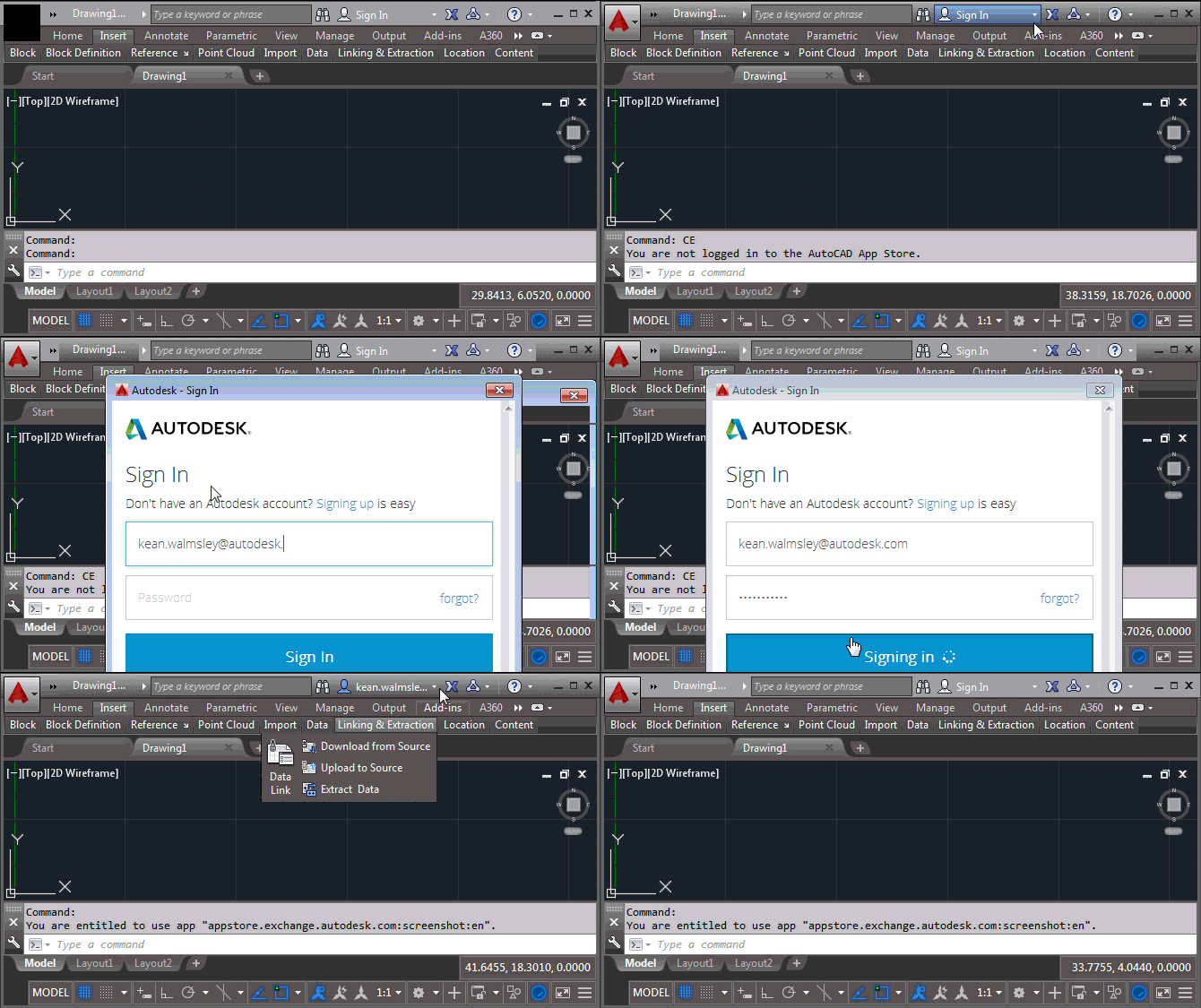
It's clearly a simple matter to check this API in your code. Here's some C# code that defines a CE command that checks the currently logged in user's entitlement for the Screenshot app. (You would want to change the ID for your own app's of course.)
using Autodesk.AutoCAD.ApplicationServices;
using Autodesk.AutoCAD.EditorInput;
using Autodesk.AutoCAD.Runtime;
using Newtonsoft.Json;
using System.Net;
using System.Threading.Tasks;
namespace EntitlementChecker
{
public static class Extensions
{
public static async Task<bool> IsEntitled(
this Editor ed, string userId, string appId
)
{
using (var wc = new WebClient())
{
// Use the REST API to check entitlement
try
{
var url =
string.Format(
"https://apps.autodesk.com/webservices/checkentitlement?userid={0}&appid={1}",
System.Uri.EscapeUriString(userId), System.Uri.EscapeUriString(appId)
);
var res = await wc.DownloadStringTaskAsync(url);
// Deserialize the response and return the entitlement value
var json = JsonConvert.DeserializeObject<dynamic>(res);
return (bool)json.IsValid;
}
catch (System.Net.WebException)
{
ed.WriteMessage("\nCould not access the online entitlement API.\n");
return false;
}
}
}
}
public class Commands
{
[CommandMethod("CE")]
public static async void CheckEntitlement()
{
var doc = Application.DocumentManager.MdiActiveDocument;
if (doc == null) return;
var ed = doc.Editor;
var appId = "appstore.exchange.autodesk.com:screenshot:en";
var userId = (string)Application.GetSystemVariable("ONLINEUSERID");
if (string.IsNullOrEmpty(userId))
{
ed.WriteMessage("\nYou are not logged in to the AutoCAD App Store.");
return;
}
// Check entitlement
var entitled = await ed.IsEntitled(userId, appId);
ed.WriteMessage(
"\nYou are {0}entitled to use app \"{1}\".\n",
entitled ? "" : "not ", appId
);
}
}
}
Right now I've implemented an extension method off the Editor class, mainly as I wanted to print a message to the command-line using WriteMessage(). In reality you'd probably want to throw an exception from within the check function and catch it in an our exception handler. At least that's what I'd look at doing for a real-world application.
Here's the CE command in action:
I've deliberately kept things simple for this blog post. If you want to find out more about this topic – including best practices for dealing with offline use, etc. – then I recommend reading this ADN DevBlog post and this DevCenter article.


Leave a Reply