I decided to dust off Visual Studio and write a quick AutoCAD app, this morning. It tackles a question received via a blog comment from Pankaj Potdar, over the weekend.
I have two blocks with different attributes I want to merge them in single block, and I don't want to create any nested blocks.
I haven't had much time to spend on AutoCAD, of late. Part of the reason has been work-related: I'm heads-down getting the VR/AR track in shape for the upcoming Forge DevCon, as well as spending time on new duties in Autodesk Research. The other part is personal (or perhaps I should say medical): over the last 10 days I've made 7 separate visits to the local hospital. Not bad for someone who has lived in the area for 10 years and wasn't even registered at the hospital (it turns out I'd only ever been there for births and the odd childhood emergency).
I haven't been going there for fun, of course: the presumed insect bite I found at the end of our stay in Cuba was actually the manifestation of an infection caused by an antibiotic-resistant strain of staph. I'm now on the right (more targeted) antibiotics, but I'm still having to spend time on a more-or-less daily basis having the site cleaned and treated.
Anyway, it's nice to be distracted by technical challenges, so I decided to have a shot at tackling Pankaj's problem.
Here's some C# code that uses Database.DeepCloneObjects() to create a new block with the contents of two others:
using Autodesk.AutoCAD.ApplicationServices;
using Autodesk.AutoCAD.DatabaseServices;
using Autodesk.AutoCAD.EditorInput;
using Autodesk.AutoCAD.Runtime;
using System.Linq;
namespace BlockMerging
{
public static class Extensions
{
public static void Add(this ObjectIdCollection col, ObjectId[] ids)
{
foreach (var id in ids)
{
if (!col.Contains(id))
col.Add(id);
}
}
}
public class Commands
{
[CommandMethod("MB")]
public static void MergeBlocks()
{
var doc = Application.DocumentManager.MdiActiveDocument;
if (doc == null)
return;
var db = doc.Database;
var ed = doc.Editor;
// Get the name of the first block to merge
var pr = ed.GetString("\nEnter name of first block");
if (pr.Status != PromptStatus.OK)
return;
string first = pr.StringResult.ToUpper();
using (var tr = doc.TransactionManager.StartTransaction())
{
var bt = (BlockTable)tr.GetObject(db.BlockTableId, OpenMode.ForRead);
// Check whether the first block exists
if (bt.Has(first))
{
// Get the name of the second block to merge
pr = ed.GetString("\nEnter name of second block");
if (pr.Status != PromptStatus.OK)
return;
string second = pr.StringResult.ToUpper();
// Check whether the second block exists
if (bt.Has(second))
{
// Get the name of the new block
pr = ed.GetString("\nEnter name for new block");
if (pr.Status != PromptStatus.OK)
return;
string merged = pr.StringResult.ToUpper();
// Make sure the new block doesn't already exist
if (!bt.Has(merged))
{
// We need to collect the contents of the two blocks
var ids = new ObjectIdCollection();
// Open the two blocks to be merged
var btr1 =
tr.GetObject(bt[first], OpenMode.ForRead) as BlockTableRecord;
var btr2 =
tr.GetObject(bt[second], OpenMode.ForRead) as BlockTableRecord;
// Use LINQ to get IEnumerable<ObjectId> for the blocks
var en1 = btr1.Cast<ObjectId>();
var en2 = btr2.Cast<ObjectId>();
// Add the complete contents to our collection
// (we could also apply some filtering, here, such as making
// sure we only include attributes with the same name once)
ids.Add(en1.ToArray<ObjectId>());
ids.Add(en2.ToArray<ObjectId>());
// Create a new block table record for our merged block
var btr = new BlockTableRecord();
btr.Name = merged;
// Add it to the block table and the transaction
bt.UpgradeOpen();
var btrId = bt.Add(btr);
tr.AddNewlyCreatedDBObject(btr, true);
// Deep clone the contents of our two blocks into the new one
var idMap = new IdMapping();
db.DeepCloneObjects(ids, btrId, idMap, false);
ed.WriteMessage("\nBlock \"{0}\" created.", merged);
}
else
{
ed.WriteMessage(
"\nDrawing already contains a block named \"{0}\".", merged
);
}
}
else
{
ed.WriteMessage("\nBlock \"{0}\" not found.", second);
}
}
else
{
ed.WriteMessage("\nBlock \"{0}\" not found.", first);
}
// Always commit the transaction
tr.Commit();
}
}
}
}
We can use DeepCloneObjects() here because we're within the same drawing: if we wanted to move the new block between databases, for some reason, then we'd use WblockCloneObjects() followed by Insert(). This latter approach ensures that any "hard" references are followed and the contents copied, too: something we shouldn't need when working in the same database.
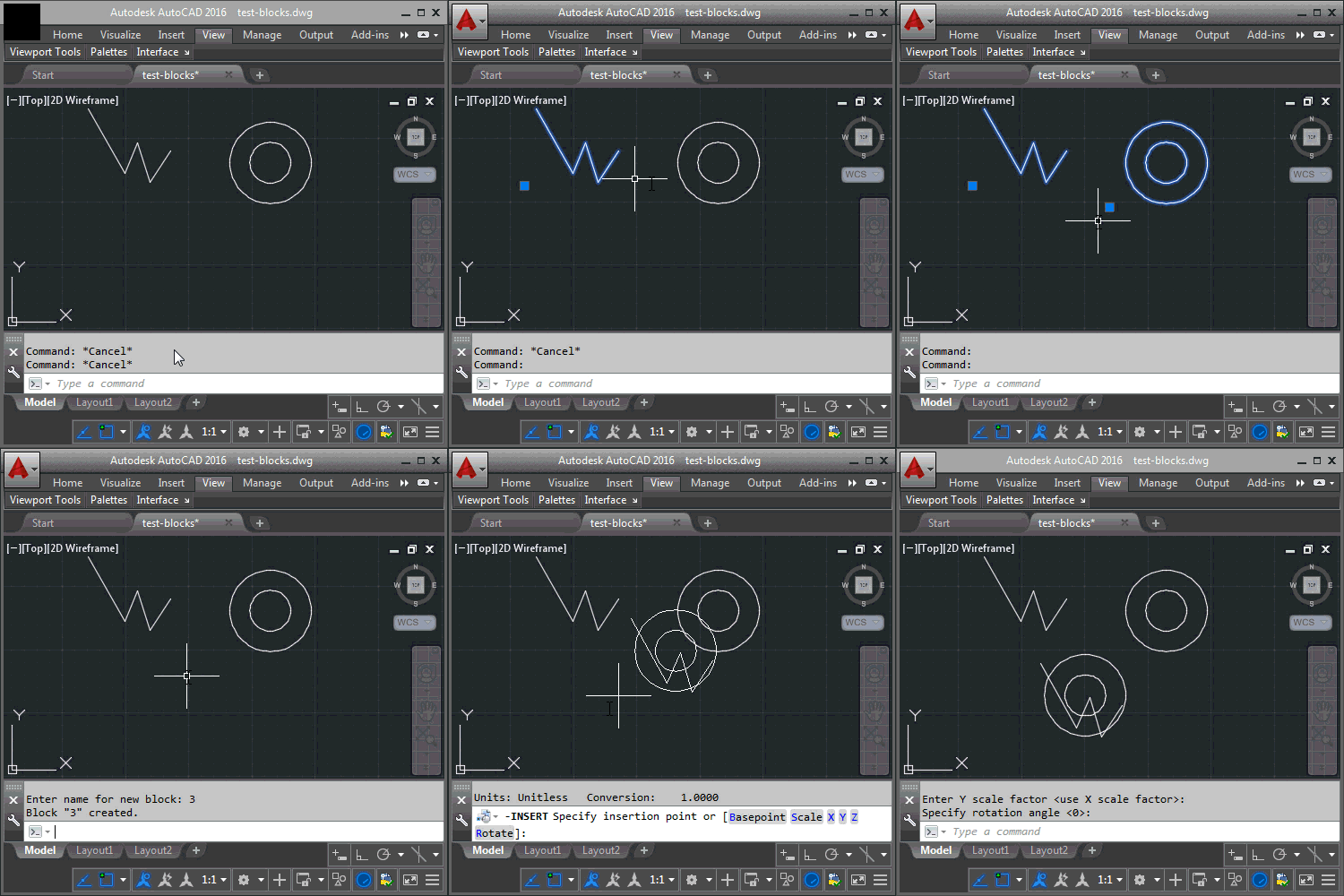
Here's the MB command working with a couple of simple blocks containing lines and circles, respectively.
It also works fine with attributes: here we combine attributes from two separate blocks that have the same names (etc.). We can see that we get the combined set of attributes – with duplicate names – in the resultant block.
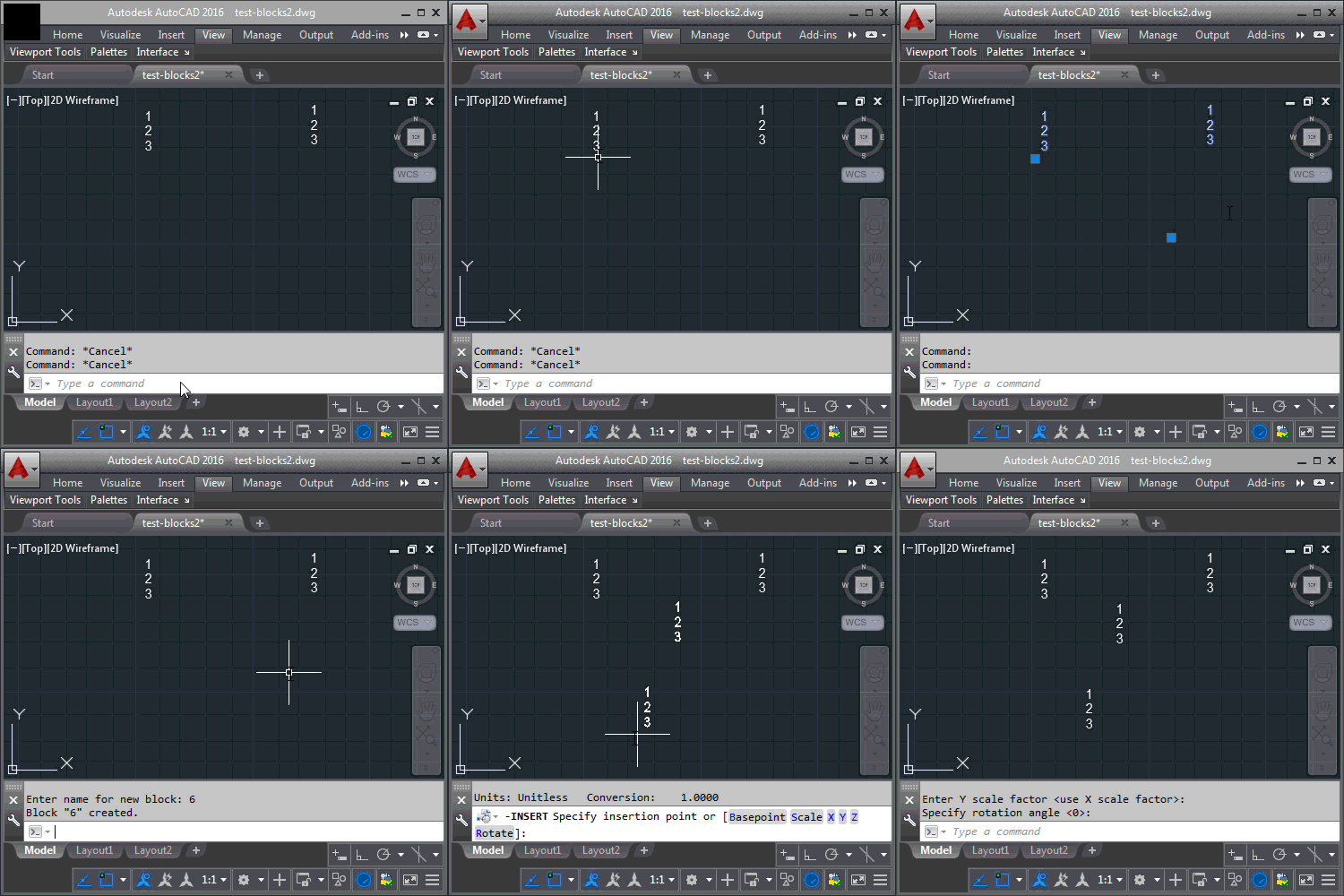
We could certainly filter out any attributes we don't want to appear twice, should that be a requirement. I've also made no attempt to worry about things such as layout: you can see I've simply placed the insertion point of the two blocks at a place that helps us avoid overlaps. Both areas have been left as exercises for the reader, as we'll quickly descend into requirements that are specific to a particular user scenario.


Leave a Reply to Said Ibrahim Cancel reply