Connecting points to curves by the shortest distance in AutoCAD using .NET – Part 1

A question came into the LISP forum during Wednesday's Answer Day. It related to a really interesting task: to take certain blocks in a drawing and connect them to the closest polyline via a perpendicular line. It took me a little while to understand, but basically the problem relates to pipeline design: there are gully posts – represented as blocks – that need to be connected to pipelines (polylines) in the drawing. They need to be connected by the shortest path, which will be perpendicular to the pipeline (assuming the pipeline is long enough, of course).

It was too juicy a problem to put to one side, so I ended up putting a little code together. I chose to solve it using C#: LISP wasn't a hard and fast requirement, and it's far easier for me to code it in .NET. The answer I originally gave on the forum was unnecessarily complicated, as it turns out, but we'll see that on Monday when we extend this code to also search for pipelines in the drawing.

So, to start with, let's see some C# code that asks the user to select a block and a curve, and we connect the two via a line. As requested, the code takes the insertion point of the block for the initial connection point.

using Autodesk.AutoCAD.ApplicationServices;

using Autodesk.AutoCAD.DatabaseServices;

using Autodesk.AutoCAD.EditorInput;

using Autodesk.AutoCAD.Geometry;

using Autodesk.AutoCAD.Runtime;


namespace ConnectBlocksToCurves

{

  public static class Extensions

  {

    public static double DistanceFrom(this Curve c, Point3d pt)

    {

      return pt.DistanceTo(c.GetClosestPointTo(pt, false));

    }


    public static void ConnectPointToCurve(

      this Transaction tr, BlockTableRecord btr,

      Point3d pt, Curve c

    )

    {

      tr.DrawLine(btr, pt, c.GetClosestPointTo(pt, false));

    }


    public static void DrawLine(

      this Transaction tr, BlockTableRecord btr, Point3d pt1, Point3d pt2

    )

    {

      var ln = new Line(pt1, pt2);

      btr.AppendEntity(ln);

      tr.AddNewlyCreatedDBObject(ln, true);

    }

  }


  public class Commands

  {

    [CommandMethod("B2C")]

    public static void Block2Curve()

    {

      var doc = Application.DocumentManager.MdiActiveDocument;

      if (doc == null)

        return;


      var db = doc.Database;

      var ed = doc.Editor;


      // Get the block to connect


      var peo = new PromptEntityOptions("\nSelect the block");

      peo.SetRejectMessage("\nMust be a block.");

      peo.AddAllowedClass(typeof(BlockReference), false);


      var per = ed.GetEntity(peo);

      if (per.Status != PromptStatus.OK)

        return;


      var brId = per.ObjectId;


      // Get the curve to connect it to


      var peo2 = new PromptEntityOptions("\nSelect the curve");

      peo2.SetRejectMessage("\nMust be a curve."< /span>);

      peo2.AddAllowedClass(typeof(Curve), false);


      var per2 = ed.GetEntity(peo2);

      if (per2.Status != PromptStatus.OK)

        return;


      var cId = per2.ObjectId;


      // Use a transaction for the geometry access and connection creation


      using (var tr = doc.TransactionManager.StartTransaction())

      {

        var br = tr.GetObject(brId, OpenMode.ForRead) as BlockReference;

        var c = tr.GetObject(cId, OpenMode.ForRead) as Curve;


        if (br != null && c != null)

        {

          // We'll be writing to the modelspace


          var btr =

            (BlockTableRecord)tr.GetObject(

              SymbolUtilityServices.GetBlockModelSpaceId(db), OpenMode.ForWrite

            );


          // Connect the point to the closest point on the curve


          tr.ConnectPointToCurve(btr, br.Position, c);

        }

        tr.Commit();

      }

    }

  }

}


Here's the code in action:
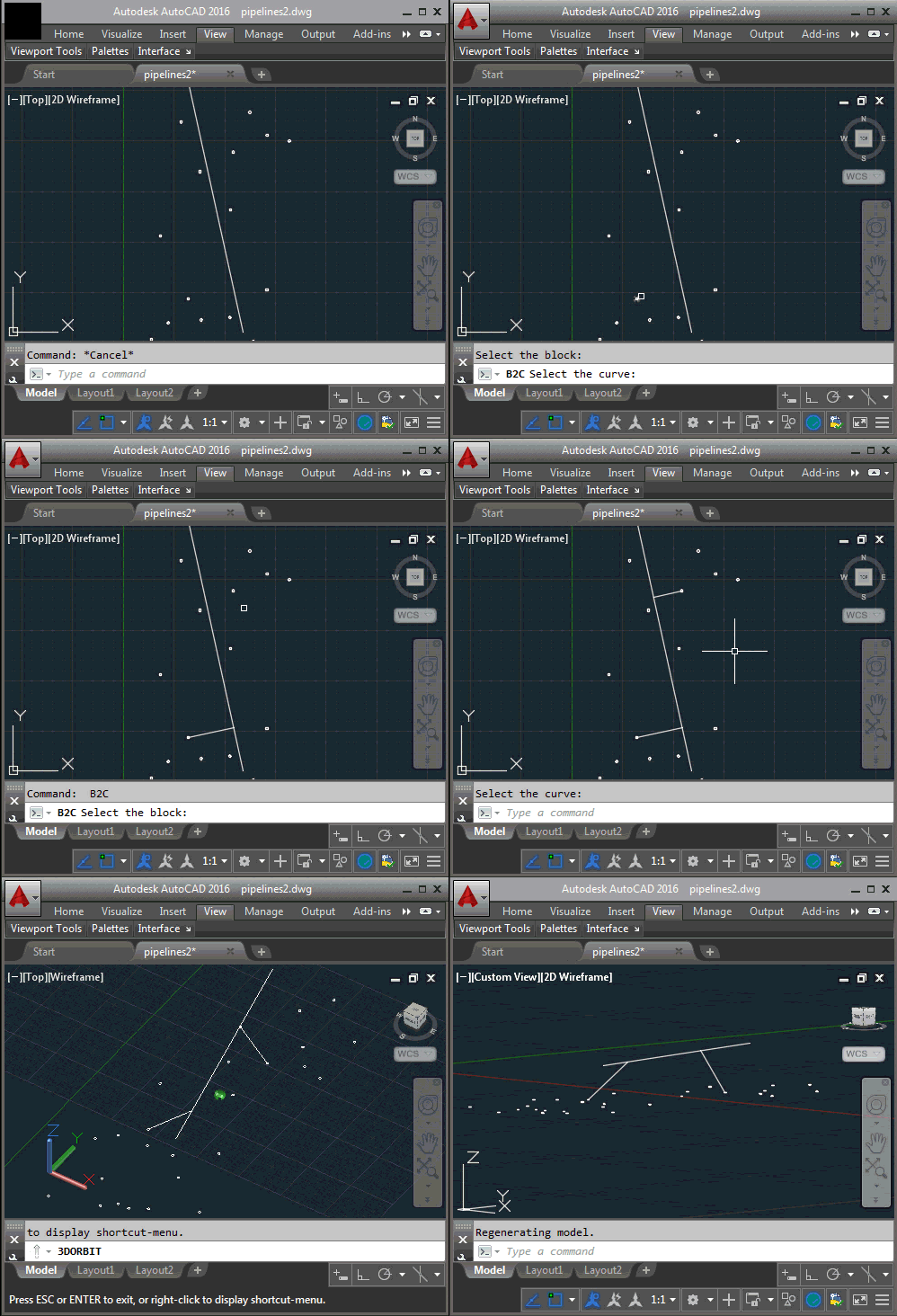
Connecting a point to a curve

On Monday we'll extend this to connect any block of the selected type to the nearest curve of any type in the drawing. Which is thankfully much simpler than it sounds.

One response to “Connecting points to curves by the shortest distance in AutoCAD using .NET – Part 1”

  1. James Maeding Avatar

    Kean, that is a "station-offset" calc in civil engineering. You take a 2d chain of lines/arcs, and find the shortest perpendicular intersection. The "first" one wins if two distances are the same, like in a loop. So that involves point/line and point/arc intersection routines, and then you do line-arc intersection routines to find where two chains of line/arcs cross each other. The thing is though, in real life you need to write those things yourself, not use built in curve methods. You will need control over handling of things right on the edge of being intersections. situations close to 0,0 have different issues than things out on state plane coordinates. Also, if you write your own, you can use it on things not involved with autocad.

    1. Kean Walmsley Avatar

      Cool - good to know what it's called.

      > Also, if you write your own, you can use it on things not involved with autocad.

      Why would I want to do that? 🙂

      Kean

      1. James Maeding Avatar

        Because autocad is just one of many tools that we use. We also use bricscad, and survey devices with windows CE so autocad is not an option, or at least I won't bother trying on that. You have hit on a topic that is an untapped goldmine for autodesk, as they should be viewing civil engineering data like an mp3 song. Make the format standard (not its standard, our standard...more to that but its easy) and write "adapters" for display and editing of the data in acad, IW, wherever. Instead we have versioned, proprietary, half undesirable, hard to share objects in c3d and so the whole ballgame is stalled. We have tools that do treat the data in a format that is exactly what the designers do to get plans done, and have done the adapters for a few non-acad situations and it works. Probably why we don't sell the tools but also because of certain business models.

        1. Kean Walmsley Avatar

          I repeat: why would *I* want to do that? 🙂

          I do understand why you might want to, of course.

          Kean

        2. Hello James, thank you for your comment. would you be able to elaborate:

          > "Make the format standard (not its standard, our standard...more to that but its easy) and write "adapters" for display and editing of the data in acad, IW, wherever. Instead we have versioned, proprietary, half undesirable, hard to share objects in c3d and so the whole ballgame is stalled."

          I do not clearly follow what you mean here.

          Ben

          1. Alen Kačarik Avatar

            Hello, thank you Kean for all the great work you provided here but i feel familiar what James is talking about, it would be best if every company used same software(c3d), engineering methods and similar stuff by "standards" of the profession not the other way around. As a land surveyor i work closely to civil e. and architecture and every company has its own "work style standards". What James is saying that Autocad tied methods on his own, i made whole new program to work as land surveyor and honestly as much i experienced, many surveyors don't find c3d usefull at all, it is powerfull software but if someone doesn't use it, it is because there are few tools which you need to process your data and then after input in acad. I'd be happiest person on Earth if acad ever decide to extend functionality for land surveyors. I think we are saying as Autodesk is leading company of CAM world it would only benefit to take a look how all sorts of civil e. companies deal with c3d working on real projects and methods, as i experienced we use it just to draw in it because autocad tied methods so every engineer must follow the autocad's rules not the profession rules and that's why you need few tools before.

            1. Kean Walmsley Avatar

              Hi Alen,

              I'm happy for you and James to use this blog as a way to provide this feedback, but there are better avenues for this (such as the Autodesk forums). Sharing it here is a way to have other developers - and some Autodesk employees - read your concerns, but it is not an effective way to drive change.

              As long as that's clear to you, please continue.

              Best,

              Kean

              1. Alen Kačarik Avatar

                Hi again Kean,
                yeah, maybe overwhelming on wrong place.
                Keep up the great work, can't wait for new stuff, long time following this page.
                Have a nice day.
                Cheers!

  2. Kean, I found this to be an interesting article. I had decided to give this a try with vb.NET in Civil 3D. I was trying to use the method GetClosestPointTo on an Aecc_Pipe (Civil 3D Pipe). The point returned by this method is always 0,0,0. I am not sure why this is the case. I ended up constructing a line using the start and end points of the pipe and then using the method GetClosestPointTo on the line instead. This finally returned a coordinate that made sense. Do you have any ideas as to why the method doesn't appear to work properly with a Civil 3D pipe?

    1. Benjamin,

      Unfortunately not: I have no knowledge of the Civil 3D API and the decisions made regarding Curve protocol support.

      Best,

      Kean

  3. pt.DistanceTo(c.GetClosestPointTo(pt, false)) ------> it's so simple, but only when you know how 🙂 thx for the post.

  4. Hi thx for this. are we able to get more information on what Autocad does behind the scenes with the GetClosestPointTo() method? I'd be curious to see how it is actually calculated. rgds Ben

    1. Kean Walmsley Avatar
      Kean Walmsley

      It's probably quite detailed and varies for different object types. You can look up the mathematical basis for the calculation on the internet (search for "closest point to a curve"), which should help.

      Kean

      1. Noel Rico S. Tecson Avatar
        Noel Rico S. Tecson

        GetClosestPointTo not working properly in 3d Polyline. but line and polyline is okey. not even extending the 3d polyline.

Leave a Reply to Alen Kačarik Cancel reply

Your email address will not be published. Required fields are marked *