In the last post we saw a simple command that connects a block with a curve via a line that starts at the insertion point and meets the curve at its closest point. In this post we're going to see how we can search the modelspace for the nearest curve and connect each block to that.
There are a few interesting techniques used in this post's code:
- We use the dynamic keyword to count the block references for a particular block without starting a transaction (as we're still in the user input phase, at that point).
- We're going to use Linq to query all the curves from the modelspace block table record.
- For each block we're going to use Linq again to sort the list of curves based on their distance from the insertion point.
Here's the C# code that connects all blocks of a certain type to the nearest curve. The code could easily be changed to only search for certain types or curve – or only curves tagged with a certain bit of XData – but I've left that as an exercise for the reader.
using Autodesk.AutoCAD.ApplicationServices;
using Autodesk.AutoCAD.DatabaseServices;
using Autodesk.AutoCAD.EditorInput;
using Autodesk.AutoCAD.Geometry;
using Autodesk.AutoCAD.Runtime;
using System.Linq;
namespace ConnectBlocksToCurves
{
public static class Extensions
{
public static double DistanceFrom(this Curve c, Point3d pt)
{
return pt.DistanceTo(c.GetClosestPointTo(pt, false));
}
public static void ConnectPointToCurve(
this Transaction tr, BlockTableRecord btr,
Point3d pt, Curve c
)
{
tr.DrawLine(btr, pt, c.GetClosestPointTo(pt, false));
}
public static void ConnectPointsToCurves(
this Transaction tr, BlockTableRecord btr,
Point3dCollection pts, ObjectIdCollection ids
)
{
// Open all the curves and store them in an array
var objs = new Curve[ids.Count];
for (int i = 0; i < ids.Count; i++)
{
objs[i] = tr.GetObject(ids[i], OpenMode.ForRead) as Curve;
}
// For each point...
foreach (Point3d pt in pts)
{
// ... we're going to sort our curves based on their distance from
// said point
var sorted =
objs.OrderBy(
c => c == null ? double.PositiveInfinity : c.DistanceFrom(pt)
);
// Then we're going to connect the point to the first curve in the
// sorted list
ConnectPointToCurve(tr, btr, pt, sorted.First<Curve>());
}
}
public static void DrawLine(
this Transaction tr, BlockTableRecord btr, Point3d pt1, Point3d pt2
)
{
var ln = new Line(pt1, pt2);
btr.AppendEntity(ln);
tr.AddNewlyCreatedDBObject(ln, true);
}
}
public class Commands
{
[CommandMethod("CBC")]
public static void ConnectBlocksToCurves()
{
var doc = Application.DocumentManager.MdiActiveDocument;
if (doc == null)
return;
var db = doc.Database;
var ed = doc.Editor;
// Get the block to connect
var peo = new PromptEntityOptions("\nSelect the block");
peo.SetRejectMessage("\nMust be a block.");
peo.AddAllowedClass(typeof(BlockReference), false);
var per = ed.GetEntity(peo);
if (per.Status != PromptStatus.OK)
return;
// Use a dynamic object to count the blocks, rather than creating
// a transaction etc.
dynamic brId = per.ObjectId;
ObjectIdCollection refIds =
brId.BlockTableRecord.GetBlockReferenceIds(true, true);
ed.WriteMessage("\nFound {0} references. ", refIds.Count);
var pko = new PromptKeywordOptions("Connect them all?");
pko.AllowNone = true;
pko.Keywords.Add("Yes");
pko.Keywords.Add("No");
pko.Keywords.Default = "Yes";
var pkr = ed.GetKeywords(pko);
if (pkr.Status != PromptStatus.OK)
return;
// Use the same code path for a single object, just reset the collection
if (pkr.StringResult != "Yes")
{
refIds.Clear();
refIds.Add(brId);
}
using (var tr = db.TransactionManager.StartTransaction())
{
var btr =
(BlockTableRecord)tr.GetObject(
SymbolUtilityServices.GetBlockModelSpaceId(db),
OpenMode.ForRead
);
// Collect all the Curves from the modelspace
var curveIds =
from ObjectId id in btr
where id.ObjectClass.IsDerivedFrom(RXClass.GetClass(typeof(Curve)))
select id;
// Convert our enumerable to a ObjectIdCollection
var ids = new ObjectIdCollection(curveIds.ToArray<ObjectId>());
// Could also do this dynamically using...
// var ptEnum = from dynamic id in refIds select (Point3d)id.Position;
// pts = new Point3dCollection(ptEnum.ToArray<Point3d>());
var pts = new Point3dCollection();
foreach (ObjectId id in refIds)
{
var br = tr.GetObject(id, OpenMode.ForRead) as BlockReference;
pts.Add(br.Position);
}
// Now we have our points and curves, connect them
btr.UpgradeOpen();
tr.ConnectPointsToCurves(btr, pts, ids);
tr.Commit();
}
}
[CommandMethod("B2C")]
public static void Block2Curve()
{
var doc = Application.DocumentManager.MdiActiveDocument;
if (doc == null)
return;
var db = doc.Database;
var ed = doc.Editor;
// Get the block to connect
var peo = new PromptEntityOptions("\nSelect the block");
peo.SetRejectMessage("\nMust be a block.");
peo.AddAllowedClass(typeof(BlockReference), false);
var per = ed.GetEntity(peo);
if (per.Status != PromptStatus.OK)
return;
var brId = per.ObjectId;
// Get the curve to connect it to
var peo2 = new PromptEntityOptions("\nSelect the curve");
peo2.SetRejectMessage("\nMust be a curve.");
peo2.AddAllowedClass(typeof(Curve), false);
var per2 = ed.GetEntity(peo2);
if (per2.Status != PromptStatus.OK)
return;
var cId = per2.ObjectId;
// Use a transaction for the geometry access and connection creation
using (var tr = doc.TransactionManager.StartTransaction())
{
var br = tr.GetObject(brId, OpenMode.ForRead) as BlockReference;
var c = tr.GetObject(cId, OpenMode.ForRead) as Curve;
if (br != null && c != null)
{
// We'll be writing to the modelspace
var btr =
(BlockTableRecord)tr.GetObject(
SymbolUtilityServices.GetBlockModelSpaceId(db), OpenMode.ForWrite
);
// Connect the point to the closest point on the curve
tr.ConnectPointToCurve(btr, br.Position, c);
}
tr.Commit();
}
}
}
}
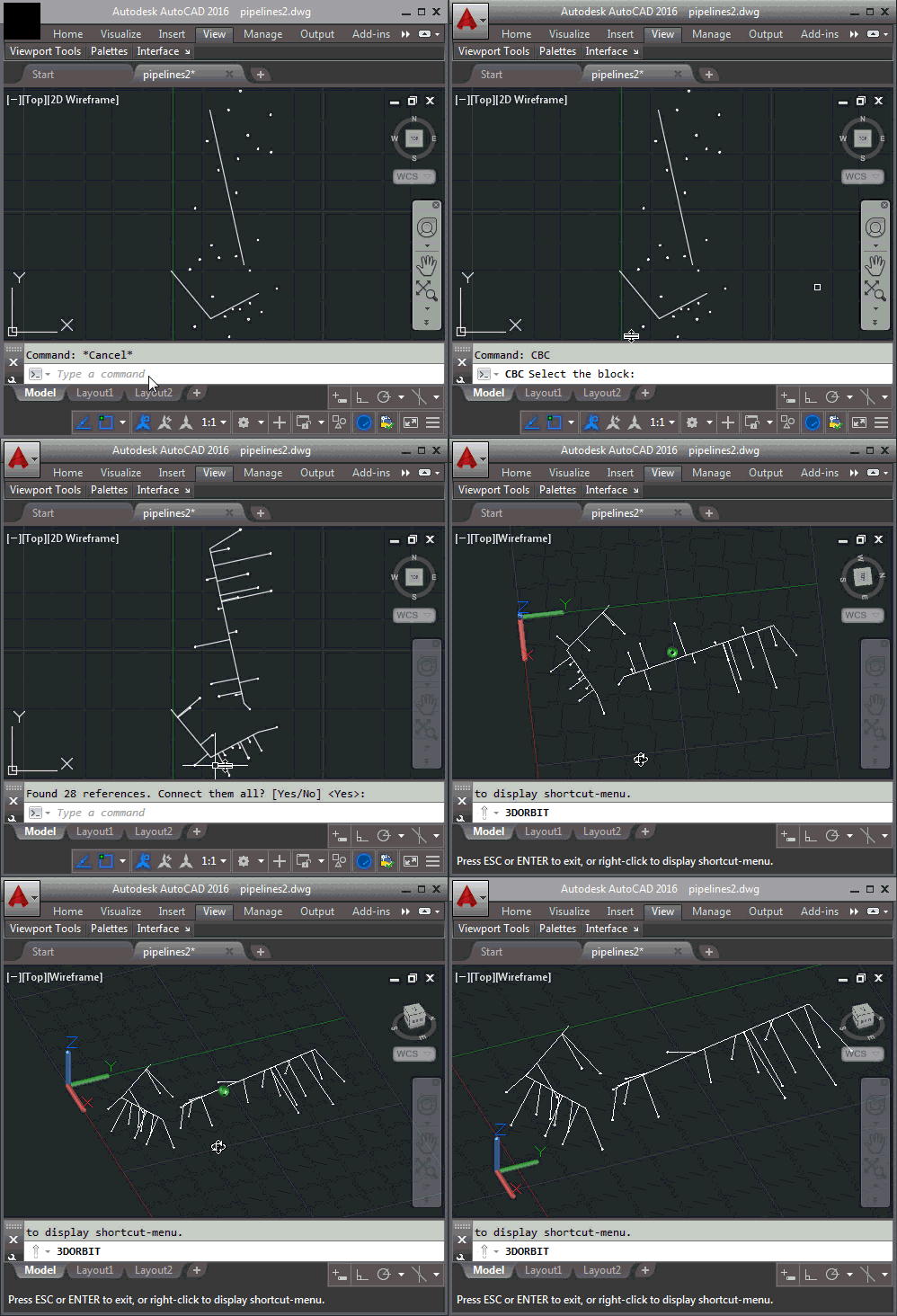
Here's the updated code in action:
I'm now on my way to Montreal for the Autodesk Technical Summit 2016. I'll be presenting a session about web-based VR, which will be interesting in light of the announcements made at Google I/O last week. Another topic I expect to post about in the coming days…


Leave a Reply to Matthew Vincent Cancel reply