One of the projects I've been working on – alongside Simon Breslav, a colleague from Autodesk Research Toronto – is a prototype, web-based client for our IoT back-end. I'll be demoing it next week at the Forge DevCon. It uses Forge's viewer component to provide access to sensor readings from within a 3D model.

Here are a few sequences of images to give you an idea of what it does. It's still early days, but we're steadily working towards feature parity with the desktop-based Project Dasher.

The first sequence shows how you can view the sensors in a building model: in our case it's the 210 King Street office of Autodesk Toronto. You can hover over the sensor markers to see their IDs and types, and then select the ones you're interested in, showing the historical data in separate or combined graphs.
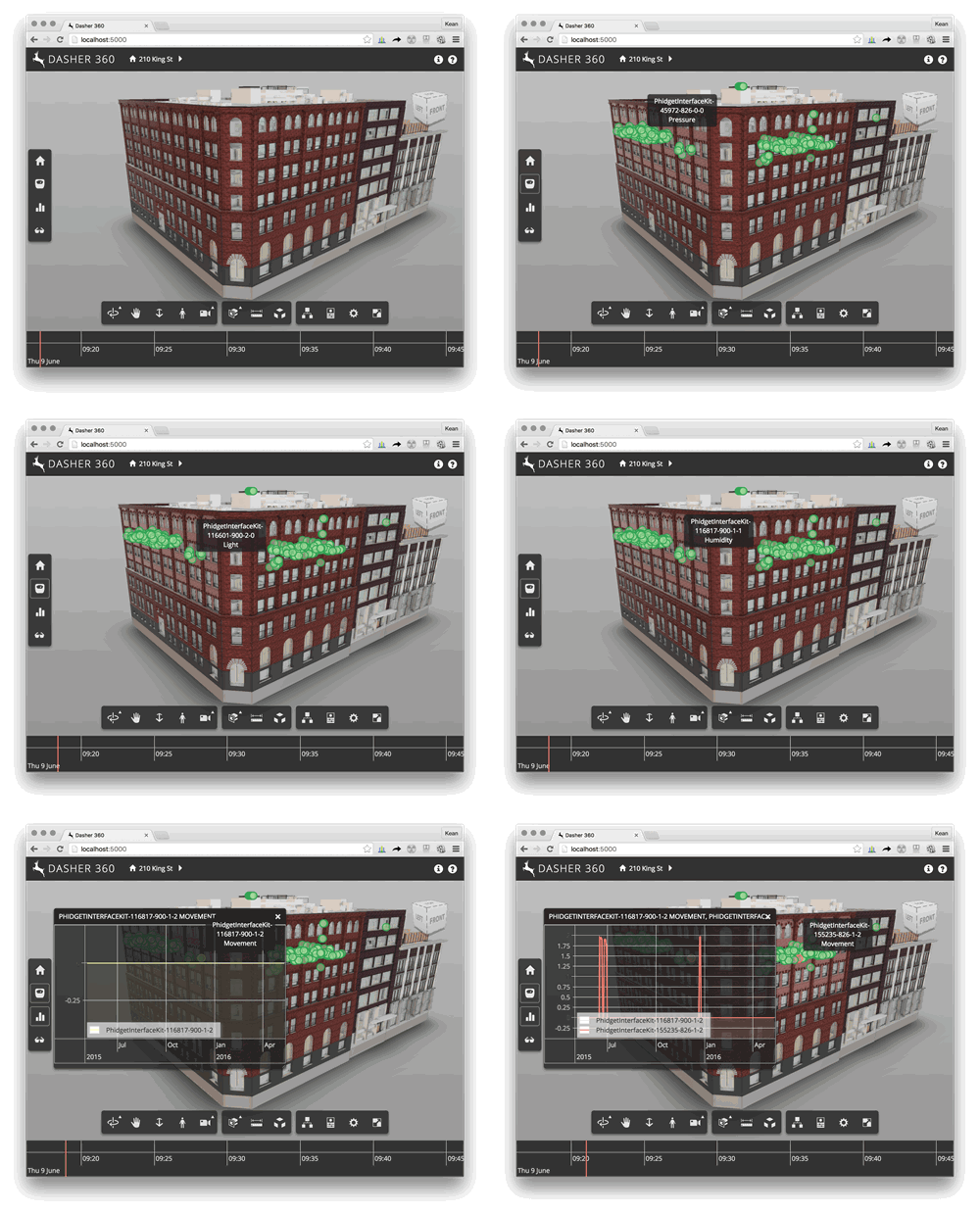
Dasher 360 basic

The second sequence shows us disabling textures – we're definitely going to need this once we implement surface shading to display sensor data graphically – and then using a building browser to navigate through the floors, down to individual rooms.

Dasher 360 navigation

We have a long way to go, but I'm pleased with the progress we've made, so far. We're making heavy use of TypeScript, which is something I've wanted to do for some time. Simon has done a great job of building out the infrastructure, and it's also looking pretty solid from an architectural perspective.

It's going to be a while before the API powering this client application is available through Forge – we're still early in that process, so there are no guarantees of when (or even whether) it will be exposed – but hopefully this gives you some idea of where we're going, aspirationally-speaking.

If you're interested in how any particular feature was implemented, please post a comment. I'll look at writing a blog post to dive into the topic.

And be sure to ask me about the project next week in San Francisco, if you're attending the DevCon!

9 responses to “Autodesk Research and IoT”

  1. Lester J. Grace Avatar
    Lester J. Grace

    Kean, I'm trying to wrap my head around this and have a couple of questions. First, does a person viewing the model online need to have Revit? Secondly, where is the model stored in order to gain access to it and is there a fee for where the model is stored?

    1. Kean Walmsley Avatar

      Lester,

      Thanks for asking - if you have these questions then I'm sure others will, too.

      In this scenario we're using a building model - that was indeed modeled in Revit - but we also want to support mechanical assemblies, in time.

      But you don't need the original application: we took the .RVT file (in our case we used the .NWC export, as it's easier to use a single file) and uploaded it to the translation service: once translated to the internal SVF format, we can load that in the viewer. The SVF is stored on Autodesk servers (actually probably somewhere in AWS... in S3).

      Using this back-end infrastructure (search for the "View & Data API", although the name is about to change) is currently still free, but at some point we'll be charging for it.

      Does that help?

      Kean

      1. Lester J. Grace Avatar
        Lester J. Grace

        Thanks for the quick reply and the explanation. This does answer my question. I was aware of the View & Data API but just wasn't sure if someone without Revit was able to view and interact with the model. Now knowing this is possible the gears are turning in my head as too a couple different services I can offer utilizing this technology. Thank you very much again.

  2. James Maeding Avatar

    since I have to comment on everything....I just thought of something that would be so cool. I would like to see who in the office has what autocad seats pulled at any moment. Let's assume I know how to ask the lic server for that info (and I do), so then I must 3d model my offices and have some way to show the data. I'm the sensor in that case. So when someone says "I need a civil3d session", and we only have vanilla acad's left on the server, I can see who has a civil3d open and ask them to switch. Its 3d license monitoring!

    1. Kean Walmsley Avatar

      Keep the comments coming - it's always to know someone's reading. 🙂

      You could absolutely use the Forge Viewer to display this kind of data. You could probably even integrate a link from the person's station to automatically launch a VOIP session to their phone (for instance).

      Kean

  3. Is it possible to get the code that handles the separation and display of specific floors?

    Is there a repo for this whole project or just an extension for the viewer that handles the seperation part?

  4. Hi, Is it possible to explain or share published information on how is the Forge’s viewer component used to provide access to sensor readings from the 3D model please.

  5. SFJ Business Solutions Pvt Ltd Avatar
    SFJ Business Solutions Pvt Ltd

    Great Information. Thank You Author, for sharing your valuable information about iot with us. People who are reading this blog can continue your knowledge which you gained with us and know how to apply this practically along with our IoT Training

  6. Thank you for sharing this amazing blog, the Internet of Things is the trending technology which is used everywhere. The term Internet of Things is recent a buzzword. In the last few years, lots of TedTalks and articles talk about the Internet of Things (IoT) as if it is a really new technology. Your blog helps peoples to know about the Internet of Things (IoT).

Leave a Reply to Smith Hennry Cancel reply

Your email address will not be published. Required fields are marked *