In the last post we added a gaze cursor and some command support for our ABB industrial robot inside HoloLens. The next step I took was to add spatial mapping, allowing the user to select the base of the robot and move it around within the spatially mapped environs.
The Holograms 101 tutorial provided very straightforward instructions on how to implement spatial mapping. I once again had to export the "wireframe" material asset from the provided project to get it across into my own, but that was a minor detail.
Unfortunately when testing the capability – just as with voice commands – it didn't work. In an attempt to track down the issue, I went and launched the app from the debugger, at which point I spotted this information in the debug output:
Capability 'spatialPerception' is required, please enable it in Package.appxmanifest in order to enable spatial mapping functionality.
(Filename: C:\buildslave\unity\build\PlatformDependent/MetroPlayer/MetroCapabilities.cpp Line: 126)
Capability 'microphone' is required, please enable it in Package.appxmanifest in order to enable speech recognition functionality.
(Filename: C:\buildslave\unity\build\PlatformDependent/MetroPlayer/MetroCapabilities.cpp Line: 126)
So it was that I realised that – just like with the original issue that stopped our robot hologram from appearing in 3D – there were a couple of project settings I needed to enable to allow both voice and spatial mapping to work properly. You can find them in Unity under File –> Build Settings… –> Player Settings… –> Capabilities. The settings are called "Microphone" and "SpatialPerception".
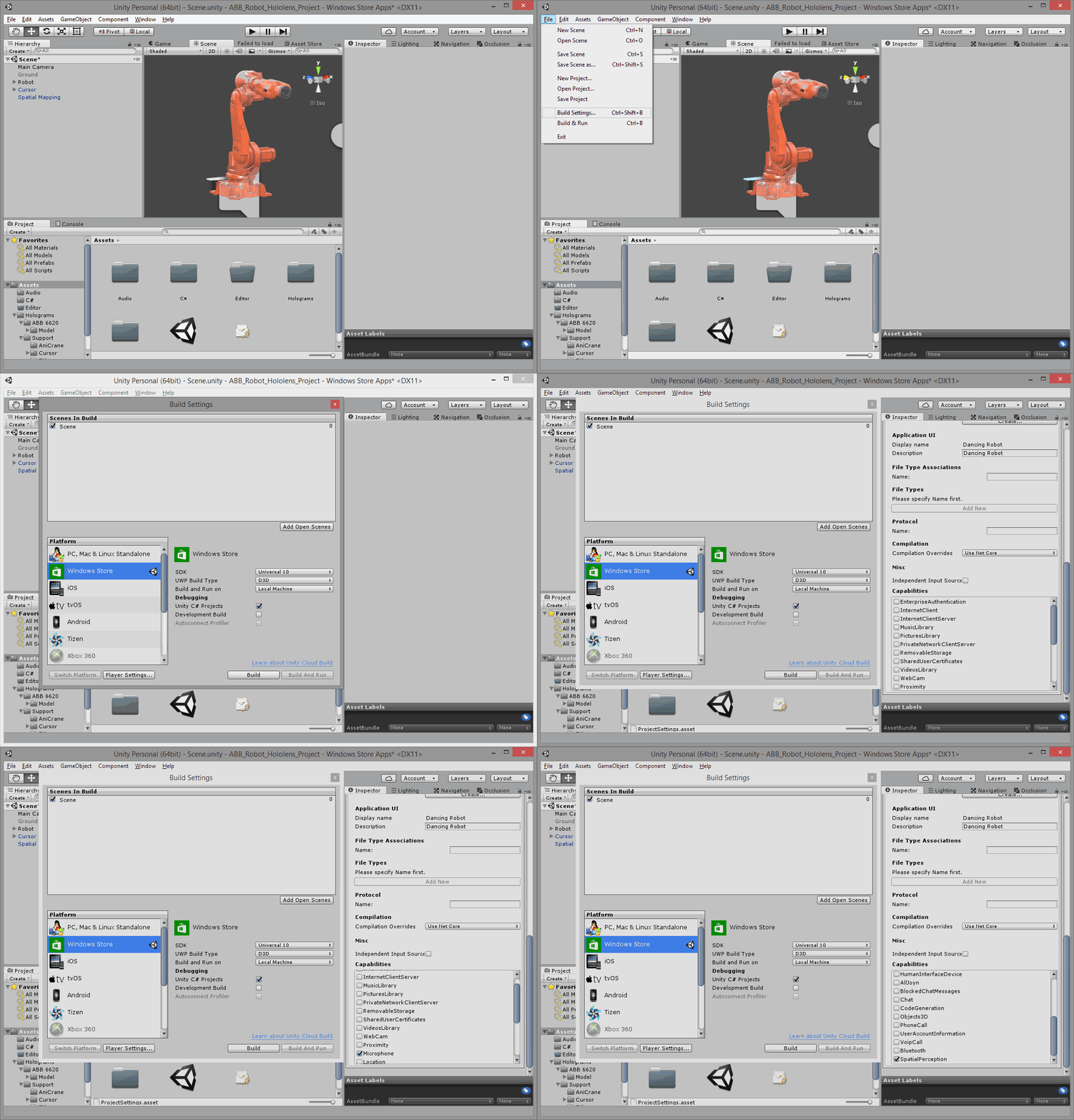
Rebuilding the project magically enabled both the voice commands and spatial mapping features I'd added by following Holograms 101.
Here's the SpeechManager.cs file, modified from the one in the tutorial:
using System.Collections.Generic;
using System.Linq;
using UnityEngine;
using UnityEngine.Windows.Speech;
public class SpeechManager : MonoBehaviour
{
KeywordRecognizer keywordRecognizer = null;
Dictionary<string, System.Action> keywords = new Dictionary<string, System.Action>();
// Use this for initialization
void Start()
{
keywords.Add("Halt", () => this.BroadcastMessage("OnStop"));
keywords.Add("Move", () => this.BroadcastMessage("OnStart"));
keywords.Add("Quick", () => this.BroadcastMessage("OnQuick"));
keywords.Add("Slow", () => this.BroadcastMessage("OnSlow"));
keywords.Add("Stop", () =>
{
var focusObject = GazeGestureManager.Instance.FocusedObject;
if (focusObject != null)
{
// Call the OnStop method on just the focused object.
focusObject.SendMessage("OnStop");
}
});
keywords.Add("Spin", () =>
{
var focusObject = GazeGestureManager.Instance.FocusedObject;
if (focusObject != null)
{
// Call the OnStop method on just the focused object.
focusObject.SendMessage("OnStart");
}
});
// Tell the KeywordRecognizer about our keywords.
keywordRecognizer = new KeywordRecognizer(keywords.Keys.ToArray());
// Register a callback for the KeywordRecognizer and start recognizing!
keywordRecognizer.OnPhraseRecognized += KeywordRecognizer_OnPhraseRecognized;
keywordRecognizer.Start();
}
private void Ke
ywordRecognizer_OnPhraseRecognized(PhraseRecognizedEventArgs args)
{
System.Action keywordAction;
if (keywords.TryGetValue(args.text, out keywordAction))
{
keywordAction.Invoke();
}
}
}
Here's the correspondingly updated PartCommands.cs file (Rotate.cs can stay as it was before):
using UnityEngine;
using System;
public class PartCommands : MonoBehaviour
{
// Called by GazeGestureManager when the user performs a Select gesture
void OnSelect()
{
CallOnParent(
r =>
{
if (r.isStopped)
{
r.speed = -r.speed;
}
r.isStopped = !r.isStopped;
}
);
}
void OnStart()
{
CallOnParent(r => r.isStopped = false);
}
void OnStop()
{
CallOnParent(r => r.isStopped = true);
}
void OnQuick()
{
CallOnParent(r => r.isFast = true);
}
void OnSlow()
{
CallOnParent(r => r.isFast = false);
}
void CallOnParent(Action<Rotate> f)
{
var rot = this.gameObject.GetComponentInParent<Rotate>();
if (rot)
{
f(rot);
}
}
}
Now to see it in action… here's a video showing both voice control and spatial mapping in our robot project:


Leave a Reply to James Maeding Cancel reply