Now that we have our basic model of the ABB 6620 industrial robot inside HoloLens, it's time to make it move.
Tom Eriksson kindly provided some basic scripts to perform rotations on the various parts in the base model. I went ahead and consolidated these into a single "Rotate" script, with parameters (the speed, axis and min/max angles of the rotation) that vary depending on the part being rotated.
For instance, some parts can rotate freely around their main axis while others are physically constrained to move between certain angle limits. This is taken care of by the below C# script:
using UnityEngine;
using System.Collections;
public class Rotate : MonoBehaviour
{
// Parameters provided by Unity that will vary per object
public float speed = 50f; // Speed of the rotation
public Vector3 axis = Vector3.up; // Axis of rotation
public float maxRot = 170f; // Minimum angle of rotation (to contstrain movement)
public float minRot = -170f; // Maximim angle of rotation (if == min then unconstrained)
// Internal variable to track overall rotation (if constrained)
private float rot = 0f;
void Update()
{
// Calculate the rotation amount as speed x time
// (may get reduced to a smaller amount if near the angle limits)
var locRot = speed * Time.deltaTime;
// If we're constraining movement (via min & max angles)...
if (minRot != maxRot)
{
// Then track the overall rotation
if (locRot + rot < minRot)
{
// Don't go below the minimum angle
locRot = minRot - rot;
}
else if (locRot + rot > maxRot)
{
// Don't go above the maximum angle
locRot = maxRot - rot;
}
rot += locRot;
// And reverse the direction if we're at a limit
if (rot <= minRot || rot >= maxRot)
{
speed = -speed;
}
}
// Perform the rotation itself
transform.Rotate(axis, locRot);
}
}
An interesting downside to using a single script, rather than having the parameters hardcoded in separate scripts, relates to deployment: the scripts exist in a separate DLL that is really quick to update (it weighs in at around 4MB versus 165MB for the whole scene). Unless I've missed something, making small changes – such as tweaking parameter settings – in the Unity project leads to the whole package being redeployed – essentially transferred to the HoloLens device via wifi – rather than just the script DLL. But it's more elegant/maintainable to have a single script, so I'm choosing to put up with this minor inconvenience.
Once assigned to each of the parts to be rotated, the script needs the various parameters assigned. Here are the various sets of parameters for the robot model:
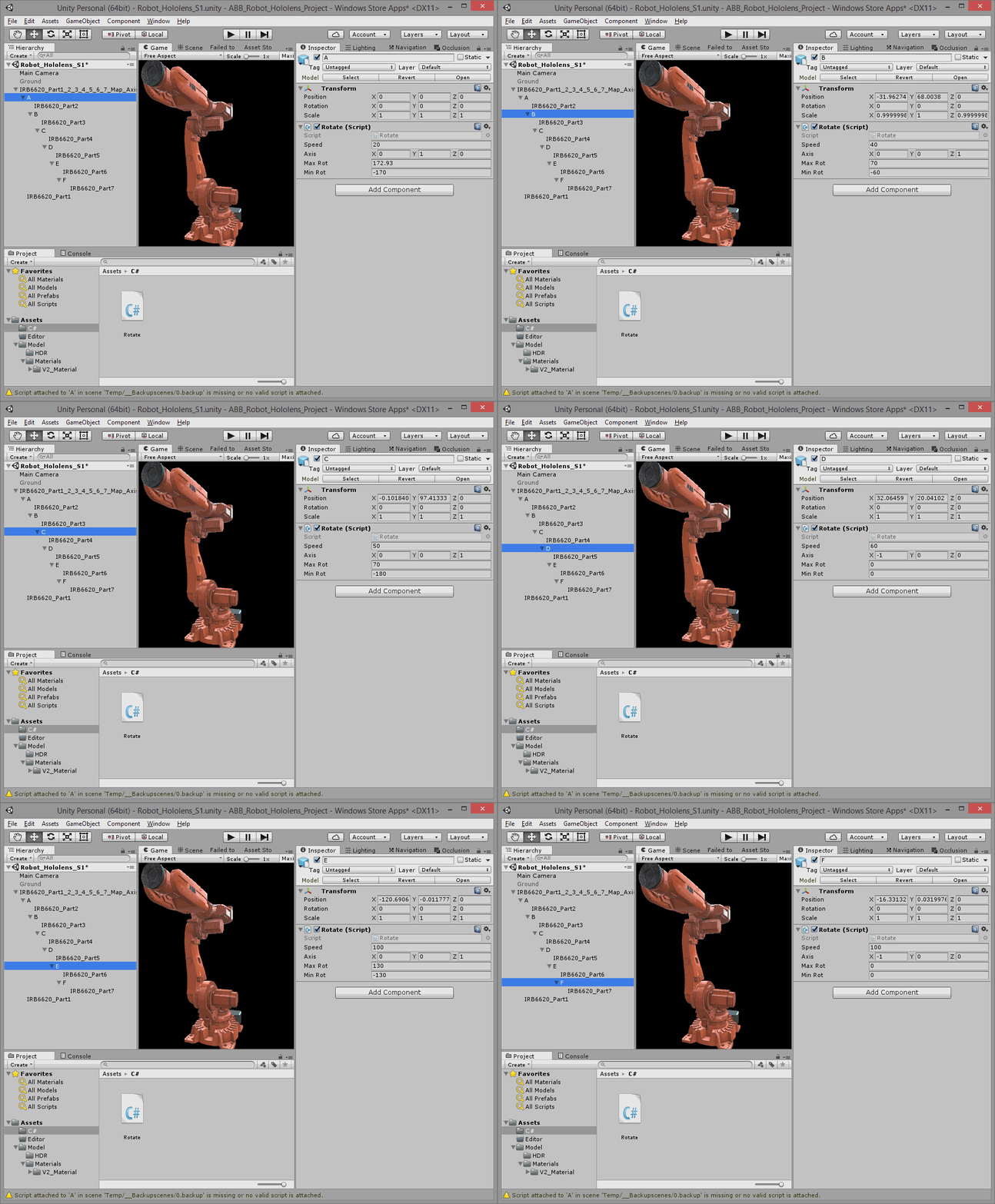
As each of the parts has a different duration for their rotation – they're of different sizes and have different angle limits & rotation speeds – the result is quite interesting. Basically it looks as if the robot is moving in a random "dance".
If I can work out how to have external audio influence the timing/duration of the rotations, we'll really have a dancing robot. That would be awesome. 🙂


Leave a Reply to James Maeding Cancel reply