As a follow-up from Tuesday's post, I wanted to hide the title bar of the dialog showing the legend for our surface shading feature. It turned out to be really easy: we're deriving from DockingPanel and we simply need to override the initialize() method and choose not to create either the title bar or the close button. All we do in the method is create "move handlers" that allow the dialog to be moved by clicking and dragging anywhere on it: very important if you no longer have a title bar on your dialog.
Here's the TypeScript class I ended up creating to do this – you could do the same by modifying the prototype in JavaScript, of course.
/// <reference path='../../../../typings/index.d.ts' />
export default class TransparentDockingPanel extends Autodesk.Viewing.UI.DockingPanel {
constructor(parentContainer: Element, id: string, title?: string, options?: any) {
super(parentContainer, id, title, options);
this.container.style.left = '0px'; // Just initing, docking will overwrite this
this.container.style.top = '0px'; // Just initing, docking will overwrite this
this.container.style.resize = 'both';
this.container.style.height = (options.height || 100) + 'px';
this.container.style.width = (options.width || 300) + 'px';
this.container.style.minHeight = (options.minHeight || options.height || 100 ) + 'px';
this.container.style.minWidth = (options.minWidth || options.width || 300) + 'px';
this.container.dockRight = true;
this.container.dockBottom = true;
$(this.container).addClass('modelStructurePanel').addClass('docking-panel');
if (options.classes && typeof options.class === 'Array') {
options.classes.forEach((additionalClass: string) => {
$(this.container).addClass(additionalClass);
});
}
}
initialize(): void {
// Don't create a title or close button, just allow movement on drag
this.initializeMoveHandlers(this.container);
};
}
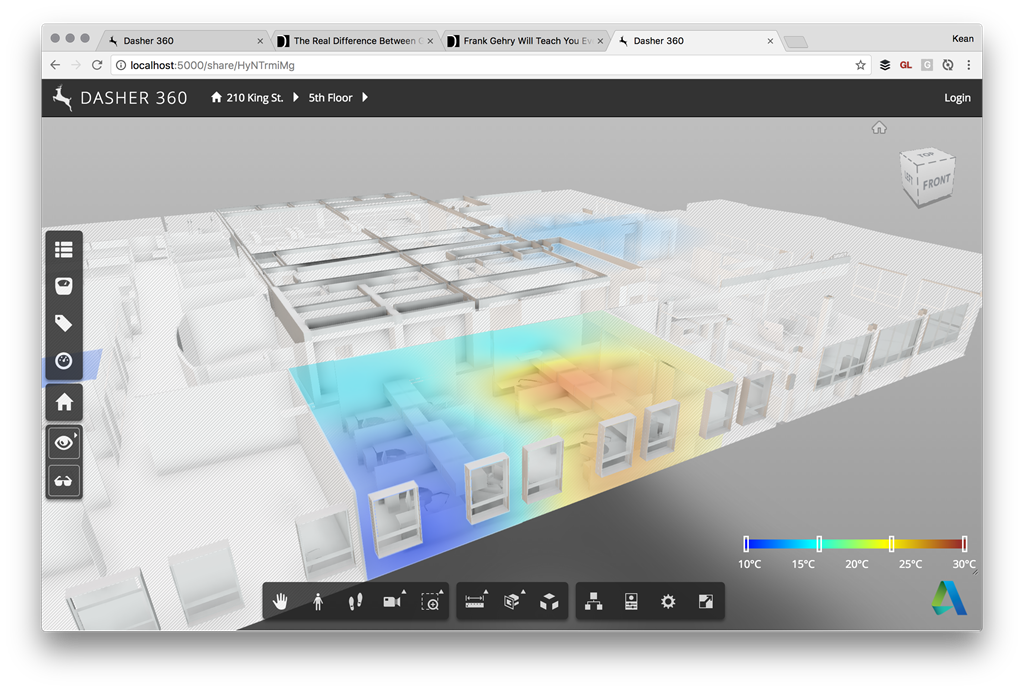
And here's the way the dialog looks now:
Leave a Reply