I mentioned last week that Dynamo 2.11 allows package owners to add additional documentation for their nodes via the enhanced Documentation Browser. I decided to give it a try, and then decided to test the possibilities around automating the process.
Here's the idea: the Space Analysis package comes with 15 different samples showing how to use its various nodes. These are all hidden away in the %appdata%\Dynamo\Dynamo [Core|Revit]\2.x\packages\SpaceAnalysis\extra folder, so lots of people don't know they exist.
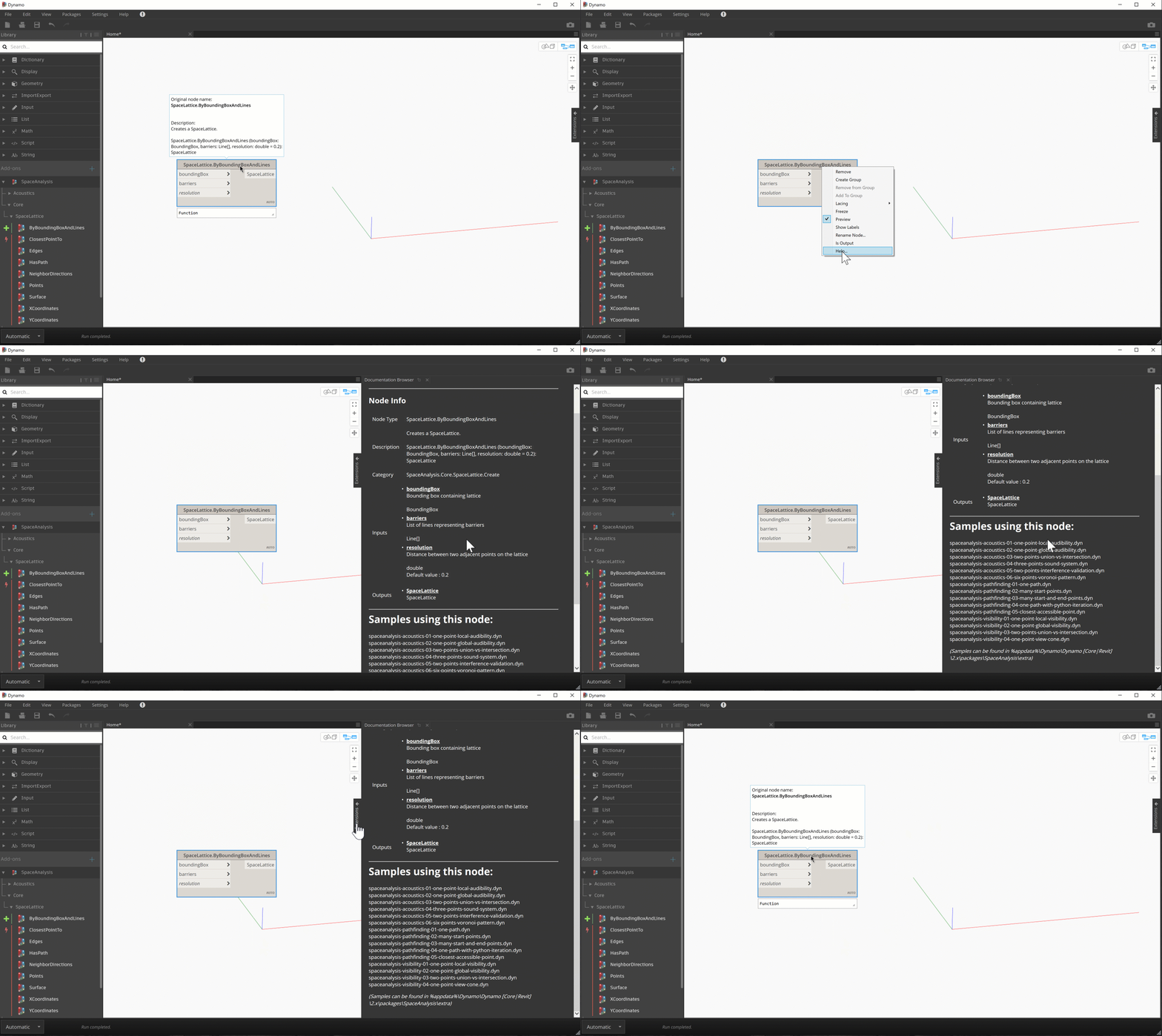
What if the Documentation Browser told you about the samples that use a particular node when you pull up its help?
Here's a quick GIF showing you what I mean. Here we are bringing up additional help for the code that creates a SpaceLattice (the data structure at the core of Space Analysis, so it comes as no surprise that it's used in every single sample ;-).
The beauty of the problem of creating the Markdown files that hold this documentation is that it's actually really easy to automate.
Firstly we need to get a list of the various methods in the package, which are luckily available in a handy XML file that's in the package's bin folder. (Visual Studio creates this manifest as a by-product of the .NET build process.)
Here's an excerpt from this file – the full one can be found in the Space Analysis package.
As you can see, the nodes are listed as methods with the M: prefix (there might also be properties beginning with P: – we just don't happen to have any in the Space Analysis package).
If we grep the XML for those lines, we can extract this list of methods:
Acoustics.AudibilityGrid.BySoundField
Acoustics.AudibilityGrid.ByUnion
Acoustics.AudibilityGrid.ByIntersection
Acoustics.AudibilityGrid.Values
Acoustics.AudibilityGrid.ValueAtPoint
Acoustics.AudibilityGrid.XCoordinates
Acoustics.AudibilityGrid.YCoordinates
Acoustics.AudibilityGrid.Points
Acoustics.AudibilityGrid.Surface
Acoustics.SoundField.BySpaceLatticeAndSoundPoint
Acoustics.SoundField.BySpaceLatticeAndSoundSystem
Acoustics.SoundField.Wavelength
Acoustics.SoundSystem.BySoundPoints
Acoustics.SoundSystem.BySoundPointsAndIntensities
Pathfinding.PathField.BySpaceLatticeAndStartPoint
Pathfinding.PathField.BySpaceLatticeAndEndPoint
Pathfinding.Route.ByPathField
Pathfinding.Route.BySpaceLattice
Pathfinding.Route.Count
Pathfinding.Route.XPositionAtIndex
Pathfinding.Route.YPositionAtIndex
Pathfinding.Route.Points
Pathfinding.Route.Curve
Core.SpaceLattice.ByBoundingBoxAndLines
Core.SpaceLattice.NeighborDirections
Core.SpaceLattice.Edges
Core.SpaceLattice.Surface
Core.SpaceLattice.XCoordinates
Core.SpaceLattice.YCoordinates
Core.SpaceLattice.Points
Core.SpaceLattice.HasPath
Core.SpaceLattice.ClosestPointTo
Visibility.ViewCone.ByViewPointAndViewDirection
Visibility.ViewField.BySpaceLatticeAndViewPoint
Visibility.ViewField.BySpaceLatticeAndViewCone
Visibility.VisibilityGrid.ByViewField
Visibility.VisibilityGrid.ByUnion
Visibility.VisibilityGrid.ByIntersection
Visibility.VisibilityGrid.Values
Visibility.VisibilityGrid.ValueAtPoint
Visibility.VisibilityGrid.XCoordinates
Visibility.VisibilityGrid.YCoordinates
Visibility.VisibilityGrid.Points
Visibility.VisibilityGrid.Surface
Now for the really cool bit. Because .DYN files are just JSON-formatted text, we can search through the directory of sample files for each of the above methods: if a .DYN contains the method name as a "FunctionSignature" then it's used in that sample. We can then just create a Markdown file (with the .md suffix) for each method listing the samples that were found to contain it. Super-easy and super-useful, too!
I'm not saying this is the best way to do it, but I will say it's a reasonably compact way: I wrote a "simple" Unix shell script to do the work. I'm using this a Mac, so this was an accessible environment: the point was not that other people would necessarily follow the same approach – you could do the same thing with batch files, PowerShell or even C# – but I wanted to show people that it's reasonably straightforward to do.
Here's the Shell script:
As we store the sample files in the extra folder, we can just run the script from the root folder of the Space Analysis package:
./createDocs.sh SpaceAnalysis extra
Here's a sample .md file that the script generates in the doc folder for the Core.SpaceLattice.Edges node:
# Samples using this node:
spaceanalysis-pathfinding-01-one-path.dyn
spaceanalysis-pathfinding-02-many-start-points.dyn
spaceanalysis-pathfinding-03-many-start-and-end-points.dyn
spaceanalysis-pathfinding-04-one-path-with-python-iteration.dyn
spaceanalysis-pathfinding-05-closest-accessible-point.dyn
spaceanalysis-visibility-01-one-point-local-visibility.dyn
spaceanalysis-visibility-02-one-point-global-visibility.dyn
spaceanalysis-visibility-03-two-points-union-vs-intersection.dyn
spaceanalysis-visibility-04-one-point-view-cone.dyn
*(Samples can be found in %appdata%\Dynamo\Dynamo [Core|Revit]\2.x\packages\SpaceAnalysis\extra)*
That's all there is to it. I believe our friends at Matterlab – who did a really great job building out this feature with the Dynamo team – may well be working on a more generalised solution for this problem, but this was just something quick & dirty I could put together because I happened to have an XML dump of the Space Analysis nodes available. And the specific problem of our users not knowing about the Space Analysis samples.
Hopefully this will be food for thought for Dynamo package authors, and inspire them to think about how this interesting mechanism might be used to help their own users.


Leave a Reply to Kean Walmsley Cancel reply