Today we're going to look at the implementation talked about in the last post: we're going to see how it's possible to use the Application.PreTranslateMessage() method to hack AutoCAD's message-loop and basically convert typed keywords into global ones.
This is actually pretty neat (yes, even if I do say so myself 🙂 and frankly I'm surprised it works. Here's the overall approach:
- Track the characters typed into the command-line
- Add individual characters into a list
- Backspace removes the tail of the list
- Arrow-keys invalidate the tracking: if the user accesses entries in the command-history we can't deal with that, and even navigating left and right along the typed text is tricky
- When we encounter a termination character – enter or space – the fun really starts…
- We check the entered string to see whether it matches any in our global keywords list. If it doesn't match any – or it matches too many – then we let the keyword get processed as normal (which should either result in a local keyword being interpreted or an error)
- If we find a single keyword match, we swallow the "keydown" message – setting e.Handled to true – which means the enter/space won't be processed
- We create a string consisting of the right number of backspace characters (ASCII 8) to erase the existing keyword and append an underscore and the typed keyword
- We use Document.SendStringToExecute() to send this to the command-line
I didn't find AutoCAD's keyword matching code accessible via an API, so I did my best to replicate it. I don't really like doing that, but it was actually quite fun to think through how AutoCAD detects keywords. I could well have missed edge cases, though – if you come across any strange behaviour, please let me know!
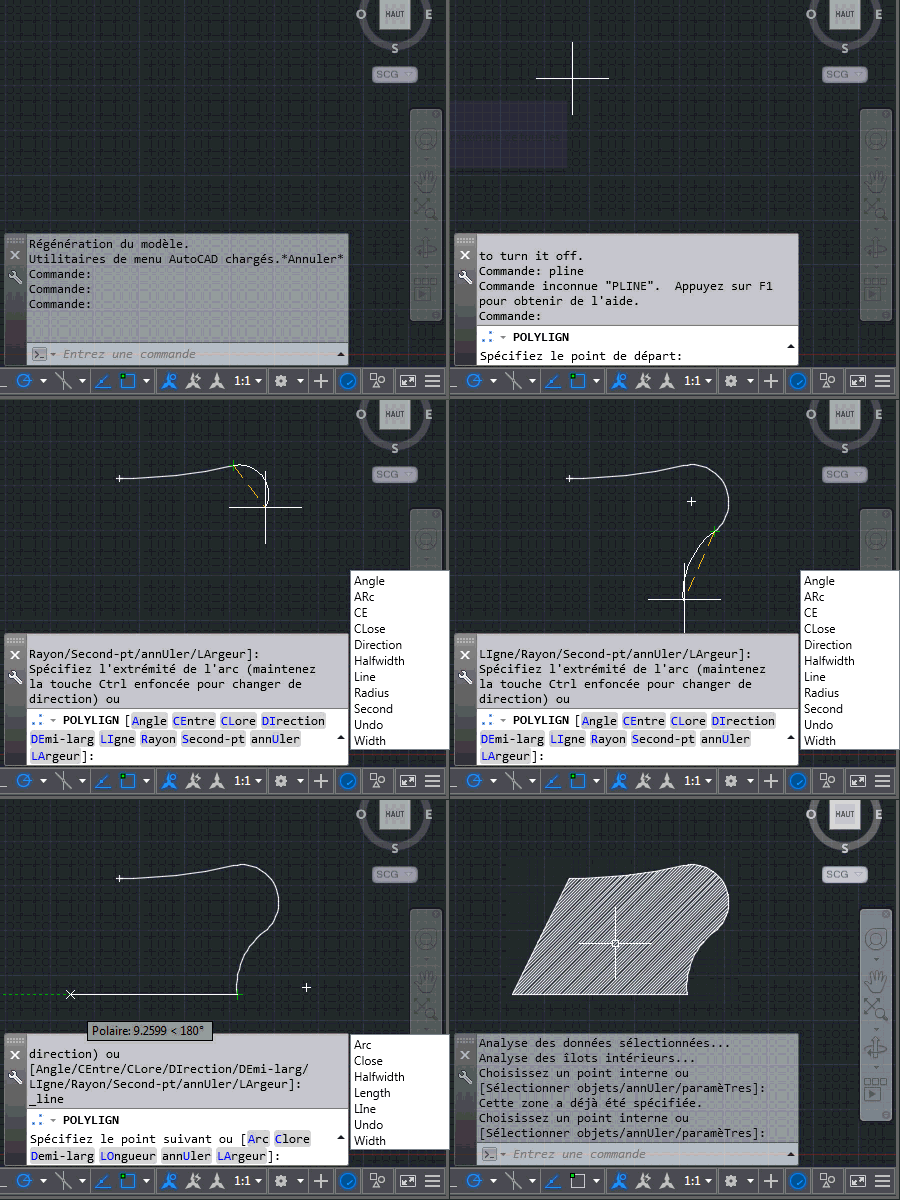
Looking at the above recording – recorded using the French version of AutoCAD 2015 – there are some important points to note: we're only using global commands and keywords entered via the command-line (as opposed to clicking from the menu, as we saw last time). When a keyword matches one in the global list (such as "arc" or "line" during the PLINE command), an underscore gets prefixed directly in the command-line.
Here's the complete project for you to play with and here's the C# source file containing the implementation described above:
using Autodesk.AutoCAD.ApplicationServices;
using Autodesk.AutoCAD.EditorInput;
using Autodesk.AutoCAD.Runtime;
using System;
using System.Collections.Generic;
using System.Collections.Specialized;
using System.Text.RegularExpressions;
namespace CmdLineHelper
{
public class KeywordCommands
{
// The keyword display window
private KeywordWindow _window = null;
// We will store the "core" set of keywords for when we have
// nested keywords that need to be appended
private KeywordCollection _coreKeywords = null;
// Keystrokes to recreate the commands entered
private List<char> _keystrokes = null;
// Flag for whether we're tracking keystrokes or not
private bool _tracking = false;
// The previous value of DYNMODE, which we override to 0
// during keyword display
private int _dynmode = 0;
// List of "special" commands that need a timer to reset
// the keyword list
private readonly string[] specialCmds = { "MTEXT" };
// Constants for our keystroke interpretation code
private const int WM_KEYDOWN = 256;
private const int WM_KEYUP = 257;
private const int WM_CHAR = 258;
// 37 - left arrow (no char, keydown/up)
// 38 - up arrow (no char, keydown/up)
// 39 - right arrow (no char, keydown/up)
// 40 - down arrow (no char, keydown/up)
// 46 - delete (no char, keydown/up)
private static readonly List<int> cancelKeys =
new List<int> { 37, 38, 39, 40, 46 };
// 13 - enter (char + keydown/up)
// 32 - space (char + keydown/up)
private static readonly List<int> enterKeys =
new List<int> { 13, 32 };
[CommandMethod("KWS")]
public void KeywordTranslation()
{
var doc = Application.DocumentManager.MdiActiveDocument;
if (doc == null)
return;
var ed = doc.Editor;
if (_window == null)
{
_window = new KeywordWindow(Application.MainWindow.Handle);
_window.Show();
Application.MainWindow.Focus();
// Add our various event handlers
// For displaying the keyword list...
ed.PromptingForAngle += OnPromptingForAngle;
ed.PromptingForCorner += OnPromptingForCorner;
ed.PromptingForDistance += OnPromptingForDistance;
ed.PromptingForDouble += OnPromptingForDouble;
ed.PromptingForEntity += OnPromptingForEntity;
ed.PromptingForInteger += OnPromptingForInteger;
ed.PromptingForKeyword += OnPromptingForKeyword;
ed.PromptingForNestedEntity += OnPromptingForNestedEntity;
ed.PromptingForPoint += OnPromptingForPoint;
ed.PromptingForSelection += OnPromptingForSelection;
ed.PromptingForString += OnPromptingForString;
// ... and removing it
doc.CommandWillStart += OnCommandEnded;
doc.CommandEnded += OnCommandEnded;
doc.CommandCancelled += OnCommandEnded;
doc.CommandFailed += OnCommandEnded;
ed.EnteringQuiescentState += OnEnteringQuiescentState;
// We'll also watch keystrokes, to see when global keywords
// are entered
Application.PreTranslateMessage += OnPreTranslateMessage;
_keystrokes = new List<char>();
// We need to turn off dynamic input: we'll reset the value
// when we unload or in KWSX
_dynmode = (short)Application.GetSystemVariable("DYNMODE");
if (_dynmode != 0)
{
Application.SetSystemVariable("DYNMODE", 0);
ed.WriteMessage(
"\nDynamic input has been disabled and can be re-enabled"
+ " by the KWSX command."
);
}
ed.WriteMessage(
"\nGlobal keyword dialog enabled. Run KWSX to turn it off."
);
}
else
{
ed.WriteMessage(
"\nGlobal keyword dialog already enabled."
);
}
}
[CommandMethod("KWSX")]
public void StopKeywordTranslation()
{
var doc = Application.DocumentManager.MdiActiveDocument;
if (doc == null)
return;
var ed = doc.Editor;
if (_window == null)
{
// This means KWS hasn't been called...
ed.WriteMessage(
"\nGlobal keyword dialog already disabled."
);
return;
}
else
{
_window.Hide();
_window = null;
}
// Remove our various event handlers
// For displaying the keyword list...
ed.PromptingForAngle -= OnPromptingForAngle;
ed.PromptingForCorner -= OnPromptingForCorner;
ed.PromptingForDistance -= OnPromptingForDistance;
ed.PromptingForDouble -= OnPromptingForDouble;
ed.PromptingForEntity -= OnPromptingForEntity;
ed.PromptingForInteger -= OnPromptingForInteger;
ed.PromptingForKeyword -= OnPromptingForKeyword;
ed.PromptingForNestedEntity -= OnPromptingForNestedEntity;
ed.PromptingForPoint -= OnPromptingForPoint;
ed.PromptingForSelection -= OnPromptingForSelection;
ed.PromptingForString -= OnPromptingForString;
// ... and removing it
doc.CommandWillStart -= OnCommandEnded;
doc.CommandEnded -= OnCommandEnded;
doc.CommandCancelled -= OnCommandEnded;
doc.CommandFailed -= OnCommandEnded;
ed.EnteringQuiescentState -= OnEnteringQuiescentState;
Application.PreTranslateMessage -= OnPreTranslateMessage;
Application.SetSystemVariable("DYNMODE", _dynmode);
ed.WriteMessage(
"\nGlobal keyword dialog disabled. Run KWS to turn it on."
);
}
// Event handlers to display the keyword list
// (each of these handlers needs a separate function due to the
// signature, but they all do the same thing)
private void OnPromptingForAngle(
object sender, PromptAngleOptionsEventArgs e
)
{
DisplayKeywords(e.Options.Keywords);
}
private void OnPromptingForCorner(
object sender, PromptPointOptionsEventArgs e
)
{
Di
splayKeywords(e.Options.Keywords);
}
private void OnPromptingForDistance(
object sender, PromptDistanceOptionsEventArgs e
)
{
DisplayKeywords(e.Options.Keywords);
}
private void OnPromptingForDouble(
object sender, PromptDoubleOptionsEventArgs e
)
{
DisplayKeywords(e.Options.Keywords);
}
private void OnPromptingForEntity(
object sender, PromptEntityOptionsEventArgs e
)
{
DisplayKeywords(e.Options.Keywords);
}
private void OnPromptingForInteger(
object sender, PromptIntegerOptionsEventArgs e
)
{
DisplayKeywords(e.Options.Keywords);
}
void OnPromptingForKeyword(
object sender, PromptKeywordOptionsEventArgs e
)
{
DisplayKeywords(e.Options.Keywords);
}
private void OnPromptingForNestedEntity(
object sender, PromptNestedEntityOptionsEventArgs e
)
{
DisplayKeywords(e.Options.Keywords);
}
private void OnPromptingForPoint(
object sender, PromptPointOptionsEventArgs e
)
{
DisplayKeywords(e.Options.Keywords);
}
private void OnPromptingForSelection(
object sender, PromptSelectionOptionsEventArgs e
)
{
// Nested selection sometimes happens (e.g. the HATCH command)
// so only display keywords when there are some to display
if (e.Options.Keywords.Count > 0)
DisplayKeywords(e.Options.Keywords, true);
}
private void OnPromptingForString(
object sender, PromptStringOptionsEventArgs e
)
{
DisplayKeywords(e.Options.Keywords);
}
private void OnCommandWillStart(
object sender, CommandEventArgs e
)
{
HideKeywords();
}
private void OnCommandEnded(object sender, CommandEventArgs e)
{
HideKeywords();
}
// Event handlers to clear & hide the keyword list
private void OnEnteringQuiescentState(object sender, EventArgs e)
{
HideKeywords();
}
private void OnPreTranslateMessage(
object sender, PreTranslateMessageEventArgs e
)
{
if (_tracking)
{
// Use of the arrow keys or delete kills our tracking
var wp = e.Message.wParam.ToInt32();
if (
e.Message.message == WM_KEYDOWN && cancelKeys.Contains(wp)
)
{
_tracking = false;
}
else if (
e.Message.message == WM_KEYDOWN && enterKeys.Contains(wp)
)
{
// Get our characters and then clear the list
var chars = _keystrokes.ToArray();
_keystrokes.Clear();
// If the keyword list contains our string, send it
// with a prefix of backspaces (to erase the prior
// characters) and an underscore
var kw = new string(chars);
if (_window.ContainsKeyword(kw))
{
e.Handled = true;
LaunchCommand(kw, kw.Length, true);
}
}
else if (e.Message.message == WM_CHAR)
{
// If we have a backspace character, remove the last
// entry in our character list, otherwise add the
// character to the list
if (wp == 8) // Backspace
{
if (_keystrokes.Count > 0)
_keystrokes.RemoveAt(_keystrokes.Count - 1);
}
else if (ValidCharacter(wp)) // Normal character
{
_keystrokes.Add((char)wp);
}
}
}
}
// Helper to display our keyword list
private void DisplayKeywords(
KeywordCollection kws, bool append = false
)
{
if (!append)
{
_coreKeywords = kws;
}
// First we step through the keywords, collecting those
// we want to display in a collection
var sc = new StringCollection();
if (append)
{
sc.AddRange(ExtractKeywords(_coreKeywords));
}
sc.AddRange(ExtractKeywords(kws));
// If we don't have keywords to display, make sure the
// current list is cleared/hidden
if (sc.Count == 0)
{
_window.ClearKeywords(true);
}
else
{
// Otherwise we pass the keywords - as a string array -
// to the display function along with a flag indicating
// whether the current command is considered "special"
var sa = new string[sc.Count];
sc.CopyTo(sa, 0);
// We should probably check for transparent/nested
// command invocation...
var cmd =
(string)Application.GetSystemVariable("CMDNAMES");
_window.ShowKeywords(
sa, Array.IndexOf(specialCmds, cmd) >= 0
);
//Application.MainWindow.Focus();
// Start tracking keyword keystrokes
_tracking = true;
}
}
private string[] ExtractKeywords(KeywordCollection kws)
{
var sc = new List<string>();
if (kws != null && kws.Count > 0)
{
foreach (Keyword kw in kws)
{
if (kw.Enabled && kw.Visible && kw.GlobalName != "dummy")
{
sc.Add(kw.LocalName); // Expected this to be GlobalName
}
}
}
return sc.ToArray();
}
private void HideKeywords()
{
_keystrokes.Clear();
_tracking = false;
_window.ClearKeywords(true);
}
internal static void GiveAutoCADFocus()
{
var doc = Application.DocumentManager.MdiActiveDocument;
if (doc != null)
doc.Window.Focus();
else
Application.MainWindow.Focus();
}
internal static void LaunchCommand(
string cmd, int numBspaces, bool terminate
)
{
var doc = Application.DocumentManager.MdiActiveDocument;
if (doc == null)
return;
doc.SendStringToExecute(
Backspaces(numBspaces) + "_" + cmd + (terminate ? " " : ""),
true, false, true
);
GiveAutoCADFocus();
}
private static string Backspaces(int n)
{
return new String((char)8, n);
}
private static bool ValidCharacter(int c)
{
var r = new Regex("^[a-zA-Z0-9]$");
return r.IsMatch(Char.ToString((char)c));
}
internal static bool KeywordsMatch(string typed, string keyword)
{
if (Match(typed, keyword))
return true;
// Find the index of the first uppercase character in
// the keyword being matched against
var chars = new List<char>(keyword.ToCharArray());
var upp = chars.Find(c => Char.IsUpper(c));
var nth = keyword.IndexOf(upp);
// Perform a similar check as the first one, this time
// starting with the first uppercase character
return
nth <= 0 ? false : Match(typed, keyword.Substring(nth));
}
private static bool Match(string typed, string keyword)
{
// We can't match a keyword that's shorter than what
// was typed
if (typed.Length > keyword.Length)
return false;
// Check the typed keyword against the initial section of the
// keyword to match of the same length (in lowercase)
var tlow = typed.ToLower();
var klow = keyword.Substring(0, typed.Length).ToLower();
bool matchComplete = true;
if (keyword.Length > typed.Length)
{
var rest = keyword.Substring(typed.Length);
matchComplete = (rest == rest.ToLower());
}
return (tlow == klow && matchComplete);
}
}
}
I made some additional – actually fairly significant – changes to the project since we saw the code posted:
- There was an issue with the code I'd posted for the global command helper: even though I thought I'd tested it thoroughly, Editor.Command() didn't work in this particular context. I went back to Document.SendStringToExecute()… I'll make sure the post gets updated.
- We didn't actually need a Popup window for our global keywords list. We now create a normal WPF window and make AutoCAD its owner, which means it will be minimised and restored along with AutoCAD and doesn't stay "topmost" in the Z order.
Overall the app is really starting to shape up. We're thinking about how best to distribute it for feedback (possibly via Labs – we'll see). If you have the chance to give it a try yourself in the meantime, please post a comment or drop me an email.
Leave a Reply