I've managed to find the time to make good progress on my linear algebra class, which means I have an update to share on the image deskewing project I mentioned last week. Thanks to all of you who provided comments on that post, by the way: there's some really valuable information there.
The current implementation has been developed in Python and runs completely separately from AutoCAD. Here's my rough integration plan to get it working in an AutoCAD plug-in:
- Adapt the code to make sure it can easily be applied to other images.
- Remove any dependencies that might stop the code working in IronPython.
- Build the code into a .NET module using IronPython.
- Develop a user-input mechanism allowing the user to specify the four corners of the portion of the image that needs straightening.
- Swap out the existing display procedure, creating a cropped image file, instead.
- Automate the insertion of a RasterImage (adding the appropriate definition, of course) into the current space.
I've so far managed to complete tasks 1 & 2. Here's how it worked on a picture taken in my living room, for instance (having manually located and hardcoded the pixel locations of the four corners):
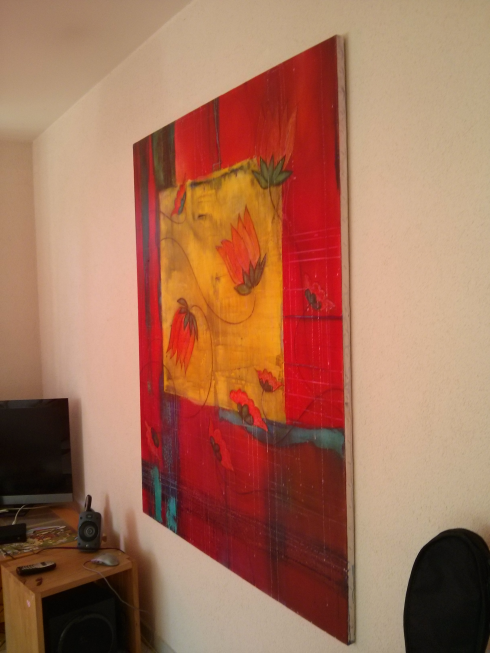
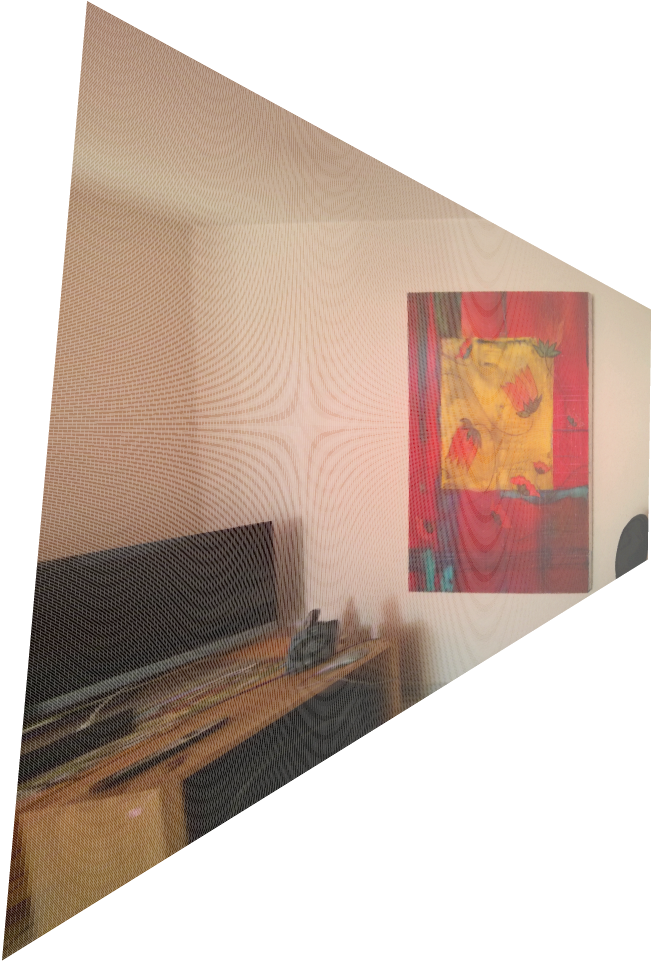
I also had to wait until this week to manage task 2: the solver component that we'd previously been using (until we had to roll our own, this week) was provided as a .pyc file, but I now have equivalent code working in straight .py modules.
So progress is being made: I now believe I know enough to say that this can be made to work. I expect it to work really slowly, but as a proof of concept the project should be good enough.
I'm not yet sharing the complete code, mainly because it includes homework answers that many people won't yet have submitted. But here's the main .py file to give you a taste of the basic approach – the four functions at the end were used to test the ability to straighten and display different images (or portions of images).
from mat import Mat
from vec import Vec
from matutil import rowdict2mat, mat2coldict, coldict2mat
from QR_solve import QR_solve
from image_mat_util import *
def move2board(v):
'''
Input:
- v: a vector with domain {'y1','y2','y3'}, the coordinate
representation of a point q.
Output:
- A {'y1','y2','y3'}-vector z, the coordinate representation
in whiteboard coordinates of the point p such that the line
through the origin and q intersects the whiteboard plane at p.
'''
return Vec({'y1','y2','y3'},
{'y1':v['y1']/v['y3'],'y2':v['y2']/v['y3'],'y3':1})
def make_equations(x1, x2, w1, w2):
'''
Input:
- x1 & x2: photo coordinates of a point on the board
- y1 & y2: whiteboard coordinates of a point on the board
Output:
- List [u,v] where u*h = 0 and v*h = 0
'''
domain = {(a, b) for a in {'y1', 'y2', 'y3'}
for b in {'x1', 'x2', 'x3'}}
u = Vec(domain,
{('y1','x1'):-x1, ('y1','x2'):-x2, ('y1','x3'):-1,
('y3','x1'):w1 * x1, ('y3','x2'):w1 * x2, ('y3','x3'):w1})
v = Vec(domain,
{('y2','x1'):-x1, ('y2','x2'):-x2, ('y2','x3'):-1,
('y3','x1'):w2 * x1, ('y3','x2'):w2 * x2, ('y3','x3'):w2})
return [u, v]
def mat_move2board(Y):
'''
Input:
- Y: Mat instance, each column of which is a 'y1', 'y2', 'y3'
vector giving the whiteboard coordinates of a point q.
Output:
- Mat instance, each column of which is the corresponding
point in the whiteboard plane (the point of intersection
with the whiteboard plane of the line through the origin
and q).
'''
cd = mat2coldict(Y)
md = { i: move2board(v) for (i,v) in cd.items() }
return coldict2mat(md)
def display_image(name, xtl, ytl, xbl, ybl, xtr, ytr, xbr, ybr,
xscale, dispscale):
'''
Input:
- name: name (including path, if needed) of the image file.
- xtl, ytl: x/y coords of top left corner to straighten.
- xbl, ybl: x/y coords of bottom left corner to straighten.
- xtr, ytr: x/y coords of top right corner to straighten.
- xbr, ybr: x/y coords of bottom right corner to straighten.
- xscale: scale of x direction (relative to y==1).
- dispscale: scale of the image to display in the browser.
'''
yd = {'y1', 'y2', 'y3'}
xd = {'x1', 'x2', 'x3'}
domain = {(a, b) for a in yd for b in xd}
tl = make_equations(xtl,ytl,0,0)
bl = make_equations(xbl,ybl,0,1)
tr = make_equations(xtr,ytr,xscale,0)
br = make_equations(xbr,ybr,xscale,1)
w = Vec(domain, {('y1','x1'):1})
L = rowdict2mat({0:tl[0],1:tl[1],2:bl[0],3:bl[1],4:tr[0],
5:tr[1],6:br[0],7:br[1],8:w})
b = Vec(set(range(9)), {8:1})
h = QR_solve(L, b)
H = Mat((yd,xd), h.f)
(X_pts, colors) = file2mat(name, ('x1','x2','x3'))
Y_pts = H * X_pts
Y_board = mat_move2board(Y_pts)
mat2display(Y_board, colors, ('y1', 'y2', 'y3'),
scale=dispscale, xmin=None, ymin=None)
def display1():
display_image('board.png',358,36,329,597,592,157,580,483,2,300)
def display2():
display_image('cit.png',82,73,81,103,105,69,105,102,1,50)
def display3():
display_image('cit.png',136,64,136,98,152,71,152,103,1,50)
def display4():
display_image('pntng.png',133,144,142,512,335,36,347,644,0.6,300)
Leave a Reply