IronPython
-
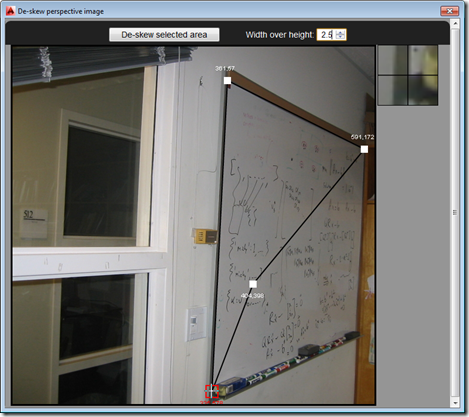
So after several posts leading up to the big reveal, as it were, in today's post we're going to see the full "De-skew Raster" application in action – and give you the complete source to fool around with. The main addition over where we were in the last post is the HTML5 and JavaScript UI implementation, as well as the new C# command – called DESKEW – that loads and displays it: Our JavaScript code uses the new JavaScript API in AutoCAD 2014 to execute the other command (DESKEW_IMAGE, which we saw implemented last time) that drives the core Python…
-
In this previous post, we saw some of the issues around executing standard Python code to de-skew raster images inside IronPython (and the effects those differences can have on the results). In this post, we're going to build the ability to execute our Python code from a .NET module loaded inside AutoCAD with the help of IronPython. The next step will be to add in an HTML5 user interface that calls into AutoCAD using the JavaScript API introduced in AutoCAD 2014. Things have changed a bit since we first saw IronPython inside AutoCAD, most notably the additional of the dynamic…
-
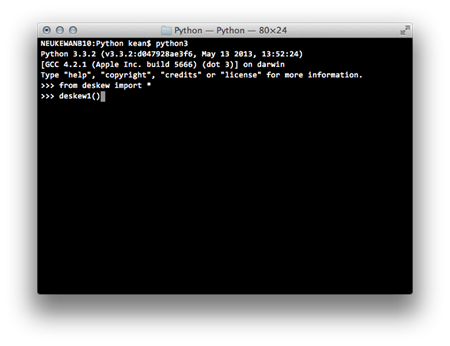
As part of the project I'm working on to deskew perspective images and insert them as RasterImage entities inside AutoCAD, I spent quite some time migrating pure Python code – a good deal of which I had to create for various assignments as part of the linear algebra class I've now finished – for it to work inside IronPython. For those of you who aren't familiar with it, IronPython is a variant of Python that works with .NET via the Dynamic Language Runtime. Making it really easy to integrate with AutoCAD. The code as it stood previously was working inside…
-
I'm sitting at Geneva airport, waiting to board a Swiss flight to the UK. I've been hacking away in Python – and now IronPython – for the last few days, which has been very interesting. Here's a quick update on that… I'm now managing to save out PNGs of the de-skewed portions of perspective photographs with a high degree of quality, if not with exceptional speed. I'll post a little on the approaches I tried out – and settled on – when I get the chance. It's now time to get the code working inside AutoCAD: I have the basic…
-
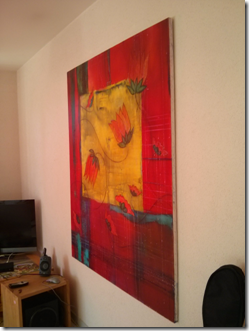
I've managed to find the time to make good progress on my linear algebra class, which means I have an update to share on the image deskewing project I mentioned last week. Thanks to all of you who provided comments on that post, by the way: there's some really valuable information there. The current implementation has been developed in Python and runs completely separately from AutoCAD. Here's my rough integration plan to get it working in an AutoCAD plug-in: Adapt the code to make sure it can easily be applied to other images. Remove any dependencies that might stop the…
-
Another really interesting, developer-oriented feature in AutoCAD 2013 is something we've been calling "Dynamic .NET". I don't know whether that's official branding, or not – I suspect not – but it's the moniker we've been using to describe this capability internally and to ADN members. The capability is based on an addition to .NET in version 4.0: to complement (or perhaps just as part of) the integration of the Dynamic Language Runtime into the core .NET Framework, various interfaces – including IDynamicMetaObjectProvider – were provided to developers to let their objects participate in "dynamic" operations. Providers of APIs therefore now…
-
I've arrived at the end of my AU+East Asia tour, having spent the last 2 weeks in Las Vegas, San Francisco, Tokyo, Seoul and now Beijing. My blog is blocked by the Great Firewall of China, so while I can post this content via Typepad I can't see the results (although I'm told I should be able to VPN into our Singapore office to bypass this restriction – I'll give that a try, later on). Later today (and today is currently Friday December 11th in China 🙂 you should be able to gain access to the sessions I delivered at…
-
This post was heavily inspired by the code presented by my old friend Albert Szilvasy during his excellent AU class on using .NET 4.0 with AutoCAD. Albert took a different approach to the one I've previously adopted (which turns out also to have been suggested by Albert, when I look back at my original post), and created a palette to host IronPython code inside AutoCAD, enabling the ability to enter code directly in AutoCAD rather than relying on an external text file. In this post we'll take Albert's technique and implement a command-line interface for querying and executing IronPython script.…
-
Seeing Jeremy's post from Friday, I decided to give you a quick update of where I am with my own preparation for this year's Autodesk University. I'm delivering two sessions, this year: CP9214-1 AutoCAD® .NET – Developing for AutoCAD Using F# CP208-1 AutoCAD® .NET – Developing for AutoCAD Using IronPython and IronRuby So yes, it seems as though I'm carving out a niche for myself as "the quirky languages guy". 🙂 The first one of these is actually a virtual session, and will be broadcast twice during the week of AU. It's one I presented already, last year, and here…
-
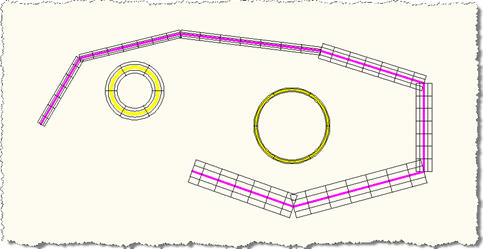
To continue my investigations into IronPython and the fun I'm having with overrules, I decided to to port my most recent C# overrule implementation across to IronPython. I've also been trying to do the same for IronRuby, but – so far – without luck. Please refer back to one of the previous IronPython posts for the PYLOAD command implementation needed to load our Python script into AutoCAD. Here are the contents of our .py file: import clr path = 'C:\\Program Files\\Autodesk\\AutoCAD 2010\\' clr.AddReferenceToFileAndPath(path + 'acdbmgd.dll') clr.AddReferenceToFileAndPath(path + 'acmgd.dll') import Autodesk import Autodesk.AutoCAD.Runtime as ar import Autodesk.AutoCAD.ApplicationServices as aas import…