Making AutoCAD less noisy when debugging

Thanks for George Varghese and Albert Szilvasy from the AutoCAD Engineering team for this helpful tip (culled from an internal email discussion).

If you've ever wondered how to reduce the noise AutoCAD makes in Visual Studio's output window while debugging – at least since AutoCAD 2009, when we integrated WPF for user-interface components such as the ribbon – then this post will be of help to you.

Here's the window we're talking about, which fills with messages from the application being debugged (in this case AutoCAD, whose acad.exe needs to be listed in the Debug properties under Start external program):
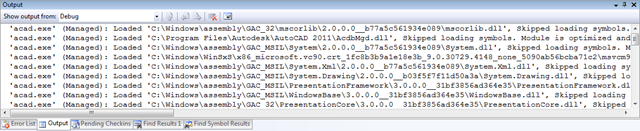
Visual Studio's output window

It's possible to edit the acad.exe.config file – found in the the same folder as the acad.exe you're debugging, such as C:\Program Files\Autodesk\AutoCAD 2011 – to add some entries asking the WPF binding trace provider to lower the volume.

Here are the lines you need to add, in bold:

<configuration>

<!--

  <startup useLegacyV2RuntimeActivationPolicy="true">

    <supportedRuntime version="v4.0"/>

  </startup>

-->


<!--All assemblies in AutoCAD are fully trusted so there's no point generating publisher evidence-->

  <runtime>       

    <generatePublisherEvidence enabled="false"/>   

  </runtime>


  <system.diagnostics>

    <sources>

      <source name="System.Windows.Data" switchName="SourceSwitch">

        <listeners>

          <remove name="Default" />

        </listeners>

      </source>

    </sources>

  </system.diagnostics>

</configuration>

To give you an idea of the effect, the number of lines in Visual Studio's Output window went from 135 lines of content to 38 for similar debugging operations on my system, simply by adding these lines to acad.exe.config.

9 responses to “Making AutoCAD less noisy when debugging”

  1. Neat tip. Definatly will give this a try, I use the debug output alot.

    Now if you only had a way do do Edit and Continue on a 64 bit computer. I don't know if you've run into this, but VS cannot do edit and continue on a 64 bit process, and since you can't install 32 bit AutoCAD when running 64 bit windows, there is not much you can do about it.

  2. Maxence DELANNOY Avatar
    Maxence DELANNOY

    You made my day. These messages were really annoying.

  3. I find it's often easier* to build whatever it is I'm working on as a Windows application; I can then simply bolt it onto whichever parent application it's targeted at - in my case mostly Autodesk Inventor lately.

    *If for instance you're building an "auto-complete form" that uses linq-to-sql to populate standards fields and don't want to wait for 64-bit Inventor to load each and every time you want to test it.

  4. It seems Edit & Continue of 64-bit apps is planned for the next release of Visual Studio, although I dare say that's little consolation for the next few years.

    When Civil 3D supported 64-bit Windows via a 32-bit executable, it was possible to use that for this kind of purpose (even just using the AutoCAD part of it), but as C3D now supports 64-bit natively (I believe), this no longer appears to be an option.

    So yes, a bit of a pain, I agree.

    Kean

  5. Hi Kean,

    It's a long time since you wrote this but on the off chance, is there a similar option to switch off the following error output. I think the appropriate "switchName" is what I need.

    System.Windows.Media.Animation Warning: 6 : Unable to perform action because the specified Storyboard was never applied to this object for interactive control.; Action='Stop'; Storyboard='System.Windows.Media.Animation.Storyboard'; Storyboard.HashCode='13014940'; Storyboard.Type='System.Windows.Media.Animation.Storyboard'; TargetElement='Autodesk.Private.Windows.RibbonPanelControl'; TargetElement.HashCode='9993078'; TargetElement.Type='Autodesk.Private.Windows.RibbonPanelControl'

    Thanks,

    Phil

  6. Actually I have worked it out. The switchName remains the same. Just the "name" changes to the assembly name shown in the error message. Adding Sources to my config with "name" values of:

    name="System.Windows.Media.Animation"; and, name="System.Windows.ResourceDictionary"

    removed all my AutoCAD generated debug messages from the output window.

  7. Hi Phil,

    Perfect - thanks for letting me know (and before I started any research :-).

    Nice to hear from you, by the way: it's been a while!

    Regards,

    Kean

  8. Hi Kean,

    I'm trying to find the intersection points between two 3D objects. Consistently getting an exception. Is this not possible yet? (Using the API for 2014) - would there be an alternative?

    Thanks in advance.
    dm

  9. Hi dm,

    It should work: I suggest posting some code (and a DWG, if needed to repro) via the appropriate discussion forum or to the ADN team, if you're a member.

    Regards,

    Kean

Leave a Reply

Your email address will not be published. Required fields are marked *