I've been meaning to play around with the Python language for some time, now, and with the recent release of IronPython 2 it seems a good time to start.
Why Python? A number of people in my team – including Jeremy Tammik and the people within our Media & Entertainment workgroup who support Python's use with Maya and MotionBuilder – are fierce proponents of the language. I'm told that it's an extremely easy, general-purpose, dynamic programming language. All of which sounds interesting, of course, although I have to admit I'm less convinced of the importance of the dynamic piece: I've found a lot of value in static typing over the years (even F# is statically typed, although many people – even some who work with it - don't realise this… its type inference system allows you to code safely without specifying types all over the place).
Let's take a quick step back and talk about what makes a language dynamic. The most common example of a dynamic language – one that I'm sure most of you will have touched at some point – is JavaScript. In JavaScript you declare everything as a var, assign it, call methods on it and hope that they work at runtime. I admit that I've always disliked developing in JavaScript because of the lack of decent tool support: I'm a big fan of Intellisense (based on an object's design-time type) and want the compiler to tell me if I'm dealing with an object that doesn't support a particular method. But perhaps that's largely what I've become used to from modern development tools, and I'm trying to remain open to new things. Really, I am.
Another dynamic language with which I've had much more favourable (but still, at times, frustrating) experiences is LISP. But my relationship with LISP is different: like most early AutoCAD programmers I adopted it out of necessity – and at the time I started with it programming environments were, in any case, generally very basic - I then grew to love it and have since never forgotten it, even when more attractive/productive development environments came along. So I'm extremely loathe to paint it with the same brush as the one I've used for JavaScript.
Python is also of interest because of its cross-platform availability: it's an open source language with its roots in the UNIX/Linux world, but is now gaining popularity across a variety of OS platforms (one of the reasons it's the scripting language chosen for at least one of our cross-platform products, Autodesk Maya).
Microsoft is definitely now very open to the possibilities of dynamic languages: they're making a significant investment in the Dynamic Language Runtime, to support languages such as IronPython and IronRuby, as well as adding more dynamic features with C# 4.0 (which is finally going to get something comparable to VB's "late binding" capability).
So all in all, the world we live in seems to be becoming increasingly dynamic. 🙂
Anyway – now on to getting IronPython working with AutoCAD. I had originally hoped to build a .NET assembly directly using IronPython – something that appears to have been enabled with the 2.0 release of IronPython - which could then be loaded into AutoCAD. Unfortunately this was an exercise in frustration: AutoCAD makes heavy use of custom attributes for identifying commands etc., but IronPython doesn't currently support the use of attributes. It is possible to do some clever stuff by compiling attributed C# on-the-fly and deriving classes from it (information on this is available here), which will – in theory, at least – get you something in memory that's attributed but, as AutoCAD scans the physical assembly for custom attributes before loading it, this didn't help. I also spent a great deal of time just trying to derive a class from Autodesk.AutoCAD.Runtime.IExtensionApplication – to have the Initialize() function called automatically on load – but I just couldn't get this to work, either.
Then, thankfully, Tim Riley came to the rescue: we've been in touch on and off over the years since he started the PyAcad.NET project to run IronPython code inside AutoCAD, and Tim was able to put together some working code which actually registered commands (after I'd pointed him at a function he could use from AutoCAD 2009's acmgdinternal.dll – an unsupported assembly that exposes some otherwise quite helpful functions). He ended up choosing an implementation that had also been suggested to me by Albert Szilvasy: to implement a PYLOAD command using C# which allows selection and loading of a Python script (because Python is, ultimately, all about scripting rather than building static, compiled assemblies).
Before we get on to the C# module, I should point out that I installed IronPython 2.0.1 as well as IronPython Studio 1.0 for the Visual Studio 2008 integration. It turns out that as we're relying on C# to manage the loading of Python – rather than compiling a .NET assembly – the main advantage of IronPython Studio is around the ability to work with Python source code inside Visual Studio.
To build the below C# code into a standard .NET Class Library assembly (a .DLL) you'll need to add assembly references to IronPython.dll, IronPython.Modules.dll, Microsoft.Scripting.dll and Microsoft.Scripting.Core.dll – all of which can be found in the main IronPython install folder (on my system this is in "C:\Program Files\IronPython 2.0.1"). As well as the standard references to acmgd.dll and acdbmgd.dll, of course.
Here's the C# code:
using Autodesk.AutoCAD.ApplicationServices;
using Autodesk.AutoCAD.DatabaseServices;
using Autodesk.AutoCAD.Runtime;
using Autodesk.AutoCAD.EditorInput;
using IronPython.Hosting;
using Microsoft.Scripting.Hosting;
using System;
namespace PythonLoader
{
public class CommandsAndFunctions
{
[CommandMethod("-PYLOAD")]
public static void PythonLoadCmdLine()
{
PythonLoad(true);
}
[CommandMethod("PYLOAD")]
public static void PythonLoadUI()
{
PythonLoad(false);
}
public static void PythonLoad(bool useCmdLine)
{
Document doc =
Application.DocumentManager.MdiActiveDocument;
Editor ed = doc.Editor;
short fd =
(short)Application.GetSystemVariable("FILEDIA");
// As the user to select a .py file
PromptOpenFileOptions pfo =
new PromptOpenFileOptions(
"Select Python script to load"
);
pfo.Filter = "Python script (*.py)|*.py";
pfo.PreferCommandLine =
(useCmdLine || fd == 0);
PromptFileNameResult pr =
ed.GetFileNameForOpen(pfo);
// And then try to load and execute it
if (pr.Status == PromptStatus.OK)
ExecutePythonScript(pr.StringResult);
}
[LispFunction("PYLOAD")]
public ResultBuffer PythonLoadLISP(ResultBuffer rb)
{
const int RTSTR = 5005;
Document doc =
Application.DocumentManager.MdiActiveDocument;
Editor ed = doc.Editor;
if (rb == null)
{
ed.WriteMessage("\nError: too few arguments\n");
}
else
{
// We're only really interested in the first argument
Array args = rb.AsArray();
TypedValue tv = (TypedValue)args.GetValue(0);
// Which should be the filename of our script
if (tv != null && tv.TypeCode == RTSTR)
{
// If we manage to execute it, let's return the
// filename as the result of the function
// (just as (arxload) does)
bool success =
ExecutePythonScript(Convert.ToString(tv.Value));
return
(success ?
new ResultBuffer(
new TypedValue(RTSTR, tv.Value)
)
: null);
}
}
return null;
}
private static bool ExecutePythonScript(string file)
{
// If the file exists, let's load and execute it
// (we could/should probably add some more robust
// exception handling here)
bool ret = System.IO.File.Exists(file);
if (ret)
{
ScriptEngine engine = Python.CreateEngine();
engine.ExecuteFile(file);
}
return ret;
}
}
}
The code behind the PYLOAD command is actually really simple. I could have kept it basic but decided it would be a good opportunity to show some best practices. So not only do we have the standard PYLOAD command, which respects the FILEDIA variable to decide whether to use dialogs or the command-line, we also have a command-line version –PYLOAD and a LISP function (pyload). All of which call into the same function to load a Python script.
OK, now let's take a look at a simple IronPython script that calls into AutoCAD via its .NET API. Thanks again to Tim Riley for providing something that works. Even with Python being (apparently) so easy to learn, I'm such a neophyte that without his help I'd still be stumbling around in the dark.
import clr
path = 'C:\\Program Files\\Autodesk\\AutoCAD 2009\\'
clr.AddReferenceToFileAndPath(path + 'acdbmgd.dll')
clr.AddReferenceToFileAndPath(path + 'acmgd.dll')
clr.AddReferenceToFileAndPath(path + 'acmgdinternal.dll')
import Autodesk
import Autodesk.AutoCAD.Runtime as ar
import Autodesk.AutoCAD.ApplicationServices as aas
import Autodesk.AutoCAD.DatabaseServices as ads
import Autodesk.AutoCAD.Geometry as ag
import Autodesk.AutoCAD.Internal as ai
from Autodesk.AutoCAD.Internal import Utils
# Function to register AutoCAD commands
# To be used via a function decorator
def autocad_command(function):
# First query the function name
n = function.__name
__
# Create the callback and add the command
cc = ai.CommandCallback(function)
Utils.AddCommand('pycmds', n, n, ar.CommandFlags.Modal, cc)
# Let's now write a message to the command-line
doc = aas.Application.DocumentManager.MdiActiveDocument
ed = doc.Editor
ed.WriteMessage("\nRegistered Python command: {0}", n)
# A simple "Hello World!" command
@autocad_command
def msg():
doc = aas.Application.DocumentManager.MdiActiveDocument
ed = doc.Editor
ed.WriteMessage("\nOur test command works!")
# And one to do something a little more complex...
# Adds a circle to the current space
@autocad_command
def mycir():
doc = aas.Application.DocumentManager.MdiActiveDocument
db = doc.Database
tr = doc.TransactionManager.StartTransaction()
bt = tr.GetObject(db.BlockTableId, ads.OpenMode.ForRead)
btr = tr.GetObject(db.CurrentSpaceId, ads.OpenMode.ForWrite)
cir = ads.Circle(ag.Point3d(10,10,0),ag.Vector3d.ZAxis, 2)
btr.AppendEntity(cir)
tr.AddNewlyCreatedDBObject(cir, True)
tr.Commit()
tr.Dispose()
As we're stuck without the ability to use custom attributes in IronPython, we're making use of the Autodesk.AutoCAD.Internal namespace to register commands at runtime. I don't like doing this, but at the same time I was left with little choice, unless we choose to find another way to call into the code. Please be warned that anything contained in the Autodesk.AutoCAD.Internal namespace is unsupported functionality, and subject to change without warning.
Now that I have that off my chest, let's comment a little further on the above code…
- Even without custom attributes, we have used a pretty cool Python language feature known as decorators (thanks *again* for the tip, Tim 🙂 which helps us to mark functions as commands. The autocad_command function is called for each decorated function, and this is where we register a command for the function based on the function's name. Pretty cool.
- You'll notice a distinct lack of types in the code (and yes, that still scares me). When I was previously trying to compile a DLL based on this code, I had a lot of trouble getting anything at all to fail at compile-time, but clearly a lot would fail at runtime (when I could actually get anything to execute :-S). I feel as though I still need to get my head around this trade-off: I can see the argument for simplicity/elegance/succinctness – and even the power it brings in some situations - but the Computer Scientist in me is screaming for safety/reliability/determinism/debuggability (if that's even a word). Oh well. The main thing is that I'm starting the journey, at least: we'll see if it ends up somewhere I like. 🙂
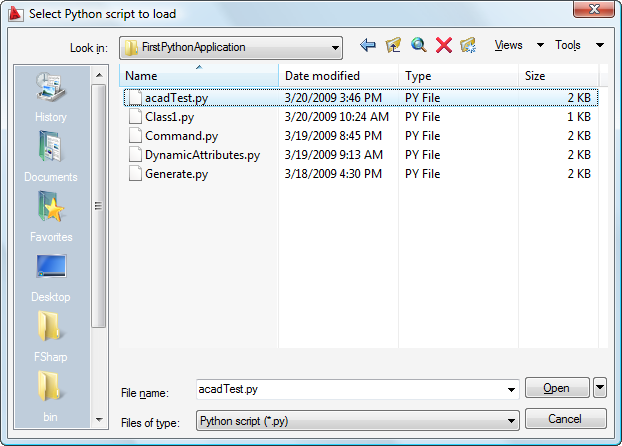
When we build and NETLOAD our PythonLoader C# application and execute the PYLOAD command, we can select our Python script:
Command: PYLOAD
Once selected, the script gets loaded and should register a couple of commands:
Registered Python command: msg
Registered Python command: mycir
Running the MSG command will execute a simple "Hello World!"-like function, just printing a message to the command-line:
Command: MSG
Our test command works!
And running the MYCIR command should just add a simple circle to the current space in the active drawing.
Command: MYCIR

That's it for my initial foray into the world of Python. I hope you've found this helpful and enjoy playing around with the Python programming language inside AutoCAD. Please do post a comment if you have experiences or anecdotes to share on this topic!


Leave a Reply