Inventor
-

A few years ago I mentioned that my team was looking into learning paths for novice programmers. This effort has led to the "My First Plug-In" series, of which we now have two guides ready: My First Revit Plug-In My First Inventor Plug-In This series is really intended for power-users of Autodesk software who want to take their use of our products to the next level, but need some targeted help on the programming side of things. We currently have guides for Maya and AutoCAD in the works. While many of this blog's readership won't need this kind of assistance,…
-
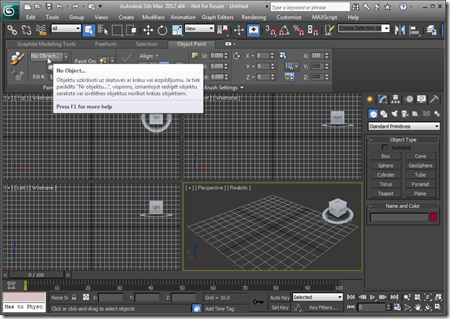
After adding Revit and then Inventor support to the original AutoCAD application, it made sense to go ahead and include support for 3ds Max. Here's a solution supporting these four products (and their verticals). And I can now confirm that a version of this application will be September's Plugin of the Month on Autodesk Labs. You may have noticed a lot of UI consistency introduced across these Autodesk products, in recent years, mainly due to a coordinated push from our product teams for a more consistent user experience. An internal acronym was used for the project driving consistency across these…
-
As you're probably mostly aware, many of our 2012 products use .NET 4 as standard. This has proven "interesting" (i.e. challenging) when it comes to loading – for example – plugin DLLs downloaded from the web, due to .NET's updated security model. Our ADN Plugins of the Month on Autodesk Labs are a prime example: most were posted prior to AutoCAD 2012 shipping, but when downloaded locally and NETLOADed into AutoCAD 2012, very often a security error gets reported: Cannot load assembly. Error details: System.IO.FileLoadException: Could not load file or assembly 'file:///C:\Program Files\Autodesk\AutoCAD 2012 – English\ADNPlugin-QRCodes.dll' or one of its…
-
Once again, it turned out to be pretty straightforward to add Inventor support to our TransTips application. We now have a single solution which builds plugins for AutoCAD, Inventor and Revit. The plugins share a common translation and caching engine as well as a WPF graphical user interface for selecting languages. Here's a demonstration of the various plugins in action: I've fixed the right-to-left issue highlighted in the video, incidentally. The next steps are to implement an in-product editing capability and then perhaps to support 3ds Max. One great aspect of this project is that I'm getting to learn a…