Embedding fields in an AutoCAD table using .NET

This post is in response to a few requests I've received to show how to embed fields in tables. It follows on from this previous post, where we looked at how to embed a block preview icon in a table. The technique I'm showing in this post is far from being specific to tables, however. You could very easily use it for any other text object that supports fields inside AutoCAD (MText, Text, Attributes, etc.)

Fields are very cool objects: they allow you to access a very wide array of information and embed them inside textual objects in AutoCAD. A field is an object, but can be defined by a text string containing angled-brackets etc. that AutoCAD interprets and regenerates at different times during execution (on regen, on drawing load etc. - check out the FIELDEVAL system variable for more details on that). The simplest way to create field objects in your applications is simply to embed a correctly formatted string: all being well, AutoCAD will understand it to represent a field and will create the corresponding object behind the scenes. Easy! 🙂

To understand in detail how the field mechanism works, I'd suggest checking out the TextFileField sample on the ObjectARX SDK. This is a C++ sample I created back when fields were first introduced (2005, if I recall correctly), to show how to implement your own custom field. This particular one links to a text file and embeds the file's contents in the container object.

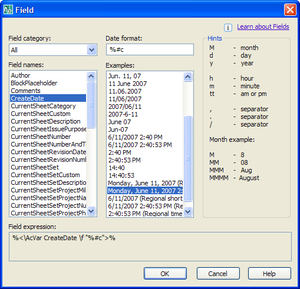
There are various standard fields available inside AutoCAD. You can access document-level information (such as the author of the drawing) or system-level information (such as the current date). To get started with fields, I recommend using the FIELD command to bring up the field-definition dialog (also accessible from the MTEXT toolbar, among other places). This dialog allows you to configure the vast majority of fields, including formatting codes, which are not explicitly documented.
Fields_1

Of the various standard fields that come with AutoCAD, the one I find most appealing - as a programmer - is the AcObjProp field, which provides the ability to access COM properties from a field object. This is really very cool - you basically pass in the object ID of the object you'd like to access, and the COM Automation property you'd like to read, and the field does the rest. This opens up enormous possibilities, as it ultimately allows you access to *any* object property, assuming it's exposed through COM (and developers often expose their custom objects via COM as it allows integration with the Property Palette and the ability to manipulate these objects via VBA).

Let's look at the string we'd like to add to our code. The plan is to add a column to our table that includes a boolean (Yes/No) indicating whether the block definition is dynamic, or not.

Here's an example of a string we can embed directly in the table cell to do this:

%<\AcObjProp Object(%<\_ObjId 2130399456>%).IsDynamicBlock>%

Breaking it down:

  • The first and last two characters tell AutoCAD the extents of the field definition
  • The AcObjProp string tells AutoCAD we're dealing with an object property
  • The Object string tells AutoCAD we're about to refer to an object
  • The _ObjId field points to an object by it's internal Object ID
  • The property we want to access is IsDynamicBlock

Object IDs are only valid for a particular session, so this number can never be hard-coded. AutoCAD is clever enough to remap these throughout the drawing whenever it is loaded, however, which allows you to reopen drawings and the properties still to be accessible by fields.

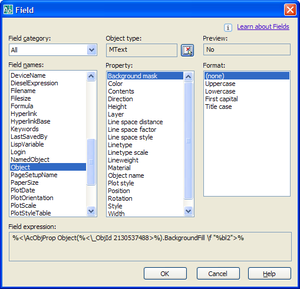
If you were to see this field embedded in a text object, it would display a grey box containing either "0" or "1", the results of calling the IsDynamicBlock property for a particular block definition (which is what needs to be pointed at by that particular Object ID, by the way). This isn't ideal, as we'd like to use a text string. You can apply formatting codes to the results of the AcObjProp field, by specifying /f. The specific codes - as mentioned previously - are not documented, but the FIELD command allows you to find out what they should be. The trick is to find a property that is of the same datatype as yours, and copy the formatting code.

For instance, I used the MText.BackgroundFill property (also a Boolean) to help me work out that the formatting code I need for my property is "%bl2". Here's the FIELD dialog showing me this information:
Fields_2

So I now know that we want to add the following string (with the Object ID changed appropriately) for each of our blocks:

%<\AcObjProp Object(%<\_ObjId 2130399456>%).IsDynamicBlock \f "%bl2">%

Alright, we're finally ready for some code... 🙂

Here's the updated C# code. I haven't numbered the lines, this time, as that makes me lose a few valuable columns of width, but the changed code should be easy enough to identify - it's simply adding an additional column to our previous table (although I did put some lines in to add some column headings):

using Autodesk.AutoCAD.ApplicationServices;

using Autodesk.AutoCAD.DatabaseServices;

using Autodesk.AutoCAD.EditorInput;

using Autodesk.AutoCAD.Geometry;

using Autodesk.AutoCAD.Runtime;

namespace TableCreation

{

  public class Commands

  {

    [CommandMethod("CRT")]

    static public void CreateTable()

    {

      Document doc =

        Application.DocumentManager.MdiActiveDocument;

      Database db = doc.Database;

      Editor ed = doc.Editor;

      PromptPointResult pr =

        ed.GetPoint("\nEnter table insertion point: ");

      if (pr.Status == PromptStatus.OK)

      {

        Transaction tr =

          doc.TransactionManager.StartTransaction();

        using (tr)

        {

          BlockTable bt =

            (BlockTable)tr.GetObject(

              doc.Database.BlockTableId,

              OpenMode.ForRead

            );

          Table tb = new Table();

          tb.TableStyle = db.Tablestyle;

          tb.NumRows = 5;

          // Added an additional column for the block image

          // and one for the "is dynamic" flag

          tb.NumColumns = 5;

          tb.SetRowHeight(3);

          tb.SetColumnWidth(15);

          tb.Position = pr.Value;

          // Create a 2-dimensional array

          // of our table contents

          string[,] str = new string[5, 4];

          str[0, 0] = "Part No.";

          str[0, 1] = "Name ";

          str[0, 2] = "Material ";

          str[1, 0] = "1876-1";

          str[1, 1] = "Flange";

          str[1, 2] = "Perspex";

          str[2, 0] = "0985-4";

          str[2, 1] = "Bolt";

          str[2, 2] = "Steel";

          str[3, 0] = "3476-K";

          str[3, 1] = "Tile";

          str[3, 2] = "Ceramic";

          str[4, 0] = "8734-3";

          str[4, 1] = "Kean";

          str[4, 2] = "Mostly water";

          // Use a nested loop to add and format each cell

          for (int i = 0; i < 5; i++)

          {

            for (int j = 0; j < 3; j++)

            {

              tb.SetTextHeight(i, j, 1);

              tb.SetTextString(i, j, str[i, j]);

              tb.SetAlignment(i, j, CellAlignment.MiddleCenter);

            }

            // Adding title information for additional columns

            if (i == 0)

            {

              tb.SetTextHeight(i, 3, 1);

              tb.SetTextString(i, 3, "Block Preview");

              tb.SetAlignment(i, 3, CellAlignment.MiddleCenter);

              tb.SetTextHeight(i, 4, 1);

              tb.SetTextString(i, 4, "Is Dynamic?");

              tb.SetAlignment(i, 4, CellAlignment.MiddleCenter);

            }

            // If a block definition exists for a block of our

            // "name" field, then let's set it in the 4th column

            if (bt.Has(str[i, 1]))

            {

              ObjectId objId = bt[str[i, 1]];

              tb.SetBlockTableRecordId(i, 3, objId, true);

              // And then we use a field to check on whether

              // it's a dynamic block or not

              string strObjId = objId.ToString();

              strObjId = strObjId.Trim(new char[] {'(',')'});

              tb.SetTextHeight(i, 4, 1);

              tb.SetTextString(

                i,

                4,

                "%<\\AcObjProp Object(%<\\_ObjId "

                  + strObjId

                  +">%).IsDynamicBlock \\f \"%bl2\">%"

              );

              tb.SetAlignment(i, 4, CellAlignment.MiddleCenter);

            }

          }

          tb.GenerateLayout();

          BlockTableRecord btr =

            (BlockTableRecord)tr.GetObject(

              bt[BlockTableRecord.ModelSpace],

              OpenMode.ForWrite

            );

          btr.AppendEntity(tb);

          tr.AddNewlyCreatedDBObject(tb, true);

          tr.Commit();

        }

      }

    }

  }

}

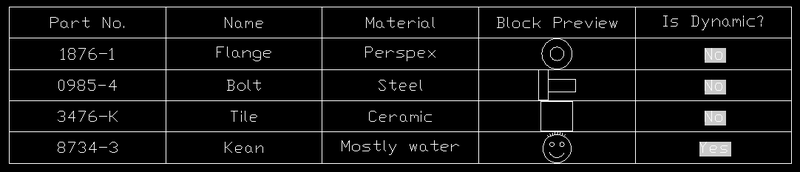
And here are the results of running the CRT command, assuming the KEAN block is the only dynamic one of the four:
Fields_3

25 responses to “Embedding fields in an AutoCAD table using .NET”

  1. Kélcyo Pereira Avatar
    Kélcyo Pereira

    Quando falei, manipulação de campo, seria criar e atribuir um valor para o mesmo. Exemplo:
    campo nome - Formato
    campo valor - A1
    campo nome - Titulo
    campo valor - Pipeline of GASCAV
    e depois sim, fazer a inserção em uma tabela.

    "When I spoke, manipulation of field, would be to create and to attribute a value for the same.
    e.g.
    field name - Format
    field value - A1
    field name - Titulo
    field value - Pipeline of GASCAV
    e later yes, to make the insertion in a table."

  2. Kean Walmsley Avatar

    Fields get information - they do not set it. So you would need to make sure your Format (i.e. PaperSize) and Title properties for the document were correct, and then you could use the following strings to embed the fields appropriately (you can find these via the FIELD command, as mentioned in this article):

    %<\AcVar PaperSize>%
    %<\AcVar Title>%

    Kean

  3. Roland Feletic Avatar
    Roland Feletic

    Hi Kean,
    thank you again for your code. At the moment I'm trying to insert a block with attributes into a drawing. With AttributeReference.HasFields I know if the attributereference has fields or not. It would be great if you could show us how to get the field-text of an attributereference.

    Regards
    Roland

  4. Kélcyo Pereira Avatar
    Kélcyo Pereira

    Por coincidência eu coloquei campos que existem no cad, mais e se for campos criados?
    Ou se for de um bloco com atributo que eu insiro número?
    Como fazer a soma dos mesmos atributos de vários blocos?

    " For coincidence I more placed fields that exist in cad, and he will be fields bred? Or one will be of a block with attribute that I insert number?
    How to make the addition of the same attributes of some blocks?"

  5. Kélcyo,

    I don't know whether it's the automatic translation, but I have trouble understanding what you need. I think it might be related to custom fields (in which case, see the TextFileField ObjectARX SDK sample).

    Regards,

    Kean

  6. Pedro Ferreira Avatar

    I will try to translate what Kélcyo said!
    "Por coincidência eu coloquei campos que existem no cad, mais e se for campos criados?
    Ou se for de um bloco com atributo que eu insiro número?
    Como fazer a soma dos mesmos atributos de vários blocos?"

    "For coincidence I have placed fields that exist in cad, but if more fields are created?
    Or, if it is from a block with an attribute in witch I insert a number?
    And how can I make the sum of the same attributes in the several blocks?"

    Regards
    Pedro Ferreira

  7. Kean Walmsley Avatar

    Thanks, Pedro.

    The item regarding addition of numeric attributes from different blocks is an interesting one - I'll try to take a look at that when we come to cover field/table formulae. Thanks!

    Kean

  8. Wolfgang Ruthensteiner Avatar
    Wolfgang Ruthensteiner

    Hi Kean!

    Great blog - thank you!
    My question is - how do i read back the field code with c# (from an attribute e.g.)?

    I am linking room-label blocks with polylines, using fields inside an attribute to display the polyline's area property.

    Later I want to find out programatically, which polyline a certain block is linked to by evaluating the field in the attribute (extracting the objectId).

    Regards,
    Wolfgang Ruthensteiner

  9. Kean Walmsley Avatar

    Hi Wolfgang,

    Thanks for the feedback!

    And this is such a good question that I decided to make a post out of it.

    Enjoy. 🙂

    Kean

  10. G. Scott Domingo Avatar

    Hi,
    My name is Scott,
    Can I use Fields in Titleblocks for the diplaying the filename and not show some text? I use this formula (%<\AcVar Filename \f "%tc1%fn2">%) to show the sheet number to be the filename but not show the "PATH" or "EXTENSION" but in our office we have to name the files with codes in front to not conflict with other files. For example:
    the file name will be "WH-E.1"
    and only need to show on the sheet as "E.1"
    Please Help
    Thank you very much,

    Scott

  11. Hi Scott,

    Sorry - I don't know of a way to present substrings using fields. Someone on the discussion groups (discussion.autodesk.com) may have a suggestion.

    Regards,

    Kean

  12. Why does autocad 2009LT not export the content of a field when doing upload user changes to source file (dat link to excel)???

  13. Etienne - this is the wrong forum for the question. I don't use AutoCAD LT, as I focus on development and customization.

    Please use the discussion groups.

    Kean

  14. This is probably not the correct place to post this but here goes. I have a project that I created a ton of custom properties for and I would like to export them so I can use them in different project without having to manually recreate them. Is there a way to export custom properties from one project to another?

  15. Kean Walmsley Avatar

    I'm afraid it's not clear what you mean by either project or custom properties (both are highly overloaded terms).

    And this isn't really the right place - I suggest posting a more complete quest ion to one of our online discussion groups.

    Kean

  16. Hi Kean. I tried your code above but somehow it merges the first row into a single cell showing just Part No. . Have any ideea why ?

  17. The first entry is being taken as the table header, I expect: I remember hitting something similar when creating tables for other posts. One of those may be of help to you.

    Kean

  18. Kean,
    I am developing an application where i have an XML string as a mtext attribute in an invisible block. It contains border title info along with revisions and other stuff. Is it possible to use fields in the titleblock and have autocad get the data from the XML string, or do i need to have separate attributes in the block for the info that I want populated in the fields?

  19. Kris,

    Your comment doesn't appear to relate to this post, so please submit your question to the ADN team, if you're a member, or otherwise the AutoCAD .NET Discussion Group.

    Regards,

    Kean

  20. Jamie V. Johnson Avatar
    Jamie V. Johnson

    Kean,

    In 2012, the Table object now has more features. I am able to say (in VB):
    Dim cell As Cell = dTable.Cells.Item(rowNum, 0)
    cell.Value = strField
    trans.commit
    When I do the cell gets a field, and the table shows the field value I entered, but it doesn't generate the value properly until I simply edit the field, and close it (no changes). Strange eh? Do you know how to best use the table object in the 2012 Acad? Is it still the same as you posted above or completely different?

    Thanks,

    jvj

  21. Hi jvj,

    Sorry for the late reply. I've been swamped, and don't now have time to look into this.

    Could you post it to ADN or to the AutoCAD .NET Discussion Group?

    I'm sure there's some way to programmatically trigger the update of the field.

    Regards,

    Kean

  22. Is there any other method to refer to an object besides _ObjId? Specifically, I want to insert a field into a MText that will show the Y coordinate of that MText itself. I don't want to use a block, because MText can hide its background. I look for something like "%<\AcObjProp Object(%<\_Self>%).InsertionPoint \f "%lu6%pt2%ds44%zs8">%".
    Thank you.

  23. Not that I'm aware of - but I suggest asking ADN or posting to the appropriate AutoCAD discussion group.

    Kean

  24. Hi Kean,

    Is there a way in AutoCAD .Net to display the standard Select Field dialog and on DialogResult == Ok retrieve the field or "field string"

    1. Hi Billy,

      I'm afraid I'm not working with AutoCAD, these days: please post your support questions to the AutoCAD .NET forum.

      Thanks,

      Kean

Leave a Reply to Eric Louria Cancel reply

Your email address will not be published. Required fields are marked *