I had this interesting request come in by email:
I have a problem where I have a block I need to insert into several parts of a drawing. The block has three attributes, 1. Point number, 2. Level, and 3. Code.
I would like to do the following;
1. be able to select objects in a drawing and have it insert the block and autosnap to circle centres, and auto number each point number attribute.
2. be able to manually select points which are automatically numbered.
3. it should remember the last point number.
4. have the option to renumber points if changes are made i could renumber all the points.
5. be able to extract the points & attributes, point number, x position, y position, level, & code to a comma delimited file.
The request was more for guidance than for custom development services, but I thought the topic was of general-enough interest to be worth spending some time working on.
Over the next few posts I'm going to serialize the implementation I put together, in more-or-less the order in which I implemented it. If further related enhancement requests come in - as comments or by email - then I'll do what I can to incorporate them into the solution (no guarantees, though :-).
Today's post looks at the first two items: automatic numbering of selected circles and manual selection of points that also get numbered.
During these posts (and in the code), I'll refer to these numbered blocks as "bubbles", as this implementation could be used to implement automatically numbered bubble (or balloon) dimensions. As you'll see in the next few posts, though, I've tried to keep the core number management implementation as independent as possible, so it could be used to manage a numbered list of any type of AutoCAD entity.
So, here's the initial C# code:
using Autodesk.AutoCAD.ApplicationServices;
using Autodesk.AutoCAD.Runtime;
using Autodesk.AutoCAD.DatabaseServices;
using Autodesk.AutoCAD.EditorInput;
using Autodesk.AutoCAD.Geometry;
using System.Collections.Generic;
namespace AutoNumberedBubbles
{
public class Commands : IExtensionApplication
{
// Strings identifying the block
// and the attribute name to use
const string blockName = "BUBBLE";
const string attbName = "NUMBER";
// In this version, just use a simple
// integer to take care of the numbering
private int m_bulletNumber = 0;
// Constructor
public Commands()
{
}
// Functions called on initialization & termination
public void Initialize()
{
try
{
Document doc =
Application.DocumentManager.MdiActiveDocument;
Editor ed = doc.Editor;
ed.WriteMessage(
"\nBAP Create bubbles at points" +
"\nBIC Create bubbles at the center of circles"
);
}
catch
{ }
}
public void Terminate()
{
}
// Command to create bubbles at points selected
// by the user - loops until cancelled
[CommandMethod("BAP")]
public void BubblesAtPoints()
{
Document doc =
Application.DocumentManager.MdiActiveDocument;
Database db = doc.Database;
Editor ed = doc.Editor;
Autodesk.AutoCAD.ApplicationServices.
TransactionManager tm =
doc.TransactionManager;
Transaction tr =
tm.StartTransaction();
using (tr)
{
// Get the information about the block
// and attribute definitions we care about
BlockTableRecord ms;
ObjectId blockId;
AttributeDefinition ad;
List<AttributeDefinition> other;
if (GetBlock(
db, tr, out ms, out blockId
))
{
GetBlockAttributes(
tr, blockId, out ad, out other
);
// By default the modelspace is returned to
// us in read-only state
ms.UpgradeOpen();
// Loop until cancelled
bool finished = false;
while (!finished)
{
PromptPointOptions ppo =
new PromptPointOptions("\nSelect point: ");
ppo.AllowNone = true;
PromptPointResult ppr =
ed.GetPoint(ppo);
if (ppr.Status != PromptStatus.OK)
finished = true;
else
// Call a function to create our bubble
CreateNumberedBubbleAtPoint(
db, ms, tr, ppr.Value,
blockId, ad, other
);
tm.QueueForGraphicsFlush();
tm.FlushGraphics();
}
}
tr.Commit();
}
}
// Command to create a bubble at the center of
// each of the selected circles
[CommandMethod("BIC")]
public void BubblesInCircles()
{
Document doc =
Application.DocumentManager.MdiActiveDocument;
Database db = doc.Database;
Editor ed = doc.Editor;
// Allow the user to select circles
TypedValue[] tvs =
new TypedValue[1] {
new TypedValue(
(int)DxfCode.Start,
"CIRCLE"
)
};
SelectionFilter sf =
new SelectionFilter(tvs);
PromptSelectionResult psr =
ed.GetSelection(sf);
if (psr.Status == PromptStatus.OK &&
psr.Value.Count > 0)
{
Transaction tr =
db.TransactionManager.StartTransaction();
using (tr)
{
// Get the information about the block
// and attribute definitions we care about
BlockTableRecord ms;
ObjectId blockId;
AttributeDefinition ad;
List<AttributeDefinition> other;
if (GetBlock(
db, tr, out ms, out blockId
))
{
GetBlockAttributes(
tr, blockId, out ad, out other
);
// By default the modelspace is returned to
// us in read-only state
ms.UpgradeOpen();
foreach (SelectedObject o in psr.Value)
{
// For each circle in the selected list...
DBObject obj =
tr.GetObject(o.ObjectId, OpenMode.ForRead);
Circle c = obj as Circle;
if (c == null)
ed.WriteMessage(
"\nObject selected is not a circle."
);
else
// Call our numbering function, passing the
// center of the circle
CreateNumberedBubbleAtPoint(
db, ms, tr, c.Center,
blockId, ad, other
);
}
}
tr.Commit();
}
}
}
// Internal helper function to open and retrieve
// the model-space and the block def we care about
private bool
GetBlock(
Database db,
Transaction tr,
out BlockTableRecord ms,
out ObjectId blockId
)
{
BlockTable bt =
(BlockTable)tr.GetObject(
db.BlockTableId,
OpenMode.ForRead
);
if (!bt.Has(blockName))
{
Document doc =
Application.DocumentManager.MdiActiveDocument;
Editor ed = doc.Editor;
ed.WriteMessage(
"\nCannot find block definition \"" +
blockName +
"\" in the current drawing."
);
blockId = ObjectId.Null;
ms = null;
return false;
}
ms =
(BlockTableRecord)tr.GetObject(
bt[BlockTableRecord.ModelSpace],
OpenMode.ForRead
);
blockId = bt[blockName];
return true;
}
// Internal helper function to retrieve
// attribute info from our block
// (we return the main attribute def
// and then all the "others")
private void
GetBlockAttributes(
Transaction tr,
ObjectId blockId,
out AttributeDefinition ad,
out List<AttributeDefinition> other
)
{
BlockTableRecord blk =
(BlockTableRecord)tr.GetObject(
blockId,
OpenMode.ForRead
);
ad = null;
other =
new List<AttributeDefinition>();
foreach (ObjectId attId in blk)
{
DBObject obj =
(DBObject)tr.GetObject(
attId,
OpenMode.ForRead
);
AttributeDefinition ad2 =
obj as AttributeDefinition;
if (ad2 != null)
{
if (ad2.Tag == attbName)
{
if (ad2.Constant)
{
Document doc =
Application.DocumentManager.MdiActiveDocument;
Editor ed = doc.Editor;
ed.WriteMessage(
"\nAttribute to change is constant!"
);
}
else
ad = ad2;
}
else
if (!ad2.Constant)
other.Add(ad2);
}
}
}
// Internal helper function to create a bubble
// at a particular point
private Entity
CreateNumberedBubbleAtPoint(
Database db,
BlockTableRecord btr,
Transaction tr,
Point3d pt,
ObjectId blockId,
AttributeDefinition ad,
List<AttributeDefinition> other
)
{
// Create a new block reference
BlockReference br =
new BlockReference(pt, blockId);
// Add it to the database
br.SetDatabaseDefaults();
ObjectId blockRefId = btr.AppendEntity(br);
tr.AddNewlyCreatedDBObject(br, true);
// Create an attribute reference for our main
// attribute definition (where we'll put the
// bubble's number)
AttributeReference ar =
new AttributeReference();
// Add it to the database, and set its position, etc.
ar.SetDatabaseDefaults();
ar.SetAttributeFromBlock(ad, br.BlockTransform);
ar.Position =
ad.Position.TransformBy(br.BlockTransform);
ar.Tag = ad.Tag;
// Set the bubble's number
int bubbleNumber =
++m_bulletNumber;
ar.TextString = bubbleNumber.ToString();
ar.AdjustAlignment(db);
// Add the attribute to the block reference
br.AttributeCollection.AppendAttribute(ar);
tr.AddNewlyCreatedDBObject(ar, true);
// Now we add attribute references for the
// other attribute definitions
foreach (AttributeDefinition ad2 in other)
{
AttributeReference ar2 =
new AttributeReference();
ar2.SetAttributeFromBlock(ad2, br.BlockTransform);
ar2.Position =
ad2.Position.TransformBy(br.BlockTransform);
ar2.Tag = ad2.Tag;
ar2.TextString = ad2.TextString;
ar2.AdjustAlignment(db);
br.AttributeCollection.AppendAttribute(ar2);
tr.AddNewlyCreatedDBObject(ar2, true);
}
return br;
}
}
}
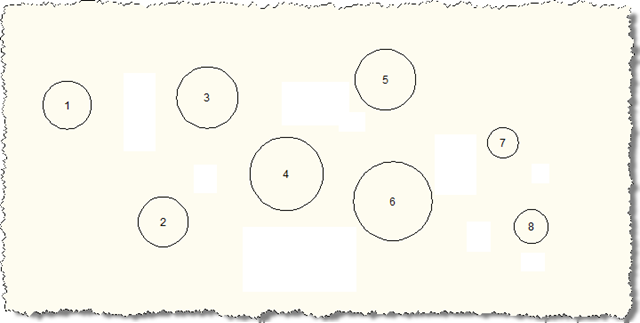
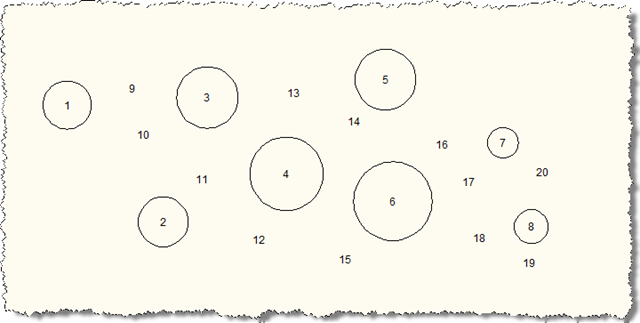
You can see only two commands have been implemented, for now: BAP (Bubbles At Points) and BIC (Bubbles In Circles). These commands will create bubbles in increasing order, starting at 1. For now there's nothing in the application to allow the numbering to continue when you reload the drawing - it will start again at 1, for now.
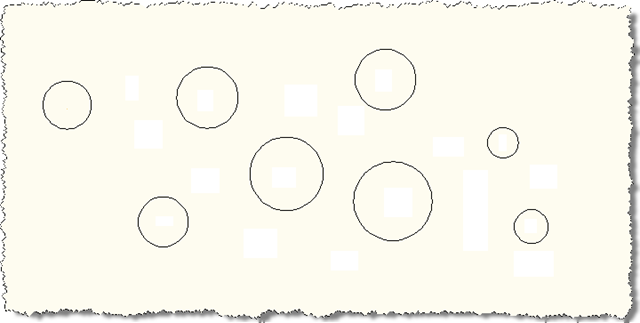
Here's a base drawing containing some circles (which you can download from here):
Here's what happens when we run the BIC command, selecting each of the circles, going from left to right:
And here's what happens after we run the BAP command, selecting a number of points at random:
In the next post we'll add some intelligence to the numbering system, by adding a class to take care of a lot of the hard work for us. We'll then implement some commands to use this class to get more control over the numbering.


Leave a Reply to Autocad designer Cancel reply