Sectioning an AutoCAD solid using .NET

In the last post we saw how to access some of the 3D modeling functionality introduced in AutoCAD 2007. This post continues that theme, by looking at how to section a Solid3d object programmatically inside AutoCAD. Thanks to Wayne Brill, from DevTech Americas, for providing the original code that inspired this post.

Here's the C# code:

using Autodesk.AutoCAD.ApplicationServices;

using Autodesk.AutoCAD.DatabaseServices;

using Autodesk.AutoCAD.EditorInput;

using Autodesk.AutoCAD.Runtime;

using Autodesk.AutoCAD.Geometry;

using System;

namespace SolidSection

{

  public class Commands

  {

    [CommandMethod("SS")]

    public void SectionSolid()

    {

      Document doc =

        Application.DocumentManager.MdiActiveDocument;

      Database db = doc.Database;

      Editor ed = doc.Editor;

      // Ask the user to select an entity to section

      PromptEntityOptions peo =

        new PromptEntityOptions(

          "\nSelect entity to section: "

        );

      peo.SetRejectMessage(

        "\nEntity must be a 3D solid, " +

        "surface, body or region."

      );

      peo.AddAllowedClass(typeof(Solid3d), false);

      peo.AddAllowedClass(

        typeof(Autodesk.AutoCAD.DatabaseServices.Surface),

        false

      );

      peo.AddAllowedClass(typeof(Body), false);

      peo.AddAllowedClass(typeof(Region), false);

      PromptEntityResult per =

        ed.GetEntity(peo);

      if (per.Status != PromptStatus.OK)

        return;

      ObjectId entId =

        per.ObjectId;

      // Ask the user to define a section plane

      Point3dCollection pts =

        new Point3dCollection();

      PromptPointResult ppr =

        ed.GetPoint("\nPick first point for section: ");

      if (ppr.Status != PromptStatus.OK)

        return;

      pts.Add(ppr.Value);

      PromptPointOptions ppo =

        new PromptPointOptions(

          "\nPick end point for section: "

        );

      ppo.BasePoint = ppr.Value;

      ppo.UseBasePoint = true;

      ppr =

        ed.GetPoint(ppo);

      if (ppr.Status != PromptStatus.OK)

        return;

      pts.Add(ppr.Value);

      // Ask what type of section to create

      PromptKeywordOptions pko =

        new PromptKeywordOptions(

          "Enter section type "

        );

      pko.AllowNone = true;

      pko.Keywords.Add("2D");

      pko.Keywords.Add("3D");

      pko.Keywords.Add("Live");

      pko.Keywords.Default = "3D";

      PromptResult pkr =

        ed.GetKeywords(pko);

      if (pkr.Status != PromptStatus.OK)

        return;

      SectionType st;

      if (pkr.StringResult == "2D")

        st = SectionType.Section2d;

      else if (pkr.StringResult == "Live")

        st = SectionType.LiveSection;

      else // pkr.StringResult == "3D"

        st = SectionType.Section3d;

      // Now we're ready to do the real work

      Transaction tr =

        db.TransactionManager.StartTransaction();

      using (tr)

      {

        try

        {

          BlockTable bt =

            (BlockTable)tr.GetObject(

              db.BlockTableId,

              OpenMode.ForRead

            );

          BlockTableRecord ms =

            (BlockTableRecord)tr.GetObject(

              bt[BlockTableRecord.ModelSpace],

              OpenMode.ForWrite

            );

          // Now let's create our section

          Section sec =

            new Section(pts, Vector3d.ZAxis);

          sec.State = SectionState.Plane;

          // The section must be added to the drawing

          ObjectId secId =

            ms.AppendEntity(sec);

          tr.AddNewlyCreatedDBObject(sec, true);

          // Set up some of its direct properties

          sec.SetHeight(

            SectionHeight.HeightAboveSectionLine,

            3.0

          );

          sec.SetHeight(

            SectionHeight.HeightBelowSectionLine,

            1.0

          );

          // ... and then its settings

          SectionSettings ss =

            (SectionSettings)tr.GetObject(

              sec.Settings,

              OpenMode.ForWrite

            );

          // Set our section type

          ss.CurrentSectionType = st;

          // We only set one additional option if "Live"

          if (st == SectionType.LiveSection)

            sec.EnableLiveSection(true);

          else

          {

            // Non-live (i.e. 2D or 3D) settings

            ObjectIdCollection oic =

              new ObjectIdCollection();

            oic.Add(entId);

            ss.SetSourceObjects(st, oic);

            if (st == SectionType.Section2d)

            {

              // 2D-specific settings

              ss.SetVisibility(

                st,

                SectionGeometry.BackgroundGeometry,

                true

              );

              ss.SetHiddenLine(

                st,

                SectionGeometry.BackgroundGeometry,

                false

              );

            }

            else if (st == SectionType.Section3d)

            {

              // 3D-specific settings

              ss.SetVisibility(

                st,

                SectionGeometry.ForegroundGeometry,

                true

              );

            }

            // Finish up the common 2D/3D settings

            ss.SetGenerationOptions(

              st,

              SectionGeneration.SourceSelectedObjects |

              SectionGeneration.DestinationFile

            );

          }

          // Open up the main entity

          Entity ent =

            (Entity)tr.GetObject(

              entId,

              OpenMode.ForRead

            );

          // Generate the section geometry

          Array flEnts, bgEnts, fgEnts, ftEnts, ctEnts;

          sec.GenerateSectionGeometry(

            ent,

            out flEnts,

            out bgEnts,

            out fgEnts,

            out ftEnts,

            out ctEnts

          );

          // Add the geometry to the modelspace

          // (start by combining the various arrays,

          // so we then have one loop, not four)

          int numEnts =

            flEnts.Length + fgEnts.Length +

            bgEnts.Length + ftEnts.Length +

            ctEnts.Length;

          // Create the appropriately-sized array

          Array ents =

          Array.CreateInstance(

            typeof(Entity),

            numEnts

          );

          // Copy across the contents of the

          // various arrays

          int index = 0;

          flEnts.CopyTo(ents, index);

          index += flEnts.Length;

          fgEnts.CopyTo(ents, index);

          index += fgEnts.Length;

          bgEnts.CopyTo(ents, index);

          index += bgEnts.Length;

          ftEnts.CopyTo(ents, index);

          index += ftEnts.Length;

          ctEnts.CopyTo(ents, index);

          // Our single loop to add entities

          foreach (Entity ent2 in ents)

          {

            ms.AppendEntity(ent2);

            tr.AddNewlyCreatedDBObject(ent2, true);

          }

          tr.Commit();

        }

        catch (System.Exception ex)

        {

          ed.WriteMessage(

            "\nException: " + ex.Message

          );

        }

      }

    }

  }

}

To see the results of the various options in the SS command, I created three identical spheres in an empty drawing:
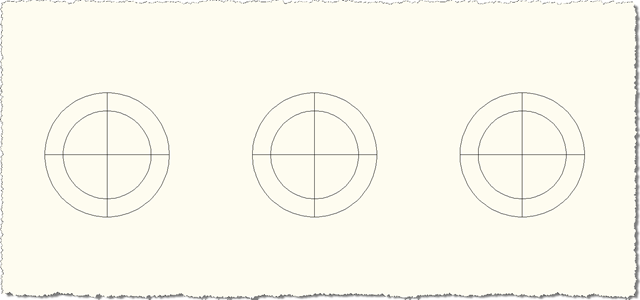
Spheres to Section

I then used the SS command, selecting each sphere in turn and selecting a similar section line for each (as close as I could get without measuring), choosing, of course, a different command option each time (2D, 3D and Live, from left to right):
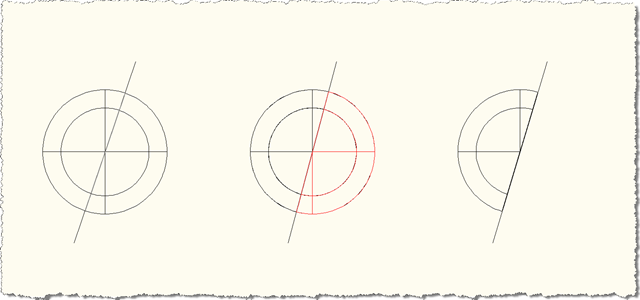
Sectioned Spheres - Plan

Orbitting this view, we see the section planes for each sphere:
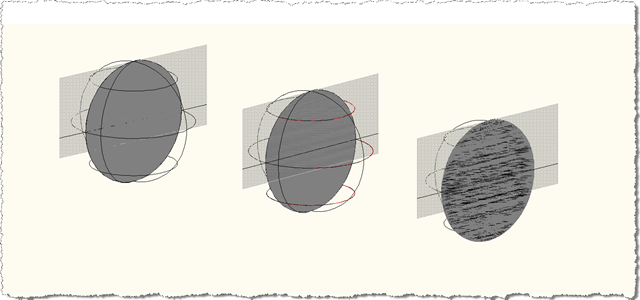
Sectioned Spheres - Orbitting

The objects we've added to the drawing for the two left-hand sections are basic (2D or 3D, depending) geometry. The third, however, includes a section object:
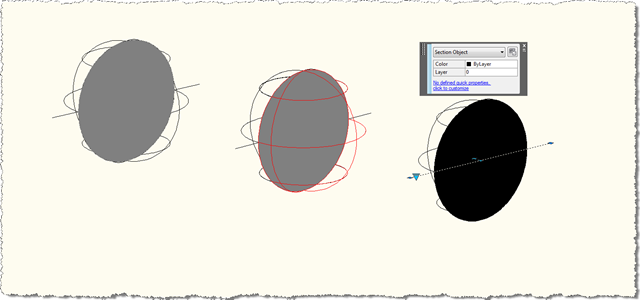
Sectioned Spheres - Live Section

A quick note on the code at the end which adds the various generated geometry to the drawing: in order to avoid having multiple foreach loops (one for each of flEnts, fgEnts, bgEnts, ftEnts & ctEnts), I opted to create an über-array which then gets populated by the contents of each of the other lists. This simple exercise was a pain in C#, as you can see from the code. In fact, having five separate loops could probably be considered less ugly, depending on your perspective. This is the kind of operation that's a breeze in a language like F#, and, with hindsight, I probably should have chosen F# from the beginning for just that reason. Maybe I'll throw an F# version together for comparison's sake.

Update

In AutoCAD 2010, Section.EnableLiveSection(bool) has become a Boolean property. For the above code to work in AutoCAD 2010, change the line containing the call to sec.EnableLiveSection(true) to:

sec.IsLiveSectionEnabled = true;

2 responses to “Sectioning an AutoCAD solid using .NET”

  1. Fernando Malard Avatar
    Fernando Malard

    Kean,

    I was wondering if you could list your samples through some kind of INDEX page inside your Blog maybe categorized by subjects.

    Today there are many posts and that would be great if you can organize them.

    Of course I always think they should be present at ObjectARX SDK because they are really great!

    Keep doing this great job.
    Regards,

  2. Kean Walmsley Avatar

    Fernando,

    Thanks for the feedback: I've been meaning to fix some of the post navigation, to make it easier to discover previous content, other than by using the search mechanism.

    So I spent some time researching how TypePad enables this, and have just published "cloud" navigation which highlights popular topics (no surprises that "AutoCAD" and "AutoCAD .NET" come out top 😉 as well as making sure that a full month-by-month history (including the number of posts for that month) is listed.

    I hope this helps. By the way - I'm still hopeful that at some point this blog will be indexed directly from AutoCAD's search mechanism (a lot of other content sources are now searchable from within the product, but blogs are proving more tricky, it seems). That may seem a little incongruous to professional developers - whose primary tool is likely to be Visual Studio, rather than an Autodesk product - but it would help users of our products with their customization tasks.

    Cheers,

    Kean

  3. Hi Kean,

    The EnableLiveSection(bool) method in C# for ObjectArx 2010 seems to have been removed. Is there any other way to enable/disable live sectioning?

    Thank you!

    Kostas

  4. Hi Kostas,

    I haven't (yet) tried it, but perhaps setting

    sec.IsLiveSectionEnabled = true;

    does the trick?

    Regards,

    Kean

  5. Indeed sec.IsLiveSectionEnabled = true; works!

    Once again thank you Kean.

  6. bikelink@tiscali.it Avatar
    bikelink@tiscali.it

    Hi. I have a trouble about the memory .
    with this code (and also with my) it seems never released.
    the memory increases very quickly!! any suggest ?

    if you try to run this loop very long autocad crash!
    for (int k = 0; k < 1000; k++) :pissed:
    {
    using (Transaction tr = d.Database.TransactionManager.StartTransaction())
    {
    Point3dCollection ptsez = new Point3dCollection();
    ptsez.Add(p1);
    ptsez.Add(p2);

    //
    Autodesk.AutoCAD.DatabaseServices.Section se = new Section(ptsez, asseverticale);
    ptsez.Dispose();
    ptsez = null;

    se.TopPlane = limiteSup;
    se.BottomPlane = limiteInf;
    se.State = SectionState.Plane;

    Array pIntFillEnts;
    Array pBackgroundEnts;
    Array pForegroundEnts;
    Array pFurveTangencyEnts;
    Array pCurveTangencyEnts;
    using (Solid3d solido = tr.GetObject(idsolido, OpenMode.ForRead) as Solid3d)
    {
    se.GenerateSectionGeometry(solido, out pIntFillEnts, out pBackgroundEnts, out pForegroundEnts, out pFurveTangencyEnts, out pCurveTangencyEnts);

    }
    se.Dispose();
    se = null;
    foreach (Entity e in pIntFillEnts)
    e.Dispose();
    foreach (Entity e in pBackgroundEnts)
    e.Dispose();
    foreach (Entity e in pForegroundEnts)
    e.Dispose();
    foreach (Entity e in pFurveTangencyEnts)
    e.Dispose();
    foreach (Entity e in pCurveTangencyEnts)
    e.Dispose();
    tr.Commit();
    }
    System.Diagnostics.Debug.WriteLine(GC.GetTotalMemory(false));
    System.Diagnostics.Debug.WriteLine(k);
    }

    it increases and at the end autocad crashs.

  7. Is the problem with the code in my blog post, with the code you've posted, or both? I really only have time to investigate issues with code I've posted.

    Kean

  8. Hi Kean, i think both codes.. (because honestly my code is inherit of your)
    and I've now tried also with c++.it's seems the same memory leak
    when we make a section that's never fully released..
    That's appear also if we make the "dispose (c#)" or delete in c++ and the section isn't added at database. You can try ..with a simple loop. If I wrong please tell me where..

    ACED_ARXCOMMAND_ENTRY_AUTO(CSectionPlaneApp, AsdkSectionPlane, _CreaSez, CreaSez, ACRX_CMD_TRANSPARENT, NULL)

    static void AsdkSectionPlane_CreaSez(void)
    {
    // Get two points in the plane
    ads_point pnt;
    int iTest = acedGetPoint(NULL,_T("\nSelect first point of the line in the plane: "),pnt);
    if(iTest != RTNORM)
    return;

    AcGePoint3d startPnt(pnt[X],pnt[Y],pnt[Z]);
    // transform the selected point to wcs
    AcGeMatrix3d ucsMat;
    startPnt.transformBy(ucsMat);
    AcGePoint3dArray sectVertices;
    sectVertices.append(startPnt);
    AcGePoint3d endPnt;
    iTest = acedGetPoint(pnt,_T("\nSelect second point of the line in the plane: "),asDblArray(endPnt));
    if(iTest != RTNORM)
    return;
    // transform the selected point to wcs
    endPnt.transformBy(ucsMat);
    sectVertices.append(endPnt);

    Acad::ErrorStatus es;
    ads_name name;
    ads_point pt;
    acedEntSel(_T("\nSeleziona solido"), name, pt);
    AcDbObjectId objId;
    acdbGetObjectId(objId, name);
    // AcDbObject * pObj;

    //AcDbObjectId sectionId = pSection->objectId();

    AcGeVector3d vv;
    vv = sectVertices[1]-sectVertices[0];
    for (int kkk=0;kkk<10000;kkk++)
    {
    AcDbSection* pSection = new AcDbSection(sectVertices, AcGeVector3d::kZAxis);
    if(pSection==NULL)
    return;
    if(Acad::eOk != (pSection->setState(AcDbSection::kPlane)))
    return;
    /*AcDbObjectId sectionId = AcDbObjectId::kNull;
    sectionId = CSectionPlaneUtility::AddEntityToDatabase(pSection);
    if(sectionId == AcDbObjectId::kNull)
    return;*/
    AcString sectName = _T("FirstSection");
    if(Acad::eOk != (pSection->setName(sectName)))
    return;
    if(Acad::eOk != (pSection->setIndicatorTransparency(90)))
    return;
    if(Acad::eOk != (pSection->setHeight(AcDbSection::kHeightAboveSectionLine, 3.0)))
    return;
    if(Acad::eOk != (pSection->setHeight(AcDbSection::kHeightBelowSectionLine, 1.0)))
    return;
    /*if(Acad::eOk != (pSection->enableLiveSection(true)))
    return;*/

    AcArray<acdbentity*> boundaryList, fillList, backgroundList, foregroundList, tangentList;
    //AcDbEntity *pEnt = NULL;

    /*for (int i = 0; i < solidIds.length(); i++)
    {*/
    AcArray<acdbentity*> boundarySet, fillSet, backgroundSet;
    AcArray<acdbentity*> foregroundSet, tangentSet;

    AcDbEntity *pEnt = NULL;
    AcArray<acdbentity*> entList;
    // es = acdbOpenObject(pEnt, solidIds[i], AcDb::kForRead);
    es = acdbOpenObject(pEnt, objId, AcDb::kForRead);

    if (es == eOk)
    {
    es = pSection->generateSectionGeometry(pEnt,
    boundarySet, fillSet, backgroundSet,
    foregroundSet, tangentSet);
    pEnt->close();

    entList.append(boundarySet);
    entList.append(fillSet);
    entList.append(backgroundSet);
    entList.append(foregroundSet);
    entList.append(tangentSet);
    }
    //}

    /*for(int k=0;k<entlist.length();k++) {="" acdbentity*="" ec="(AcDbEntity*)entList.at(k)" ;="" delete="" ec;="" ec="NULL;" }*="" *boundaryset.~acarray();="" fillset.~acarray();="" backgroundset.~acarray();="" foregroundset.~acarray();="" tangentset.~acarray();*="" entlist.~acarray();="" psection-="">close();
    pSection=NULL;
    }
    }

  9. Have you tried calling acdbAcisSetDeleteBulletins(Adesk::kTrue)?

    Kean

  10. acdbAcisSetDeleteBulletins it's sounds new ...to me.
    where i must call it and where autocad documentation talks about it ?

  11. If you search the ObjectARX Reference you should find this description:

    >>>
    This function sets the flag that controls whether the solid modeler releases all memory for cached solids information at the start of each command in the editor. If onOff is Adesk::kTrue, the flag is set; otherwise, if Adesk::kFalse, the flag is cleared and the modeler no longer releases the memory at the start of each command.
    <<<

    Kean

  12. Wow! now i'm going to try it.
    I never saw wrote it in the samples code
    Thanks in advance your are a very wizard!
    acdbAcisSetDeleteBulletins

  13. I have been playing around with the sectioning capabilities in .NET. It appears as though the GenerateSectionGeometry method can only be applied to a single solid, one-at-a-time. Therefore, when this method is used with the visiblity of background geometry set to true and the visibilty of hiddenlines set to false, it does hide lines on the backside of a solid but lines on a solid that should be hidden behind another solid are still visible. However, when I manually produce a section view from a section object from within the Autocad editor, the results are as you would expect, lines on a solid hidden behind another solid are not shown. Is this functionality achievable with the .NET API? It looks as though it is not, since GenerateSectionGeometry seems to only accept a single entity. Am I right?

  14. What happens if you add more objects to the collection passed into the SetSourceObjects() call?

    Kean

  15. I have tried adding more objects, but it does not seem to work. Have you been able achieve what I described in my previous post using the SetSourceObjects() call?

  16. Kean Walmsley Avatar

    No, I haven't: I was grasping at straws, because I sadly don't have time to investigate all the support requests I get via my blog (unless they are due to issues with the code I've posted).

    If that doesn't help I suggest submitting your question to the ADN team, if you're a member, or otherwise the AutoCAD .NET Discussion Group.

    Regards,

    Kean

  17. Hi Kean,

    Related to this post, after sectioning, I want to define the hidden line so I tried Hidden Line Removal API of Object ARX; but when I selected Solids done, the API not generate anything. Can you make a post about how to using this API?

    Thank you!
    Amosivor

    1. Hi Amosivor,

      Unfortunately I'm not working with AutoCAD these days: please post your request to the AutoCAD .NET or ObjectARX forum.

      Best,

      Kean

Leave a Reply to Amosivor Cancel reply

Your email address will not be published. Required fields are marked *