Once again I've ended up extending this series in a way I didn't originally expect to (and yes, that's a good thing :-). Here are parts 1, 2, 3 and 4, as well as the post that started it all.
After thinking about my initial 3D implementation in Part 4, I realised that implementing pen colours and widths would actually be relatively easy. Here's the idea:
- Each section of a different width and/or pen colour is actually a separate extruded solid
- Whenever we start a new section we start off by creating a circular profile of the current pen width at the start
- When we terminate that section - by changing the pen colour or width - we extrude the profile along the Polyline3d defining the section's path
- This extruded Solid3d will be the colour of the pen, of course
- We then erase the original polyline
In order to achieve this, we now have a TerminateCurrentSection() helper function, which we call whenever the pen width or colour changes, and when we are done with the TurtleEngine, of course. For this last part we've changed the TurtleEngine to implement IDisposable: this gives us the handy Dispose() method to implement (which simply calls TerminateCurrentSection()), and we can the add the using() statement to control the TurtleEngine's lifetime. One important point: we need to Dispose of the TurtleEngine before we commit the transaction, otherwise it won't work properly.
Here's the modified C# code:
using Autodesk.AutoCAD.ApplicationServices;
using Autodesk.AutoCAD.DatabaseServices;
using Autodesk.AutoCAD.EditorInput;
using Autodesk.AutoCAD.Runtime;
using Autodesk.AutoCAD.Geometry;
using Autodesk.AutoCAD.Colors;
using System;
namespace TurtleGraphics
{
// This class encapsulates pen
// information and will be
// used by our TurtleEngine
class Pen
{
// Private members
private Color m_color;
private double m_width;
private bool m_down;
// Public properties
public Color Color
{
get { return m_color; }
set { m_color = value; }
}
public double Width
{
get { return m_width; }
set { m_width = value; }
}
public bool Down
{
get { return m_down; }
set { m_down = value; }
}
// Constructor
public Pen()
{
m_color =
Color.FromColorIndex(ColorMethod.ByAci, 0);
m_width = 0.0;
m_down = false;
}
}
// The main Turtle Graphics engine
class TurtleEngine : IDisposable
{
// Private members
private Transaction m_trans;
private Polyline3d m_poly;
private Circle m_profile;
private Pen m_pen;
private CoordinateSystem3d m_ecs;
private bool m_updateGraphics;
// Public properties
public Point3d Position
{
get { return m_ecs.Origin; }
set {
m_ecs =
new CoordinateSystem3d(
value,
m_ecs.Xaxis,
m_ecs.Yaxis
);
}
}
public Vector3d Direction
{
get { return m_ecs.Xaxis; }
}
// Constructor
public TurtleEngine(Transaction tr)
{
m_pen = new Pen();
m_trans = tr;
m_poly = null;
m_profile = null;
m_ecs =
new CoordinateSystem3d(
Point3d.Origin,
Vector3d.XAxis,
Vector3d.YAxis
);
m_updateGraphics = false;
}
public void Dispose()
{
TerminateCurrentSection();
}
// Public methods
public void Turn(double angle)
{
// Rotate our direction by the
// specified angle
Matrix3d mat =
Matrix3d.Rotation(
angle,
m_ecs.Zaxis,
Position
);
m_ecs =
new CoordinateSystem3d(
m_ecs.Origin,
m_ecs.Xaxis.TransformBy(mat),
m_ecs.Yaxis.TransformBy(mat)
);
}
public void Pitch(double angle)
{
// Pitch in our direction by the
// specified angle
Matrix3d mat =
Matrix3d.Rotation(
angle,
m_ecs.Yaxis,
m_ecs.Origin
);
m_ecs =
new CoordinateSystem3d(
m_ecs.Origin,
m_ecs.Xaxis.TransformBy(mat),
m_ecs.Yaxis
);
}
public void Roll(double angle)
{
// Roll along our direction by the
// specified angle
Matrix3d mat =
Matrix3d.Rotation(
angle,
m_ecs.Xaxis,
m_ecs.Origin
);
m_ecs =
new CoordinateSystem3d(
m_ecs.Origin,
m_ecs.Xaxis,
m_ecs.Yaxis.TransformBy(mat)
);
}
public void Move(double distance)
{
// Move the cursor by a specified
// distance in the direction in
// which we're pointing
Point3d oldPos = m_ecs.Origin;
Point3d newPos = oldPos + m_ecs.Xaxis * distance;
m_ecs =
new CoordinateSystem3d(
newPos,
m_ecs.Xaxis,
m_ecs.Yaxis
);
// If the pen is down, we draw something
if (m_pen.Down)
GenerateSegment(oldPos, newPos);
}
public void PenDown()
{
m_pen.Down = true;
}
public void PenUp()
{
m_pen.Down = false;
// We'll start a new entity with the next
// use of the pen
TerminateCurrentSection();
}
public void SetPenWidth(double width)
{
m_pen.Width = width;
TerminateCurrentSection();
}
public void SetPenColor(int idx)
{
// Right now we just use an ACI,
// to make the code simpler
Color col =
Color.FromColorIndex(
ColorMethod.ByAci,
(short)idx
);
// If we have to change the color,
// we'll start a new entity
// (if the entity type we're creating
// supports per-segment colors, we
// don't need to do this)
if (col != m_pen.Color)
{
TerminateCurrentSection();
m_pen.Color = col;
}
}
// Internal helper to generate geometry
private void GenerateSegment(
Point3d oldPos, Point3d newPos)
{
Document doc =
Application.DocumentManager.MdiActiveDocument;
Database db = doc.Database;
Editor ed = doc.Editor;
Autodesk.AutoCAD.ApplicationServices.
TransactionManager tm =
doc.TransactionManager;
// Create the current object, if there is none
if (m_poly == null)
{
BlockTable bt =
(BlockTable)m_trans.GetObject(
db.BlockTableId,
OpenMode.ForRead
);
BlockTableRecord ms =
(BlockTableRecord)m_trans.GetObject(
bt[BlockTableRecord.ModelSpace],
OpenMode.ForWrite
);
// Create the polyline
m_poly = new Polyline3d();
m_poly.Color = m_pen.Color;
// Add the polyline to the database
ms.AppendEntity(m_poly);
m_trans.AddNewlyCreatedDBObject(m_poly, true);
// Add the first vertex
PolylineVertex3d vert =
new PolylineVertex3d(oldPos);
m_poly.AppendVertex(vert);
m_trans.AddNewlyCreatedDBObject(vert, true);
m_profile =
new Circle(oldPos, Direction, m_pen.Width);
ms.AppendEntity(m_profile);
m_trans.AddNewlyCreatedDBObject(m_profile, true);
m_profile.DowngradeOpen();
}
// Add the new vertex
PolylineVertex3d vert2 =
new PolylineVertex3d(newPos);
m_poly.AppendVertex(vert2);
m_trans.AddNewlyCreatedDBObject(vert2, true);
// Display the graphics, to avoid long,
// black-box operations
if (m_updateGraphics)
{
tm.QueueForGraphicsFlush();
tm.FlushGraphics();
ed.UpdateScreen();
}
}
// Internal helper to generate 3D geometry
private void TerminateCurrentSection()
{
if (m_profile != null && m_poly != null)
{
Document doc =
Application.DocumentManager.MdiActiveDocument;
Database db = doc.Database;
Editor ed = doc.Editor;
try
{
// Generate a Region from our circular profile
DBObjectCollection col =
new DBObjectCollection();
col.Add(m_profile);
DBObjectCollection res =
Region.CreateFromCurves(col);
Region reg =
res[0] as Region;
if (reg != null)
{
BlockTable bt =
(BlockTable)m_trans.GetObject(
db.BlockTableId,
OpenMode.ForRead
);
BlockTableRecord ms =
(BlockTableRecord)m_trans.GetObject(
bt[BlockTableRecord.ModelSpace],
OpenMode.ForWrite
);
// Extrude our Region along the Polyline3d path
Solid3d sol = new Solid3d();
sol.ExtrudeAlongPath(reg, m_poly, 0.0);
sol.Color = m_pen.Color;
// Add the generated Solid3d to the database
ms.AppendEntity(sol);
m_trans.AddNewlyCreatedDBObject(sol, true);
// Get rid of the Region, profile and path
reg.Dispose();
m_profile.UpgradeOpen();
m_profile.Erase();
m_poly.Erase();
}
}
catch (System.Exception ex)
{
ed.WriteMessage(
"\nException: {0}",
ex.Message
);
}
}
m_profile = null;
m_poly = null;
}
}
public class Commands
{
[CommandMethod("CB")]
static public void Cube()
{
Document doc =
Application.DocumentManager.MdiActiveDocument;
Transaction tr =
doc.TransactionManager.StartTransaction();
using (tr)
{
TurtleEngine te = new TurtleEngine(tr);
using (te)
{
// Draw a simple 3D cube
te.SetPenWidth(5.0);
te.PenDown();
for (int i = 0; i < 4; i++)
{
for (int j = 0; j < 4; j++)
{
// Only draw some of the segments
// (this stops overlap)
if (i % 2 == 0 || j % 2 == 0)
te.PenDown();
else
te.PenUp();
te.SetPenColor(i+j+1);
te.Move(100);
te.Turn(Math.PI / 2);
}
te.PenUp();
te.Move(100);
te.Pitch(Math.PI / -2);
}
}
tr.Commit();
}
}
static private int CubesPerLevel(int level)
{
if (level == 0)
return 0;
else
return 2 * CubesPerLevel(level - 1) + 1;
}
static public bool GetHilbertInfo(
out Point3d position,
out double size,
out int level
)
{
Document doc =
Application.DocumentManager.MdiActiveDocument;
Editor ed = doc.Editor;
size = 0;
level = 0;
position = Point3d.Origin;
PromptPointOptions ppo =
new PromptPointOptions(
"\nSelect base point of Hilbert cube: "
);
PromptPointResult ppr =
ed.GetPoint(ppo);
if (ppr.Status != PromptStatus.OK)
return false;
position = ppr.Value;
PromptDoubleOptions pdo =
new PromptDoubleOptions(
"\nEnter size <100>: "
);
pdo.AllowNone = true;
PromptDoubleResult pdr =
ed.GetDouble(pdo);
if (pdr.Status != PromptStatus.None &&
pdr.Status != PromptStatus.OK)
return false;
if (pdr.Status == PromptStatus.OK)
size = pdr.Value;
else
size = 100;
PromptIntegerOptions pio =
new PromptIntegerOptions(
"\nEnter level <5>: "
);
pio.AllowNone = true;
pio.LowerLimit = 1;
pio.UpperLimit = 10;
PromptIntegerResult pir =
ed.GetInteger(pio);
if (pir.Status != PromptStatus.None &&
pir.Status != PromptStatus.OK)
return false;
if (pir.Status == PromptStatus.OK)
level = pir.Value;
else
level = 5;
return true;
}
private static void Hilbert(
TurtleEngine te, double size, int level)
{
if (level > 0)
{
te.SetPenColor(level);
int newLevel = level - 1;
te.Pitch(Math.PI / -2); // Down Pitch 90
te.Roll(Math.PI / -2); // Left Roll 90
Hilbert(te, size, newLevel); // Recurse
te.SetPenColor(level);
te.Move(size); // Forward Size
te.Pitch(Math.PI / -2); // Down Pitch 90
te.Roll(Math.PI / -2); // Left Roll 90
Hilbert(te, size, newLevel); // Recurse
te.SetPenColor(level);
te.Move(size); // Forward Size
Hilbert(te, size, newLevel); // Recurse
te.Turn(Math.PI / -2); // Left Turn 90
te.Move(size); // Forward Size
te.Pitch(Math.PI / -2); // Down Pitch 90
te.Roll(Math.PI / 2); // Right Roll 90
te.Roll(Math.PI / 2); // Right Roll 90
Hilbert(te, size, newLevel); // Recurse
te.SetPenColor(level);
te.Move(size); // Forward Size
Hilbert(te, size, newLevel); // Recurse
te.SetPenColor(level);
te.Pitch(Math.PI / 2); // Up Pitch 90
te.Move(size); // Forward Size
te.Turn(Math.PI / 2); // Right Turn 90
te.Roll(Math.PI / 2); // Right Roll 90
te.Roll(Math.PI / 2); // Right Roll 90
Hilbert(te, size, newLevel); // Recurse
te.SetPenColor(level);
te.Move(size); // Forward Size
Hilbert(te, size, newLevel); // Recurse
te.SetPenColor(level);
te.Turn(Math.PI / -2); // Left Turn 90
te.Move(size); // Forward Size
te.Roll(Math.PI / 2); // Right Roll 90
Hilbert(te, size, newLevel); // Recurse
te.SetPenColor(level);
te.Turn(Math.PI / -2); // Left Turn 90
te.Roll(Math.PI / 2); // Right Roll 90
}
}
[CommandMethod("DH")]
static public void DrawHilbert()
{
Document doc =
Application.DocumentManager.MdiActiveDocument;
double size;
int level;
Point3d position;
if (!GetHilbertInfo(out position, out size, out level))
return;
int cbl = CubesPerLevel(level);
Transaction tr =
doc.TransactionManager.StartTransaction();
using (tr)
{
TurtleEngine te = new TurtleEngine(tr);
using (te)
{
// Draw a Hilbert cube
te.Position = position;
te.SetPenWidth(10.0 / cbl);
te.PenDown();
Hilbert(te, size / cbl, level);
}
tr.Commit();
}
}
}
}
Here are the results of the modified CB command, which now has coloured segments with a width:
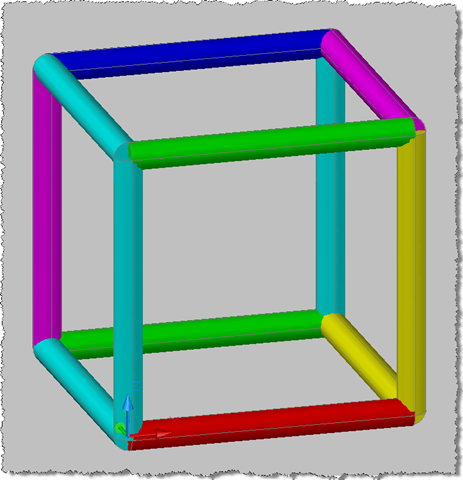
Here's what we get from the DH command. This command now runs pretty slowly for the higher levels - it is doing a lot of work, after all - and only runs at all because we're using separate sections by changing the colour regularly. You'll notice that the pen width is set according to the level, as the finer the detail, the finer the pen width needed.
First the plan view:
%20-%203D%20plan.png)
Then the full 3D view:
%20-%20Full%203D.png)
Here's a close-up of the level 5 cube:
%20-%20Full,%20scary%203D.png)
A word of caution: some of these higher levels are extremely resource-intensive. Please do not attempt to play around with something like this while working on something you don't want to lose: there is always a slim chance of the application (and even the system, if you're really unlucky) being brought down when system resources become scarce.


Leave a Reply to Kean Walmsley Cancel reply