Preventing an AutoCAD block from being exploded using .NET

In response to these recent posts, I received a comment from Nick:

By any chance would it be possible to provide an example to prevent a user from using the EXPLODE command for a given block name?

I delved into the ADN knowledgebase and came across this helpful ObjectARX DevNote, which I used to create a .NET module to address the above question.

Here's the C# code, which should contain enough comments to make it self-explanatory:

using Autodesk.AutoCAD.ApplicationServices;

using Autodesk.AutoCAD.DatabaseServices;

using Autodesk.AutoCAD.EditorInput;

using Autodesk.AutoCAD.Runtime;

namespace ExplosionPrevention

{

  public class Commands

  {

    private Document _doc;

    private Database _db;

    private ObjectIdCollection _blkDefs =

      new ObjectIdCollection();

    private ObjectIdCollection _blkRefs =

      new ObjectIdCollection();

    private ObjectIdCollection _blkConts =

      new ObjectIdCollection();

    private bool _handlers = false;

    private bool _exploding = false;

    [CommandMethod("STOPEX")]

    public void StopBlockFromExploding()

    {

      _doc =

        Application.DocumentManager.MdiActiveDocument;

      _db = _doc.Database;

      if (!_handlers)

      {

        AddEventHandlers();

        _handlers = true;

      }

      // Get the name of the block to protect

      PromptStringOptions pso =

        new PromptStringOptions(

          "\nEnter block name: "

        );

      pso.AllowSpaces = false;

      PromptResult pr =

        _doc.Editor.GetString(pso);

      if (pr.Status != PromptStatus.OK)

        return;

      Transaction tr =

        _db.TransactionManager.StartTransaction();

      using (tr)

      {

        // Make sure the block definition exists

        BlockTable bt =

          (BlockTable)

            tr.GetObject(

              _db.BlockTableId,

              OpenMode.ForRead

            );

        if (bt.Has(pr.StringResult))

        {

          // Collect information about the block...

     &#
160;    // 1. the block definition

          ObjectId blkId =

            bt[pr.StringResult];

          _blkDefs.Add(blkId);

          BlockTableRecord btr =

            (BlockTableRecord)

              tr.GetObject(

                blkId,

                OpenMode.ForRead

              );

          // 2. the block's contents

          foreach (ObjectId id in btr)

            _blkConts.Add(id);

          // 3. the block's references

          ObjectIdCollection blkRefs =

            btr.GetBlockReferenceIds(true, true);

          foreach (ObjectId id in blkRefs)

            _blkRefs.Add(id);

        }

        tr.Commit();

      }

    }

    private void AddEventHandlers()

    {

      // When a block reference is added, we need to

      // check whether it's for a block we care about

      // and add it to the list, if so

      _db.ObjectAppended +=

        delegate(object sender, ObjectEventArgs e)

        {

          BlockReference br =

            e.DBObject as BlockReference;

          if (br != null)

          {

            if (_blkDefs.Contains(br.BlockTableRecord))

              _blkRefs.Add(br.ObjectId);

          }

        };

      // Conversely we need to remove block references

      // that as they're erased

      _db.ObjectErased +=

        delegate(object sender, ObjectErasedEventArgs e)

        {

          // This is called during as part of the cloning

          // process, so let's check that's not happening

          if (!_exploding)

          {

            BlockReference br =

              e.DBObject as BlockReference;

            if (br != null)

            {

              // If we're erasing, remove this block

              // reference from the list, otherwise if

             
// we're unerasing we will want to add it

              // back in

              if (e.Erased)

              {

                if (_blkRefs.Contains(br.ObjectId))

                  _blkRefs.Remove(br.ObjectId);

              }

              else

              {

                if (_blkDefs.Contains(br.BlockTableRecord))

                  _blkRefs.Add(br.ObjectId);

              }

            }

          }

        };

      // This is where we fool AutoCAD into thinking the

      // block contents have already been cloned

      _db.BeginDeepClone +=

        delegate(object sender, IdMappingEventArgs e)

        {

          // Only for the explode context

          if (e.IdMapping.DeepCloneContext !=

              DeepCloneType.Explode)

            return;

          // We add IDs to the map to stop the

          // block contents from being cloned

          foreach (ObjectId id in _blkConts)

            e.IdMapping.Add(

              new IdPair(id, id, true, true, true)

            );

        };

      // And this is where we remove the mapping entries

      _db.BeginDeepCloneTranslation +=

        delegate(object sender, IdMappingEventArgs e)

        {

          // Only for the explode context

          if (e.IdMapping.DeepCloneContext !=

              DeepCloneType.Explode)

            return;

          // Set the flag for our CommandEnded handler

          _exploding = true;

          // Remove the entries we added on BeginDeepClone

          foreach (ObjectId id in _blkConts)

            e.IdMapping.Delete(id);

        };

      // As the command ends we unerase the block references

      _doc.CommandEnded +=

        delegate(object sender, CommandEventArgs e)

        {

          if (e.GlobalCommandName == "EXPLODE" && _exploding)

          {

< p style="font-size: 8pt; margin: 0px">            // By this point the block contents should not have

            // been cloned, but the blocks have been erased

            Transaction tr =

              _db.TransactionManager.StartTransaction();

            using (tr)

            {

              // So we need to unerase each of the erased

              // block references

              foreach (ObjectId id in _blkRefs)

              {

                DBObject obj =

                  tr.GetObject(

                    id,

                    OpenMode.ForRead,

                    true

                  );

                // Only unerase it if it's needed

                if (obj.IsErased)

                {

                  obj.UpgradeOpen();

                  obj.Erase(false);

                }

              }

              tr.Commit();

            }

            _exploding = false;

          }

        };

    }

  }

}

The STOPEX command takes a block name and then gathers (and stores) information about a block: its ObjectId, the IDs of its contents and its various block references. I've added some logic to handle creation of new block references (e.g. via INSERT), and erasure of ones that are no longer needed. I haven't put anything in to deal with redefinition of blocks (if the contents of blocks change then explosion may not be prevented properly), but this is left as an exercise for the reader.

Let's define and insert a series of three blocks: LINES, ARCS and CIRCLES (no prizes for guessing which is which :-):

Inserted blocks

Now we run the STOPEX command on the LINES and CIRCLES blocks:

Command: STOPEX

Enter block name: circles

Command: STOPEX

Enter block name: lines

Command: EXPLODE

Select objects: all

9 found

Select objects:

Command: Specify opposite corner:

Selecting the "exploded" blocks, we see that only the ARCS blocks have actually been exploded:
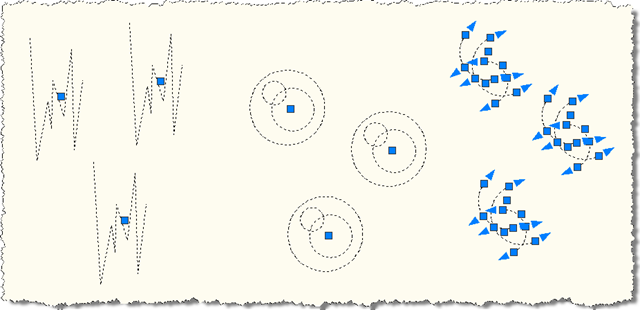
Exploded blocks

Update:

There's a simpler – although user-controllable – way to achieve this shown in this more recent post.

13 responses to “Preventing an AutoCAD block from being exploded using .NET”

  1. Genésio Paulo Hanauer Avatar
    Genésio Paulo Hanauer

    This example is great. It's possible extend to provide prevention for attribute edition?

    Thanks in advance,

    Genésio

  2. That would really be addressing a completely different requirement... the sample to roll-back changes (available here) might be a better starting point, but it would still be quite some work.

    Kean

  3. Hi Kean.

    Another nice example and if you don't mind, a helpful tip:

    Your code is handling events continuously, though it would seem that they only need to be handled while the EXPLODE command is running.

    Jermey's sample in another post (rolling back changes to commands) demonstrates a best practice, which is to only monitor the CommandWillStart event continuously, and begin handling all other relevant events when the command(s) of interest start, and stop handling them when the command ends. Doing that minimizes event overhead, which can be somewhat expensive during 'command-intensive' user scripting.

  4. Cattoor Bjorn Avatar

    Thanks Tony for pointing this out, would have missed it otherwise.

  5. Gabriel Potestades Avatar
    Gabriel Potestades

    Hi Kean,

    I have successfully created a command that will disable the EXPLODE of a block by following your guide here:

    keanw.com/2015/06/preventing-an-autocad-block-from-being-exploded-using-net-redux.html

    Thanks btw, but it can be turned off (The allow exploding checkbox). I am try to use the above code but I'm having a hard time converting it to VB.

    Are these Sub Functions?

    _db.BeginDeepClone +=

    delegate(object sender, IdMappingEventArgs e)

    {

    // Only for the explode context

    if (e.IdMapping.DeepCloneContext !=

    DeepCloneType.Explode)

    return;

    // We add IDs to the map to stop the

    // block contents from being cloned

    foreach (ObjectId id in _blkConts)

    e.IdMapping.Add(

    new IdPair(id, id, true, true, true)

    );

    };

    1. Hi Gabriel,

      Oh, you'll need to look at how event handlers are attached/removed in VB... AddHandler(), I think?

      Good luck,

      Kean

      1. Gabriel Potestades Avatar
        Gabriel Potestades

        Hi Kean,

        They were Addhandlers and I have managed to use this code. But I copied the block to another drawing and tried exploding it. It has exploded. Is it possible to disable the explode of a block even if you copied it to a different drawing?

        Thanks!

        1. Hi Gabriel,

          If (and only if) your application is present then you have some level of control, although not necessarily with the technique shown here. You should be able to control whether the block is copied elsewhere, for instance.

          But you won't get the level of control with a block that you would with a custom object (which can only be defined using C++).

          Regards,

          Kean

          1. Gabriel Potestades Avatar
            Gabriel Potestades

            Noted.

            Thanks!

            1. Gabriel Potestades Avatar
              Gabriel Potestades

              Hi Kean,

              Just wanted to tell that I used MInsertBlock to insert the block in the Model Space and named my BlockReference to a Anonymous Block so it cannot be reproduced in the model space.

              This guide helped me in figuring this out.

              Thanks!

              1. Good to know!

                Kean

          2. Gabriel Potestades Avatar
            Gabriel Potestades

            Hi Kean,

            I just researched that using the MINSERT command can disable exploding even when copied. But only when the rows or columns is greater than 1. Is there a way to mimic MINSERT?

            1. Hi Gabriel,

              Yes, if you implement a custom object. (See my prior answer.)

              Regards,

              Kean

Leave a Reply to Kean Walmsley Cancel reply

Your email address will not be published. Required fields are marked *