Changing the colour of the contents of an AutoCAD block using .NET

Here's a question that came in to us, recently:

How can I show the AutoCAD color dialog from .NET? I need to allow the user to select a block, show the AutoCAD color dialog and apply the selected color to the contents of the selected block.

A new member of DevTech Americas - Augusto Gonçalves, who's based in our São Paulo office - answered with the following code (which I've modified slightly, mostly to follow this blog's coding conventions). Thanks, Augusto!

By the way, these previous posts may also be useful to those interested in this topic.

Here's the C# code:

using Autodesk.AutoCAD.ApplicationServices;

using Autodesk.AutoCAD.DatabaseServices;

using Autodesk.AutoCAD.EditorInput;

using Autodesk.AutoCAD.Runtime;

using Autodesk.AutoCAD.Windows;

using Autodesk.AutoCAD.Colors;

namespace ColorPicking

{

  public class Commands

  {

    [CommandMethod("CB")]

    public void ColorBlock()

    {

      Document doc =

          Application.DocumentManager.MdiActiveDocument;

      Database db = doc.Database;

      Editor ed = doc.Editor;

      // Ask the user to select a block

      PromptEntityOptions peo =

        new PromptEntityOptions("\nSelect a block:");      

      peo.AllowNone = false;

      peo.SetRejectMessage("\nMust select a block.");

      peo.AddAllowedClass(typeof(BlockReference), false);

      PromptEntityResult per =

        ed.GetEntity(peo);

      if (per.Status != PromptStatus.OK)

        return;

      // Open the entity using a transaction

      Transaction tr =

        db.TransactionManager.StartTransaction();

      using (tr)

      {

        try

        {

          Entity ent =

            (Entity)tr.GetObject(

              per.ObjectId,

              OpenMode.ForRead

            );

          // Should always be a block reference,

          // but let's make sure

          BlockReference br = ent as BlockReference;

          if (br != null)

          {

            // Select the new color

            ColorDialog cd = new ColorDialog();

            cd.IncludeByBlockByLayer = true;

            cd.ShowDialog();

            // Change the color of the block itself

            br.UpgradeOpen();

            br.Color = cd.Color;

            // Change every entity to be of color ByBlock

            BlockTableRecord btr =

              (BlockTableRecord)tr.GetObject(

                br.BlockTableRecord,

                OpenMode.ForRead

              );

            // Iterate through the BlockTableRecord contents

            foreach (ObjectId id in btr)

            {

              // Open the entity

              Entity ent2 =

                (Entity)tr.GetObject(id, OpenMode.ForWrite);

              // Change each entity's color to ByBlock

              ent2.Color =

                Color.FromColorIndex(ColorMethod.ByBlock, 0);

            }

          }

          // Commit if there hasn't been a problem

          // (even if no objects changed: it's just quicker)

          tr.Commit();

        }

        catch (Autodesk.AutoCAD.Runtime.Exception e)

        {

          // Something went wrong

          ed.WriteMessage(e.ToString());

        }

      }

    }

  }

}

Here's a quick example of running the CB command on a block inserted from the "Architectural - Imperial" sample block library that ships with AutoCAD.

After launching the CB command selecting our sports car, we can see the colour selection dialog, which allows us to select an AutoCAD colour index, a true color or a standard colour from a color book:
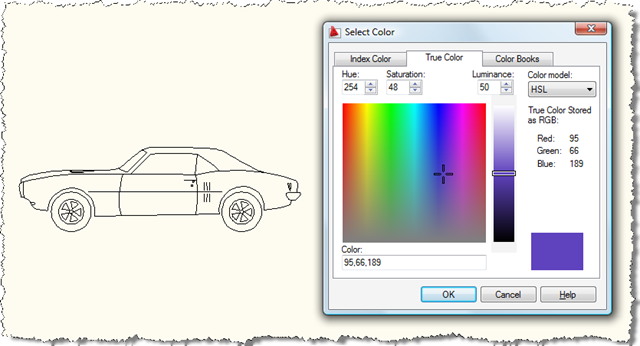
Select color for block contents

We can then see our block is changed to this colour (well, in fact the block is changed to be this colour and all its contents are all changed to be coloured ByBlock):

Purple sports car

This block happens to be a dynamic block, so if we change it to its truck representation, we see the colour has propagated there, also (as the geometry for this view also resides in the block table record, of course):
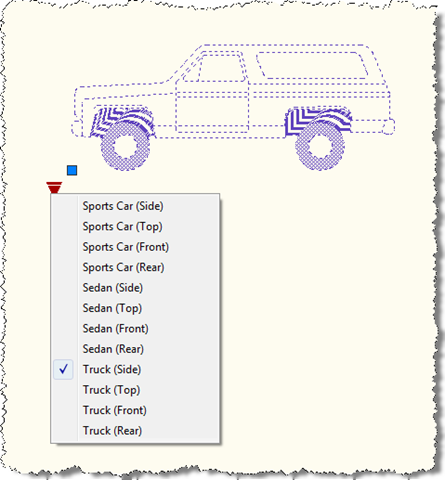
Purple truck

By the way, for those of you who are confused by my apparently inconsistent use of spelling, please see this previous post. 🙂

23 responses to “Changing the colour of the contents of an AutoCAD block using .NET”

  1. I should probably add that this code clearly doesn't deal with nested blocks, but that would be a relatively easy thing to address (should you so wish).

    Kean

  2. Kean,
    I was looking back at some of your posts, and noticed one on F#. It had the pretty green 3d math plotting pictures.
    You mentioned that you used the mouse middle click to do something, and that it sometimes needed a "drag" for the handler to kick in.
    I believe this is exactly the same problem I've been running into with the snap menu, and the behavior started in Acad 2006, when the CUI system was introduced.
    What I do is set mbuttonpan to 1. Then set my side mouse button as middle button.
    For the wheel click, I set my mouse driver to run keystroke F11, which brings up the snap menu due to having set F11 to do that in the acad CUI.
    Works great, but you must move the mouse after clicking the wheel, or no snap menu.
    This messes me up because I type the mnemonic of the snap, the mous stays still while doing so. I end up typing before the snap menu shows and it messes up the input, have to cancel out.

    Is there any possibility of ridding the need to move the mouse, for the handler to kick in?
    I really like realtime pan on side button, and osnap menu on wheel click, but have abandoned it for mbuttonpan set to 0 for now...
    thx

  3. James,

    The form this occurs in has nothing much to do with AutoCAD: it's a modal form thrown up by AutoCAD using DirectX to view a pretty 3D graph. So I suspect the problem I hit is a general Windows programming issue: something to do with window messages coming through from the mouse. Maybe it's the same one you're hitting, maybe not.

    Beyond me, I'm afraid - and there's no great need for me to fix this for the demo app I've thrown together - but hopefully you'll manage to work it out.

    Kean

  4. I HAVE C++ DEMO

  5. kean,
    I have tried this example. It's looks ok, but actually it will create 2 layers of the block.

  6. Kean Walmsley Avatar

    Irenelim,

    Sorry - I don't understand what you mean. This sample doesn't create or modify layers in any way - perhaps you can explain the problem differently?

    Regards,

    Kean

  7. Hi Kean,

    In my plugin, I use blocks to represents different objects. Quite often I need to place in the drawing more than a reference to the same block definition. Each reference represents the same object but with different choices of colors/materials for the components (3D solids) that constitute the object.

    Is it possiblle to set different colors/materials for different block references to the same block definition?

    Thanks

  8. Hi Antonio,

    This is slightly off topic - please ask in future on the appropriate AutoCAD discussion forum.

    You can choose to have certain components in the block marked as having their colour "by layer" or "by block" (which mean they take the colour of the layer the block reference is on or the colour of the block itself), but I don't know of a standard way to enable more that two different colours.

    You may be able to implement a DrawableOverrule to add this capability, but it would probably be quite a bit of work.

    Regards,

    Kean

  9. i have tried this.it's very helpful but i am facing one problem on this if the block generation is not in zero like while creating block layer is xxx layer not zero.my appliction unable to change the color.could please help on this ASAP..

    Thanks and Regards,
    Sunny

    1. Kean Walmsley Avatar

      Are you running exactly this code, or have you changed it in some way? You're only setting the colour of the block and its contents - it shouldn't be a problem unless the 0 layer is locked.

      Kean

      1. yes,i am used same code after that i have added the code as it's contents.by using this

        problem 1:-

        a)i have got another problem.while i am changing color and changing block layer also.block layer is changing but it's represents the existing layer(means if layer is x layer after color and layer changed i am changing layer as y but it's layer wise its showing y layer.if switch off y layer ,the block as showing x layer only...)
        problem 2:-
        if i changed block and its contents changed,if any another block having same definition.all block definitions also changing..

        please let me how to resolve the problem..

        Thanks & Regards
        Sunny

        1. Kean Walmsley Avatar

          Problem 2 is how blocks work. If you need different blocks then you might copy the definition or consider what might be possible using dynamic blocks.

          I don't actually understand problem 1. I suggest posting it with a clearer explanation to the AutoCAD .NET Discussion Group.

          Kean

          1. my requirement is changing block reference color and color changed block reference will in new layer.

            for this,i used same code and added contents code.but i getting issue like the color and layer is updating for all the features, but some features is not visible graphically in the changed layer.

            1. Kean Walmsley Avatar

              Please post code - with very clear steps to reproduce the problem - to the AutoCAD .NET Discussion Group. You can post the link here once it's there.

              Kean

              1. /// <summary>

                /// changeBlockColor method
                change block color and it's layer

                /// </summary>

                /// <param name="acEditor"></param>

                /// <param name="acBlkEntity"></param>

                /// <param name="strLayer">Layer name</param>

                /// <param name="intColorIndex">index of color</param>

                /// <returns>void</returns>

                internal static void changeBlockColor(Editor
                acEditor, Entity acBlkEntity, string strLayer, int
                intColorIndex)

                {

                Document doc = null;

                Database db = null;

                try

                {

                if (acEditor != null
                && acBlkEntity != null)

                {

                doc = acEditor.Document;

                db = doc.Database;

                DocumentLock acDocLk =
                doc.LockDocument();

                Transaction tr =
                db.TransactionManager.StartTransaction();

                using (tr)

                {

                Entity ent = (Entity)tr.GetObject(acBlkEntity.ObjectId,
                OpenMode.ForWrite);

                BlockReference br = ent as BlockReference;

                if (br != null)

                {

                br.ColorIndex =
                intColorIndex;

                br.Layer = strLayer;

                // Change every entity to be of color ByBlock

                BlockTableRecord btr = (BlockTableRecord)tr.GetObject(br.BlockTableRecord,
                OpenMode.ForWrite);

                BlockTable blkTblAcad =
                tr.GetObject(db.BlockTableId, OpenMode.ForWrite)
                as BlockTable;

                BlockTableRecord blkRecTemp = (BlockTableRecord)tr.GetObject(blkTblAcad[ent.BlockName],
                OpenMode.ForRead);

                if (blkRecTemp.HasAttributeDefinitions)

                {

                foreach (ObjectId
                objId in blkRecTemp)

                {

                DBObject dbObjTemp = tr.GetObject(objId, OpenMode.ForWrite);

                Entity entAttribute = dbObjTemp as Entity;

                entAttribute.Layer = strLayer;

                entAttribute.Color = Color.FromColorIndex(ColorMethod.ByBlock, 0);

                }

                }

                // Iterate through the BlockTableRecord contents

                foreach (ObjectId
                id in btr)

                {

                // Open the entity

                Entity ent2 = (Entity)tr.GetObject(id,
                OpenMode.ForWrite);

                string strLayer_1 = ent2.Layer;

                // Change each entity's color to ByBlock

                ent2.Color = Color.FromColorIndex(ColorMethod.ByBlock,
                0);

                ent2.Layer =
                strLayer;

                }

                }

                tr.Commit();

                }

                acDocLk.Dispose();

                }

                }

                catch (System.Exception
                ex)

                {

                // Something went wrong

                throw;

                }

                }

                for this, i have found issue in my autocad data like
                the block generation is not in zero like while creating block layer is xxx layer not zero.my appliction unable to change the color. as i am discuss with first posted..

                1. Not here. This is not a support forum. Please post to the AutoCAD .NET Discussion Group (you can find it on forums.autodesk.com) or I'll be forced to block you.

                  Kean

  10. Hello Kean, I know this is an old post 🙂 Is there a particular reason for not using the ent.colorindex property?
    Didn't this exist at the time of writing this post?
    However, if someone finds this, maybe an update of the post could be helpful 🙂

    ent.colorindex = 0 (=BYBLOCK)
    ent.colorindex= 256 (=BYLAYER)
    ent.colorindex= 1..255 (Acad Index Colors)

    BR,
    Daniel

    1. Kean Walmsley Avatar

      Hi Daniel,

      Good question. I'm not sure why Augusto chose this way - both should work, of course (and existed at the time of posting).

      Perhaps it was for clarity of code: setting to zero isn't very intuitive.

      Best,

      Kean

      1. Hello Kean,

        thanks for the feedback, just wanted to be sure about it.
        BR,
        Daniel

  11. Hello!

    In this blog post, we obtain a block reference of an entity which exists in the drawing, and then we change it's color:

    br.UpgradeOpen();
    br.Color = cd.Color;

    What is the above meant to do? (the color's not changing color in my code). Moreoever, why change the block reference's color when one is going straight to the block table record and changing the color of every entity in the block table record?

    in other words, why do this:

    br.UpgradeOpen();
    br.Color = cd.Color;

    When one does this:

    BlockTableRecord btr = (BlockTableRecord)tr.GetObject(br.BlockTableRecord,OpenMode.ForRead);

    // Iterate through the BlockTableRecord contents
    foreach (ObjectId id in btr)

    {
    // Open the entity

    Entity ent2 = (Entity)tr.GetObject(id, OpenMode.ForWrite);

    // Change each entity's color to ByBlock
    ent2.Color = Color.FromColorIndex(ColorMethod.ByBlock, 0);
    }

    1. ahh i got it: when we edit the block table record, we are changing it too ColorMethod.ByBlock, which means that the individual block references need to have their colors changed too. I think i follow now.

  12. Hi Kean/Others,

    Should just note that one of my users just crashed his autoCAD and had to recover his work while using this code by using the red X to cancel out instead of the cancel button.

    Try...Catch didn't work as it didn't pick up on an exception, so I simply encased the remaining code after:
    cd.showdialog()
    with an :
    if cd.color IsNot Nothing Then
    to prevent the code trying to set the block colour to nothing.

Leave a Reply to james Cancel reply

Your email address will not be published. Required fields are marked *