Adding custom properties to AutoCAD's rollover tooltip and its quick properties panel

This topic is a little on the advanced side - it requires the use of C++ and some knowledge of COM - but I felt it was worth covering, as you can get some interesting results without a huge amount of effort.

Since we introduced the Properties Palette (once known as the Object Property Manager (OPM) and otherwise referred to as the Properties Window) back in AutoCAD 2004 (I think it was) it has become a core tool for viewing and editing properties of AutoCAD objects. In AutoCAD 2009 we have taken the concept further, allowing properties to be added to the "rollover tooltip" - for easy viewing of important properties - and to the "quick properties" panel - for editing core properties on object selection, rather than requiring a separate command or window.

All these features use COM to communicate with the objects they're viewing or editing. Various COM interfaces are used, whether the features are accessing static or dynamic properties. Static properties are the standard properties of a COM object: those exposed (typically) by the provider of the object, or at least of the COM wrapper. Dynamic properties are additional properties that can be provided by anyone for any object: the property provider simply chooses the objects they wish to store and expose dynamic properties for, and they then do so (typically by storing the data as extended entity data (XData) or via a custom object or XRecord in the extension dictionary of an object).

Static and dynamic properties are actually very nicely analogous to concepts from the world of object-oriented programming. Static properties are like the standard, compiled-in protocol for a C++ (or .NET, for that matter) class, while dynamic properties correspond to what in ObjectARX we call "protocol extensions" - additional methods that allow you to extend the compiled-in protocol of a class - and what are now called "extension methods" in C# 3.0.

A quick word on the "dynamic" nomenclature: dynamic properties are really a development-centric concept - the user shouldn't care whether something is static or dynamic. Now that dynamic blocks (a user-centric feature) have been introduced into AutoCAD, it can get a little confusing as to whether you're talking about properties of dynamic blocks or dynamic properties (of, say, blocks). So searching on ADN, etc., for help with dynamic (COM) properties is tricky: your best bet in general is to search for IDynamicProperty, the COM interface objects that must be implemented to provide dynamic properties for AutoCAD objects.

Today we're going to focus on getting dynamic properties onto the rollover tooltip and into the quick properties panel. As a starting point we're going to take the SimpleDynProps sample on the ObjectARX 2009 SDK (under samples/editor/simpledynprops). After building the project and loading the SimpleDynProps.arx module into AutoCAD 2009, run the ASSIGNDATA command and select some objects to which we will attach our custom properties with blank values (they'll be set to 0). The data gets stored in the extension dictionary of the selected objects, and it's from there that our dynamic property implementation will pick it up and display it in the Properties Window.Dynamic properties on a line
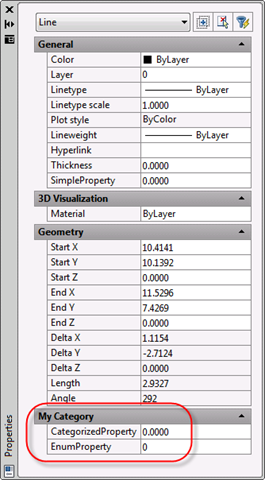
If you select one of the objects to which you've assigned data and run the PROPS command, you should see our dynamic properties in their own category at the bottom of the window, as shown in the image to the right.

So we can see now that dynamic properties can be implemented for standard AutoCAD objects, and these can be exposed by a custom ObjectARX module (if it's not loaded, the properties won't get shown).

Now let's make a few changes to our project, to enable these properties for the new property display/editing functionality in AutoCAD 2009. The modified project - along with the .arx file, for those who don't want to have to build it, but would like to get a feel for how it works - can be downloaded from here.

Start with SimpleProperty.h, which is the base for our custom dynamic property implementation. At the top of this file, we're going to make the CSimpleProperty class implement the new IFilterableProperty interface (inserted code in red):

class ATL_NO_VTABLE CSimpleProperty :

  public CComObjectRootEx<CComSingleThreadModel>,

  public IDynamicProperty,

  public IFilterableProperty

{

public:

  CSimpleProperty();

BEGIN_COM_MAP(CSimpleProperty)

  COM_INTERFACE_ENTRY(IDynamicProperty)

  COM_INTERFACE_ENTRY(IFilterableProperty)

END_COM_MAP()

Further down in the file we will add the public method that is required for the IFilterableProperty implementation (no need to put anything in red, here - it's all new):

STDMETHOD(ShowFilterableProperty)(THIS_

                   /*[in]*/DISPID dispID,

                   /*[in]*/AcFilterablePropertyContext context,

                   /*[out]*/BOOL* pbShow);

In my code I added this after the declaration for SetCurrentValueData and before the notifications section, but it can basically go anywhere as long as it's declared as public.

Then we switch across to the SimpleProperty.cpp file, where we'll implement the function:

STDMETHODIMP

CSimpleProperty::ShowFilterableProperty(

                   /*[in]*/DISPID dispID,

                   /*[in]*/AcFilterablePropertyContext context,

                   /*[out]*/BOOL* pbShow)

{

  *pbShow = TRUE;

  return S_OK;

}

The function definition can go pretty much anywhere in the class implementation, but I put it (once again) after SetCurrentValueData and before the implementation of the Connect/Disconnect notification event handlers.

Well, that's almost all there is to it. The implementation we've put in place says "these properties are available" for all the dynamic properties we expose, both for inclusion on rollover tooltips and in the quick properties panel. You could very easily check the dispID argument to see for which dynamic property the "filterable" property is being queried, or the context argument to see whether the question relates to rollover tooltips or quick properties. We're just keeping things simple, here.

The project should now build, and the output .ARX module should be loadable into AutoCAD. Once you've done so, if you launch the CUI command, you should be able to enable our properties for the rollover tooltip and/or the quick properties panel for various object types:
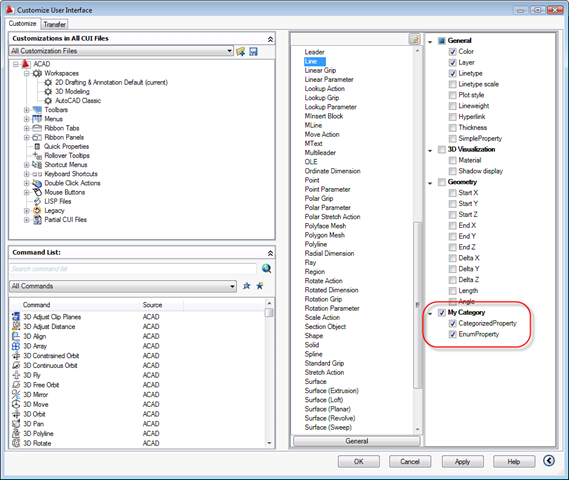
Editing the rollover tooltip properties for a line in the CUI dialog

Using the CUI command I enabled our new properties for the Line object in both the rollover tooltip and the quick properties panel. Let's now take a look at both these in action - looking at objects who have data assigned via our ASSIGNDATA command.

Rollover tooltip:
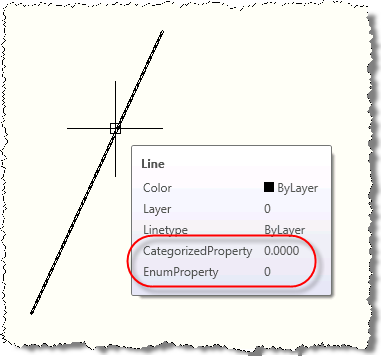
Rollover tooltip with our custom properties 

Quick properties:

Quick properties panel with our custom properties

I haven't yet found a way to add custom properties into the "general properties" set - those shown for every class type. For now it seems you need to add them in at the individual class level (for each type of object), which does make this type of customization slightly less easy to roll-out. Hopefully I'm just missing something obvious, though - if so I'll follow up with a note or comment.

39 responses to “Adding custom properties to AutoCAD's rollover tooltip and its quick properties panel”

  1. Hi
    I want to use your code to add dynamic prop to my Entity which I was created. As my program generate .dll I don't know how to use your code? ( relationship between COM and my codes in C++ is unknown?)
    Thanks in Advance

  2. You would need to modify the code and build the .arx module - which is just another .DLL that can be loaded using APPLOAD or ARX LOAD.

    Both C++ and COM are used in the project I provided.

    Kean

  3. Hallo Kean,

    thanks a lot for very informative blog!
    May I bother you with a question, concerning properties palette?

    I'm a little bit confused with the use of static properties.

    My intention is the following:
    I want to create a class, derived from some Autocad entity (say, MyLine, derived from AcDbLine).
    I add some additional members there (with ability to set and get them). Now, I want to see corresponding additional fields in properties palette.
    What should I do? I though, that static properties should be used here.
    So, I have to write a COM wrapper for MyLine and reimplement MyLine::GetClassID function, so that MyLine would "use" this wrapper.
    I want this wrapper to show all the fields of AcDbLine plus some additional fields of MyLine. But how can I make wrapper to "inherit" form AcDbLine wrapper, i.e. so that all IAcadLine interface funtions were implemented?
    In axtempl.h there is only implementation of AcDbEntity wrapper (IAcadEntityDispatchImpl), so, if I inherit from this template class, I have to imlement all additional AcDbLine properties by myself.

    So, am I right that to add new properties to line I have only two choices: either to implement by myself all wrapper functions for AcDbLine properties, (except those that are common for all entities) or to use dynamic properties instead?

    Thanks in Advance

  4. Hi Ivan,

    When you create a COM interface for your custom object, you are doing 2 things. The first one is to enable COM programming for your object, so VBA or another COM aware language can instantiate and use your objects. The second is to expose your object to OPM and this is from where the difference between static and dynamic properties comes in.

    Static properties are the COM interface properties for your object, where dynamic properties are properties you add to your object for OPM and OPM only. OPM will use the AutoCAD dynamic properties protocol (property manager) to retrieve them and display them.

    Now when you want to implement properties for your object to be displayed in OPM, you have 2 choices: static or dynamic. If you don't mind not giving access to COM to program your objects, then dynamic properties is an option. If accessing your object via COM is required, then you have no choice and you should implement a COM interface.

    Because you derive your object COM interface from IAcadEntityDispatchImpl, you are losing all the properties of your parent class. If you derive from AcDbLine, you would expect to derive the COM interface for your derived line class from something like IAcadLineDispatchImpl. Unfortunately, this template class does not exist in the ARX SDK, and you cannot derive from the IAcadLine interface directly because the interface is not aggregatable.

    The solution is to implement these IAcadXXXDispatchImpl template class yourself to map the properties appropriately. Here is below the Line sample for your convenience, and I will post all the others to Kean to be posted on the blog separately. What is important here is to let AutoCAD continue to do his work on categorizing properties like for native AutoCAD entities. This is why the IAcadEntityBaseDispatchImpl template class is implementing a lot of interface by default.

    Please let me know where I should send the sample if you interested to see the code and try on your side.

    Regards,
    Cyrille

    //- IAcadEntityBaseDispatchImpl
    template <
    class T, class rxClass, class interfaceClass, class inheritedInterface,
    const CLSID *pclsid, const CLSID *pinheritedClsid, const IID *piid =&__uuidof (interfaceClass),
    const GUID *plibid =&CAtlModule::m_libid
    >
    class ATL_NO_VTABLE IAcadEntityBaseDispatchImpl :
    public IOPMPropertyExtensionImpl2<t>,
    public IAcPiCategorizePropertiesImpl<t>,
    public IOPMPropertyExpander,
    public IAcadEntityDispatchImpl<t, pclsid,="" interfaceclass,="" piid,="" plibid="">
    {

    protected:
    inheritedInterface *mpInnerObject ;

    public:
    IAcadEntityBaseDispatchImpl () : mpInnerObject(NULL) {
    InternalFinalConstruct () ;
    }

    virtual ~IAcadEntityBaseDispatchImpl () {
    InternalFinalRelease () ;
    }

    //- IAcadLineDispatchImpl
    template <
    class T, class rxClass, class interfaceClass,
    const CLSID *pclsid, const IID *piid =&__uuidof (interfaceClass),
    const GUID *plibid =&CAtlModule::m_libid
    >
    class ATL_NO_VTABLE IAcadLineDispatchImpl :
    public IAcadEntityBaseDispatchImpl<t, rxclass,="" interfaceclass,="" iacadline,="" pclsid,="" &amp;clsid_acadline,="" piid,="" plibid="">
    {
    public:
    //- IAcadLine
    STDMETHOD(get_StartPoint) (VARIANT *StartPoint) {
    return (mpInnerObject->get_StartPoint (StartPoint)) ;
    }

    STDMETHOD(put_StartPoint) (VARIANT StartPoint) {
    return (mpInnerObject->put_StartPoint (StartPoint)) ;
    }

    //- IMyLine
    class ATL_NO_VTABLE CMyLine :
    public CComObjectRootEx<ccomsinglethreadmodel>,
    public CComCoClass<cmyline, &amp;clsid_myline="">,
    public ISupportErrorInfo,
    public IAcadLineDispatchImpl<cmyline, asdkmyline,="" imyline,="" &amp;clsid_myline,="" &amp;iid_imyline,="" &amp;libid_asdkarxproject7lib="">
    {
    public:
    CMyLine () {
    }

    DECLARE_REGISTRY_RESOURCEID(IDR_MYLINE)

    BEGIN_COM_MAP(CMyLine)

    Finally in the .idl file
    interface IMyLine : IAcadLine {

    and
    coclass MyLine
    {
    [default] interface IMyLine;
    [source] interface IAcadObjectEvents;
    interface IAcadLine;
    };

  5. Hi dear

    There are some points I want to share with you.

    1. I think this newly born ObjectARX Wizard have a great problem: It's not able to produce ATL Simple Object and Object DBX ATL COM Wrapper Object. It is my responsibility to let you know. I hope in near future it would be perfect.

    2. I want to add some (control) properties (ctrl +1) to my object. By now my ObjectDBX produce a managed dll that give me this chance to use it in C# program.

    ObjectDBX(C++) to dll to C#

    I think by using COM it would be possible to add the property (ctrl +1). to produce dll (manage file: mgObject ) I have to use Common Language Runtime Support, Old Syntax (/clr:oldSyntax) in General in Configuration properties in Properties on ObjectDbx part. To add properties (ctrl +1) to object I have to use Enable C++ Exceptions and Smaller Type Check in Code Generation in C/C++ in Configuration properties in Properties on ObjectDbx part. The problem is I can't use both of them at the same time.

    (/clr:oldSyntax)

    To Produce dll managed file that I can use in C# as a refrence

    (/Ehsc) & (/RTCc)

    To Add Properties (Ctrl + 1) in AutoCAD

    3. How can I add Parallel and Extension to My Object Snap?

    4. The following code for saving dosnt work.

    void SazeRebar::saveAs(AcGiWorldDraw * mode, AcDb::SaveType saveType)

    {

    AcDbEntity::saveAs(mode, saveType) ;

    if ((mode->regenType() == kAcGiSaveWorldDrawForProxy) && (saveType == AcDb::kR13Save))

    this->worldDraw(mode);

    }

    With Respect

    Ehssan Sheikh

  6. Ehssan,

    This is not a forum to get support. I suggest either contacting the ADN team, if you're a member, or otherwise posting your questions to one of the Autodesk Discussion Groups.

    Regards,

    Kean

  7. Hi Cyrille,

    thanks a lot for the detailled answer. I think, I've got the idea about inherited interface - it let simple implementation of wrapper template.

    > Please let me know where I should send the sample if you interested to see the code and try on your side.

    I'm very interested in it, thank you! Could you please send the code to the ivan.r@ngs.ru

  8. Eric McDonough Avatar
    Eric McDonough

    Hello Kean,

    I would love to have an image display in the rollover tooltip. Is this possible? Thanks so much in advance.

    Eric

  9. Kean Walmsley Avatar

    Hello Eric,

    You can certainly do this for the enhanced tooltips for ribbon items, but for entities it's a little harder.

    That said, if you can get the Property Palette to host the image (perhaps using a technique similar to that shown in today's post), then maybe you can get it to display in the Quick Properties panel.

    Kean

  10. Hi Kean,
    Thanks for your excellent article. Can you provide a sample about Adding and Removing Properties Palette Tabs?
    Thanks,
    -Bill

  11. Kean Walmsley Avatar

    Hi Bill,

    You know, I don't even think that's possible. If it turns out to be, I'll add it to my list of potential future topics.

    Regards,

    Kean

  12. Bhoopathy Sreedharan Avatar
    Bhoopathy Sreedharan

    Hi,
    can you please give me the code for visual basic .net to create a custom property to Roll over tips.

    Bhoopathy Sreedharan

  13. You will only be able to achieve part of what you want in VB.NET (just as you can only do part using C#). You also need the C++ component provided in this post.

    To convert the C# code to VB.NET, see this post.

    Kean

  14. Bhoopathy Sreedharan Avatar
    Bhoopathy Sreedharan

    Hi,

    Thanks for the reply.

    I have converted the code from c# to VB.Net and as like:

    Imports Autodesk.AutoCAD.ApplicationServices
    Imports Autodesk.AutoCAD.Runtime
    Imports Autodesk.AutoCAD.Windows.OPM
    Imports System.Reflection
    Imports System.Runtime.InteropServices

    Namespace zip
    #Region "Our Custom Property"

    ' No class interface is generated for this class and
    ' no interface is marked as the default.
    ' Users are expected to expose functionality through
    ' interfaces that will be explicitly exposed by the object
    ' This means the object can only expose interfaces we define

    ' Set the default COM interface that will be used for
    ' Automation. Languages like: C#, C++ and VB allow to
    'query for interface's we're interested in but Automation
    ' only aware languages like javascript do not allow to
    ' query interface(s) and create only the default one

    '<guid("f60ae3da-0373-4d24-82d2-b2646517abcb"), progid("opmnetsample.customproperty.1"),="" classinterface(classinterfacetype.none),="" comdefaultinterface(gettype(idynamicproperty2)),="" comvisible(true)=""> _
    <guid("41ad8719-b45f-4bd4-bc3d-67dd29a0b19a"), progid("zip.customproperty.1"),="" classinterface(classinterfacetype.none),="" comdefaultinterface(gettype(idynamicproperty2)),="" comvisible(true)=""> _
    Public Class CustomProp
    Implements IDynamicProperty2
    Private m_pSink As IDynamicPropertyNotify2 = Nothing

    ' Unique property ID

    Public Sub GetGUID(ByRef propGUID As Guid) Implements IDynamicProperty2.GetGUID
    'propGUID = New Guid("F60AE3DA-0373-4d24-82D2-B2646517ABCB")
    propGUID = New Guid("41ad8719-b45f-4bd4-bc3d-67dd29a0b19a")
    End Sub

    ' Property display name

    Public Sub GetDisplayName(ByRef szName As String) Implements IDynamicProperty2.GetDisplayName
    szName = "dist1"
    End Sub

    ' Show/Hide property in the OPM, for this object instance

    Public Sub IsPropertyEnabled(ByVal pUnk As Object, ByRef bEnabled As Integer) Implements IDynamicProperty2.IsPropertyEnabled
    bEnabled = 1
    End Sub

    ' Is property showing but disabled
    Public Sub IsPropertyReadOnly(ByRef bReadonly As Integer) Implements IDynamicProperty2.IsPropertyReadOnly
    bReadonly = 0
    End Sub

    ' Get the property description string

    Public Sub GetDescription(ByRef szName As String) Implements IDynamicProperty2.GetDescription
    szName = "This property is an integer"

    End Sub

    ' OPM will typically display these in an edit field
    ' optional: meta data representing property type name,
    ' ex. ACAD_ANGLE

    Public Sub GetCurrentValueName(ByRef szName As String) Implements IDynamicProperty2.GetCurrentValueName
    Throw New System.NotImplementedException()
    End Sub

    ' What is the property type, ex. VT_R8

    Public Sub GetCurrentValueType(ByRef varType As UShort) Implements IDynamicProperty2.GetCurrentValueType
    ' The Property Inspector supports the following data
    ' types for dynamic properties:
    ' VT_I2, VT_I4, VT_R4, VT_R8,VT_BSTR, VT_BOOL
    ' and VT_USERDEFINED.

    varType = 3
    ' VT_I4
    End Sub

    ' Get the property value, passes the specific object
    ' we need the property value for.

    Public Sub GetCurrentValueData(ByVal pUnk As Object, ByRef pVarData As Object) Implements IDynamicProperty2.GetCurrentValueData
    ' TODO: Get the value and return it to AutoCAD

    ' Because we said the value type was a 32b int (VT_I4)
    pVarData = CInt(500)

    End Sub

    ' Set the property value, passes the specific object we
    ' want to set the property value for

    Public Sub SetCurrentValueData(ByVal pUnk As Object, ByVal varData As Object) Implements IDynamicProperty2.SetCurrentValueData
    ' TODO: Save the value returned to you

    ' Because we said the value type was a 32b int (VT_I4)
    Dim myVal As Integer = CInt(varData)

    End Sub

    ' OPM passes its implementation of IDynamicPropertyNotify, you
    ' cache it and call it to inform OPM your property has changed

    Public Sub Connect(ByVal pSink As Object) Implements IDynamicProperty2.Connect
    m_pSink = DirectCast(pSink, IDynamicPropertyNotify2)
    End Sub

    Public Sub Disconnect() Implements IDynamicProperty2.Disconnect
    m_pSink = Nothing
    End Sub
    End Class
    #End Region

    #Region "Application Entry Point"
    Public Class MyEntryPoint
    Implements IExtensionApplication

    Protected Friend custProp As CustomProp = Nothing

    Public Sub Initialize() Implements IExtensionApplication.Initialize
    Assembly.LoadFrom("asdkOPMNetExt.dll")

    ' Add the Dynamic Property

    Dim classDict As Dictionary = SystemObjects.ClassDictionary
    Dim lineDesc As RXClass = DirectCast(classDict.At("AcDbLine"), RXClass)
    Dim pPropMan As IPropertyManager2 = DirectCast(xOPM.xGET_OPMPROPERTY_MANAGER(lineDesc), IPropertyManager2)

    custProp = New CustomProp()
    pPropMan.AddProperty(DirectCast(custProp, Object))
    End Sub

    Public Sub Terminate() Implements IExtensionApplication.Terminate
    ' Remove the Dynamic Property

    Dim classDict As Dictionary = SystemObjects.ClassDictionary
    Dim lineDesc As RXClass = DirectCast(classDict.At("AcDbLine"), RXClass)
    Dim pPropMan As IPropertyManager2 = DirectCast(xOPM.xGET_OPMPROPERTY_MANAGER(lineDesc), IPropertyManager2)

    pPropMan.RemoveProperty(DirectCast(custProp, Object))
    custProp = Nothing
    End Sub
    End Class
    #End Region
    End Namespace

    when i run this classlibrary.dll, I found no changes from Autocad PROPS command.

    Kindly advice.

    Bhoopathy Sreedharan.

  15. I'm afraid I don't have time to help you debug this.

    I suggest posting your project to to the ADN team, if you're a member, or otherwise the AutoCAD .NET Discussion Group.

    Kean

  16. Bhoopathy Sreedharan Avatar
    Bhoopathy Sreedharan

    Sorry troubling you kean, I made everything fine here, and strucking up with Inherits IDynamicProperty2,Inherits IExtensionApplication.
    (It say classes can inherit only from other classes)
    As I followed your blog only for this, I believe you can only solve this.

    If you find any time please help.

    Bhoopathy Sreedharan

  17. The ADN team would also be able to help with this. I do not have time, myself, unfortunately.

    Kean

  18. Bhoopathy Sreedharan Avatar
    Bhoopathy Sreedharan

    Thanks Kean.I will do it as you suggested.

  19. please provide me code in Visual Basic Application(VBA)

  20. Sorry - I don't take requests for converting to other languages/environments.

    Kean

  21. Hi ,
    I want to draw region entities using my code C#,i am using Theiga.Net and it classes to read and draw AutoCad entities.
    I want to use the Theiga class named "AcDbRegion".
    Thanx

  22. Hello,

    Teigha isn't an Autodesk product. I suggest contacting someone at the Open Design Alliance for support.

    Regards,

    Kean

  23. David J. Ortega Avatar
    David J. Ortega

    Kean,
    I like what I see here, however, I am completely foreign to C++ and COM. How would I go about adding a Dynamic Blocks Unicode 'Anonymous Name' within the code contained within the 'simpledynprops2.zip'? I found that I can use the LIST command to provide me with the 'Anonymous Name' however it's easier to utilize the Rollover Tooltip menu.
    To give you background of the process I am trying to rid myself of, here is a link to my post on CadTutor (cadtutor.net/forum/showthread.php?80087-Battman-Sync...&p=542108#post542108)

  24. David J. Ortega Avatar
    David J. Ortega

    I'm having a tough time installing Autodesk's AutoCADNetWizards.msi onto my computer - would you have any clue why it won't install to get my templates?
    I am using Visual Studio 2010 Express and AutoCADNetWizards.msi (version: AutoCAD 2013)

  25. I don't know, off the top of my head. You might try sending an email to see if someone on the ADN team can help.

    Kean

  26. Hi! How can i reset or refresh properties window after some property changed? Not just properties values but properties set.

    1. This is a support question - please send it to ADN or post to the relevant forum. (In the worst case you could try calling the PROPERTIES command, but there must be a cleaner way.)

      Kean

  27. Hi,

    This is the great tool but you can change from water network ?
    I am interested to add manually or from list different properties: material, node (started polyline - end polyline), street, various observations, with the possibility to be visible or invisible in the middle of polyline (like attribute).
    I`m use Acad 2008.
    Regards,
    Doru V.

    1. Hi,

      "Water network"? Sorry - that seems out of context or an auto-(mis)translation.

      Any part of what you've described is going to require programming work. I can't simply provide you a solution for AutoCAD 2008.

      Regards,

      Kean

      1. Hi Kean,

        I mean ‘’Water supply networks’’. Infrastructure design works : pipes, valve chambers, hydrants, etc.
        The idea is that I need for a pipe (drawn as a polyline):
        - to create more proprieties than those provided by AutoCAD standard, in order to export them further to Excel; it will be very useful to me to export in Excel information like: pipe diameter, material ( PVC, steel, GRP, etc), name of the street where will be buried the pipe, etc.;
        - the value of the new proprieties to be visible/invisible at the middle of the polyline.

        Thanks a lot,

        Doru V.

        1. Hi Doru,

          OK, I see. But I still don't understand what you're expecting... I unfortunately don't have the time to implement an infrastructure design product (or even a more specific sample) for you.

          I would hope that the provided sample would be of some use to you in building one.

          Regards,

          Kean

  28. Hi Kean.
    I want determine when the user working with properties palette . Is there a way to get access to properties palette and determine when Properties palette is visible and user changes something?

    Thank you.

    1. Kean Walmsley Avatar

      Hi Volodymyr,

      That's tricky... I don't think you can easily hook into the use of the Property Palette in this way. I do suggest posting to the discussion groups, though: someone there may have a suggestion.

      Best,

      Kean

  29. Hi Kean,
    I have two questions :
    1. As with quick properties and rollover tooltip, is it possible to use a dynamic property (added to the AcDbEntity class) in the quick selection dialog ?
    2. Is it possible to set the category order ? For example, to show the added dynamic properties before the "standard' AcDbEntity properties ?
    Thanks.
    Thierry

  30. Hello,
    I realise this was made 12 years ago and could be outdated, but I am learning autoCAD and this plugin is exactly what I need, however, I can't seem to get it to work, can you point me in a direction to learn how to get started?
    Thanks

    1. Kean Walmsley Avatar

      Hello Zachary,

      This is indeed a really old post and involves coding with C++ as it currently stands, which is really not for learners. I suggest checking in on the AutoCAD .NET forum, to see whether someone has something you can use posted there.

      Best,

      Kean

  31. Rajashree Patil Avatar
    Rajashree Patil

    Hi, I have a custom entity derived from AcDbEntity class. I want to be able to show the properties of this entity in the properties pallete. I am of course able to see the properties like Linetype, Layer, Color etc. But I would like to show other custom properties of the entity. I have a COM wrapper already implemented for this entity, which is why I can see it in the properties pallete when selected. But I would like extend this functionality.
    I tried implementing the method in this post, trying to get the properties in the quick properties at least, but it did not work.
    Could you please point me in the right direction?

    1. Have you posted your question to the AutoCAD .NET or ObjectARX forums? Someone there should be able to help.

      Kean

Leave a Reply to Kean Walmsley Cancel reply

Your email address will not be published. Required fields are marked *