I was pleasantly surprised the other day to find that the "permanent object deletion" API I mentioned back in this post - and had marked as only being available in ObjectARX - was also exposed in the .NET API to AutoCAD 2009. What better way to celebrate the good news than to put together some test code and post it to my blog? 🙂
So, for a Thanksgiving/pre-AU treat, here's some information on making use of the Database.ReclaimMemoryFromErasedObjects() method to - surprisingly enough - reclaim memory from erased objects.
Firstly, why is this even needed? Well, when you erase an object inside AutoCAD, you only actually set its "erased" flag to true, which means it no longer participates in a number of operations such as regenerating its graphics for display/plotting and saving itself to file. Using a flag makes operations such as Undo more efficient, as objects don't need to be paged out and back into memory. The manual approach to reclaim this memory is to save and close the drawing and then reopen it: erased objects are not written to file and closing the document will cause its memory to be reclaimed.
But now - with AutoCAD 2009 - it's possible to reclaim some of that memory programmatically. The following C# code implements two commands: the CREATE command adds 200,000 lines to the modelspace, and the DESTROY command goes through the modelspace and erases all the lines it contains, requesting the memory used by them to be reclaimed. Note that to reclaim an entity's memory you do need to erase it first.
using Autodesk.AutoCAD.ApplicationServices;
using Autodesk.AutoCAD.DatabaseServices;
using Autodesk.AutoCAD.EditorInput;
using Autodesk.AutoCAD.Geometry;
using Autodesk.AutoCAD.Runtime;
namespace PermanentDeletionTest
{
public class Commands
{
[CommandMethod("create")]
public static void CreateLotsOfObjects()
{
Document doc =
Application.DocumentManager.MdiActiveDocument;
Database db = doc.Database;
Transaction tr =
db.TransactionManager.StartTransaction();
using (tr)
{
BlockTable bt =
(BlockTable)tr.GetObject(
db.BlockTableId,
OpenMode.ForRead
);
BlockTableRecord btr =
(BlockTableRecord)tr.GetObject(
bt[BlockTableRecord.ModelSpace],
OpenMode.ForWrite
);
for (int i=0; i < 200000; i++)
{
Line ln = new Line();
ln.StartPoint = new Point3d(0, i, 0);
ln.EndPoint = new Point3d(i, 0, 0);
btr.AppendEntity(ln);
tr.AddNewlyCreatedDBObject(ln, true);
}
tr.Commit();
}
}
[CommandMethod("destroy")]
public static void PermanentlyDeleteContentsOfModelspace()
{
Document doc =
Application.DocumentManager.MdiActiveDocument;
Database db = doc.Database;
ObjectIdCollection erased =
new ObjectIdCollection();
Transaction tr =
db.TransactionManager.StartTransaction();
using (tr)
{
BlockTable bt =
(BlockTable)tr.GetObject(
db.BlockTableId,
OpenMode.ForRead
);
BlockTableRecord btr =
(BlockTableRecord)tr.GetObject(
bt[BlockTableRecord.ModelSpace],
OpenMode.ForRead
);
foreach (ObjectId id in btr)
{
DBObject obj = tr.GetObject(id, OpenMode.ForRead);
Line ln = obj as Line;
if (ln != null)
{
ln.UpgradeOpen();
ln.Erase();
erased.Add(id);
}
}
tr.Commit();
}
db.ReclaimMemoryFromErasedObjects(erased);
}
}
}
To see how it all worked, I used the very useful Process Explorer tool from Microsoft's Sysinternals site. This may not be a perfect way to measure memory usage by a process, but at least it provided me with a pretty graph. 🙂
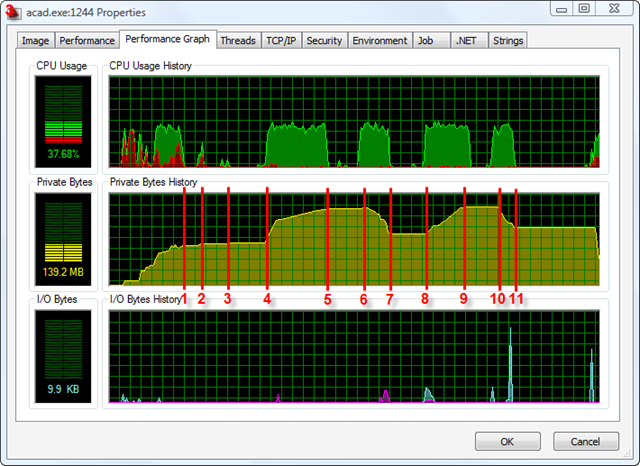
I've annotate the image with the following events:
- AutoCAD start-up complete (204 Mb)
- NETLOAD launched (213 Mb)
- Application loaded (216 Mb)
- CREATE starts (216 Mb)
- CREATE completed (388 Mb)
- DESTROY starts (388 Mb)
- DESTROY completed (263 Mb)
- UNDO starts (263 Mb)
- UNDO completed (396 Mb)
- REDO starts (396 Mb)
- REDO completed (294 Mb)
I fully admit to not being an expert when it comes to memory profiling - so I'm sure people will step in and tell me why what I've done isn't accurate - but this should give you a feel for the capabilities of this particular function. You can see that there is still some increase in memory usage, even after "destroying" the entities, but there is benefit to be derived here. With hindsight I probably shouldn't have referred to it as the "permanent object deletion" API, as UNDO and REDO still work fine: it simply means AutoCAD has to page the objects back into memory (which explains some of the memory increase: UNDO doesn't come for free as we need a buffer containing the changes to the objects).
Here are some additional notes regarding this function from the ObjectARX Reference (the C++ version currently contains better information than the one for .NET):
For performance reasons, it is better to call this function as infrequently as possible with as many objects in the input array as possible, because there is a performance overhead that varies with the size of the overall database with each call, regardless of the number of objects whose memory is to be reclaimed.
If there are entities in the array, it is faster to group them by their owning block, although not required.
Also note that before being deleted, the object state is saved for Undo, of which some will remain in memory. It should be negligible for a huge drawing, but disabling Undo should eliminate this aspect of residual memory usage.
Note also that there is a residual amount of memory per object that cannot be reclaimed which can approach 10% of simple objects such as lines and circles that is associated with the object id and handle.
Finally its worth pointing out what happens when you comment out this function call. There is some reduction in memory usage, even when just erasing - probably as the graphics subsystem needs less memory for the geometry representation - but I saw the memory usage decrease to around 340 Mb, rather than 260 Mb.
OK, that's it from me until AU. Hopefully see some of you in Vegas!


Leave a Reply to xinggangzhang Cancel reply