This is the first post in a series looking at the new APIs in AutoCAD 2010, and follows on from this post looking at the migration steps required. I've copied the information in this post from the recently-published Platform Technologies Customization Newsletter, a quarterly newsletter available to ADN members. A big thank you to Stephen Preston, Fenton Webb and Gopinath Taget for putting the material together.
AutoCAD 2010 New API Overview
AutoCAD 2010 has some really cool APIs. Please download the ObjectARX 2010 Beta SDK and review the Migration Guide for a complete list of changes and additions. [This is currently available to ADN members on the ADN extranet.]
Here are the highlights:
Overrule API
One of the most powerful ObjectARX APIs is the custom objects API. The custom object API allows you to create your own entities in a drawing that behave in the same way as standard AutoCAD entities. So, for example, where AutoCAD has a line, you might develop a custom entity that looks like a 'pipe'. You can define how your pipe displays itself, the pipes grip- and snap- points, how the pipe behaves when moves or copied, etc.
However, with great power comes great responsibility. Custom objects are saved to a drawing. Without your Object Enabler, your custom object is loaded into AutoCAD as a dumb proxy object. So when you are considering creating a custom object, you need to consider whether you're prepared to make a commitment to your application users that you will continue to support your custom object through multiple AutoCAD releases. If you're not prepared to make that commitment, then you really shouldn't be creating custom objects.
And because your custom object is responsible for filing itself when a drawing is saved or opened, you also have an extremely powerful mechanism for corrupting all your customers drawings if you make a mistake in your implementation.
To provide you with an alternative to custom objects – an alternative that requires less long term support commitment from you – AutoCAD 2010 introduces the new Overrule API. Think of Overrule as customized objects, rather than custom objects. It's essentially a mechanism for AutoCAD to call your implementation of certain object functions instead of immediately calling the functions for that object. Your implementation can then choose whether to refer the call back to the native object. Unlike custom objects, the overrule definitions are not filed to the DWG file, so it's a lot harder to corrupt your drawing. Instead, the Overrule API will only customize an entity when your application is loaded. (Although, you can save data used by your Overrul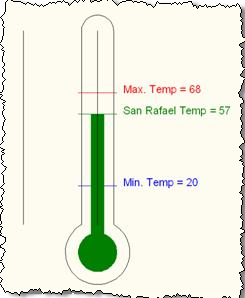 e as Xdata or in Xrecords).
As a simple example, you can overrule an entity's worldDraw function and draw your own graphical representation instead. (In the simple sample we demonstrated at Developer Days, we took a Line and turned it into a Thermometer (see image).
Image: Two Lines – Can you tell which one has been Overruled? ;-).
The Overrule API is available in ObjectARX (C++) and .NET. Here's a simple VB.NET example of how you'd create an overrule…
First, create your custom Overrule class, inheriting from one of the available Overrules, and overriding the functions you want to overrule. In this case, we're overruling an entity's WorldDraw function. WorldDraw is part of the DrawableOverrule.
Imports Autodesk.AutoCAD.GraphicsInterface
Public Class MyDrawOverrule
Inherits DrawableOverrule
'This is the function that gets called to add/replace
'an entity's WorldDraw graphics
Public Overrides Function WorldDraw( _
ByVal drawable As Drawable, _
ByVal wd As WorldDraw) As Boolean
'Draw my own graphics here ...
'Call the object's own worldDraw function (if you want to)
Return MyBase.WorldDraw(drawable, wd)
End Function
End Class
Next, instantiate your Overrule, add it to the entity you want to overrule, and turn Overruling on. (You can also specify how the overrule is applied – you can apply it to every object of that type, apply it depending on Xdata or Xrecords, maintain a list of ObjectIds of entities to be overruled, or define your own custom filter).
[Note that you will need to have Imported Autodesk,AutoCAD.Runtime and DatabaseServices for the below code to build.]
'mDrawOverrule is a class member variable
'we declared elsewhere
mDrawOverrule = New MyDrawOverrule
'Add the Overrule to the entity class - in this case Line
Overrule.AddOverrule( _
RXObject.GetClass(GetType(Line)), _
mDrawOverrule, False)
'Optional - specify filter
'(In this case we only apply overrule to Lines with entry
' named "RDS_MyData" in Extension Dictionary)
mDrawOverrule.SetExtensionDictionaryEntryFilter("RDS_MyData")
'Turn overruling on
Overrule.Overruling = True
And that's all there is to it.
You can find a (simple) working Overrule sample with the Developer Days material posted on the ADN website. [I will post my own C# sample to this blog over the coming weeks, as I play around with the API myself - Kean] We'll be extending that sample soon and using it as the basis of a webcast after AutoCAD 2010 has shipped. And look at the 'Behavior Overrules' section of the ObjectARX Developers Guide for information on the ObjectARX implementation of this API, and for details of methods affected by this API.
Freeform Modeling API
3D modeling in AutoCAD tends to be a bit 'blocky'. It's hard to create a shape that looks really organic. That's where Freeform modeling comes in. It's hard to describe succinctly the power of this feature, so I'd encourage you to review Heidi's product demonstration [Once again, this link is to the ADN site - I will post more about the freeform modelling capabilities of AutoCAD 2010, in due course - Kean]. The basic idea is to take a solid or mesh, twist it around a bit by pushing and pulling at its edges, vertices and faces, and then smooth it and crease it. The smoothing is performed using Subdivision – we use the Catmull-Clark algorithm that is already being used by other Autodesk products.
The API centers on the Sub-division mesh object – AcDbSubDMesh in ObjectARX, DatabaseServices.SubDMesh in .NET, and AcadSubDMesh in ActiveX. The API allows you to do essentially everything a user can through the UI. Here's a simple VB.NET sample showing how to generate a SubDMesh from a Solid3d and then apply level 1 smoothing to it.
Imports Autodesk.AutoCAD.ApplicationServices
Imports Autodesk.AutoCAD.DatabaseServices
Imports Autodesk.AutoCAD.EditorInput
Imports Autodesk.AutoCAD.Geometry
Imports Autodesk.AutoCAD.Runtime
Public Class FreeFormSample
<CommandMethod("CREATEMESH")> _
Public Sub MySub()
'Select a solid.
Dim ed As Editor = _
Application.DocumentManager.MdiActiveDocument.Editor
Dim opts As _
New PromptEntityOptions(vbCrLf + "Select Solid:")
opts.SetRejectMessage(vbCrLf & "That's not a solid!")
opts.AddAllowedClass(GetType(Solid3d), False)
Dim res As PromptEntityResult = ed.GetEntity(opts)
'Exit sub if user cancelled selection.
If res.Status <> PromptStatus.OK Then Exit Sub
'Usual transaction stuff
Dim db As Database = _
Application.DocumentManager.MdiActiveDocument.Database
Using tr As Transaction = _
db.TransactionManager.StartTransaction
Dim mySolid As Solid3d = _
tr.GetObject( _
res.ObjectId, _
OpenMode.ForRead, False)
Dim ext As Extents3d = mySolid.Bounds
Dim vec As Vector3d = (ext.MaxPoint - ext.MinPoint)
'Define params governing mesh generation algorithm
'(See ObjectARX helpfiles for explanation of params –
' you may need to change them depending on the scale
' of the solid)
Dim myFaceterData As _
New MeshFaceterData( _
0.01 * vec.Length, _
40 * Math.PI / 180, _
2, 2, 15, 5, 5, 0)
'Create new mesh from solid (smoothing level 1)
Dim meshData As MeshDataCollection = _
SubDMesh.GetObjectMesh(mySolid, myFaceterData)
Dim myMesh As New SubDMesh
myMesh.SetSubDMesh( _
meshData.VertexArray, meshData.FaceArray, 1)
'Add mesh to database. (Don't remove solid).
myMesh.SetDatabaseDefaults()
Dim btr As BlockTableRecord = _
tr.GetObject(db.CurrentSpaceId, OpenMode.ForWrite)
btr.AppendEntity(myMesh)
tr.AddNewlyCreatedDBObject(myMesh, True)
'Our work here is done
tr.Commit()
End Using
End Sub
End Class
In the next post we'll look at the Parametric Drawing API, CUI API Enhancements, RibbonBar Controls, PDF Underlays and the new AutoCAD .NET Developer's Guide.


Leave a Reply to dan mcrae Cancel reply