Interfacing an external COM application with a .NET module in-process to AutoCAD (redux)

Thanks to all of your interest in this recent post, which looked at a way to interface an out-of-process .NET application with an assembly running in-process to AutoCAD. After some obvious functionality gaps were raised, Renze de Waal, one of our ADN members, pointed out a DevNote on the ADN website covering – and more completely addressing – this topic. Shame on me for not checking there before writing the post. Anyway, onwards and upwards…

The information in the DevNote highlights some of the problems I and other people had hit with my previous code, mostly related to the fact it wasn't executed on the main AutoCAD thread (which meant we were effectively limited in the interactions we had with the AutoCAD application).

To fix this we can derive our application from System.EnterpriseServices.ServicedComponent (also adding an additional project reference to the System.EnterpriseServices .NET assembly). Here is the updated C# code for the LoadableComponent:

using Autodesk.AutoCAD.ApplicationServices;

using Autodesk.AutoCAD.EditorInput;

using Autodesk.AutoCAD.DatabaseServices;

using Autodesk.AutoCAD.Runtime;

using Autodesk.AutoCAD.Geometry;

using System.Runtime.InteropServices;

using System.EnterpriseServices;


namespace LoadableComponent

{

  [Guid("5B5B731C-B37A-4aa2-8E50-42192BD51B17")]

  public interface INumberAddition

  {

    [DispId(1)]

    string AddNumbers(int arg1, double arg2);

  }


  [ProgId("LoadableComponent.Commands"),

   Guid("44D8782B-3F60-4cae-B14D-FA060E8A4D01"),

   ClassInterface(ClassInterfaceType.None)]

  public class Commands : ServicedComponent, INumberAddition

  {

    // A simple test command, just to see that commands

    // are loaded properly from the assembly


    [CommandMethod("MYCOMMAND")]

    static public void MyCommand()

    {

      Document doc =

        Application.DocumentManager.MdiActiveDocument;

      Editor ed = doc.Editor;

      ed.WriteMessage("\nTest command executed.");

    }


    // A function to add two numbers and create a

    // circle of that radius. It returns a string

    // withthe result of the addition, just to use

    // a different return type


    public string AddNumbers(int arg1, double arg2)

    {     

      // During tests it proved unreliable to rely

      // on DocumentManager.MdiActiveDocument

      // (which was null) so we will go from the

      // HostApplicationServices' WorkingDatabase


      Document doc =

        Application.DocumentManager.MdiActiveDocument;

      Database db = doc.Database;

      Editor ed = doc.Editor;


      ed.WriteMessage(

        "\nAdd numbers called with {0} and {1}.",

        arg1, arg2

      );


      // Perform our addition


      double res = arg1 + arg2;


      // Lock the document before we access it


      DocumentLock loc = doc.LockDocument();

      using (loc)

      {

        Transaction tr =

          db.TransactionManager.StartTransaction();

        using (tr)

        {

          // Create our circle


          Circle cir =

            new Circle(

              new Point3d(0, 0, 0),

              new Vector3d(0, 0, 1),

              res

            );


          cir.SetDatabaseDefaults(db);


          // Add it to the current space


          BlockTableRecord btr =

            (BlockTableRecord)tr.GetObject(

              db.CurrentSpaceId,

              OpenMode.ForWrite

            );

          btr.AppendEntity(cir);

          tr.AddNewlyCreatedDBObject(cir, true);


          // Commit the transaction


          tr.Commit();

        }

      }


      // Return our string result


      return res.ToString();

    }

  }

}

Some points to note...

  • We now use an interface to expose functionality from our component, which allows us more flexibility in the way we return data to the calling application.
  • We're labeling our interface and component with specific GUIDs - generated by guidgen.exe - although we could probably skip this step.
  • We're now able to use the MdiActiveDocument property safely, as well as being able to write messages via the editor.

When we build the component we can - as before - register it via the regasm.exe tool. Here's the .reg output if you specify the /regfile option:

REGEDIT4


[HKEY_CLASSES_ROOT\LoadableComponent.Commands]

@="LoadableComponent.Commands"


[HKEY_CLASSES_ROOT\LoadableComponent.Commands\CLSID]

@="{44D8782B-3F60-4CAE-B14D-FA060E8A4D01}"


[HKEY_CLASSES_ROOT\CLSID\{44D8782B-3F60-4CAE-B14D-FA060E8A4D01}]

@="LoadableComponent.Commands"


[HKEY_CLASSES_ROOT\CLSID\{44D8782B-3F60-4CAE-B14D-FA060E8A4D01}\InprocServer32]

@="mscoree.dll"

"ThreadingModel"="Both"

"Class"="LoadableComponent.Commands"

"Assembly"="LoadableComponent, Version=1.0.0.0, Culture=neutral, PublicKeyToken=null"

"RuntimeVersion"="v2.0.50727"


[HKEY_CLASSES_ROOT\CLSID\{44D8782B-3F60-4CAE-B14D-FA060E8A4D01}\InprocServer32\1.0.0.0]

"Class"="LoadableComponent.Commands"

"Assembly"="LoadableComponent, Version=1.0.0.0, Culture=neutral, PublicKeyToken=null"

"RuntimeVersion"="v2.0.50727"


[HKEY_CLASSES_ROOT\CLSID\{44D8782B-3F60-4CAE-B14D-FA060E8A4D01}\ProgId]

@="LoadableComponent.Commands"


[HKEY_CLASSES_ROOT\CLSID\{44D8782B-3F60-4CAE-B14D-FA060E8A4D01}\Implemented Categories\{62C8FE65-4EBB-45E7-B440-6E39B2CDBF29}]

One thing to mention - I found that the calling application was not able to cast the returned System.__COMObject to LoadableComponent.INumberAddition unless I updated the project settings to "Register from COM Interop" (near the bottom of the Build tab).

Now for our calling application… here's the updated C# code:

using Autodesk.AutoCAD.Interop;

using System.Windows.Forms;

using System.Runtime.InteropServices;

using System.Reflection;

using System;

using LoadableComponent;


namespace DrivingAutoCAD

{

  public partial class Form1 : Form

  {

    public Form1()

    {

      InitializeComponent();

    }


    private void button1_Click(object sender, EventArgs e)

    {

      const string progID = "AutoCAD.Application.18";


      AcadApplication acApp = null;

      try

      {

        acApp =

          (AcadApplication)Marshal.GetActiveObject(progID);

      }

      catch

      {

        try

        {

          Type acType =

            Type.GetTypeFromProgID(progID);

          acApp =

            (AcadApplication)Activator.CreateInstance(

              acType,

              true

            );

        }

        catch

        {

          MessageBox.Show(

            "Cannot create object of type \"" +

            progID + "\""

          );

        }

      }

      if (acApp != null)

      {

        try

        {

          // By the time this is reached AutoCAD is fully

          // functional and can be interacted with through code


          acApp.Visible = true;


          INumberAddition app =

            (INumberAddition)acApp.GetInterfaceObject(

              "LoadableComponent.Commands"

            );


          // Now let's call our method


          string res = app.AddNumbers(5, 6.3);


          acApp.ZoomAll();


          MessageBox.Show(

            this,

            "AddNumbers returned: " + res

          );

        }

        catch (Exception ex)

        {

          MessageBox.Show(

            this,

            "Problem executing component: " +

            ex.Message

          );

        }

      }

    }

  }

}

You should be able to see straightaway that it's simpler – we cast the results of the GetInterfaceObject call to our interface and call the AddNumbers method on it.

And when we execute the code, we can see we're now able to write to the command-line, as well as getting better results from our ZoomAll():
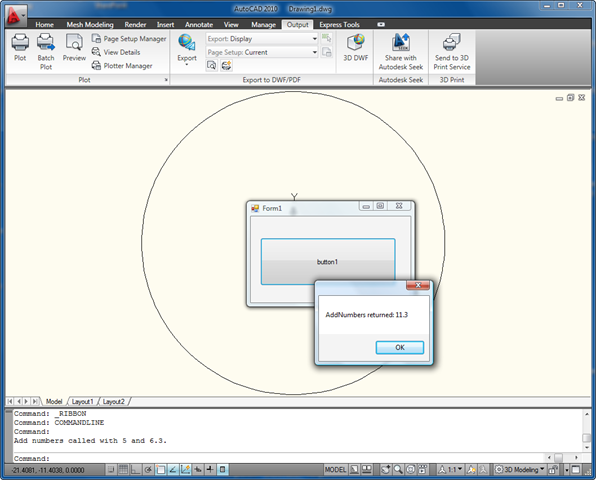
Result of driving AutoCAD via in- and out-of-proc code (redux)

3 responses to “Interfacing an external COM application with a .NET module in-process to AutoCAD (redux)”

  1. Kélcyo Pereira Avatar
    Kélcyo Pereira

    Hello Kean,

    Microsoft recently released Visual Studio 2010 Beta 1, we know that it still has many changes, most already have enough people using it to discover their new tools and technologies, including me.
    But to implement the NET framework 4 with Autocad 2010, we have some difficulties because it is still in beta.
    It would be a timely opportunity a post talking about it now and there is anybody better to strip it of you and your team.

    Thank you for understanding.

  2. Kean Walmsley Avatar

    Hi Kélcyo,

    Thanks for the suggestion.

    There are clearly pros and cons with investing time in pre-release technology, as I'm sure you're aware. Right now our shipping products clearly don't take advantage of the capabilities of .NET FX 4.0, and it will be some time before a tighter integration exists.

    Eventually I'd certainly like to look into the new features of VS 2010, but I probably won't spend serious time until it's out of Beta (there's too much scope for thrashing, and I don't have the time to invest, unfortunately).

    It's true that I sometimes investigate pre-release programming language technology - such as F# and IronRuby - but I've also learned that to do so you need to be prepared to spend time both "breaking the ground" and working around annoying issues that will get addressed, in time.

    That said - you never know. If there's something that ends up providing particularly interesting, you may yet see a post on it. 🙂

    If you hit issues in the meantime you should definitely post them to the ADN team or to the AutoCAD .NET Discussion Group.

    Cheers,

    Kean

  3. Paul Hoenecke Avatar

    Hi Kean,
    Thanks to Renze and you for finding this. The updated way is great.

  4. Hi Kean,

    I am trying to get this working on Vista x64 and AutoCAD 2010. Assembly can be loaded and mycommand can be executed, but i can't get the AddNumber to work (Some kind of file not found exception) Where can i find a complete solution of this to download, may be i missed some kind of project setting.

    Tia,

    Quint

  5. Kean Walmsley Avatar

    Hi Quint,

    I'll email you the project I used, but I have only tested on Vista 32-bit.

    Regards,

    Kean

  6. Fernando Malard Avatar
    Fernando Malard

    Hi Quint,

    Have you succeeded at your x64 machine?

    I'm trying to both build and run it on a Vista x64 machine and VS2008 are presenting some problems during the COM DLL registration.

    If I turn on the "Register for COM Interop" option at my DLL the compiler displays the MSB3097 error code and say that my DLL is not a valid Assembly.

    If I turn it off, it compile ok but when I try to register it via RegAsm application the same problem occurs.

    Regards,
    Fernando.

  7. Hello Kean,

    Interesting topic. Can you please specify how you solved the following part in more detail:

    "I found that the calling application was not able to to cast the returned System.__COMObject to LoadableComponent.INumberAddition unless I updated the project settings to "Register from COM Interop" (near the bottom of the Build tab)."

    I've checked the checkboxes 'Register for COM interop' in the Compile tab, but when running this line of code:

    'INumberAddition app = (INumberAddition)acApp.GetInterfaceObject("LoadableComponent.Commands");'

    I receive the following error: No such interface supported (Exception from HRESULT: 0x80004002 (E_NOINTERFACE)).

    When I changed both 'INumberAddition' into 'Object' in this line, the code works fine, but doesn't seem to be the proper solution.

    Maybe there is a problem in the registry of the AutoCAD references acmgd.dll acdbmgd.dll? I can't really figure out how to solve this.

    Any idea's? Kind regards,

    Hans

  8. Hello Hans,

    If I recall correctly this step needed to be performed on the the COM component I was calling into (i.e. the in-process .NET DLL project).

    I hope this helps,

    Kean

  9. Abhishek Singhal Avatar
    Abhishek Singhal

    Hi

    I tried this method and could get it to operate. Three observations:

    1. Register for COM interop in the AutoCAD add-in module works only when the output directory is set to AutoCAD directory. Regasm throws "Cant find acdbmgd.dll" if its in its own bin directory

    2. I am using sendcommand NETLOAD to load up my add-in. Its working nicely but the only thing is that the Commandmethods stop working. (whereas they work normally if netload is called manually)

    3. Debugging is an issue. You have to debug the in-process dll separately and out-of-process separately. Would have been infinitely nice if debugging was a seamless experience.

    All-in-all, out-of-process application development experience needs a little "Facelifting" as its not a very uncommon scenario.

    Thanks
    Abhishek

  10. Geert van den Brand Avatar
    Geert van den Brand

    Hi,

    I've got the same problem here.
    I've an out-of-process exe which call's a in-process dll with GetInterfaceObject as described here.
    The problem is that i can't get the dll debugged in the same project.
    Did you find a solution for this or is this not possible at all?

    Thanks,

    Geert

  11. I don't recall exactly how this works, off the top of my head - I suggest posting your question to the ADN team, if you're a member, or otherwise the AutoCAD .NET Discussion Group.

    Kean

  12. Did anyone run this successfully on 64bit OS?

    I run it successfully on 32bit OS, however, run into the error "Mixed mode assembly is built against version 'v2.0.50727' of the runtime and cannot be loaded in the 4.0 runtime without additional configuration information.", I used VS 2010 with .net4 framwork to run the sample, Kean, do you have any idea on this?

  13. Kean Walmsley Avatar
    Kean Walmsley

    Sorry, I don't - I'm still working on a 32-bit system, and haven't tried this on x64.

    Kean

  14. Thanks Kean, I found a resolution for this, try to move the functions related with Acdbmgd.dll/Acmgd.dll to static method can resolve it.

  15. Kean Walmsley Avatar

    Great! 🙂

    Kean

  16. About Register for COM...
    Have the same problem, I get "Cant find acdbgmd.dll..." as soon the Register for COM is on.
    Tried to to set the output to Autocad (what directory?) but same result.

    Thanks for any suggestions
    Daniel

  17. It's trying to resolve the assembly references when it loads the DLL - the folder containing acdbmgd.dll will either need to contain your DLL or be in the PATH.

    The specific folder will depend on the version of AutoCAD you're using.

    Kean

  18. Hi Kean,

    This is an excellent article. I used it to create a VS2010 C# application that generates geometry in AutoCAD 2010. It is working well on Windows XP 32 bit. However, I have tried to move to 64 Bit Windows 7 and i am having problems. When I try to rebuild the LoadableComponent on Windows 7 I get:

    Cannot register assembly "C:\Companies\Vistakon\ISAAC\AutoCAD Comunicator\Test 64\LoadableComponent\LoadableComponent\bin\Debug\LoadableComponent.dll". Could not load file or assembly 'acmgd, Version=18.0.0.0, Culture=neutral, PublicKeyToken=null' or one of its dependencies. The system cannot find the file specified.

    When I try to use RegAsm on the original 32 bit version I get:

    RegAsm : error RA0000 : A BadImageFormatException has been thrown while parsing
    the signature. This is likely due to lack of a generic context. Ensure genericTy
    peArguments and genericMethodArguments are provided and contain enough context.

    I have tried to use ObjectARX 2010 dlls as well as the ones installed with AutoCAD but nothing resolves the compile issue.

    I did notice if I set ComVisible(false) it will build but when ComVisible(true) is used it fails.

    I am sure there is something I am doing wrong - do you have any suggestions?

    Thanks,
    Jason

  19. Hi Jason,

    Have you tried setting the output directory for LoadableComponent.dll to the AutoCAD program files folder? This will allow the DLL's dependency on acmgd.dll to be resolved.

    Regards,

    Kean

  20. Hi Kean,
    I'm having the same problem as Daniel on Nov 16th 2011 and tried your solution for this to add the folder containing acmgd.dll and acdbmgd.dll to the path system variable. But it didn't work unfortunaltely. Do I need to do something else? The other way (setting the output directory) works, but is no option to me (it's just too much of a mess, putting the dll's directly in the AutoCad folder).

    Thanks, Silke

  21. Update: I would not recommend to set the output directory to the Acad directory, as this did destroy my Autocad installation! See also: forums.autodesk.com/t5/NET/AutoCAD-2011-install-gets-corrupted/m-p/2713229/highlight/true#M19740

  22. Kean Walmsley Avatar

    Hi Silke,

    Copying properly-named (i.e. prefixed with your Registered Developer Symbol) DLLs into AutoCAD's Program Files folder isn't necessarily a problem. You need to be very careful - if building into that folder - that you don't have Copy Local set to True for any of AutoCAD's referenced assemblies.

    The best is ultimately to build elsewhere but deploy to Program Files.

    Cheers,

    Kean

  23. Hi Kean,

    thank you for your answer. I'll definitely not do this anymore and compile to the Autocad directory directly (although probably this could have been the problem, not using the right prefix).

    But what I'd really like to do is make acmgd.dll and acdbmgd.dll (from ObjectArx inc folder) known by adding it to the path system variable, as you suggested in an earlier comment. (So that I can check the 'register for COM interop' without getting errors at compile time.) Could you specify what needs to be done, because I didn't succeed...

    Thanks,
    Silke

  24. Kean Walmsley Avatar

    Hi Silke,

    I have a vague recollection of what was required, at this stage: I'd try adding the AutoCAD's main Program Files folder to the path, assuming adding the ObjectARX SDK inc folder doesn't work.

    Regards,

    Kean

  25. Just an update for anyone who wants to know:

    I've solved my issue now. Neither by setting the output directory (problems mentioned above), nor by using the path variable (which I couldn't get running).

    I've added a post build step to my project INSTEAD of using 'register for COM interop'. This step first copies acmgd and acdbmgd to my project directory, then does a regasm, and afterwards deletes acmgd and acdbmgd from my project directory. Something like:
    copy "$(OARX2012)\inc\acmgd.dll" "$(TargetDir)"
    copy "$(OARX2012)\inc\acdbmgd.dll" "$(TargetDir)"
    "$(REGASM64_2012_NET4)" "$(ProjectDir)bin\$(ConfigurationName)\MyModule.dll" /tlb:"$(ProjectDir)bin\$(ConfigurationName)\MyModule.tlb"
    del "$(TargetDir)\acmgd.dll"
    del "$(TargetDir)\acdbmgd.dll"

    This addresses 2 issues I had:
    1) that acmgd and acdbmgd can't be found when trying to register for com interop
    2) that 'register for com interop' always just performs a regsitration with the 32bit version of regasm, which is not helpful on my 64bit machine... (In this case be sure to set system variable REGASM64_2012_NET4 to the appropriate regasm version! For me it was: 'C:\Windows\Microsoft.NET\Framework64\v4.0.30319\RegAsm.exe')

  26. Great - thanks for the info, Silke!

    Kean

  27. Great thanks for this post! It was very helpful for me and after a few sleepless nights I made this solution working with Win7 x64 and Acad 2012 x64 and VS 2010.
    Now I`ve got a tiny update for the sample code. I have recognized the problem that when I run my forms-application, start an Acad-Instance, close the Acad-Instance and try to start a new instance, it crashes.
    This problem can be solved by using the BeginQuit-Event to set the _acApp-variable to null again:

    ..._acApp.Visible = true;

    _acApp.BeginQuit +=
    new_DAcadApplicationEvents_BeginQuitEventHandler(ACAD_BeginQuit);
    ...

    //methode which was called by quitting acad
    public void ACAD_BeginQuit(ref bool cancel) {

    _acApp.BeginQuit -= new _DAcadApplicationEvents_BeginQuitEventHandler(ACAD_BeginQuit);
    //set the _acApp to null when the acad-instace was closed
    _acApp = null;
    }

    Have a nice time!
    robert

  28. Hi Robert,

    Thanks for taking the time to share your update.

    I see acApp is local in the above code, so I'd assume it doesn't need nulling out, here (although I didn't check the overall project, it could well be global in other parts of the application).

    Anyway - I'm glad if it helped you. 🙂

    Kean

  29. Hi Kean,

    You are right. It was my fault. In your code the acApp is local and so there is no need for the update.
    In my own project acApp is a global member, so my problems were made by myself.

    But maybe it is nice to know for other ones how to solve such problems.

    robert

  30. Hello Kean,

    First, Happy new year !

    You use (AcadApplication)Marshal instruction to cast to com object interface. It was a C# example, but what about VB NET ? Have you an example ?

    Thanks

    Daniel

  31. Hello,

    Finally, I found that I have a problem of vb projet references.
    My 2 interop dll I add was for 32 bits instead of 64 bits. When I change them, the cast problem disappear.

    Sorry

    Daniel

  32. Hi Kean,

    Not too late or too unrelated, i hope:
    How would one interface a (unmanaged) c++ arx app with a
    in-process .net dll? i.e. being able to call methods in the managed dll from the arx, pass parameters and receive return values.
    Except using COM i mean.

    Thanks

    alex

  33. Hi alex,

    I haven't had to do this, myself, but this seems to be the recommended approach:

    stackoverflow.com/questions/225277/calling-managed-code-from-unmanaged-code

    Regards,

    Kean

  34. Hi kean,
    I have tried your solution to open a dwg file in autocad with my winform application.

    It works fine in my system,but it has problem when i want to use my dll on another system with another winform app.

    It gives me this error : "mixed mode assembly is build against version 'v2.0.50727' of the runtime and cannot be loaded in the 4.0 runtime without additional configuration information".
    I have added the following code lines in app.config of my dll but the error is existing yet.

    <startup uselegacyv2runtimeactivationpolicy="true">
    <supportedruntime version="v4.0"/>
    <requiredruntime version="v4.0.20506"/>

    Note : I have Autocad 2012 in my system but 2010 on the other system.

    what is my mistake?

  35. Hi,

    The obvious answer is that there's a mismatch between the .NET Framework used between your DLL and AutoCAD. The message makes it sound as though you're building for .NET 2.0 and AutoCAD is using .NET 4.0, but that surprises me: AutoCAD 2012 shouldn't be using it, as far as I recall.

    But you may want to look into the application settings, to see what's going on (the build settings in your project and the acad.exe.config).

    Regards,

    Kean

  36. Confirming this works with x64 2012. Additionally, I found out that you can have the same assembly creating the COM instance of AutoCAD be netloaded. Having everything under a single .dll is pretty nice.

  37. Good to know (on both fronts).

    Thanks!

    Kean

  38. Hey Locke,
    I've been battling with this one!
    Do you have a stripped down example that you're willing to share?

    Kind regards,

    Matt

  39. Hi Kean,

    Firstly, I want to thank you for all your posts. They were very helpful as source of information for getting used to work on AutoCAD programing via C# for both in process and out process.

    I am trying to build a .exe program getting inputs from users and generating an autoCAD file (drawing will be as per the user's input) and an excel sheet (summary of all the used components/blocks).

    Therefore, I am creating in process .dll which contains all the functions that draw on autoCAD (
    using Autodesk.AutoCAD.ApplicationServices;
    using Autodesk.AutoCAD.EditorInput;
    using Autodesk.AutoCAD.Runtime;
    using Autodesk.AutoCAD.DatabaseServices;
    using Autodesk.AutoCAD.Geometry;)
    My Out process will be user interface and shall send commands to AutoCAD (with parameters).
    Your above described post is the solution to my problem. However:

    1- I created a class library. I built the "LoadableComponent.DLL" and then I specified "Register for COM interop".

    2- I created another windows forms Application (for the out process) and added the loadableComponent.DLL to the references.

    I am trying to test the above. However, I am having the following error: "Problem in loading application".
    and I really appreciate your help with this if possible.
    I am using Visual Studio 2015 and AutoCAD 2015 (I modified your code accordingly to const string progID = "AutoCAD.Application.20")

    1. If you're trying to do this without AutoCAD, you need to take a look at RealDWG.

      If you're trying to do this from an external EXE, launching or connecting to an AutoCAD instance, then it should be possible to make it work. I'm unfortunately not in a position to help you debug the specific situation, though - hopefully someone on the AutoCAD .NET Discussion Group will be able to help.

      Kean

      1. Thank you Kean for your kind reply.
        I will try to post my situation on the AutoCAD .NET discussion grp. However, I just wanted to verify that I understood the whole concept which is totally new for me.
        Have a nice day!
        Georges

    2. I am posting the below solution as suggested by Gilles Chanteau for future users:

      The out of process part (a Console Application here, but it could be a Window or WPF application as well) in which you:

      get some user inputs: location(X and Y) and Radius.

      get or create an AutoCAD instance,

      create a new drawing from a template,

      netload the InProcess.dll,

      call the CIRCLE_CMD defined in InProcess.dll passing it the user inputs:

      Outprocess:

      using Autodesk.AutoCAD.Interop;
      using System;
      using System.IO;
      using System.Runtime.InteropServices;
      using System.Windows.Forms;

      namespace OutOfProcess
      {
      class Program
      {
      static void Main()
      {
      // get some user inputs
      double x, y, rad;
      Console.WriteLine("Center X:");
      if (!double.TryParse(Console.ReadLine(), out x)) return;
      Console.WriteLine("Center Y:");
      if (!double.TryParse(Console.ReadLine(), out y)) return;
      Console.WriteLine("Radius:");
      if (!double.TryParse(Console.ReadLine(), out rad)) return;

      // get or create AutoCAD.Application
      AcadApplication acApp = null;
      const string strProgId = "AutoCAD.Application";
      try
      {
      acApp = (AcadApplication)Marshal.GetActiveObject(strProgId);
      }
      catch
      {
      try
      {
      acApp = (AcadApplication)Activator.CreateInstance(Type.GetTypeFromProgID(strProgId), true);
      }
      catch
      {
      MessageBox.Show("Cannot create an instance of 'AutoCAD.Application'.");
      return;
      }
      }
      if (acApp != null)
      {
      try
      {
      // wait for AutoCAD is visible
      while (true)
      {
      try { acApp.Visible = true; break; }
      catch { }
      }
      var docs = acApp.Documents;

      // open a new drawing (template)
      var doc = docs.Add("acadiso.dwt");

      // netload the InProcess.dll (it have to be in the same folder as OutOfProcess.exe)
      string filename = Path.Combine(Application.StartupPath, "InProcess.dll");
      filename = filename.Replace("\\", "\\\\");
      doc.SendCommand($"(command \"_netload\" \"{filename}\") ");

      // launch the command defined in InProcess passing it the inputs
      doc.SendCommand($"CIRCLE_CMD {x},{y} {rad} ");
      }
      catch (Exception ex)
      {
      MessageBox.Show("Error: " + ex.Message);
      }
      }
      }
      }
      }

      The "InProcess" code. The command must have prompts corresponding to user inputs. The dll have to be in the same folder as the exe:

      using Autodesk.AutoCAD.DatabaseServices;
      using Autodesk.AutoCAD.EditorInput;
      using Autodesk.AutoCAD.Geometry;
      using Autodesk.AutoCAD.Runtime;
      using AcAp = Autodesk.AutoCAD.ApplicationServices.Application;

      namespace InProcess
      {
      public class Commands
      {
      [CommandMethod("CIRCLE_CMD")]
      public void CircleCmd()
      {
      var doc = AcAp.DocumentManager.MdiActiveDocument;
      var db = doc.Database;
      var ed = doc.Editor;

      // prompt for center
      var ptRes = ed.GetPoint("\nCircle Center: ");
      if (ptRes.Status != PromptStatus.OK) return;

      // prompt for radius
      var distRes = ed.GetDistance("\nCircle radius: ");
      if (distRes.Status != PromptStatus.OK) return;

      // draw circle
      using (var tr = db.TransactionManager.StartTransaction())
      {
      var model = (BlockTableRecord)tr.GetObject(
      SymbolUtilityServices.GetBlockModelSpaceId(db), OpenMode.ForWrite);
      var circle = new Circle(ptRes.Value, Vector3d.ZAxis, distRes.Value);
      model.AppendEntity(circle);
      tr.AddNewlyCreatedDBObject(circle, true);
      tr.Commit();
      }
      }
      }
      }

      You can find this solution in Autodesk forum

  40. Hello Kean,

    I tried to connect winform to Autocad 2017 with proid = AutoCAD.Application.21, but have a problem.
    Autocad is active, but acApp = null.

    Thanks you

    1. Hi Mou,

      I don't provide support - please post your question to the AutoCAD online forums.

      Best,

      Kean

    2. This feature doesn't work anymore as of 2015. Problem with registering your library as a COM object. The reason is the accoremgd.dll library which should have a strong name.

  41. Hello all,

    I have tried to follow the steps to achieve an external windows form application that is able to utilize the internal functions of my dll plugin to no avail. I can easily setup my external application and startup an AutoCAD instance, load in my dll, and call custom commands from the AcadApplication.SendCommand("xxx"). The problem is I need AutoCAD to communicate information back to my external application.
    When following these steps, everytime I fix an exception another pops up and I am losing hope! I am a beginner in such complex processes.
    Does anyone know any more in-depth guides or alternative solutions to obtain the same result? Hoping 14 years later is not too late for someone to see this!!

    Thank you very much, any help is greatly appreciated!

    Isaac Bhérer-Constant

    1. Sorry for the delayed response. Have you tried posting your problem to the AutoCAD .NET forum?

      Kean

Leave a Reply to Paul Hoenecke Cancel reply

Your email address will not be published. Required fields are marked *