In this recent post we looked at adding custom editing capabilities for dynamic properties we've added via .NET. In the first example we looked at a "distance" property which provided a button allowing the user to select two points. In this post we'll look at implementing a masked string property, such as one you would use for a password.
I won't repeat too much of the background information from the last post in this series: you should refer to that to understand the fundamentals (the fact that we're basing this implementation on Cyrille Fauvel's OPM .NET sample, that we're not dealing with per-object persistence, and that we're using "stock" ActiveX editing controls we've discovered via the Registry). That said, the code we're providing here stands alone from the code in the last post, even if it's altogether possible to combine them.
Here is the C# code to implement a simple, masked string dynamic property:
using Autodesk.AutoCAD.Runtime;
using Autodesk.AutoCAD.Windows.OPM;
using Autodesk.AutoCAD.Windows.ToolPalette;
using System;
using System.Reflection;
using System.Runtime.InteropServices;
namespace OPMNetSample
{
#region Our Custom Password Property
[
Guid("B5D9010E-48A2-4bfb-8601-76A7B1007C68"),
ProgId("OPMNetSample.PasswordProperty.1"),
ClassInterface(ClassInterfaceType.None),
ComDefaultInterface(typeof(IDynamicProperty2)),
ComVisible(true)
]
public class PasswordProp : IDynamicProperty2, IAcPiPropertyDisplay
{
private IDynamicPropertyNotify2 _pSink = null;
private string _password = "";
#region IDynamicProperty2 methods
// Unique property ID
public void GetGUID(out Guid propGUID)
{
propGUID =
new Guid("B5D9010E-48A2-4bfb-8601-76A7B1007C68");
}
// Property display name
public void GetDisplayName(out string
{
szName = "Password";
}
// Show/Hide property in the OPM, for this object instance
public void IsPropertyEnabled(object pUnk, out int bEnabled)
{
bEnabled = 1;
}
// Is property showing but disabled
public void IsPropertyReadOnly(out int bReadonly)
{
bReadonly = 0;
}
// Get the property description string
public void GetDescription(out string szName)
{
szName =
"This masked property is a string";
}
// OPM will typically display these in an edit field
// optional: meta data representing property type name,
// ex. ACAD_ANGLE
public void GetCurrentValueName(out string szName)
{
throw new System.NotImplementedException();
}
// What is the property type, ex. VT_R8
public void GetCurrentValueType(out ushort varType)
{
// The Property Inspector supports the following data
// types for dynamic properties:
// VT_I2 (2), VT_I4 (3), VT_R4 (4), VT_R8 (5),
// VT_BSTR (8), VT_BOOL (11), and VT_USERDEFINED (29).
varType = 8; // VT_BSTR
}
// Get the property value, passes the specific object
// we need the property value for.
public void GetCurrentValueData(object pUnk, ref object pVarData)
{
pVarData = _password;
}
// Set the property value, passes the specific object we
// want to set the property value for
public void SetCurrentValueData(object pUnk, object varData)
{
_password = varData.ToString();
System.Windows.Forms.MessageBox.Show(
"String entered was \"" + _password + "\"."
);
}
// OPM passes its implementation of IDynamicPropertyNotify, you
// cache it and call it to inform OPM your property has changed
public void Connect(object pSink)
{
_pSink = (IDynamicPropertyNotify2)pSink;
}
public void Disconnect() {
_pSink = null;
}
#endregion
#region IAcPiPropertyDisplay methods
public void GetCustomPropertyCtrl(
object id, uint lcid, out string progId
)
{
progId = "AcPEXCtl.AcPePropertyEditorPwdText.16";
}
public void GetPropertyWeight(object id, out int propertyWeight)
{
propertyWeight = 0;
}
public void GetPropertyIcon(object id, out object icon)
{
icon =
null;
}
public void GetPropTextColor(object id, out uint textColor)
{
textColor = 0;
}
public void IsFullView(
object id, out bool visible, out uint integralHeight
)
{
visible = false;
integralHeight = 1;
}
#endregion
}
#endregion
#region Application Entry Point
public class MyEntryPoint : IExtensionApplication
{
protected internal PasswordProp passProp = null;
public void Initialize()
{
Assembly.LoadFrom("asdkOPMNetExt.dll");
// Add the Dynamic Property
Dictionary classDict = SystemObjects.ClassDictionary;
RXClass lineDesc = (RXClass)classDict.At("AcDbLine");
IPropertyManager2 pPropMan =
(IPropertyManager2)xOPM.xGET_OPMPROPERTY_MANAGER(lineDesc);
passProp = new PasswordProp();
pPropMan.AddProperty((object)passProp);
}
public void Terminate()
{
// Remove the Dynamic Property
Dictionary classDict = SystemObjects.ClassDictionary;
RXClass lineDesc = (RXClass)classDict.At("AcDbLine");
IPropertyManager2 pPropMan =
(IPropertyManager2)xOPM.xGET_OPMPROPERTY_MANAGER(lineDesc);
pPropMan.RemoveProperty((object)passProp);
passProp = null;
}
}
#endregion
}
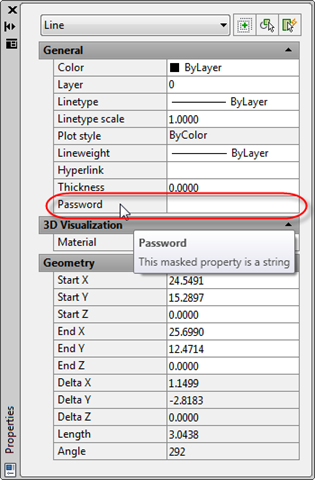
Let's see what happens when we NETLOAD the asdkOPMNetExt.dll and our OPMNetSample.dll, and then select a standard line:
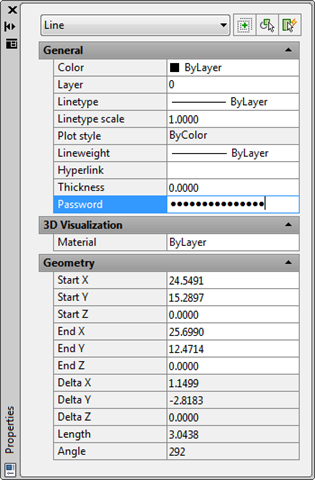
Once we start entering a string inside our dynamic password property, we see it displayed as a masked string:
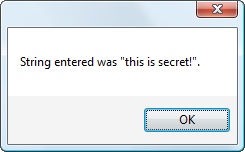
And once we finish entering our string, we can see that our code has the unmasked data available to it – here's a MessageBox we throw up to display the contents:
If we really wanted to store this securely – to avoid any determined application from snooping the underlying data – then we would really need to encrypt it before assigning it to our object (whether in Xdata or an Xrecord stored in the extension dictionary of an object). Beyond that we might even want to take measures to make sure the variable – as stored in memory, not just persisted with the object – isn't readable by external applications. But again, this is beyond the scope of this post, which is really just to introduce another property editing control available inside AutoCAD.


Leave a Reply to dba Cancel reply