Providing information on AutoCAD objects in a tooltip using .NET

One of the responses to my last post on the "Plugin of the Month" asked about showing information on an AutoCAD drawing object via a tooltip. Other than using the standard rollover tooltip properties mechanism, as shown in this previous post, the best way to achieve this is via a PointMonitor.

In the below C# code we check which object ore objects are being hovered over, get information about those objects and add them to the tooltip.

using Autodesk.AutoCAD.ApplicationServices;

using Autodesk.AutoCAD.DatabaseServices;

using Autodesk.AutoCAD.Runtime;

using Autodesk.AutoCAD.EditorInput;

using Autodesk.AutoCAD.Geometry;


public class PointMonitorTooltips

{

  [CommandMethod("SM")]

  public static void StartMonitor()

  {

    Editor ed =

      Application.DocumentManager.MdiActiveDocument.Editor;

    ed.PointMonitor +=

      new PointMonitorEventHandler(ed_PointMonitor);

  }


  [CommandMethod("XM")]

  public static void StopMonitor()

  {

    Editor ed =

      Application.DocumentManager.MdiActiveDocument.Editor;

    ed.PointMonitor -=

      new PointMonitorEventHandler(ed_PointMonitor);

  }


  static void ed_PointMonitor(object sender, PointMonitorEventArgs e)

  {

    Editor ed = (Editor)sender;

    Document doc = ed.Document;


    if (!e.Context.PointComputed)

      return;


    try

    {

      // Determine the size of the selection aperture


      short pickbox =

        (short)Application.GetSystemVariable("PICKBOX");

      Point2d extents =

        e.Context.DrawContext.Viewport.GetNumPixelsInUnitSquare(

          e.Context.ComputedPoint

        );

      double boxWidth = pickbox / extents.X;

      Vector3d vec =

        new Vector3d(boxWidth / 2, boxWidth / 2, 0.0);


      // Do a crossing selection using a centred box the

      // size of the aperture


      PromptSelectionResult pse =

        ed.SelectCrossingWindow(

          e.Context.ComputedPoint - vec,

          e.Context.ComputedPoint + vec

        );


      if (pse.Status != PromptStatus.OK ||

          pse.Value.Count <= 0)

        return;


      // Go through the results of the selection

      // and detect the curves


      string curveInfo = "";


      Transaction tr =

        doc.TransactionManager.StartTransaction();

      using (tr)

      {

        // Open each object, one by one


        ObjectId[] ids = pse.Value.GetObjectIds();

        foreach (ObjectId id in ids)

        {

          DBObject obj =

            tr.GetObject(id, OpenMode.ForRead);

          if (obj != null)

          {

            // If it's a curve,
get its length


            Curve cv = obj as Curve;

            if (cv != null)

            {

              double length =

                cv.GetDistanceAtParameter(cv.EndParam);


              // Then add a message including the object

              // type and its length


              curveInfo +=

                obj.GetType().Name + "'s length: " +

                string.Format("{0:F}", length) + "\n";

            }

          }

        }

        // Cheaper than aborting


        tr.Commit();

      }


      // Add the tooltip of the lengths of the curves detected


      if (curveInfo != "")

        e.AppendToolTipText(curveInfo);

    }

    catch

    {

      // Not sure what we might get here, but not real action

      // needed (worth adding an Exception parameter and a

      // breakpoint, in case things need investigating).

    }

  }

}

During the command we perform a selection, using Editor.SelectCrossingWindow() specifying a window based on the selected point, using a window that's about the size of the selection aperture (at least that's what I'm trying to do: let me know if you've got a better solution for this). Having some amount of "fuzz" in the selection allows us to not have to hover very precisely over the object, which may or may not be what you're looking for.

We then iterate through the objects, gathering information about the objects we care about. In this case we're looking for curves: when we find one, we add its length (along with its object type) to the string we eventually add to the tooltip via AppendToolTipText().

There are two commands: SM adds the monitor, and XM removes it. Bear in mind that the event fires for all sorts of input events - including keystrokes – so you can actually cause problems unless you're careful. As an example, I wasn't previously checking the PointComputed status of the PointManager's context, which is false if we're looking at keyboard input. The code would go ahead and try to select geometry, which – for some reason unknown to me – cause the character in the keystroke buffer to be lost. Which meant that entering any command would only result in the last command being executed (via the return being processed – that one got through, OK :-). All this to point out that care should be taken when relying on events that are so integrated so deeply into AutoCAD's user input mechanism.
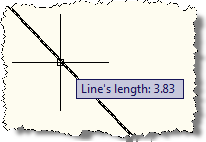
PointMonitor tooltip over a single line So let's see what we get after NETLOADing the module, running the SM command and hovering over a curve, in this case a line. We see a tooltip appear containing the line's length.

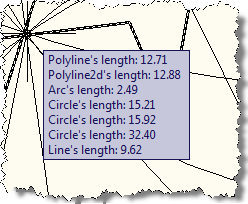
And if we do the same with a lot more intersecting objects, we see that we also get the PointMonitor tooltip over lots of different curvesopportunity to provide information on those. It's ultimately our choice how we manage the selection process and what we do with the results (although please don't assume you can attempt everything from this kind of very frequently fired event: there are a number of areas where you may find things failing, especially if there's any interactive component).
 

Update:

Thanks to Tony Tanzillo for keeping me honest (see his comments, below). The below code addresses a few issues with the version shown above, and should be used instead.

using Autodesk.AutoCAD.ApplicationServices;

using Autodesk.AutoCAD.DatabaseServices;

using Autodesk.AutoCAD.Runtime;

using Autodesk.AutoCAD.EditorInput;

using Autodesk.AutoCAD.Geometry;


public class PointMonitorTooltips

{

  [CommandMethod("SM")]

  public static void StartMonitor()

  {

    Editor ed =

      Application.DocumentManager.MdiActiveDocument.Editor;

    ed.PointMonitor +=

      new PointMonitorEventHandler(ed_PointMonitor);

  }


  [CommandMethod("XM")]

  public static void StopMonitor()

  {

    Editor ed =

      Application.DocumentManager.MdiActiveDocument.Editor;

    ed.TurnForcedPickOn();

    ed.PointMonitor -=

      new PointMonitorEventHandler(ed_PointMonitor);

  }


  static void ed_PointMonitor(object sender, PointMonitorEventArgs e)

  {

    Editor ed = (Editor)sender;

    Document doc = ed.Document;


    try

    {

      FullSubentityPath[] paths =

        e.Context.GetPickedEntities();


      // Go through the results of the selection

      // and detect the curves


      string curveInfo = "";


      Transaction tr =

        doc.TransactionManager.StartTransaction();

      using (tr)

      {

        // Open each object, one by one


        foreach (FullSubentityPath path in paths)

        {

          ObjectId[] ids = path.GetObjectIds();

          if (ids.Length > 0)

          {

            ObjectId id = ids[ids.GetUpperBound(0)];


            DBObject obj =

              tr.GetObject(id, OpenMode.ForRead);

            if (obj != null)

            {

              // If it's a curve, get its length


              Curve cv = obj as Curve;

              if (cv != null)

              {

                double length =

                  cv.GetDistanceAtParameter(cv.EndParam) -

                  cv.GetDistanceAtParameter(cv.StartParam);


                // Then add a message including the object

                // type and its length


                curveInfo +=

                  obj.GetType().Name + "'s length: "
+

                  string.Format("{0:F}", length) + "\n";

              }

            }

          }

        }

        // Cheaper than aborting


        tr.Commit();

      }


      // Add the tooltip of the lengths of the curves detected


      if (curveInfo != "")

        e.AppendToolTipText(curveInfo);

    }

    catch

    {

      // Not sure what we might get here, but not real action

      // needed (worth adding an Exception parameter and a

      // breakpoint, in case things need investigating).

    }

  }

}

32 responses to “Providing information on AutoCAD objects in a tooltip using .NET”

  1. Hi Kean,
    this is nice and clean; I just wanted to point out some help I got to a similar issue from ADN take a look at: (maybe you can track this better than anyone!)
    Problem ID : 1251347
    Created On : 2009-06-25 07:59:57.0
    Last Saved On : 2009-06-30 01:33:13.0
    Status : CLOSED - Sub Status : Solved
    Solution provided by "Philippe L"
    I think it's an extension of this post.

    Looking forward the “Plugin of the Month”
    René

  2. Kean Walmsley Avatar

    Hi René,

    Thanks for pointing this out!

    The solution Philippe provided was fairly complex (given the need to work around an issue with detecting hatches in AutoCAD 2008, as far as I can tell...).

    Hopefully with 2009 onwards it's all simpler (I'm using 2010, of course).

    Regards,

    Kean

  3. Well, there's a few problems there...

    You're using the Editor's selection methods to acquire the objects in the pickbox.

    Not sure why you'd want to do that, considering that it trashes the user's Previous selection set, and because the PointMonitor event arguments already provides you with the objects within the aperture (The GetPickedEntities() method of the Context property of the PointMonitor event arguments returns both top-level and nested entities in the aperture).

    Another tip: You have to call the Editor's TurnForcedPickOn() method in order for GetPickedEntities() to cooperate when there's no command running.

    Also, I'm not sure why you'd want to bail out if the PointComputed property is false. It has no bearing on whether there are objects in the aperture.

  4. Oh, and one more thing....

    To get the length of a curve, you have to subtract the distance from the start parameter, from the distance to the end parameter. Arcs and Ellipitical arcs can have non-zero start parameters.

  5. Also, in 2010 PointMonitor wont work with bulk entities (FDO). There is an issue with the SubEntityIDs returned via the FullSubentityPath. I had to XOR out the top two bytes of the SubEntId (Int32 in .NET) to get it to properly pick the subentity.

  6. Tony Tanzillo Avatar

    Hi Tony, I and I'm sure others would be interested in knowing more about your workaround for FDO objects.

  7. Kean Walmsley Avatar

    Thanks, Tony (T). I'll fix the post.

    The reason I was bailing when the PointComputed property was false was to stop the selection process from causing the keystrokes to get swallowed (which was a side problem from using the editor to select...).

    With hindsight I don't know why I didn't use GetPickedEntities() - I had copied some code from an old experiment and clearly wasn't diligent in cleaning it up. At least that's the best reason I can come up with, other than "nappy brain" :-).

    Kean

  8. Tony Tanzillo Avatar

    I posted a simple example at the url below, that also shows how to ignore PointMonitor events that are triggered by keyboard input:

    http://www.caddzone.com/Poi...

  9. Hi Kean,
    I'm using PointMonitor for custom tooltips, but for some reason, my tooltips are not shown. When i debug my code, I get to e.AppendToolTipText(info), but the tooltip is not displayed.
    Is there some AutoCAD option that disables these tooltips, or do i have to show the tooltip, except just adding the text to it?

    Thanks for any help, I'm pretty stuck here.

  10. Fortunatelly i found the answer myself.
    forums.autodesk.com/t5/NET/PointMonitor-and-AutoSnap-37/m-p/2125768/highlight/true#M8924 gives a hint. I had AUTOSNAP set to 0, you have to have the third bit set to true to have the tooltips displayed.

    Thanks for the inspiration anyway, keep the good work.

  11. I know this is old, but it looked like something I could use for a prototype I'm doing.

    I dropped it into a new project as-is just to try it out and ran into a couple of problems:
    1) When I mouse over a curve all the code runs, but nothing happens on-screen in AutoCAD (Map, 2012). The curveInfo variable gets filled out with text as expected but the call to AppendToolTipText doesn't seem to do anything.
    2) When I mouse OUT from a curve I often get a weird blank debug assertion thrown from GetPickedEntities()

    I wonder if these problems are due to changes between ACAD 2010 and 2012...?

  12. Hi Chuck,

    I can confirm it still works for me in AutoCAD 2012 and 2013 (although the text gets prefixed to the extended tooltip, which is actually pretty cool).

    I don't see the debug assertion failure (that *is* wierd), so perhaps both issues are Map-specific?

    I suggest pinging ADN or posting to the Map Developer discussion group...

    Regards,

    Kean

  13. "the text gets prefixed to the extended tooltip"

    Hmm, maybe my problem is that I don't get any tooltips on my AutoCAD entities ever. I'm not sure why... ROLLOVERTIPS is set to 1 and the box for "Show rollover ToolTips" is checked in Options.

    If you set ROLLOVERTIPS to 0 do you get a debug assertion on mouseout?

  14. Kean Walmsley Avatar

    Nope - without roll-over tooltips I see the appended tooltip on its own (it looks just like the the screenshot in the post, in that case).

    Kean

  15. Hi,

    thanks for your nice posts, it was indeed useful for me. I do not have too much experience with AutoCAD and its API, I'm simple ASP .NET software developer 🙂 and right now I need to quickly clone Google Earth infobox (when user clcik on some feature, show some picture with info) functionality in AutoCAD.

    I decided to use your approach with pallete, I will just need make it really looks like with Google Earth.

    Current problems I'm facing is how to add custom property to objects in layer (I want to store path to jpeg file on disk) and read it in program, so I can show picture in infobox on "mouse click".

    Next problem is "mouse click" event. I'm not able to find it in documentation. I see on hover and on double click, but now "mouse click" event.

    I would appreciate any help, and also if you have any suggestion how it would be better to make this behavior without using pallete.

  16. Kean Walmsley Avatar

    Hi Minja,

    Try searching this blog for "XData", which is certainly one mechanism for storing additional data on an object.

    There's no "on click" event on AutoCAD entities, but you can see when the pickfirst selection set has been modified and use it from there:

    keanw.com/2006/09/using_the_pickf.html

    keanw.com/2011/10/displaying-an-autocad-ribbon-tab-contextually-using-net.html

    Regards,

    Kean

  17. Good morning, Kean.

    I can confirm that this example will work fine in AutoCad 2013, even with ROLLOVERTIPS set to 1.

    I was also able to use AcDb.Entity.GetField() instead of using standard XData for custom entity information (which I assigned from before in another plugin).

    However, I wanted to point out that if a command is in progress you can have unexpected behaviour.

    The best example is if you attempt to draw a linear dimension via the DIMLINEAR command. It appears that if AppendToolTipText() is called in a PointMonitor event while this command is in progress, the dimension jig will disappear.

    My personal fix was simple - I checked to see if the document had a command in progress before I executed my code in the PointMonitor event handler.

    If you want to reproduce, and need some sample code to do so, let me know...

    Best Regards,
    Jason Booth

  18. Kean Walmsley Avatar

    Hello Jason,

    That seems a reasonable check to make (and one I probably should have included it from the beginning).

    That's not to say the behaviour of DIMLINEAR is correct: I'd suggest posting the information via ADN (or the AutoCAD Discussion Group), if you'd like someone to look into this further for you.

    Regards,

    Kean

  19. Kean,

    I'm using this in C3D 2012 to create custom tooltips. The e.AppendToolTipText method displays just the custom string supplied. Is there any way to have the default Layer, Color, etc. tooltip information displayed along with my custom tip?

    Thanks.

  20. Rod,

    This approach does indeed replace the tooltip information.

    This post may be more what you're looking for (and hopefully you can OPMNetExt, if you need to use it from a .NET language - I haven't tried that myself).

    Regards,

    Kean

  21. Hi Kean,
    This is very interesting as I'm trying - not very successfully - to move some InputPointMonitor code from C++/ARX to C#.
    Unfortunately, Tony's site is not what it used to be anymore, so I would appreciate a pointer to his new site or to his PointMonitorClient.cs file.

    Thanks,

    alex

  22. Hi alex,

    Sadly I don't know where Tony's site is, these days. You might try posting on The Swamp - there's a chance that the code he's linked to here has been made available in some way over there.

    Regards,

    Kean

  23. Thank you, Kean

    I posted on The Swamp but no luck so far.
    Maybe someone listening on this frequency has the file.
    In the meantime, it's back to the salt mines for me.

    alex

  24. Is there a way to get the BlockReference from a FullSubentityPath? If you move over a block the entity path is the nested object not the BlockReference.

    Thanks,

    Matt

  25. Have you tried getting the containers' ObjectIds and going one up (can't remember whether it's the first or the last you need)?

    Kean

  26. I can't seem to get the container from the FullSubentityPath. What methods are available to cast the Path or resulting ObjectId as a PromptNestedEntityResult to acquire the container?

  27. Call GetContainers() on the PromptNestedEntityResult object. That will return the ObjectIds of the containing entities.

    Kean

  28. Can I use PromptNestedEntityResult when my entity is gathered from GetPickedEntities as a FullSubentityPath?

    when after grabbing all of the FullSubentityPath from the GetPickedEntities would I call GetContainers()?

    I know it takes a bit of time showing a brief example but this would be greatly helpful.

    Thanks,
    Matt

  29. After reading a bit more into the FullSubentityPath documentation and fixating on this definition:
    "The object ID array contains a sequential list of the object IDs for all the objects that make up the "path" from the outermost entity"

    I realized I could get the heights level of the array using:

    ObjectId id = paths[0].GetObjectIds()[0]

    Matt

  30. I have found that this method a great way to drill through all of the elements within the pickbox or under the crosshairs, including extraction of XData contained within an Xref or even a nested Xref. Working with some of the functionality available with BREP helped in further information retrieval. My question is: Can this same process be used when supplying a point3d? If not, what kind of workaround is available?
    There are many times when a routine may iterate through elements using known coordinates or end points. It would be great to be able to utilize the full capabilities of GetPickedEntities rather than GetNestedEntity as they do not behave the same. Once all necessary information from an element a (X,Y,Z) coordinate has been extracted, one should be able to determine different paths of analysis without requiring any user input especially where nested xrefs are concerned.
    Any thoughts?

    1. You could probably attach a PointMonitor to get the additional information during your custom selection process, if that works better for your particular scenario.

      Let me know if that doesn't really answer your question...

      Kean

  31. MOHAMED EL YAKOUBI Avatar
    MOHAMED EL YAKOUBI

    can i do ha in revit , any help

Leave a Reply to MOHAMED EL YAKOUBI Cancel reply

Your email address will not be published. Required fields are marked *