Hitting breakpoints in .NET Class Libraries while debugging with Visual Studio 2010

This question has popped up a few times since Visual Studio 2010's recent launch. I received it by email overnight from Roland Cox, which is interesting as I'd already planned this post for today.

Do you know how to debug AutoCAD and a custom add in using Visual Studio 2010?

What settings do I need to make?  I know the add is getting loaded (the code runs in AutoCAD) but I can't set a breakpoint (it shows a empty circle saying that VS doesn't have the assembly loaded).

I first saw this issue raised a few times on threads with Microsoft, both with respect to AutoCAD and Revit. Jeremy has also posted something on his blog about it.

Adam Nagy, from our DevTech team in Europe, has created this excellent DevNote on the ADN website covering the various options for dealing with this problem. I've used this as the basis for the details in today's post. (Thanks, Adam! 🙂

The problem is not at all specific to Autodesk products, although – if the above threads are an indicator – it does seem that as commonly used .NET plugin hosts our products are among the more common environments in which people are hitting this issue.

The cause of the problem boils down to the fact that VS 2010 does not choose the right version of the debugger for Class Library projects targeting prior versions of the .NET Framework: it always uses the default version, the debugger targeting v4 of the .NET Framework. This debugger doesn't see breakpoints in projects targeting older versions of .NET.

The three workarounds Adam has highlighted show different ways to make VS 2010 use the correct debugger (one which actually hits breakpoints) on these projects. Which solution works best for you will depend on your specific scenario (I would tend to use option 2 or 3, myself).

Solution 1

Start the exe that loads your AddIn (acad.exe, revit.exe, etc) and then attach to it from Visual Studio (Debug -> Attach to Process...)

Solution 2

Modify the config file of the exe that loads your AddIn (acad.exe.config, revit.exe.config, etc) so that it contains the following just before the </configuration> part:

<startup>

  <supportedRuntime version="v2.0.50727" />

</startup>

Solution 3

Add the exe that loads your AddIn as an existing project to your solution and set the debugger version for it to v2.0.

  1. Right-click the Solution in the Solution Explorer and select Add -> Existing Project... and locate the exe that loads your AddIn
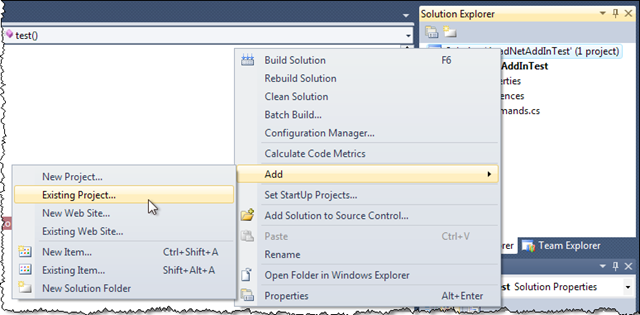
 Add an existing project to our VS 2010 solution

  1. Right-click on the Project that has just been added and select Set as StartUp Project
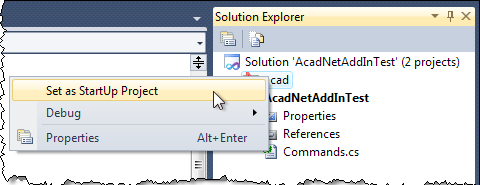
 Make our new project the startup project

  1. Right-click on the Project and select Properties
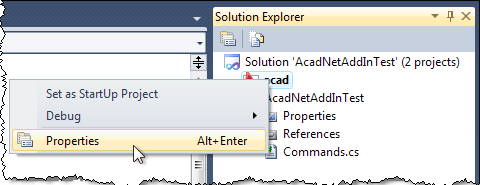
 Edit our project's properties

  1. Set the Debugger Type to Managed (v2.0, v1.1, v1.0)
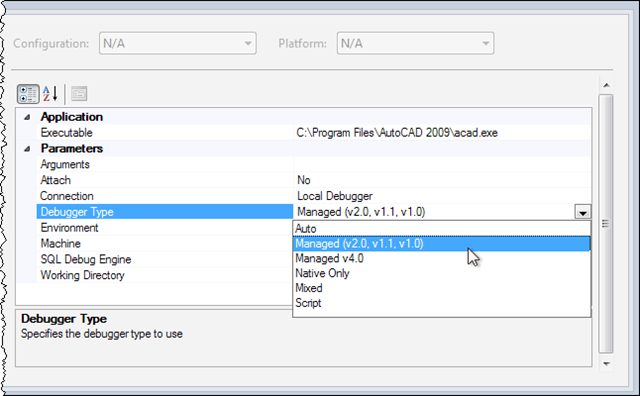
Change the debugger type in our executable project's properties

40 responses to “Hitting breakpoints in .NET Class Libraries while debugging with Visual Studio 2010”

  1. Fernando Malard Avatar
    Fernando Malard

    Kean,

    What about VS2010 compatibility with AutoCAD 2009, 2010 and 2011 in regards to both .NET and C++ SDK?

    Any significant advantage over VS2008 in terms of AutoCAD applications coding and debugging?

    Regards.

  2. Fernando,

    I'm yet to install it, myself. Perhaps others can chime in with their opinions and experiences.

    From a compatibility perspective you should be just fine if you're using .NET (although there may be things you need to do if you're targetting .NET 4 - I'm not sure about that), but clearly you can't use it for ObjectARX development.

    Regards,

    Kean

  3. Fernando Malard Avatar
    Fernando Malard

    It is a shame Microsoft don't add an option to compile C++ code using previous versions libraries as you can target with .NET projects.

    It is annoying to keep all flavors of VS installed or use some unsupported techniques to make VS compile with old C++ libraries.

    Maybe in VS 2020... 🙂

    Thanks.

  4. Fernando Malard Avatar
    Fernando Malard

    Kean,

    What about this new feature called "Platform Toolset"?

    blogs.msdn.com/somasegar/archive/2008/11/21/c-enhancements-in-vs-2010.aspx

    Any chance?

  5. Looks promising. It's probably worth trying to build something and seeing whether AutoCAD recognises the .ARX as a DLL built with the appropriate compiler version.

    If you don't have any luck, let us know via the ADN site.

    Kean

  6. Microsoft did add that capability to VS 2010, and it works fine for targeting AutoCAD 2007 and later.

  7. Fernando Malard Avatar
    Fernando Malard

    Ok, I did it.
    Have opened ARXDBG project inside VS2010.

    VS have converted it and then I compiled it.
    I have received two errors (apparently errors related to the Wizard while converting the project setting which have changed a little bit):

    1) UNICODE,_UNICODE definitions disappeared
    2) _AFXDLL is now required (no clue why)
    3) Changed the "Platform Toolset" to v90

    After that, it did compile ok.
    Have opened it inside both AutoCAD 2010 and 2011 and...voila! Worked like magic!

    How cool is that??? 🙂

    I have used:
    VS 2010 Professional Trial version
    ObjectARX 2010
    Windows 7 Ultimate - x64 English
    AutoCAD 2010 x64 English
    AutoCAD 2011 x64 English

    Could you test at your end?

    Fernando.

  8. Very cool - good to know it works.

    Even if I could test this easily (I still haven't installed VS 2010), my testing wouldn't indicate official support - we'd need sign-off from our engineering team on that.

    It's best to ask via ADN for the official word on this.

    Kean

  9. Buyer beware!

    If your developing mixed managed c++ code you need to know about these two issues:

    No intellisense support in managed c++
    connect.microsoft.com/VisualStudio/feedback/details/501921/c-cli-intellisense

    No incremental builds in managed c++
    connect.microsoft.com/VisualStudio/feedback/details/519771/managed-incremental-build-for-c-projects-is-missing

    Although targeting multiple builds is useful on our build server, for developers we are having to stay with VS 2008

    Jeff

  10. Juergen.Becker@CAD-Becker.de Avatar
    Juergen.Becker@CAD-Becker.de

    Hi Kean,

    after several frustrated hours I found your article.
    It's work fine. I have chosen the third possibility.

    Many thanks.

    Regards
    Jürgen

  11. tietze@lcs-schlieben.de Avatar
    tietze@lcs-schlieben.de

    Great solution!!! Thank you. I spend 2 days before I found your conclusion. I´ve chossen the third way, as well.

    Daniel

    1. " Great share. Same here finding conclusion took time".?

  12. +1 On option 3. I just installed the SDK and oddly enough I read the "readme" file which I never seam to do. Inside I found a link to this page which describes problems I didnt know I had yet!

    "Just finished "Hello World" YAYYYYY

  13. Firstly. Brilliant work. Will be the first to admit that I don't fully understand most of it. but enjoy reading you blogs.

    Secondly. Trying Option 3 above. When I try to add an existing project all I can add is an existing item. The first top 4 option are missing from my selection. Actually, your bottom 3 selection are my top 3, followed by Windows form, user control, module & class.

    I know its a wild shot but any ideas why this would be so?

    Using VB2010 Express & AutoCAD 2010

    David

  14. It's quite possible that the Express versions of Visual Studio don't support option 3 (they are intended to have limited debugging capabilities).

    Kean

  15. Bummer, thanks for the quick reply.

    David

  16. Moved up to VS2010 and Win 7

    Got the debugproblem,
    and after searching a while I found this page.
    Went for solution 3.
    Easy and smart solution.

  17. FOR EXPRESS USERS: I'm using VB 2010 Express , AutoCAD Map3d 2011, win 7 . First I edit vb project file to set startaction & startprogram (because I'm using express), then find in my acad.exe.config file:

    1.

    remove the comment block tags on lines 1. and 5.
    DEBUG STARTS ACAD & BREAKPOINTS WORKING!!!!
    (thanks for your help MF in Vancouver)

  18. oops, xml char.s conflict with html char.s, so in my acad.exe.config file (with angle brackets removed):

    1!--
    2startup useLegacyV2RuntimeActivationPolicy="true"
    3supportedRuntime version="v4.0"/
    4/startup
    5--

    remove the comment block tags on line 1 and 5

  19. Hi,
    I'm glad to hear that above solutions work for almost everybody.. Unfortunately, they don't work for me.

    I have my VS Framework set to version 3.5. Do you think this could cause problems?

  20. It's hard to say: I suggest posting a more complete description of your environment to the ADN team, if you're a member, or otherwise the AutoCAD .NET Discussion Group.

    Kean

  21. Verónica Basaldúa Avatar
    Verónica Basaldúa

    I´m working with Visual Studio 2010 .NET Framework 4.0 and Autocad 2012. I have a class in my project that shows a form. I can debug the class but I get a "No symbols are loaded for any call stack frame. The source code cannot be displayed", when trying to debug code in the form. In the solution, "Properties", "Common Properties" "Debug Source Files", I defined my working directories, with no luck. Any ideas that could help me?? Thank you in advance.

  22. Hi Verónica,

    Sorry - no obvious suggestions. Please try posting your question to the ADN team, if you're a member, or otherwise the AutoCAD .NET Discussion Group.

    Regards,

    Kean

  23. Verónica Basaldúa Avatar
    Verónica Basaldúa

    I found the answer. In order to debug the code in a form with VS2010 + AUTOCAD 2012 you need to turn the environment variable FIBERWORLD to 0 (it´s read only) but you can change the value with the NEXTFIBERWORLD. Close the AutoCAD in order to the change take place. Reload Autocad and then you can debug the code in the form.

  24. José Montes Herraiz Avatar
    José Montes Herraiz

    Thanks’, thanks’, thanks’.
    My break points stopped working after reinstalling Revit and visual Studio 2010. I had to spend a whole week searching internet. But at last I’ve got here. Thanks’.

  25. Grande!!!!

    grazie
    Andrea

  26. Went through step 3 - but sadly it's still not working. I am getting this error in Autocad 2010.

    C:\Windows\Microsoft.NET\Framework64\v2.0.50727\config\machine.config.
    LOG: Attempting download of new URL
    file:///C:/Users/Workstation/Documents/Visual Studio
    2010/Projects/Entity1/Entity1/bin/Debug/Entity1.dll.
    ERR: Failed to complete setup of assembly (hr = 0x8013101b). Probing terminated.

    I am using win7 64bit with Autocad 2010 (demo) and Autocad Plant 2011.

    Any ideas will help tremendously, thanks Kean!

  27. Kean Walmsley Avatar

    Hi Dave,

    Sorry - nothing springs to mind.

    I suggest posting your question to the ADN team, if you're a member, or otherwise the AutoCAD .NET Discussion Group.

    Regards,

    Kean

  28. I did post here: forums.autodesk.com/t5/NET/Debugging-with-vs2010/td-p/3037350

    Will let you know if I resolve it. Thanks

  29. Hi Kean,

    Thanks for this info. I went for option 2 and it works fine using VS2010 and ACADM2011.

    This helps a lot as i've been working in the dark without debug capability for the last year!

    Cheers,
    Matt

  30. thank you. seems to work for me.

    ACAD MAP 2009
    VS2010
    Targeted .Net framework 3.5

    -JD

  31. how do you set up VB.net 2010 express to do this?
    am i out of luck? doesn't have the config file and doesn't allow to add exe file. or set it up in vs2010 and copy the file would work?

    thanks.

  32. Express editions don't have the same configurability as full Visual Studio, so you may be out of luck. (I assume you're following the procedure in this post if you've even got debugging working at all).

    Kean

  33. According to connect.microsoft.com/VisualStudio/feedback/details/487949/debugging-external-application this was fixed in Studio 2010 SP1, released 3/3/2011.

    SP1 release download at microsoft.com/download/en/details.aspx?id=23691

    I used option 3 to get one project working a few months ago, but then today none of the options were working for me on a new project, so I'm in the process of downloading the service pack. Will post back here with results in the hope of creating an option 4...

  34. Nope, that did not fix the problem either.

  35. I don't know if this question could be sent here but you'll let me know.

    From a first projet wich is the start one in our solution, we lunch a second one which lunch Autocad with c# ObjectARX dll and we can't debug that one with our VS 2010.

    please could you help us

    best regards

  36. Hi Michel,

    I don't see how Visual Studio would know to debug into code that isn't loaded into the editor. Is there a reason you can't just debug from the C# DLL project?

    Regards,

    Kean

    P.S. I don't have time to provide support - you should really be posting this via ADN or the AutoCAD .NET Discussion Group.

  37. Hans Joachim Kemmann Avatar
    Hans Joachim Kemmann

    Hello,
    is it possible to debug a project with VS 2012 and AutoCAD 2012?
    Thanks
    Hans

  38. Hi Hans,

    It should be, as long as you're using .NET and targetting the appropriate framework version.

    If you're using native (ObjectARX) code then you'll need to use the appropriate platform toolset (which means VC9/VS2008, I think).

    Regards,

    Kean

  39. Hi kean, i found third solution interesting and worked fine for me. Thanx.

Leave a Reply to blominao Cancel reply

Your email address will not be published. Required fields are marked *