Importing Photosynth point clouds into AutoCAD 2011 - Part 1

For some background into what this series is all about, see this previous post.

I've been tracking Photosynth for some time, but only recently became aware of its use of point-clouds on the back-end and the possibility of extracting this information from the site. I first got inspired by Binary Millenium's video of the process they've used along with the Python script they've provided on their website to extract the points from a Photosynth point cloud file. I converted this code to C# (without realising there was already a version out there – I should really have done better research, but anyway), and then eventually came across a much more complete exporter on CodePlex which filled in some of the gaps in the original script (such as how to properly skip the file headers).

The process that Binary Millenium outlined makes use of a network monitor tool such as Wireshark to detect point cloud files accessed on the Photosynth server. The Photosynth client is Silverlight based, and accesses a set of files on a Photosynth server, each of which stores up to 5,000 points. These files usually take the form of a file named "points_0_0.bin" (where the two zeroes are incremented, although it's not clear to me the logic driving the change in these indeces, as yet).

So the approach I've used is to incrementally download and process the files in a particular set, first by incrementing the minor number (the second) and then – should there be no more "minor" files – the major number. And if there isn't another "major" file in the sequence, then we stop.

[It should be noted that the technique we're using to extract the points from Photosynth is really a backdoor, although there seems to be a fair amount of interest in an official export mechanism.]

Processing is reasonably straightforward: we chunk through each file, adding each of its points to a text file. We do this because AutoCAD currently doesn't provide a point cloud creation API, so we create a text file and convert it to the primary supported format (.LAS) using the freely available txt2las tool (which you need to place in the same folder as the application's DLL for this to work).

We then index the point cloud using the POINTCLOUDINDEX command, and then bring it into the current editing session using the POINTCLOUDATTACH command. So no, we're not actually using an API to create or manipulate point clouds inside AutoCAD (as yet), but this is the approach that makes the most sense, for now. And it works well.

Here's the C# code:

using Autodesk.AutoCAD.ApplicationServices;

using Autodesk.AutoCAD.DatabaseServices;

using Autodesk.AutoCAD.EditorInput;

using Autodesk.AutoCAD.Runtime;

using Autodesk.AutoCAD.Geometry;

using Autodesk.AutoCAD.Colors;

using System.Diagnostics;

using System.Text.RegularExpressions;

using System.Reflection;

using System.IO;

using System.Net;

using System;


namespace ImportPhotosynth

{

  public class Commands

  {

    [CommandMethod("IMPORTPHOTOSYNTH")]

    public void ImportPhotosynth()

    {

      Document doc =

        Application.DocumentManager.MdiActiveDocument;

      Database db = doc.Database;

      Editor ed = doc.Editor;

      HostApplicationServices ha =

        HostApplicationServices.Current;


      PromptResult pr =

        ed.GetString(

          "Enter URL of first Photosynth point cloud: "

        );

      if (pr.Status != PromptStatus.OK)

        return;


      string path = pr.StringResult;


      pr =

        ed.GetString(

          "Enter name of Photosynth point cloud: "

        );

      if (pr.Status != PromptStatus.OK)

        return;


      string name = pr.StringResult;


      // The root path has "points_0_0.bin" on the end.

      // Strip off the last 5 characters ("0_0.bin"), so

      // that we can compose the sequence of URLs needed

      // for each of the point cloud files (usually

      // going up to about "points_0_23.bin")


      if (path.Length > 5)

        path = path.Substring(0, path.Length - 7);


      // We'll store most local files in the temp folder.

      // We get a temp filename, delete the file and

      // use the name for our folder


      string localPath = Path.GetTempFileName();

      File.Delete(localPath);

      Directory.CreateDirectory(localPath);

      localPath += "\\";


      // Paths for our temporary files


      string txtPath = localPath + "points.txt";

      string lasPath = localPath + "points.las";


      // Our PCG file will be stored under My Documents


      string outputPath =

        Environment.GetFolderPath(

          Environment.SpecialFolder.MyDocuments

        ) + "\\Photosynth Point Clouds\\";


      if (!Directory.Exists(outputPath))

        Directory.CreateDirectory(outputPath);


      // We'll use the title as a base filename for the PCG,

      // but will use an incremented integer to get an unused

      // filename


      int cnt = 0;

      string pcgPath;

      do

      {

        pcgPath =

          outputPath + MakeValidFileName(name) +

          (cnt == 0 ? "" : cnt.ToString()) + ".pcg";

        cnt++;

      }

      while (File.Exists(pcgPath));     


      // The path to the txt2las tool will be the same as the

      // executing assembly (our DLL)


      string exePath =

        Path.GetDirectoryName(

          Assembly.GetExecutingAssembly().Location

        ) + "\\";


      if (!File.Exists(exePath + "txt2las.exe"))

      {

        ed.WriteMessage(

          "\nCould not find the txt2las tool: please make sure it " +

          "is in the same folder as the application DLL."

        );

        return;

      }


      // Start our progress meter


      ProgressMeter pm = new ProgressMeter();

      using (pm)

      {

        pm.SetLimit(100);

        pm.Start("Downloading/processing Photosynth points");


        // Counters for the major and minor file numbers and

        // a total count


        int maj = 0, min = 0, totalFiles = 0;

        bool cont = true;

        bool first = true;

        long totalPoints = 0;


        // Create our intermediate text file in the temp folder


        FileInfo t = new FileInfo(txtPath);

        StreamWriter sw = t.CreateText();

        using (sw)

        {

          pm.MeterProgress();


          // We'll use a web client to download each .bin file


          WebClient wc = new WebClient();

          using (wc)

          {

            while (cont)

            {

              // Loop for each .bin file


              string root =

                maj.ToString() + "_" + min.ToString() + ".bin";

              string src = path + root;

              string loc = localPath + root;


              try

              {

                wc.DownloadFile(src, loc);

              }

              catch

              {

                // First time we fail, reset min and increment maj


                if (first)

                {

                  min = 0;

                  maj++;

                  first = false;

                }

                else

                {

                  // The second time there's an error, it means

                  // we can't get the next major version


                  cont = false;

                }

              }


              if (File.Exists(loc))

              {

                // Reset the failure flag, as we have a valid file


                first = true;


                ed.WriteMessage("\npoints_" + root);


                // Open our binary file for reading


                BinaryReader br =

                  new BinaryReader(

                    File.Open(loc, FileMode.Open)

                  );

                using (br)

                {

                  try

                  {

                    // First information is the file version

                    // (for now we support version 1.0 only)


                    ushort majVer = ReadBigEndianShort(br);

                    ushort minVer = ReadBigEndianShort(br);


                    if (majVer != 1 || minVer != 0)

                    {

                      ed.WriteMessage(

                        "\nCannot read a Photosynth point cloud " +

                        "of this version ({0}.{1}).",

                        majVer, minVer

                      );

                      return;

                    }


                    pm.MeterProgress();


                    // Clear some header bytes we don't care about


                    int n = ReadCompressedInt(br);

                    for (int i = 0; i < n; i++)

                    {

                      int m = ReadCompressedInt(br);


                      for (int j = 0; j < m; j++)

                      {

                        ReadCompressedInt(br);

                        ReadCompressedInt(br);

                      }

                    }


                    // Find out the number of points in the file


                    int nPoints = ReadCompressedInt(br);

                    totalPoints += nPoints;


                    ed.WriteMessage(" - {0} points\n", nPoints);


                    // We want to tick the progress meter four times

                    // per file


                    int interval = nPoints / 4;


                    for (int i = 0; i < nPoints; i++)

                    {

                      if (interval > 0 && i % interval == 0)

                        pm.MeterProgress();


                      System.Windows.Forms.Application.DoEvents();


                      // Give the user the chance to escape


                      if (ha.UserBreak())

                      {

                        ed.WriteMessage(

                          "\nImport cancelled. Run the " +

                          "IMPORTPHOTOSYNTH command to try again."

                        );

                        pm.Stop();

                        sw.Close();

                        br.Close();

                        File.Delete(loc);

                        CleanupTmpFiles(txtPath);

                        return;

                      }


                      // Read our coordinates


                      float x = ReadBigEndianFloat(br);

                      float y = ReadBigEndianFloat(br);

                      float z = ReadBigEndianFloat(br);


                      // Read and extract our RGB values


                      UInt16 rgb = ReadBigEndianShort(br);


                      int r = (rgb >> 11) * 255 / 31;

                      int g = ((rgb >> 5) & 63) * 255 / 63;

                      int b = (rgb & 31) * 255 / 31;


                      // Write the point with its color to file


                      sw.WriteLine(

                        "{0},{1},{2},{3},{4},{5}", x, y, z, r, g, b

                      );

                    }

                  }

                  catch (System.Exception ex)

                  {

                    ed.WriteMessage(

                    "\nError processing point cloud file " +

                    "\"points_{0}\": {1}",

                    root, ex.Message

                    );

                  }

                }


                // Delete our local .bin file


                File.Delete(loc);


                // Increment our counters


                min++;

                totalFiles++;

              }

            }


            ed.WriteMessage(

              "\nImported {0} points from {1}" +

              "point cloud files downloaded from Photosynth.\n" +

              "Converting the text file to a .LAS.\n",

              totalPoints, totalFiles

            );


            // Close the text file stream


            sw.Close();


            // Stop the progress meter


            pm.Stop();


            if (totalFiles > 0)

            {

              // Use the txt2las utility to create a .LAS

              // file from our text file


              ProcessStartInfo psi =

                new ProcessStartInfo(

                  exePath + "txt2las",

                  "-i \"" + txtPath +

                  "\" -o \"" + lasPath +

                  "\" -parse xyzRGB"

                );

              psi.CreateNoWindow = false;

              psi.WindowStyle = ProcessWindowStyle.Hidden;


              // Wait up to 20 seconds for the process to exit


              try

              {

                using (Process p = Process.Start(psi))

                {

                  p.WaitForExit(20000);

                }

              }

              catch

              { }


              // If there's a problem, we return


              if (!File.Exists(lasPath))

              {

                ed.WriteMessage(

                  "\nError creating LAS file."

                );

                return;

              }

              File.Delete(txtPath);


              ed.WriteMessage(

                "Indexing the LAS and attaching the PCG.\n"

              );


              // Index the .LAS file, creating a .PCG


              string lasLisp = lasPath.Replace('\\', '/'),

                    pcgLisp = pcgPath.Replace('\\', '/');


              doc.SendStringToExecute(

                "(command \"_.POINTCLOUDINDEX\" \"" +

                lasLisp + "\" \"" +

                pcgLisp + "\")(princ) ",

                false, false, false

              );


              // Attach the .PCG file


              doc.SendStringToExecute(

                "_.WAITFORFILE \"" +

                pcgLisp + "\" \"" +

                lasLisp + "\" " +

                "(command \"_.-POINTCLOUDATTACH\" \"" +

                pcgLisp +

                "\" \"0,0\" \"1\" \"0\")(princ) ",

                false, false, false

              );


              doc.SendStringToExecute(

                "_.-VISUALSTYLES _C _Conceptual _.ZOOM _E ",

                false, false, false

              );

            }

          }

        }

      }

    }


    // A command which waits for a particular PCG file to exist


    [CommandMethod("WAITFORFILE", CommandFlags.NoHistory)]

    public void WaitForFileToExist()

    {

      Document doc =

        Application.DocumentManager.MdiActiveDocument;

      Database db = doc.Database;

      Editor ed = doc.Editor;

      HostApplicationServices ha =

        HostApplicationServices.Current;


      PromptResult pr = ed.GetString("Enter path to PCG: ");

      if (pr.Status != PromptStatus.OK)

        return;

      string pcgPath = pr.StringResult.Replace('/', '\\');


      pr = ed.GetString("Enter path to LAS: ");

      if (pr.Status != PromptStatus.OK)

        return;

      string lasPath = pr.StringResult.Replace('/', '\\');


      // Check the write time for the PCG file...

      // if it hasn't been written to for at least one second,

      // we can continue


      TimeSpan ts = new TimeSpan(100);

      do

      {

        if (File.Exists(pcgPath))

        {

          DateTime dt = File.GetLastWriteTime(pcgPath);

          ts = DateTime.Now - dt;

        }

        else

        {

          ts = new TimeSpan(ts.Ticks + 100);

        }

        System.Windows.Forms.Application.DoEvents();

      }

      while (ts.Seconds < 1);


      try

      {

        CleanupTmpFiles(lasPath);

      }

      catch

      { }

    }


    private void CleanupTmpFiles(string txtPath)

    {

      if (File.Exists(txtPath))

        File.Delete(txtPath);

      Directory.Delete(

        Path.GetDirectoryName(txtPath)

      );

    }


    private static int ReadCompressedInt(BinaryReader br)

    {

      int i = 0;

      byte b;


      do

      {

        b = br.ReadByte();

        i = (i << 7) | (b & 127);

      }

      while (b < 128);


      return i;

    }


    private static float ReadBigEndianFloat(BinaryReader br)

    {

      byte[] b = br.ReadBytes(4);

      return BitConverter.ToSingle(

        new byte[] { b[3], b[2], b[1], b[0] },

        0

      );

    }


    private static UInt16 ReadBigEndianShort(BinaryReader br)

    {

      byte b1 = br.ReadByte();

      byte b2 = br.ReadByte();


      return (ushort)(b2 | (b1 << 8));

    }


    private static string MakeValidFileName(string name)

    {

      string invChars =

        Regex.Escape(new string(Path.GetInvalidFileNameChars()));

      string invRegEx = string.Format(@"[{0}]", invChars + ".");

      return Regex.Replace(name, invRegEx, "-");

    }

  }

}

To give this try, let's run the code with this Photosynth of Pembroke Castle:
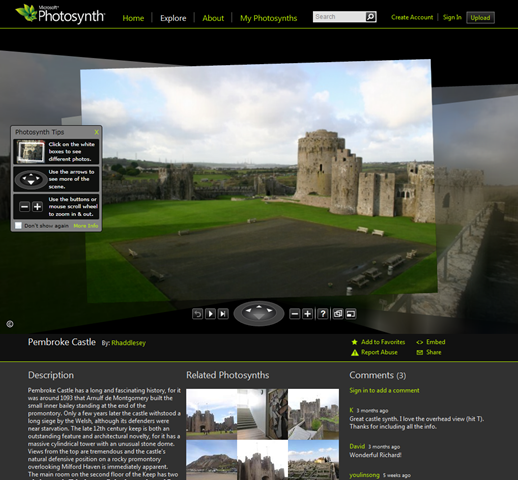
Pembroke Castle Photosynth

We can run the IMPORTPHOTOSYNTH command, passing in the initial point cloud URL as determined by Wireshark:


Command: IMPORTPHOTOSYNTH

Enter URL of first Photosynth point cloud:

http://mslabs-840.vo.llnwd.net/d2/photosynth/m6/collections/68/14/1b/68141b01-fd02-468e-934a-004769a0c30b.synth_files/points_0_0.bin

Enter name of Photosynth point cloud: "Pembroke Castle"


As the code downloads and processes the various files, you should see appropriate output at the command-line. Now without downloading the files up front, there's no way I know of to tell how many they'll be, so the progress metre is often inaccurate (unless we happen to have exactly 20 files, which is a fairly typical number).

Here's the output you'll hopefully see:

points_0_0.bin - 5000 points

points_0_1.bin - 5000 points

points_0_2.bin - 5000 points

points_0_3.bin - 5000 points

points_0_4.bin - 5000 points

points_0_5.bin - 5000 points

points_0_6.bin - 5000 points

points_0_7.bin - 5000 points

points_0_8.bin - 5000 points

points_0_9.bin - 5000 points

points_0_10.bin - 5000 points

points_0_11.bin - 5000 points

points_0_12.bin - 5000 points

points_0_13.bin - 5000 points

points_0_14.bin - 5000 points

points_0_15.bin - 5000 points

points_0_16.bin - 5000 points

points_0_17.bin - 5000 points

points_0_18.bin - 5000 points

points_0_19.bin - 5000 points

points_0_20.bin - 5000 points

points_0_21.bin - 5000 points

points_0_22.bin - 1849 points

points_1_0.bin - 2456 points


Imported 114305 points from 24 point cloud files downloaded from Photosynth.

Converting the text file to a .LAS.

Indexing the LAS and attaching the PCG.


Command:  _.POINTCLOUDINDEX

Path to data file to index:

C:/Users/walmslk/AppData/Local/Temp/tmpD280.tmp/points.las

Path to indexed point cloud file to create

<C:\Users\walmslk\AppData\Local\Temp\tmpD280.tmp\points.pcg>:

C:/Users/walmslk/Documents/Photosynth Point Clouds/Pembroke Castle.pcg

Converting C:\Users\walmslk\AppData\Local\Temp\tmpD280.tmp\points.las to

C:\Users\walmslk\Documents\Photosynth Point Clouds\Pembroke Castle.pcg in the background.

Command:

Command:  Enter path to PCG:  Enter path to LAS:

Command:  _.-POINTCLOUDATTACH

Path to point cloud file to attach: C:/Users/walmslk/Documents/Photosynth Point

Clouds/Pembroke Castle.pcg

Specify insertion point <0,0>:0,0

Current insertion point: X = 0.0000, Y = 0.0000, Z = 0.0000

Specify scale factor <1>:1

Current scale factor: 1.000000

Specify rotation angle <0>:0

Current rotate angle: 0

1 point cloud attached

Command:

Command:  Regenerating model.

Command:

Enter an option [set Current/Saveas/Rename/Delete/?]:

Enter an option

[2dwireframe/Wireframe/Hidden/Realistic/Conceptual/Shaded/shaded with

Edges/shades of Gray/SKetchy/X-ray/Other] <2dwireframe>:

And then there's the model itself, of course:
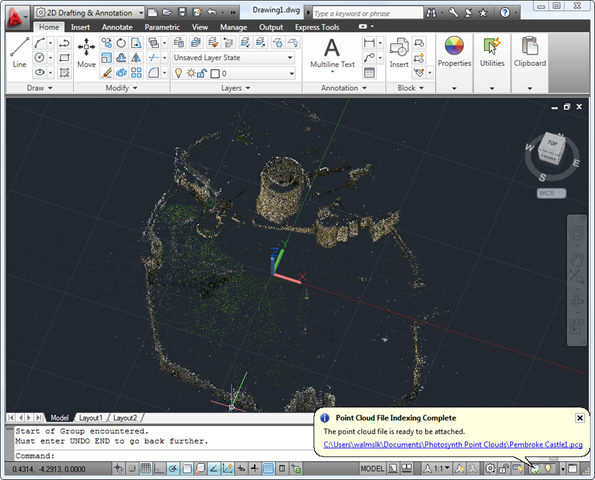
Pembroke Castle imported from Photosynth into AutoCAD

Once completed, an appropriate PCG will have been created and placed in your "My Documents\Photosynth Point Clouds". If you want to keep the intermediate text and .LAS files, then it should be a simple matter to comment out the code that erases them from the temporary files folder (I've done my best to have the application clean up extraneous files from the file system as it goes along).

One other thought I've had on this implementation… as the various point cloud files are independent, and could presumably be added in any order into our intermediate text files, this is a highly parallelizable bit of code, and would be perfect for F#'s Asynchronous Workflows. It would help to know exactly what files are available to us before downloading/processing them, but if this were possible it would be a very cool use of that particular mechanism.

So what's next? Well, Wireshark is fine for testing, but it's a bit cumbersome to be used as part of a consistently applied process. I really wanted to avoid having this manual step (although I admit I found it intriguing to take the lid off the HTTP traffic generated by a typical browsing session: I'm much more used to using tools such as Process Monitor to check Registry and/or file system access, but this was new for me).

In the next post in this series we're going to make use of another freely available web browser component that provides us with HTTP event information, so we can provide a UI that builds a list of point clouds as the user browses through a hosted Photosynth session, for later importing into AutoCAD.

22 responses to “Importing Photosynth point clouds into AutoCAD 2011 - Part 1”

  1. Hi Kean, that's some excellent work you've done there!

    Without having tried it myself, just how usable are the point clouds once they're imported into AutoCAD?

    I'm guessing that each 'point cloud' takes a fair chunk of system memory due to the sheer number of entities - take for the castle example you used above, are you subsequently able to use these to create a full-fledged 3D model without the system becoming overly taxed?

  2. Kean Walmsley Avatar

    Thanks, Alex!

    AutoCAD's point cloud implementation is pretty impressive. It can handle up to around 2 billion points and with very good performance (the indexing into the cloud means an appropriate subset is displayed). The whole cloud isn't loaded, but you will need a certain amount of memory to hold AutoCAD's point cloud object, of course.

    The modelling integration is pretty good, too: you can create geometry by snapping to points in the cloud, for instance. I expect more advanced capabilities to come over time, whether implemented by Autodesk or external developers.

    Cheers,

    Kean

  3. Kean,

    I haven't actually loaded any files into photosynth (yet), but correct me if I'm wrong, it seems that photosynth is doing this virtual 3d scanning? You load a set of pictures into it, and it creates this point cloud from them.

    Is that right?

  4. Viktor,

    That's correct. I'd mentioned it briefly in a previous post, which had been linked to incorrectly above (now fixed).

    Regards,

    Kean

  5. Hi,Kean
    I'm now rewriting my VBA code to VB.NET,one thing is about rename the specified layout,it's easy in VBA,but I'm confused about using which method or property.Would you mind giving me a direction?Greate appreciated!

  6. Kean Walmsley Avatar

    Hi Kenny,

    Sorry - this isn't a support forum (I really don't have time to answer questions that aren't specifically related to my posts).

    Please ask the ADN team, if you're a member, or otherwise you might post to the AutoCAD .NET Discussion Group.

    Regards,

    Kean

  7. Hi Kean,
    nice piece of work and fairly laborious 😉

    There are some points I noticed:
    <ol>
    <li>I wonder in which unit the point cloud is. The mighty tower of Pembroke Castle has a diameter of about 1.2, I hope this is not meters ;)</li>
    <li>Maybe this is also because of the scale (and limited precision), the point cloud looks somewhat "rasterized" (points arranged in a grid when looking from top), whereas the feature point cloud shouldn't look like that by its nature.</li>
    <li>I'm also really interested in what precision could be accomplished using this technique. All the point clouds I have "photosynthed" yet are pretty noisy. But that's a question to the Phothosynth guys I guess.</li>
    </ol>

    OK, enough criticism, I am looking forward to seeing this going further and meanwhile running my experiments trying to photosynth frames extracted from a video - and so missing the glorious Bayern victory over ManU a few minutes ago 🙂

    Best regards,
    Tilo.

  8. Hi Tilo,

    Thanks! 🙂

    1. The point cloud is in Photosynth's internal units, which I haven't attempted to map into anything like the real world. Photos are unitless - and the internal point ordinates are stored as single-precision floats - so Photosynth uses units that are appropriate for its need to collate images, which won't reflect reality in any way.

    2. Yes, I've noticed the same. Presumably this is some function of a reduction in complexity or a by-product of their analysis algorithm.

    3. There does appear to be a fair amount of noise, although I tend to be a little forgiving considering how the clouds are being generated.

    Whether this particular approach proves useable for real-world design capture remains to be seen, but it certainly demonstrates what will one day be possible.

    Best regards,

    Kean

  9. Greetings, Kean,

    In the pointcloud files the first number notates which pointcloud from the synth that binary file is a part of and the second number notates which piece of that pointcloud it is.

    The primary pointcloud is referred to in the Photosynth log files and the pointcloud bin files as Synth 0, so every bin file which corresponds to the pointcloud for synth 0 will begin "points_0_". In your example list above, the "points_1_0.bin" file corresponds to a second pointcloud within the synth.

    Generally speaking, you can accurately tell how many pointclouds you can expect to harvest from a given synth by viewing the synth in Grid Mode and counting the photo clusters, barring the last group of orphan photos which consist of photos which did not correspond to any others (hence no features matched and therefore no points). Occasionally a single photo cluster may contain mini clusters which are not strongly connected to the rest of the scene and have their own miniature pointcloud, but have enough of a connection that they are still grouped together within the Photosynth viewer, though they will be referred to in the log file and pointcloud files as separate.

    As to Tilo's question about how accurate the pointcloud can be, the answer is honestly that it depends on what input you provide. The closer you get to a subject, the more of its texture will appear in the pointcloud. The more crisp your shots are, likewise. The greater number of angles you provide of a given surface, the more finely detailed the reconstruction will become.

    To highly define surfaces for pointclouds, it is useful to think of using your photos as sculpting tools. Think of taking photos in patterns that prove that your subject is not some sort of visual trick, facade, or movie set, but the real thing.

    Move all the way around things or think of using your camera to sweep, crawl, or polish a surface.

    I have found that orbits are one of the most effective and descriptive camera motions that can be universally applied to just about any subject in order to maximally inform Photosynth about any given surfaces. Use multiple orbits at multiple heights, distances, or orientations and the accuracy multiplies.

    Simple pans left or right or strafing a subject in a straight line can work, but actually leaves much about the scene ambiguous. Orbits, by contrast, leave very little room for error in interpretation, however applying orbits to many portions of a scene quickly drives your number of photos up very highly.

    I tend to strive to quickly define each major object in a scene with at least one orbit apiece, then add larger scale panoramas or strafes that provide continuous coverage of entire walls full of objects at a wider field of view to emphasize how each smaller piece fits into the whole. If I still have more space in my photo budget then I add photos walking along the natural pathways through a scene - both directions along each path, if possible, although the pathways are largely for actually viewing the synth, rather than for the benefit of the pointcloud.

    The simple moral of the story is that as you pay more attention to individual objects, rather than simply sweeping past them with your camera, the more clearly they become seen within the pointcloud.

  10. Mark Willis' Tres Yonis synth is a good example of attention paid to a surface:
    photosynth.net/view.aspx?cid=4dee6f33-43a7-4120-bedb-770040c95f2a

    Tap the [P] key twice to flip on the pointcloud in the Photosynth viewer.

    The deprecated Windows-only Direct3D viewer is optionally available here:
    photosynth.net/d3d/photosynth.aspx?cid=4dee6f33-43a7-4120-bedb-770040c95f2a

  11. Thanks, Nate. This background information (and guidance on maximising accuracy) is very useful.

    I'm not sure whether this question falls within your area of expertise, but here goes, anyway...

    Are you aware of any programmatic way to determine the number and size of the various point clouds in a synth? Knowing this would present some really interesting optimization possibilities (particular in terms of downloading and processing the various files in parallel).

    Regards,

    Kean

  12. It is certainly outside of my expertise, though Christoph Hausner's exporter from Codeplex does present a list of the pointclouds contained in a synth and the number of points in each as soon as it is handed a synth's collection ID, so presumably that is your answer, though perhaps this analysis is only available after the pointclouds are downloaded. I think that he would be the one to ask, or perhaps you can simply look at his source code and see if you can adapt what he's done to suit your use case.

    As to whether this can be done at a larger scale, say, for the entire list of a given user's synths or all the synths whose tags match a particular query, I suspect that you would have to do your own data mining. If some sort of API to pull this information out is available, I am not aware of it.

    I would love better sorting options than the Photosynth site currently affords (something more along the lines of Live Labs' Pivot) and sorting according to largest primary pointcloud or largest total number of points would be most useful.

    If you do find a way to automate and index this data without downloading each synth's pointcloud files first (or even if you do have to download the files first), such an index could still be a valuable asset.

  13. Thanks again, Nate.

    I'd seen a previous version of the application, but now see that it makes use of a web service exposed by Photosynth which provides information on a particular collection. This is exactly what I was looking for.

    Kean

  14. Very cool: this is the first point cloud I've seen on Photosynth with >1M points. The level of detail is impressive.

    Kean

  15. Hi Nate,
    I've just read your comment thanks to the link in Kean's latest post.

    The orbit-around-object method you've suggested to take the photos is actually the one I've experimented with in photosynth.net/view.aspx?cid=18c0f3ef-15ca-4f53-badd-93944f6ed58b

    Though it might not look too impressive, it is notable that I've created it taking two (1280x720) videos and uploading over 600 grabbed frames.

    I believe this could be an approach to easily take the massive amount of photos needed to create a relatively high density point cloud.

  16. Hi Tilo,

    That's an interesting approach to creating the photosynth. Do you mind if I ask how you captured the frames you subsequently uploaded to Photosynth?

    Thanks,

    Alex.

  17. Nate Lawrence Avatar

    Alex, if your video can be played in Quicktime and you have a Quicktime Pro license (or if you look up Dawn M Fredette on the web) Quicktime Pro has an option to export to an image sequence.

    Another option is VirtualDub which gives you some more freedom as to what formats of video can be exported to individual frames, as long as you are willing to hunt down the codecs that VirtualDub needs. It's free and also comes with options to export only ever 1 out of X frames so that you don't export more frames than you can use.

  18. Thanks for the tips Nate, I'll be sure to bear them in mind if I'm taken with the urge to do some video 'synths. 🙂

  19. When revit be able to take PC. like .fls files

  20. Sorry - I can't comment on future product plans here.

    Kean

  21. hey Kean. Is there a reason you're not processign the photosynth in PMVS2? You'd get a way way more detailed point cloud out of this. Here's the link to PMVS2:
    1

    and this guy wrote a tool that downloads photosynths and processes them through PMVS:
    1

  22. Hi Michal,

    The goal of this approach - in and of itself - was not to get a dense point cloud, but to get the data from Photosynth into AutoCAD.

    It's certainly possible to insert densification tools into the pipeline, but ultimately point clouds inside AutoCAD are currently used as references for modelling or for shape extraction (and as such PMVS densification doesn't really bring anything new to this, as least not as far as I'm aware).

    Kean

Leave a Reply to Kenny Cancel reply

Your email address will not be published. Required fields are marked *