Thanks again to Stephen Preston, our DevTech Americas Manager, for developing this very useful little utility. You can find an earlier version of this code – which I'd converted to C# and extended to cover text entities – in this previous post.
June's Plugin of the Month is now live: Dimension Patrol for AutoCAD. This one was kicked off by a suggestion from Shaan Hurley: a tool for designers and CAD Managers to quickly check drawings for dimensions with overridden text (which, logically enough, could mean the dimensions no longer accurately reflect their associated distance or value).
Sometimes the best applications are the simplest, and this one is certainly elegant in its simplicity. To be fair, though, it's depending on the Overrule mechanism introduced in AutoCAD 2010 - hence the requirement to use AutoCAD 2010 or above – which provides you with a great deal of control over object behaviour.
Here are the important VB.NET source files from the project (which is, of course, provided with the plugin's download from Labs).
Firstly the myPlugin.vb file:
Imports System
Imports Autodesk.AutoCAD.Runtime
Imports Autodesk.AutoCAD.ApplicationServices
Imports Autodesk.AutoCAD.DatabaseServices
Imports Autodesk.AutoCAD.Geometry
Imports Autodesk.AutoCAD.EditorInput
' This line is not mandatory, but improves loading performance
<Assembly: ExtensionApplication(GetType(DimensionPatrol.MyPlugin))>
Namespace DimensionPatrol
' This class is instantiated by AutoCAD once and kept alive for
' the duration of the session.
Public Class MyPlugin
Implements IExtensionApplication
' Declare member variables - note they are Shared
' (don't require class instance to access them)
Private Shared mOverrule As DimPatrolDrawOverrule
Private Shared WithEvents mDocs As DocumentCollection
Private Shared mOldOverruleState As Boolean
Private Shared ReadOnly Property DimPatrolVal() As Short
Get
Return MyCommands.DimPatrolVal
End Get
End Property
Private Shared ReadOnly Property DimPatrolColVal() As Short
Get
Return MyCommands.DimPatrolColVal
End Get
End Property
' Called by AutoCAD to initialize the addin.
' This is where we setup our overrule.
Public Sub Initialize() _
Implements IExtensionApplication.Initialize
Try
' Add demand loading info to registry
DemandLoading.RegistryUpdate.RegisterForDemandLoading()
' Initialize 'withevents' variables to activate events
mDocs = Application.DocumentManager
' Register overrule
mOverrule = New DimPatrolDrawOverrule
Overrule.AddOverrule(RXObject.GetClass(GetType(Dimension)), _
mOverrule, False)
mOverrule.SetCustomFilter()
mOldOverruleState = Overrule.Overruling
Overrule.Overruling = True
' In case this app is loaded midway through a session,
' we need to honor values of DimPatrol and DimPatrolColor
' and setup the current document
UpdateDoc(mDocs.MdiActiveDocument)
Catch ex As Autodesk.AutoCAD.Runtime.Exception
CleanUp(ex)
End Try
End Sub
' Our addin only terminates when AutoCAD quits -
' you can't dynamically unload .NET DLLs.
' (So one could argue that this tidy up is unnecessary).
Public Sub Terminate() Implements IExtensionApplication.Terminate
CleanUp(Nothing)
End Sub
' Tidy up our stuff (unregister overru
les etc).
' Called by Terminate method, and also in response to an
' exception to disable addin if there's a problem.
Private Shared Sub CleanUp(ByVal ex As _
Autodesk.AutoCAD.Runtime.Exception)
' If this is being called by an exception handler,
' then we politely inform user of the problem.
If Not ex Is Nothing Then
MsgBox("Dimension Patrol has encountered an error and " & _
"is disabling itself.", MsgBoxStyle.Critical, "Oops!")
End If
' Deactivate event handlers
mDocs = Nothing
' Unregister overrule
If Not mOverrule Is Nothing Then
Overrule.RemoveOverrule( _
RXObject.GetClass(GetType(Dimension)), mOverrule)
End If
' We assume here that no other addin that uses overrules was
' loaded since our addin initialized.
Overrule.Overruling = mOldOverruleState
End Sub
' Called by myCommands class to tell this class that value of
' DimPatrolColor variable has changed.
' (That's why its a Friend method)
Friend Shared Sub DimPatColorVar_Changed()
Try
Dim doc As Document = _
Application.DocumentManager.MdiActiveDocument
' Set stored value of color for this document so we know
' color change has been processed for this doc.
Dim oldDimPatColVal As Short = _
UpdateDocData(doc, "DimPatrolColor", DimPatrolColVal)
' Regen drawing if color has changed & DimPatrol sysvar = 1
' (Color changes while we're not drawing our custom graphics
' don't have any effect until DimPatrol is next changed and
' this doc is active/activated).
If (DimPatrolVal) And (oldDimPatColVal <> DimPatrolColVal) _
Then
doc.Editor.Regen()
End If
Catch ex As Autodesk.AutoCAD.Runtime.Exception
CleanUp(ex)
End Try
End Sub
' Called by myCommands class to tell this class that value of
' DimPatrolColor variable has changed
' (That's why its a Friend method)
Friend Shared Sub DimPatVar_Changed()
Try
' Update active document with new value of DimPatrol to show
' we've regened it since the value was last changed
Dim doc As Document = _
Application.DocumentManager.MdiActiveDocument
UpdateDocData(doc, "DimPatrol", DimPatrolVal)
' Whatever else happens, if we've changed the value of
' DimPatrol then we must regen the current document to
' display changed graphics.
doc.Editor.Regen()
Catch ex As Autodesk.AutoCAD.Runtime.Exception
CleanUp(ex)
End Try
End
Sub
' When user switches document we want to respond to possible
' changes to DimPatrol and DimPatrolColor in that document
Private Shared Sub mDocs_DocumentActivated(ByVal sender As _
Object, ByVal e As Autodesk.AutoCAD.ApplicationServices. _
DocumentCollectionEventArgs) Handles mDocs.DocumentActivated
Try
UpdateDoc(e.Document)
Catch ex As Autodesk.AutoCAD.Runtime.Exception
CleanUp(ex)
End Try
End Sub
' Updates userdata key 'varName' in document 'doc' to value 'val'
' Returns old value (or 0 if there wasn't an old value)
Private Shared Function UpdateDocData(ByVal doc As Document, _
ByVal varName As String, ByVal val As Short) As Short
Dim oldVal As Short
If doc.UserData.ContainsKey(varName) Then
' Update value of key-value pair
oldVal = doc.UserData.Item(varName)
If oldVal <> val Then
doc.UserData.Item(varName) = val
End If
Else
' Add key-value pair if it didn't exist
doc.UserData.Add(varName, val)
oldVal = 0
End If
Return oldVal
;
End Function
' Check userdata attached to document (where we store value of
' DimPatrol and DimPatrolColor when doc was last active).
' If userdata isn't there, or if it differs from current values,
' then we must regen the drawing.
Private Shared Sub UpdateDoc(ByVal doc As Document)
' Update old DimPatrol value to show changes to this doc have
' been processed
Dim oldDimPatVal As Short = UpdateDocData(doc, "DimPatrol", _
DimPatrolVal)
' Update old DimPatrolColor value to show changes to this doc
' have been processed
Dim oldDimPatColVal As Short = UpdateDocData(doc, _
"DimPatrolColor", DimPatrolColVal)
' If DimPatrol sysvar has changed, or DimPatrolColor has
' changed when DimPatrol = 1, then we must regen the drawing
If (oldDimPatVal <> DimPatrolVal) Or ((DimPatrolVal) And _
(oldDimPatColVal <> DimPatrolColVal)) Then
doc.Editor.Regen()
End If
End Sub
End Class
' This is the one and only overrule used by this utility
Public Class DimPatrolDrawOverrule
Inherits Autodesk.AutoCAD.GraphicsInterface.DrawableOverrule
' Overrule WorldDraw so we can draw our additional graphics
' (solid color block covering the Dimension's extents)
Public Overrides Function WorldDraw(ByVal drawable As _
Autodesk.AutoCAD.GraphicsInterface.Drawable, _
ByVal wd As Autodesk.AutoCAD.GraphicsInterface.WorldDraw) _
As Boolean
Try
' We know this overrule is only registered for Dimensions,
' so we cast without checking.
Dim dm As Dimension = drawable
' Now we want to draw a colored box around Dimension's
' extents()
Dim ext As Extents3d = dm.Bounds
Dim maxPt As Point3d = ext.MaxPoint
Dim minPt As Point3d = ext.MinPoint
Dim pts As New Point3dCollection
' These are the vertices of the highlight box
pts.Add(New Point3d(minPt.X, minPt.Y, minPt.Z))
pts.Add(New Point3d(minPt.X, maxPt.Y, minPt.Z))
pts.Add(New Point3d(maxPt.X, maxPt.Y, minPt.Z))
pts.Add(New Point3d(maxPt.X, minPt.Y, minPt.Z))
' Store current filltype and set to FillAlways
Dim oldFillType As _
Autodesk.AutoCAD.GraphicsInterface.FillType = _
wd.SubEntityTraits.FillType
wd.SubEntityTraits.FillType = _
Autodesk.AutoCAD.GraphicsInterface.FillType.FillAlways
' Store old graphics color and set to the color we want
Dim oldColor As Short = wd.SubEntityTraits.Color
wd.SubEntityTraits.Color = MyCommands.DimPatrolColVal
' Draw the filled polygon
wd.Geometry.Polygon(pts)
' Restore old settings
wd.SubEntityTraits.FillType = oldFillType
wd.SubEntityTraits.Color = oldColor
Catch ex As Autodesk.AutoCAD.Runtime.Exception
' Mop up any exception here so at least the Dimension can try
' to draw itself
Application.DocumentManager.MdiActiveDocument.Editor. _
WriteMessage( _
vbLf & "Error highlighting changed dimension: " _
& ex.ErrorStatus.ToString & vbLf)
End Try
' Let the overruled Drawable draw itself.
Return MyBase.WorldDraw(drawable, wd)
End Function
' This function is called if we call SetCustomFilter on our
' overrule to check if the overrule should be applied for each
' entity.
' We add our own code to return true if the Dimension passed in
' is one we want to highlight.
Public Overrides Function IsApplicable( _
ByVal overruledSubject As RXObject) As Boolean
Try
' If its a Dimension, we check if the text has been manually
' changed. But only if DimPatrol sysvar is set to 1
If (MyCommands.DimPatrolVal) And _
(TypeOf overruledSubject Is Dimension) Then
Dim dm As Dimension = overruledSubject
If dm.DimensionText <> "" Then
Return True
End If
End If
Catch ex As Autodesk.AutoCAD.Runtime.Exception
' Mop up any exc
eption here so at least the Dimension can try
' to draw itself
Application.DocumentManager.MdiActiveDocument.Editor. _
WriteMessage(vbLf & "Error testing dimension: " _
& ex.ErrorStatus.ToString & vbLf)
End Try
' We only get to here if object isn't a Dimension and it didn't
' contain overridden text
Return False
End Function
End Class
End Namespace
And secondly the myCommands.vb file:
Imports System
Imports Autodesk.AutoCAD.Runtime
Imports Autodesk.AutoCAD.ApplicationServices
Imports Autodesk.AutoCAD.DatabaseServices
Imports Autodesk.AutoCAD.Geometry
Imports Autodesk.AutoCAD.EditorInput
' This line is not mandatory, but improves loading performance
<Assembly: CommandClass(GetType(DimensionPatrol.MyCommands))>
Namespace DimensionPatrol
' Container class for our commands
' All methods and properties in this class are Shared,
' so this class is never instantiated by AutoCAD.
Public Class MyCommands
' Member variables to store values of DIMPATROL and
' DIMPATROLCOLOR
Private Shared mDimPatrol As Short = 0
Private Shared mDimPatrolColor As Short = 1
' This property is also used by MyPlugin and
' DimPatrolDrawOverrule - hence use of 'Friend'
Friend Shared Property DimPatrolVal() As Short
Get
Return mDimPatrol
End Get
Private Set(ByVal value As Short)
mDimPatrol = value
' Tell MyPlugin that value of DimPatrol has changed
MyPlugin.DimPatVar_Changed()
End Set
End Property
' This property is also used by MyPlugin and
' DimPatrolDrawOverrule - hence use of 'Friend'
Friend Shared Property DimPatrolColVal() As Short
Get
Return mDimPatrolColor
End Get
Private Set(ByVal value As Short)
mDimPatrolColor = value
' Tell MyPlugin that value of DimPatrolColor has changed
MyPlugin.DimPatColorVar_Changed()
End Set
End Property
' Turn dimension patrol on (1) or off (0)
<CommandMethod("ADNPLUGINS", "DIMPATROL", CommandFlags.Modal)> _
Public Shared Sub DIMPATROL()
Try
' Prompt for new value
Dim ed As Editor
ed = Application.DocumentManager.MdiActiveDocument.Editor
Dim opts As New _
PromptIntegerOptions("Enter new value for DIMPATROL")
opts.DefaultValue = DimPatrolVal
opts.LowerLimit = 0
opts.UpperLimit = 1
Dim res As PromptIntegerResult = ed.GetInteger(opts)
' Only update stored value if user has entered a different
' value()
If (res.Status = PromptStatus.OK) _
And (res.Value <> DimPatrolVal) Then
DimPatrolVal = res.Value
End If
Catch ex As Autodesk.AutoCAD.Runtime.Exception
Application.DocumentManager.MdiActiveDocument. _
Editor.WriteMessage( _
vbLf & "Error changing DIMPATROL value: " & _
ex.ErrorStatus.ToString & vbLf)
End Try
End Sub
' Allow user to set highlight color for manually edited
' dimensions. Color index can be set within range 1-7.
<CommandMethod("ADNPLUGINS", "DIMPATROLCOLOR", _
CommandFlags.Modal)> _
Public Shared Sub DIMPATROLCOLOR()
Try
' Prompt for new value
Dim ed As Editor
ed = Application.DocumentManager.MdiActiveDocument.Editor
Dim opts As New _
PromptIntegerOptions("Enter new value for DIMPATROLCOLOR")
opts.DefaultValue = DimPatrolColVal
opts.LowerLimit = 1
opts.UpperLimit = 7
Dim res As PromptIntegerResult = ed.GetInteger(opts)
' Only update stored value if user has entered a different
' value
If (res.Status = PromptStatus.OK) _
And (res.Value <> DimPatrolColVal) Then
DimPatrolColVal = res.Value
End If
Catch ex As Autodesk.AutoCAD.Runtime.Exception
Application.DocumentManager.MdiActiveDocument.Editor. _
WriteMessage( _
vbLf & "Error changing DIMPATROLCOLOR value: " _
& ex.ErrorStatus.ToString & vbLf)
End Try
End Sub
'Remove demand load settings from registry
<CommandMethod("ADNPLUGINS", "REMOVEDP", CommandFlags.Modal)> _
Public Shared Sub RemoveDP()
DemandLoading.RegistryUpdate.UnregisterForDemandLoading()
Dim ed As Editor = _
Autodesk.AutoCAD.ApplicationServices.Application _
.DocumentManager.MdiActiveDocument.Editor()
ed.WriteMessage(vbCr + _
"Dimension Patrol will not be loaded" _
+ " automatically in future editing sessions.")
End Sub
End Class
End Namespace
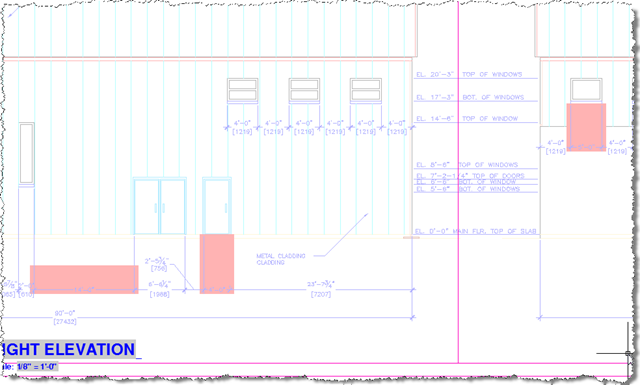
We can set the DIMPATROL value to 1 to turn on checking for problematic dimensions. Here's are some problematic dimensions from an Xrefed drawing (which is why the red is slightly dimmed):


Leave a Reply to Joris Cancel reply