This one is a bit of an experiment: our first "fun" Plugin of the Month (fun in that it doesn't serve a serious work-related purpose that I can think of :-).
I've post earlier versions of the code to this blog, but thought I'd post and share the latest & greatest. Scott has kindly announced the plugin's availability already over on It's Alive in the Lab.
This is our first Plugin on the Month written in F#, which means an additional DLL needs to be copied with the plugin itself. Other than that the application should work just as if it were coded in VB.NET or C#.
Here's the F# code (for additional files please download the project from Autodesk Labs):
// Declare a specific namespace and module name
module Spiro.Commands
// Import managed assemblies
open Autodesk.AutoCAD.ApplicationServices
open Autodesk.AutoCAD.Runtime
open Autodesk.AutoCAD.DatabaseServices
open Autodesk.AutoCAD.EditorInput
open Autodesk.AutoCAD.Geometry
open Autodesk.AutoCAD.GraphicsInterface
open System
open DemandLoading
// Our global variables
let mutable _jigSegs = 1
let mutable _perfectSegs = 10
let mutable _innerOverOuter = 0.125
let mutable _aOverInner = 0.3333
// Return a sampling of points along a spiro's path
let pointsOnSpiro cenX cenY inRad outRad a tStart tEnd num =
[|
for i in tStart .. tEnd * num do
let t = (float i) / (float num)
let diff = inRad - outRad
let ratio = inRad / outRad
let x =
diff * Math.Cos(ratio * t) +
a * Math.Cos((1.0 - ratio) * t)
let y =
diff * Math.Sin(ratio * t) -
a * Math.Sin((1.0 - ratio) * t)
yield new Point2d(cenX + x, cenY + y)
|]
// Different modes of acquisition for our jig
type AcquireMode =
| Inner
| Outer
| A
type SpiroJig() as this = class
inherit DrawJig()
&
#160; // Our member variables
let mutable (_pl : Polyline) = null
let mutable _cen = Point3d.Origin
let mutable _norm = new Vector3d(0.0,0.0,1.0)
let mutable _inner = 0.0
let mutable _outer = 0.0
let mutable _a = 0.0
let mutable _mode = Outer
member x.StartJig(ed : Editor, pt, pl) =
// Set our center and start with the outer radius
_cen <- pt
_pl <- pl
_mode <- Outer
_norm <-
ed.CurrentUserCoordinateSystem.CoordinateSystem3d.Zaxis
let stat = ed.Drag(this)
if stat.Status = PromptStatus.OK then
// Next we get the inner radius
_mode <- Inner
let stat = ed.Drag(this)
if stat.Status = PromptStatus.OK then
// And finally the pen distance
_mode <- A
let stat = ed.Drag(this)
if stat.Status = PromptStatus.OK then
_innerOverOuter <- _inner / _outer
_aOverInner <- _a / _inner
stat
else
stat
else
stat
// Our Sampler function to acquire the various distances
override x.Sampler prompts =
// We're just acquiring distances
let jo = new JigPromptDistanceOptions()
jo.UseBasePoint <- true
jo.Cursor <- CursorType.RubberBand
// Local function to acquire a distance and
return
// the appropriate status
let getDist (prompts : JigPrompts)
(opts : JigPromptDistanceOptions) oldVal =
let res = prompts.AcquireDistance(opts)
if res.Status <> PromptStatus.OK then
(SamplerStatus.Cancel, 0.0)
else
if oldVal = res.Value then
(SamplerStatus.NoChange, 0.0)
else
(SamplerStatus.OK, res.Value)
// Then we have slightly different behavior depending
// on the info we're acquiring
match _mode with
// The outer radius...
| Outer ->
jo.BasePoint <- _cen
jo.Message <- "\nRadius of outer circle: "
let (stat, res) = getDist prompts jo _outer
if stat = SamplerStatus.OK then
_outer <- res
stat
// The inner radius...
| Inner ->
jo.BasePoint <-
_cen + new Vector3d(_outer, 0.0, 0.0)
jo.Message <- "\nRadius of smaller circle: "
let (stat, res) = getDist prompts jo _inner
if stat = SamplerStatus.OK then
_inner <- res
stat
// The pen distance...
| A ->
jo.BasePoint <-
_cen + new Vector3d(_outer - _inner, 0.0, 0.0)
jo.Message <-
"\nPen distance from center of smaller circle: "
let (stat, res) = getDist prompts jo _a
if stat = SamplerStatus.OK then
_a <- res
stat
// Our WorldDraw function to display the Spiro and
// the related temporary graphics
override x.WorldDraw(draw : WorldDraw) =
// Save our current colour, to reset later
let col = draw.SubEntityTraits.Color
// Make our construction geometry green
draw.SubEntityTraits.Color <- (int16 3)
match _mode with
| Outer -> // Draw the outer circle
draw.Geometry.Circle(_cen, _outer, _norm)
|> ignore
| Inner -> // Draw the outer and inner circles
draw.Geometry.Circle(_cen, _outer, _norm)
|> ignore
draw.Geometry.Circle
(_cen + new Vector3d(_outer - _inner, 0.0, 0.0),
_inner, _norm)
|> ignore
| A -> // Draw the outer and inner circles
draw.Geometry.Circle(_cen, _outer, _norm)
|> ignore
draw.Geometry.Circle
(_cen + new Vector3d(_outer - _inner, 0.0, 0.0),
_inner, _norm)
|> ignore
// Check the RegenAbort flag...
// If it's set then we drop out of the function
if not draw.RegenAbort then
draw.SubEntityTraits.Color <- col
// If getting the outer radius fix the other
// parameters relative to it (as the inner radius
// comes later we only need to fix the pen distance
// against it)
if _mode = Outer then
_inner <- _outer * _innerOverOuter
_a <- _inner * _aOverInner
else if _mode = Inner then
_a <- _inner *_aOverInner
// Generate the polyline with low accuracy
// (fewer segments == quicker)
if not draw.RegenAbort then
// Generate our polyline
x.Generate(_jigSegs)
if not draw.RegenAbort then
// And then draw it
draw.Geometry.Polyline(_pl, 0, _pl.NumberOfVertices-1)
|> ignore
true
// Generate a more accurate polyline
member x.Perfect() =
x.Generate(_perfectSegs)
member x.Generate(num) =
// Generate points based on the accuracy
let pts =
pointsOnSpiro
_cen.X _cen.Y _inner _outer _a 0 300 num
// Remove all existing vertices but the first
// (we need at least one, it seems)
while _pl.NumberOfVertices > 1 do
_pl.RemoveVertexAt(0)
// Add the new vertices to our polyline
for i in 0 .. pts.Length-1 do
_pl.AddVertexAt(i, pts.[i], 0.0, 0.0, 0.0)
// Remove the first (original) vertex
if _pl.NumberOfVertices > 1 then
_pl.RemoveVertexAt(0)
end
// Our jig-based command
[<CommandMethod("ADNPLUGINS", "SPI", CommandFlags.Modal)>]
let spirojig() =
// Let's get the usual helpful AutoCAD objects
let doc =
Application.DocumentManager.MdiActiveDocument
let ed = doc.Editor
let db = doc.Database
// Prompt the user for the center of the spiro
let cenRes = ed.GetPoint("\nSelect center point: ")
if cenRes.Status = PromptStatus.OK then
let cen = cenRes.Value
// Create the polyline and run th
e jig
let pl = new Polyline()
let jig = new SpiroJig()
let res = jig.StartJig(ed, cen, pl)
if res.Status = PromptStatus.OK then
// Perfect the polyline created, smoothing it up
jig.Perfect()
use tr =
db.TransactionManager.StartTransaction()
// Get appropriately-typed BlockTable and BTRs
let bt =
tr.GetObject
(db.BlockTableId,OpenMode.ForRead)
:?> BlockTable
let ms =
tr.GetObject
(bt.[BlockTableRecord.ModelSpace],
OpenMode.ForWrite)
:?> BlockTableRecord
// Add our polyline to the modelspace
let id = ms.AppendEntity(pl)
tr.AddNewlyCreatedDBObject(pl, true)
tr.Commit()
[<CommandMethod("ADNPLUGINS", "SPISEGS", CommandFlags.Modal)>]
let spiroSegments() =
// Let's get the usual helpful AutoCAD objects
let doc =
Application.DocumentManager.MdiActiveDocument
let ed = doc.Editor
let db = doc.Database
// Prompt the user for the center of the spiro
let pio =
new PromptIntegerOptions(
"\nEnter segment resolution for jigged spiro: ")
pio.LowerLimit <- 1
pio.UpperLimit <- 20
pio.DefaultValue <- _jigSegs
pio.UseDefaultValue <- true
let segRes = ed.GetInteger(pio)
if segRes.Status = PromptStatus.OK then
_jigSegs <- segRes.Value
pio.Message <-
"\nEnter segment resolution for perfected spiro: "
pio.DefaultValue <- _perfectSegs
let segRes = ed.GetInteger(pio)
if segRes.Status = PromptStatus.OK then
_perfectSegs <- segRes.Value
[<CommandMethod("ADNPLUGINS", "REMOVESP", CommandFlags.Modal)>]
let removeSpiro() =
try
RegistryUpdate.UnregisterForDemandLoading()
let doc =
Application.DocumentManager.MdiActiveDocument
doc.Editor.WriteMessage
("\nThe Spiro plugin will not be loaded" +
" automatically in future editing sessions.")
with _ -> ()
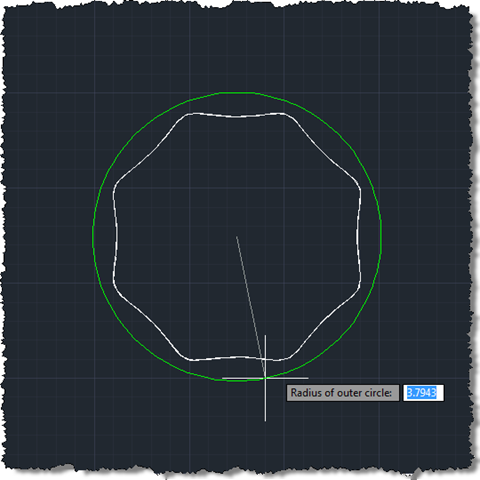
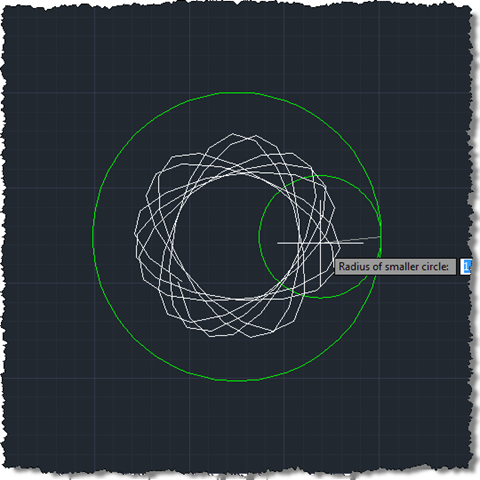
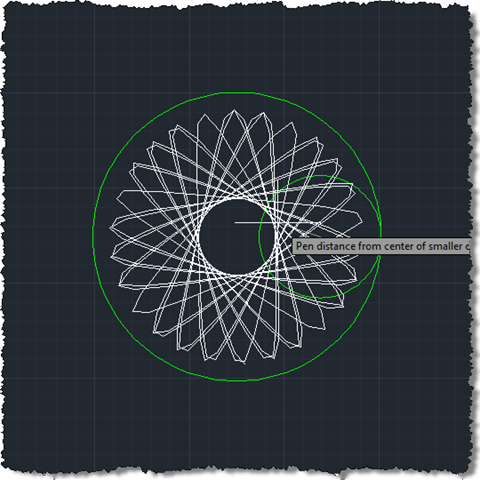
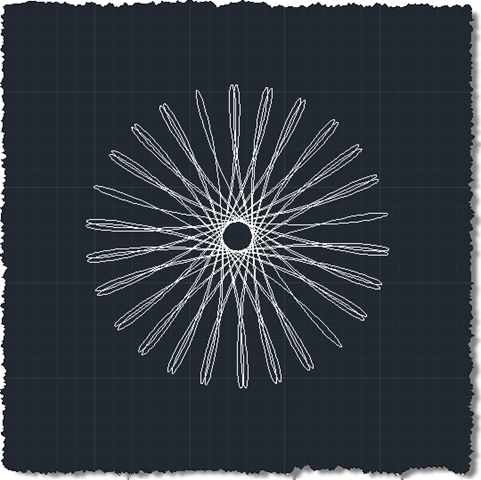
When you run the SPI command you will see temporary graphics presented as you "jig" your Spirograph-like pattern:
Hopefully you (or you kids) will have fun with this one. Enjoy! 🙂
Leave a Reply