Creating transparent hatches in AutoCAD using .NET

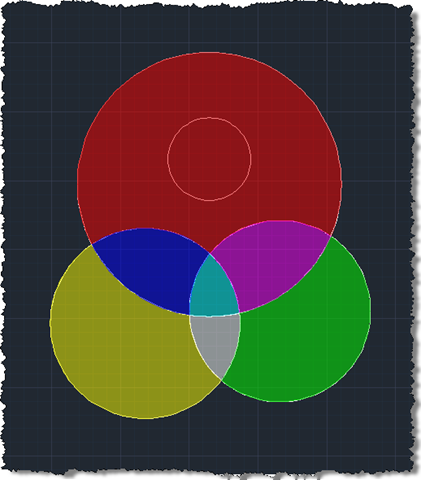
In the last post we used an API introduced in AutoCAD 2011 to trace boundaries defined by geometry in a drawing. In this post we're going to use these boundaries to define the limits of solid hatch objects which we will – using another new capability in AutoCAD 2011 - make transparent.

Here's the updated C# code to define our TBH command with new/changed lines in red (you can also get the source file without line numbers here):

    1 using Autodesk.AutoCAD.ApplicationServices;

    2 using Autodesk.AutoCAD.EditorInput;

    3 using Autodesk.AutoCAD.DatabaseServices;

    4 using Autodesk.AutoCAD.Runtime;

    5 using Autodesk.AutoCAD.Colors;

    6 

    7 namespace TraceBoundaryWithHatch

    8 {

    9   public class Commands

   10   {

   11     static int _index = 1;

   12 

   13     [CommandMethod("TBH")]

   14     public void TraceBoundaryAndHatch()

   15     {

   16       Document doc =

   17         Application.DocumentManager.MdiActiveDocument;

   18       Database db = doc.Database;

   19       Editor ed = doc.Editor;

   20 

   21       // Select a seed point for our boundary

   22 

   23       PromptPointResult ppr =

   24         ed.GetPoint("\nSelect internal point: ");

   25 

   26       if (ppr.Status != PromptStatus.OK)

   27         return;

   28 

   29       // Get the objects making up our boundary

   30 

   31       DBObjectCollection objs =

   32         ed.TraceBoundary(ppr.Value, false);

   33 

   34       if (objs.Count > 0)

   35       {

   36         Transaction tr =

   37           doc.TransactionManager.StartTransaction();

   38         using (tr)

   39         {

   40           // We'll add the objects to the model space

   41 

   42           BlockTable bt =

   43             (BlockTable)tr.GetObject(

   44               doc.Database.BlockTableId,

   45               OpenMode.ForRead

   46             );

   47 

   48           BlockTableRecord btr =

   49             (BlockTableRecord)tr.GetObject(

   50               bt[BlockTableRecord.ModelSpace],

   51               OpenMode.ForWrite

   52             );

   53 

   54           // Add our boundary objects to the drawing and

   55           // collect their ObjectIds for later use

   56 

   57           ObjectIdCollection ids = new ObjectIdCollection();

   58           foreach (DBObject obj in objs)

   59           {

   60             Entity ent = obj as Entity;

   61             if (ent != null)

   62             {

   63               // Set our boundary objects to be of

   64               // our auto-incremented colour index

   65 

   66               ent.ColorIndex = _index;

   67 

   68               // Set our transparency to 50% (=127)

   69               // Alpha value is Truncate(255 * (100-n)/100)

   70 

   71               ent.Transparency = new Transparency(127);

   72 

   73               // Add each boundary object to the modelspace

   74               // and add its ID to a collection

   75 

   76               ids.Add(btr.AppendEntity(ent));

   77               tr.AddNewlyCreatedDBObject(ent, true);

   78             }

   79           }

   80 

   81           // Create our hatch

   82 

   83           Hatch hat = new Hatch();

   84 

   85           // Solid fill of our auto-incremented colour index

   86 

   87           hat.SetHatchPattern(

   88             HatchPatternType.PreDefined,

   89             "SOLID"

   90           );

   91           hat.ColorIndex = _index++;

   92 

   93           // Set our transparency to 50% (=127)

   94           // Alpha value is Truncate(255 * (100-n)/100)

   95 

   96           hat.Transparency = new Transparency(127);

   97 

   98           // Add the hatch to the modelspace & transaction

   99 

  100           ObjectId hatId = btr.AppendEntity(hat);

  101           tr.AddNewlyCreatedDBObject(hat, true);

  102 

  103           // Add the hatch loops and complete the hatch

  104 

  105           hat.Associative = true;

  106           hat.AppendLoop(

  107             HatchLoopTypes.Default,

  108             ids

  109           );

  110 

  111           hat.EvaluateHatch(true);

  112 

  113           // Commit the transaction

  114 

  115           tr.Commit();

  116         }

  117       }

  118     }

  119   }

  120 }

A few things to note about this implementation:

  • We choose not to detect islands when using the results to create a hatch
    • Hatches clearly support islands, but we would make separate calls to AppendLoop() to add them
    • It should be possible to detect islands whether geometrically or by diffing the results of two calls to TraceBoundary(), one detecting islands, one not
  • We've applied transparency both to the boundary objects and the hatch
    • We no longer set the lineweight on the boundary objects
  • The Alpha-based transparency value isn't as simple as using a straight percentage
    • After doing some tests (setting the transparency as a percentage and running a simple command to print the Alpha value to the command-line), I found that the value stored actually seems to reflect "opacity" rather than transparency (i.e. it's an inverse relationship), so we subtract our percentage from 100 before applying it to the total of 255 (and truncating – not rounding – the result)
    • It also appears you can't have transparency of higher than 90% (at least not according to my tests)
      • In our case we're just using 50% transparency

Here's what happens when we run our TBH command on the boundaries we used to test the code in the last post.

Before…
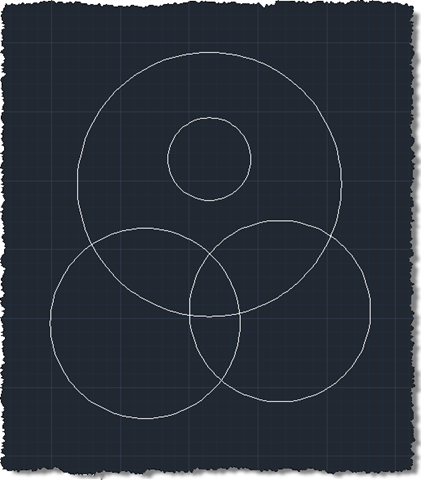

Our boundaries


After…


Our transparently hatched boundaries

12 responses to “Creating transparent hatches in AutoCAD using .NET”

  1. sir i need the professional learning of autcad programming

  2. You might try looking for a local Autodesk Authorized Training Center that provides such services.

    Kean

  3. Hi, Kean!
    I have a question - how can we create hatch during jig?

  4. Hi Modis,

    Interesting question - I'll add it to my list of possible future posts (although I can't promise when I'll get to it).

    Regards,

    Kean

  5. hi kean!

    i have a question about jigs, in fact i want to know what's that and why should i use them?

  6. Hi Amin,

    As explained by email, I don't have time to provide support in this way. Please post your questions to the AutoCAD .NET Discussion Group.

    Jigs are message loops that AutoCAD uses to gather input (usually related to geometry) from the user.

    Kean

  7. Alvaro Ampudia Avatar
    Alvaro Ampudia

    hi Kean!! thanks a lot!! this has been really helpful!! im new to autocad plugins, and what im trying to do is to create hatches in a map according to some data in an excel file. that's already working, but for some reasons not every section of the map gets hatched, its weird, i think its something to do with the boundary created for the hatches next to that area... is there a way that i could create the boundary for the hatch and then delete the boundary??
    and im having problems with the hatch being on top, and i haven't been able to move'em to the bottom. i tried following this other post of you( keanw.com/draw_order/ ) and i used dot.movetobottom() but it's not working

    any help you could give me will be very appreciated!! =)
    thanks!

  8. Alvaro Ampudia Avatar
    Alvaro Ampudia

    ooops!! hehe following my previous post, i already solved the draw order xD (i followed your post (keanw.com/2007/03/manipulating_th.html ) from march 30, 2007, and not the one i was reading before (october 19, 2010), i was just missing
    btr.DowngradeOpen()
    ids.Add(hatid)
    all the rest was fine... but if you could still help me for deleting the polylines of the boundary after the hatch is created, i'd be very very thankful!!

    Alvaro

  9. Kean Walmsley Avatar

    Have you tried opening the boundary objects for write and calling Erase() on each one?

    Kean

  10. Instead of performing geometric checks or comparing the result of two calls to TraceBoundary(), the order of the returned DbObjectCollection objects can be used instead.

    According to the 2011 ObjectARX docs:
    "...the first entry is the outermost boundary, and the succeeding entries represent the islands found."

    Based on my tests in Acad 2012 I found this to be INCORRECT. It seems to be the other way around, i.e. the last entry is the outermost boundary.

    This post and tip simplified hatching with islands considerably 🙂

    Cheers,
    Art

    1. Patrik Salopek Avatar
      Patrik Salopek

      Any example in code? i 'm trying to enable detectIslands and set hatchstyle.outer but cant get it to work properly.

  11. Kean Walmsley Avatar
    Kean Walmsley

    Thanks, Art!

    Kean

Leave a Reply

Your email address will not be published. Required fields are marked *