October’s Plugin of the Month: BrowsePhotosynth for AutoCAD

Many of you will have seen previous incarnations of this tool, during its development. It's a little more complex than most of our other monthly plugins – mostly as it depends on a couple of external components – but the functionality should hopefully be simple enough to understand and use.

BrowsePhotosynth for AutoCADI won't go into great details here, but if you're using AutoCAD 2011, give it a try by downloading the ZIP from the Autodesk Labs Plugin of the Month site and executing the contained installer package. From there you should be able to run the BROWSEPS command inside AutoCAD to load the browser dialog, at which point you can simply browse the Photosynth website: as you encounter point clouds in the browsed content, they will appear in the list on the right-hand side. Clicking on an item in the list will cause it to be downloaded and inserted into your current AutoCAD session as a point cloud object.

For those of you interested in gory details, the code – which is installed with the application – is primarily in C# but also includes an F# module for downloading the various point cloud files asynchronously. This implementation is the subject of my upcoming AU class, Integrate F# into Your C# or VB.NET Application for an 8x Performance Boost (CP322-2).
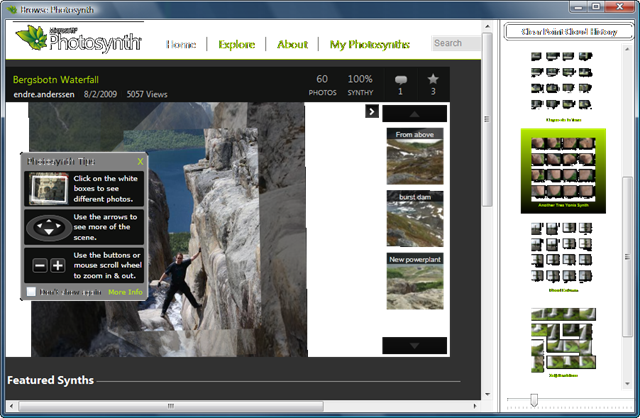
BrowsePhotosynth dialog

I've been working on – and demoing – this little application for the best part of a year, so am probably too close to it to be appropriately aware of its shortcomings: I'd really appreciate you trying it out and letting me know of any issues, which I'll do my best to fix in an interim update.

16 responses to “October’s Plugin of the Month: BrowsePhotosynth for AutoCAD”

  1. Alberto Venturini Avatar
    Alberto Venturini

    Hi, I follow with deep admiration for the past several years and this is the first time
    that I write. Waiting for this plugin for a few months and finally tried it. Great work as always but I have a problem. When I import point clouds, is inserted along a line as if the points were projected into a plane. the command line of AutoCAD (2011) I get the following message:

    Command: Enter path to PCG: Enter path to LAS:
    Waiting for PCG creation to complete ...
    File 1499 times inaccessible.
    Command: _.-POINTCLOUDATTACH
    Path to point cloud file to attach: C: / Users / ramPowerUser / Documents / Photosynth
    Point Clouds / Bergsbotn Waterfall3.pcg
    Specify insertion point <0.0>: 0.0
    Current insertion point: X = -1.0000, Y = 1.0000, Z = 0.0000
    Specify scale factor <1>: 1
    Current scale factor: 1.000000
    Specify rotation angle <0>: 0
    Current rotate angle: 0
    A point cloud attached

    I also tried with other files but the problem remains.

    I'm Italian and I apologize for my English translated by google however I wanted to thank you for the excellent work you are doing.

  2. Hi Alberto,

    Thank you for the kind words.

    Some synths do come out a little peculiar - especially those made from photos taken from a single position.

    Have you tried it with other synths, for comparison?

    Regards,

    Kean

  3. Alberto Venturini Avatar
    Alberto Venturini

    Hello Kean,
    I tried with other synth including your head;).
    Unfortunately the result is always the same. All points of the cloud are arranged as if the y and z coordinates have value zero.
    I tried your plugin on different workstations but the result is always the same and I don't understand where I'm wrong.

    Thank you for your time,
    Alberto

  4. Hi Alberto,

    I can confirm that my head should indeed not be one-dimensional. 🙂

    Could you let me know the specific product versions you're testing with (including language version), as well as the OS (and whether it's 32- or 64-bit)?

    Also if you could email me a sample PCG file then I'll take a closer look.

    I may end up needing to provide a custom build that doesn't clean up the intermediate TXT and LAS files, which will hopefully shed some more light on the problem.

    Regards,

    Kean

  5. For others who are experiencing this...

    It turns out it's to do with the Italian locale, which - like French and German - has comma as the default decimal point. As the points are saved to a comma-delimited file, this is a problem.

    Changing the decimal separator to "." at the OS level is a possible workaround, but I'll try to create a version of the app that forces its locale to English.

    Thanks, Alberto!

    Kean

  6. hi... i want to upgrade autocad 3d map 2010 plugins, but i don't know what to do!
    can you help me,,,??
    (i'am from indonesia, i'm sorry for my language)

  7. can you sent me a link ...
    sent to my email please

    if you have a software / aplication RPC, cant you sent to my email..

  8. Kean Walmsley Avatar

    Sorry - I don't have time to provide personal support (unless specifically related to code posted on my blog).

    Kean

  9. Kean,

    I installed the program and the "browseps" command will not work. Nothing happens. I'm using Autocad 2011....

    Didn't know if others had this issue for some reason...

  10. Adam,

    Could you provide a bit more info:

    * Which Windows version are you using (including whether 32- or 64-bit)?
    * What happens during install, if anything?
    * What fails to happen, according to your expectations?

    I'm using BROWSEPS on Vista 32-bit AutoCAD 2011, in case (but it's not the only OS it'll work on, by any means).

    Cheers,

    Kean

  11. Kean, I am using Windows 7, 64bit. I am also using Autocad 2011 64bit. Installation is fine. Nothing unusual at all, it says that it was successfully installed.

    When Autodesk is opened, the "browseps" command is an unknown command.

  12. Adam,

    Hmm. I wonder if something stopped the installer from writing to the Registry.

    Can you use the NETLOAD command inside AutoCAD and browse to the Program Files installation (on my system it's in "C:\Program Files\Autodesk\BrowsePhotosynth for AutoCAD") and then select the "ADNPlugin-BrowsePhotosynth.dll" file?

    If that doesn't work then there's something else in play, and I'll need to do some more digging.

    Regards,

    Kean

  13. Adam Hockley Avatar

    Kean, the "netload" command worked great. I then did the "browseps" command and I got the Photosynth to work. The point cloud came in as well. Thanks for that tip! I'm not quite sure why it didn't work as originally installed.

  14. Hi Kean, I've had the following error:

    "cdn1.ps1.photosynth....
    /points_0_0.bin" Enter name of Photosynth point cloud: "Maraetai Dam Spillway"
    Accessing Photosynth web service to get information on "Maraetai Dam Spillway"
    point cloud(s)...
    Invalid URL: Dashes are in the wrong position for GUID parsing.
    0 point clouds found. This point cloud (containing 0 files) will now be
    imported.
    Error processing point cloud: Value cannot be null.

    Any ideas on a quick fix? If not then hope it's usefull for future reference

  15. Hi John,

    Thanks - I see the problem.

    Photosynth point clouds are now being stored somewhere other than under a URL with the GUID included. The tool detects when a point cloud file has been loaded, and uses the URL to get the GUID and query some properties about the project (such as the files it needs to access).

    This is going to take a little work to fix, unfortunately...

    Cheers,

    Kean

  16. A quick update: I've provided John an interim version (1.0.4) for him to test, which should work with the new way that Photosynth works.

    Once I have confirmation it works, I'll get it posted to Labs.

    Kean

Leave a Reply to John Cancel reply

Your email address will not be published. Required fields are marked *