Adding a 2D spatial filter to perform a simple xclip on an external reference in AutoCAD using .NET

I've now checked in for my flight to Las Vegas – and, thanks to Jeremy Tammik's recent troubles, I luckily renewed my ESTA – so I'm pretty much all set for my trip to AU 2010, at least from a travel perspective. I'm just keeping my fingers crossed that the gastric 'flu my kids seem to have come down with doesn't hit me before I leave (or once I'm at AU… what a grim thought).

I was going to keep today's post light, just like the last one, but then decided to dip into my email folder of externally contributed posts. This little nugget from Jamie Robertson shows how to add a simple 2D spatial filter to an external reference, effectively duplicating the XCLIP command (although this basic sample doesn't handle non-World UCSs, block rotation/scaling, etc.).

At some point I may look at implementing a more complete version of this command, but even as it stands I have no doubt it'll be of use to many of you. Many thanks for contributing this code, Jamie!

Here's the C# code, with minor modifications to fit this blog:

using Autodesk.AutoCAD.DatabaseServices;

using Autodesk.AutoCAD.EditorInput;

using Autodesk.AutoCAD.Geometry;

using Autodesk.AutoCAD.ApplicationServices;

using Autodesk.AutoCAD.DatabaseServices.Filters;

using Autodesk.AutoCAD.Runtime;

using System;


namespace SpatialFiltering

{

  public class ClipBlock

  {

    const string filterDictName = "ACAD_FILTER";

    const string spatialName = "SPATIAL";


    [CommandMethod("2DXCLIP")]

    public static void clipBlockTest()

    {

      Document doc =

        Application.DocumentManager.MdiActiveDocument;

      Database db = doc.Database;

      Editor ed = doc.Editor;


      // Select a block to clip


      PromptEntityOptions peo =

        new PromptEntityOptions(

          "\nSelect a block reference to clip:"

        );

      peo.AllowNone = false;

      peo.SetRejectMessage("\nNot a block reference.");

      peo.AddAllowedClass(typeof(BlockReference), false);

      PromptEntityResult per = ed.GetEntity(peo);

      if (per.Status != PromptStatus.OK)

        return;


      // Select rectangle to clip


      PromptPointOptions ppo =

        new PromptPointOptions(

          "\nSelect first clip corner: "

        );

      ppo.AllowNone = false;

      PromptPointResult ppr = ed.GetPoint(ppo);

      if (ppr.Status != PromptStatus.OK)

        return;

      Point3d pt1 = ppr.Value;


      PromptCornerOptions pco =

        new PromptCornerOptions(

          "\nSelect second clip corner: ", pt1

        );

      ppr = ed.GetCorner(pco);

      if (ppr.Status != PromptStatus.OK)

        return;

      Point3d pt2 = ppr.Value;


      Transaction tr = db.TransactionManager.StartTransaction();

      using (tr)

      {

        // Transform and re-order points


        BlockReference br =

          (BlockReference)tr.GetObject(

            per.ObjectId, OpenMode.ForRead

          );

        pt1 = pt1.TransformBy(br.BlockTransform.Inverse());

        pt2 = pt2.TransformBy(br.BlockTransform.Inverse());

        Point2d rectMin =

          new Point2d(

            Math.Min(pt1.X, pt2.X),

            Math.Min(pt1.Y, pt2.Y)

          );

        Point2d rectMax =

          new Point2d(

            Math.Max(pt1.X, pt2.X),

            Math.Max(pt1.Y, pt2.Y)

          );


        Point2dCollection pts =

          new Point2dCollection(2){ rectMin, rectMax };


        // Create spatial filter

        // Just zeroes for the elevation and clip depths


        SpatialFilterDefinition sfd =

          new SpatialFilterDefinition(

            pts, Vector3d.ZAxis, 0.0, 0.0, 0.0, true

          );

        SpatialFilter sf = new SpatialFilter();

        sf.Definition = sfd;


        // Create extension dictionary if doesn't exist


        if (br.ExtensionDictionary == ObjectId.Null)

        {

          br.UpgradeOpen();

          br.CreateExtensionDictionary();

          br.DowngradeOpen();

        }


        // Add spatial filter to extension dictionary


        DBDictionary xDict =

          (DBDictionary)tr.GetObject(

            br.ExtensionDictionary, OpenMode.ForWrite

          );

        if (xDict.Contains(filterDictName))

        {

          DBDictionary fDict =

            (DBDictionary)tr.GetObject(

              xDict.GetAt(filterDictName), OpenMode.ForWrite

            );

          if (fDict.Contains(spatialName))

            fDict.Remove(spatialName);

          fDict.SetAt(spatialName, sf);

        }

        else

        {

  
;       
DBDictionary fDict = new DBDictionary();

          xDict.SetAt(filterDictName, fDict);

          tr.AddNewlyCreatedDBObject(fDict, true);

          fDict.SetAt(spatialName, sf);

        }

        tr.AddNewlyCreatedDBObject(sf, true);

        tr.Commit();

      }

      ed.Regen();

    }

  }

}

Here's an xrefed drawing – the venerable HVAC Architectural sample drawing, no less:
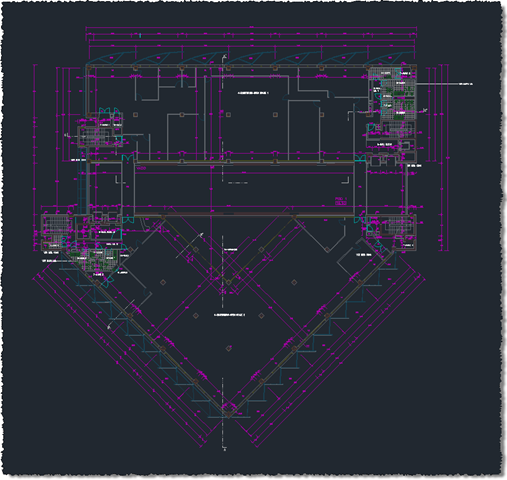
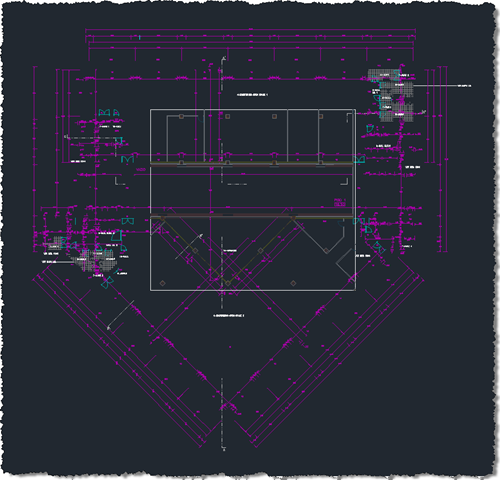
HVAC Architectural drawingAnd here's the effect of running the 2DXCLIP command, selecting the Xref (the grey geometry) and a window to which to clip:
Our spatially clipped xrefThat's it until AU – I'm looking forward to catching up with many of you in Las Vegas! 🙂

16 responses to “Adding a 2D spatial filter to perform a simple xclip on an external reference in AutoCAD using .NET”

  1. Hello Kean!

    Where could I find the API for Autocad .Net, something similar of Java Library? ( download.oracle.com/javase/6/docs/api )

  2. Hello Peter,

    If you're just looking for documentation, try here.

    Otherwise the API ships with AutoCAD, in AcMgd.dll and AcDbMgd.dll, and is also shipped and documented in the ObjectARX SDK for that version.

    Regards,

    Kean

  3. Hi Kean,

    I was wondering if you had any more information on the 4th and 5th parameters to the SpatialFilterDefinition constructor?

    Specifically, I am trying to clip something that exists below zero on the z-axis and the clipping is not including any of it. Changing the 4th and 5th parameters on the SpatialFilterDefinition to make sure the 4th is "more negative" than the object in question means it is included. However I can't make dead nor tail of that the parameters are supposed to be and it would be nice to do something that is included regardless of z values. Might there be a way to just clip on the x-y plane and ignore the z axis?

    The ObjectARX documentation has the following:
    4th param - frontClip - Input front clip distance in the positive extrusion direction
    5th param - backClip - Input back clip distance in the negative extrusion direction

    Any help you might be able to offer would be great!

  4. Sorry, nothing new from my side: I suggest posting to the discussion forum or asking ADN, if you're a member.

    Kean

  5. Hi Kean,

    I'm working with Autocad 2013 and I was trying to clip a block (like the XCLIP command) in C# when I found your post but unfortunatly, when I try to execute it on a block in my Autocad editor frame the whole block disappears even if I try to clip just the half of it.

    Do you know what functions are used by the XCLIP command ?

  6. My mistake, the function works very well but be careful the filter definition has a front and back clip value of 0 so if your block is not exactly at 0 altitude it does not work.
    To clip everything under your selection change it to :
    SpatialFilterDefinition sfd =
    new SpatialFilterDefinition(
    pts, Vector3d.ZAxis, 0.0, double.PositiveInfinity, double.NegativeInfinity, true);

  7. Indeed - I noticed just yesterday that the XCLIP command creates clipping volumes where Z varies between -10 billion to +10 billion. 🙂

    Kean

  8. Bryco
    Hi Kean I am running this in acad2015 from 2012 vs express and it crashes

    1. Bryco,

      It works fine for me in AutoCAD 2015. You'll have to provide more information for me to reproduce the problem.

      Regards,

      Kean

      1. I tested this on AutoCAD 2015 (64-bit on Windows 7).

        Running the command works fine the first time. However, it leaves the system in unstable state as running the same command again for the same object causes Runtime error R6025 - pure virtual function call, i.e. crashes AutoCAD. The same thing happens if one tries to run the XCLIP command on the object first clipped with the given code. NB, running XCLIP several times for an object does not crash AutoCAD.

        The crash happens on this line:

        PromptPointResult ppr = ed.GetPoint( ppo );

        Any ideas on how to get around this?

        The same problem happens with similar code presented in adndevblog.typepad.com/autocad/

        1. Hi Antti,

          As it stands the code seems to work fine for me on AutoCAD 2016. Can you give the precise steps needed to reproduce the crash?

          Thanks,

          Kean

          1. Either: run your command "2DXCLIP" twice on the same block reference object
            Or: run "2DXCLIP" on a block reference and then run XCLIP on the same one. With XCLIP just press enter to accept defaults for all the alternatives.

            Augusto also asked for reproduction instructions (the link I provided in my post above) and I am elaborating the instructions there.

            1. I've performed exactly these steps on a block reference I've just created - as well as on an xref I've just attached - and there's no crash in AutoCAD 2016. Can you please provide precise steps that reliably reproduce the problem? Right now it's working for me.

              1. Now I also tested this on AutoCAD 2016 (64 bit on Windows 8) and there is no crash. It occurs only with AutoCAD 2015 (and possibly older, can't say).

                The precise steps I did:
                - create a new drawing using acadiso.dwt
                - draw six circles fairly close together, select them and create a block out of them (Block menu -> create). Now the circles appearing on the screen are part of a block reference.
                - type 2DXCLIP, select the block reference and draw a rectangle from lower right to upper left so that the starting point and endpoint are outside the circles and part of the visible circles is left out (from top and bottom)
                - repeat the previous step -> crash

                I would suspect that this level of precision is not needed in repeating the crash and that running the command twice on any block reference in any drawing will do (at least for me the crash occurred in all cases I tried).

                1. Thanks, Antti.

                  I've also now repro'ed it on 2015. You can see the same crash if you launch the LINE command after using 2DXCLIP and hover over the clipped block.

                  Right now I'm trying to zero in on the differences between the spatial filters created by 2DXCLIP and XCLIP... the only one I see relates to "front clipping" being enabled, even if the clipping distance is zero. I can't see a way to disable it, but will keep trying.

                  Regards,

                  Kean

                  1. OK, it doesn't appear to be specifically a data-related problem, as if you save the drawing and reopen it the problem goes away. The crash only appears to occur with newly created 2D XCLIP objects.

                    My best recommendation, at this stage, is to script the XCLIP command rather than using the API when you need to support 2015. It's not ideal, but as it's no longer an issue in 2016 that's currently my best suggestion.

                    Kean

Leave a Reply to Peter Cancel reply

Your email address will not be published. Required fields are marked *